

15 Best AI Tools for Real Estate Agents in 2026 (Free & Paid)


The real estate industry is changing fast, and AI is at the forefront of this transformation. Today, successful agents aren’t just selling properties—they’re also using technology to work smarter, save time, and deliver better experiences for their clients.
From automatically generating listing descriptions to virtually staging homes, analyzing market trends, and qualifying leads, AI is helping real estate professionals take control of every step in the workflow.
In 2026, it’s no longer enough to rely on traditional methods. Homebuyers expect realistic visuals, quick responses, and personalized recommendations—and AI tools make that possible.
This guide highlights the 15 best free & paid AI tools for real estate agents, showing how they can help with marketing, visualization, lead management, and productivity. They all are fully tested and compaired by real workflow, pricing, strengths, and limitations.
Whether you’re a freelancer, broker, or agency, these tools can help you close deals faster, impress clients, and stay ahead in a competitive market.
Let's dive into the details!
Design any room, shop or space with DecAI in less 30 seconds! It's free!
How AI Is Transforming Real Estate in 2026
AI is completely reshaping the way real estate professionals work. In 2026, it’s no longer just a “nice-to-have” tool—it’s a game-changer that streamlines tasks, improves decision-making, and enhances client experiences.
AI tools now help agents:
- Automatically generate property descriptions and marketing copy.
- Visualize interiors and exteriors with realistic virtual staging.
- Analyze property values, market trends, and investment opportunities.
- Identify and qualify high-potential leads faster than ever.
- Optimize workflows, saving hours on repetitive tasks.
The result? Agents can spend less time on administrative work and more time building relationships, closing deals, and providing personalized client service.
In short, AI is turning real estate professionals into smarter, faster, and more efficient agents.
15 Best Free & Paid AI Tools for Realtors & House Agents to Work Smarter in 2026
Let's firstly give a quick overview of all these 15 AI tools
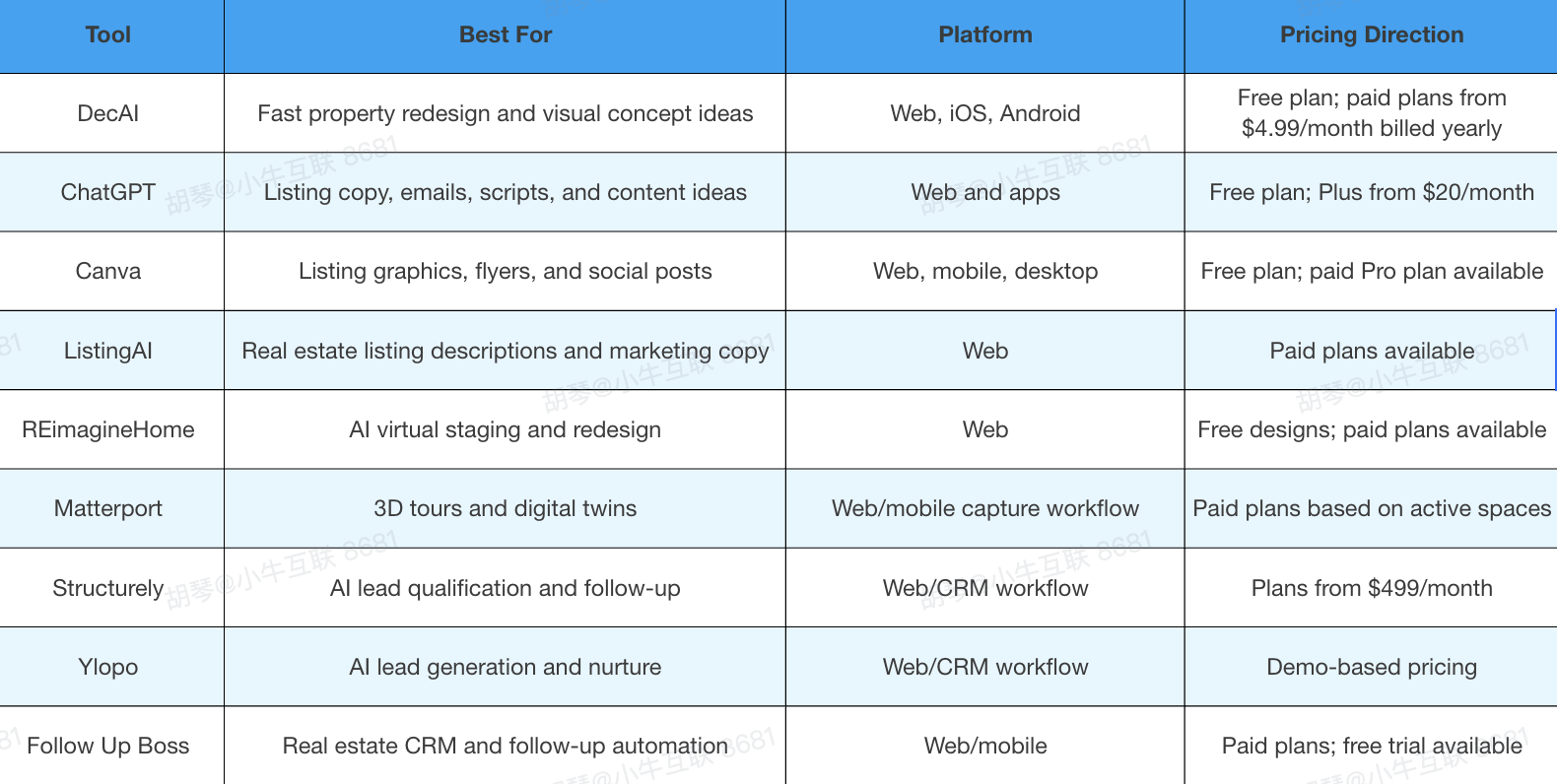
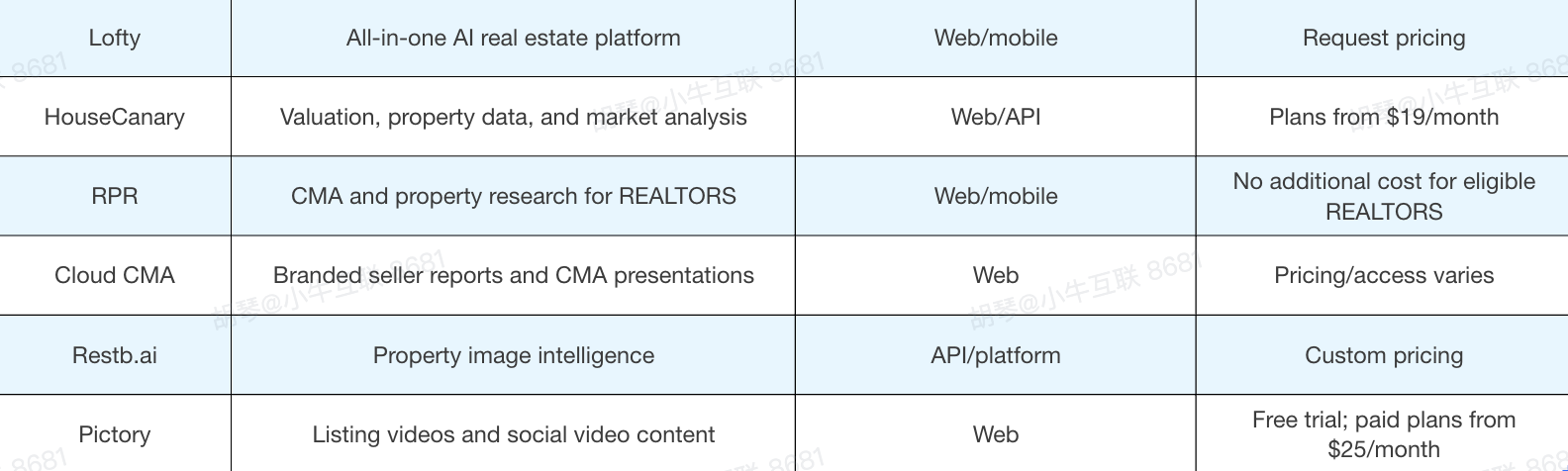
1.DecAI™ - Best for Fast House Redesign and Listing Visual Ideas

Platform: Web, iOS, Android
Pricing: Free-forever planavailable; paid plans start from $4.99/month billed yearly.
DecAI™ is a free AI-driven home design tool that is useful for real estate agents who need to show the potential of a property before a buyer or seller can fully imagine it.
Instead of asking a seller to picture a refreshed living room, improved curb appeal, or a different interior style, agents can upload a property photo and generate quick design concepts in seconds. This is especially helpful for dated homes, vacant spaces, under-furnished rooms, exterior refresh ideas, and pre-listing conversations where visual examples can make recommendations easier to understand.
For listing agents, DecAI™ works best as a visual planning and communication tool. It can help explain why small cosmetic updates may improve buyer perception, or help a buyer understand how a room could look with a different style. However, agents should use it responsibly. AI-generated redesigns should support imagination and discussion, not replace accurate listing photos, staging disclosure, contractor advice, or professional renovation plans.
Key features:
- AI interior redesign: Helps agents test different room styles from an uploaded property photo.
- Exterior and garden design: Useful for curb appeal ideas, outdoor refresh concepts, and seller-prep discussions.
- Furniture, wall, and floor refresh: Helps visualize smaller cosmetic updates without complex design software.
- 30+ design styles: Agents can compare modern, minimalist, farmhouse, vintage, and other looks quickly.
- Cross-device access: Works across web and mobile, which is useful during listing prep or client conversations.
Pros:
- Fast enough for quick seller or buyer discussions.
- Beginner-friendly, with no design or 3D modeling skills required.
- Covers interiors, exteriors, gardens, furniture, walls, and floors.
- Helpful for turning vague improvement ideas into visible concepts.
Cons:
- AI visuals should not be presented as exact renovation results.
- Agents still need to follow disclosure and listing-photo rules.
Best for: Listing agents who want quick visual concepts for seller consultations, pre-listing preparation, and property-potential previews.
2.ChatGPT - Best for Listing Copy, Emails, and Client Scripts
Platform: Web, iOS, Android, desktop apps
Pricing: Free plan available; ChatGPT Plus starts from $20/month.
ChatGPT is one of the most flexible AI tools for real estate agents because it can support almost every writing-heavy task in the business. Agents can use it to draft listing descriptions, buyer emails, seller follow-ups, open house scripts, neighborhood guides, social captions, video scripts, objection responses, and blog outlines.
Its biggest advantage is adaptability: the same tool can help with quick copy, deeper planning, and client-facing explanations.
The quality of ChatGPT output depends heavily on the input. If you simply ask for a “good listing description,” the result may sound generic. If you provide property facts, buyer profile, neighborhood highlights, tone preferences, and compliance limits, the result becomes much more useful. Agents should treat ChatGPT as a skilled drafting assistant, not a source of verified facts.
Key features:
- Listing description drafts: Turns property details into polished first drafts.
- Email and SMS templates: Helps create follow-up messages for buyers, sellers, and leads.
- Scripts and objection handling: Useful for open houses, seller calls, and buyer consultations.
- Content repurposing: Converts one listing into social posts, emails, and video scripts.
- Summarization: Helps condense notes, market updates, or client questions.
Pros:
- Extremely flexible for many daily real estate tasks.
- Affordable compared with specialized real estate platforms.
- Helpful for agents who struggle with writing from scratch.
- Works well for repeatable templates and brand voice development.
Cons:
- Can invent details if prompts are vague.
- Requires careful review for property facts, fair housing language, and brokerage compliance.
Best for: Agents who want one general AI assistant for writing, brainstorming, scripts, and content repurposing.
You can also check another 20 ChatGPT interior design prompts and confirm whether they can also inspire you when using ChatGPT for listing copies.
3.Canva - Best for Listing Graphics and Social Media Assets
Platform: Web, iOS, Android, Windows, Mac
Pricing: Free plan available; paid Pro plans are available.
Canva helps real estate agents create professional-looking marketing assets without needing advanced design skills. For daily real estate work, that can include listing flyers, open house graphics, Instagram posts, property carousels, postcards, email headers, buyer guides, seller checklists, and listing presentation visuals. Its template library is especially useful for agents who need to create content quickly but still want a consistent brand presence.
Canva’s AI and design tools are not real estate-specific, but they fit real estate marketing very naturally. Agents can use it to resize a listing announcement for multiple platforms, remove photo backgrounds, create branded layouts, and prepare quick social graphics for a new listing or price improvement.
The main limitation is sameness: if you rely too heavily on templates without customizing colors, typography, photography, and messaging, your materials can look generic.
Key features:
- Real estate-friendly templates: Useful for flyers, social posts, postcards, and presentations.
- Brand kits: Keeps colors, logos, and fonts consistent across assets.
- Magic Design and AI tools: Speeds up layout creation and visual editing.
- Resize tools: Adapts one design for multiple social and print formats.
- Collaboration features: Helpful for teams, assistants, and marketing coordinators.
Pros:
- Easy for non-designers to learn.
- Strong template library for fast marketing production.
- Useful across print, email, social media, and presentations.
- Helps agents maintain a consistent visual brand.
Cons:
- Designs can look generic without customization.
- Canva does not automatically handle MLS, brokerage, or compliance rules.
Best for: Agents who need fast listing graphics, social media assets, and branded marketing materials.
User review: No verified public user review quote is included.
4.ListingAI - Best for Real Estate Listing Description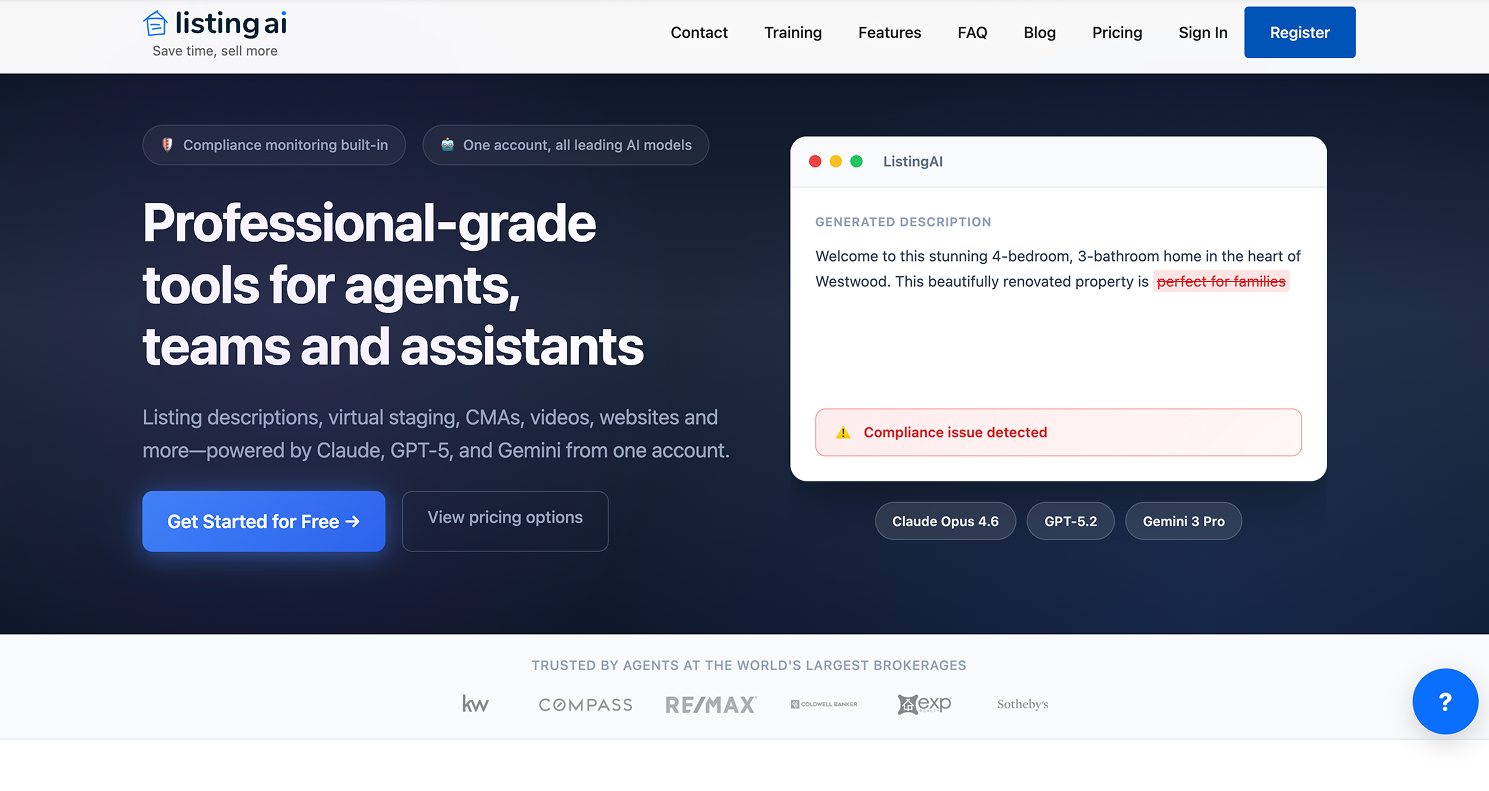
Platform: Web
Pricing: Paid plans available; pricing varies by plan.
ListingAI is built specifically for real estate marketing copy. Instead of using a general AI assistant and shaping every prompt yourself, agents can use ListingAI to create listing descriptions, social posts, property websites, video scripts, and related promotional materials around a listing. This makes it useful for agents who regularly launch listings and want a more structured copy workflow.
Its strongest value is focus. Real estate listing copy needs to sound appealing while staying accurate, concise, and property-specific. ListingAI can help agents move from raw property details to a usable marketing draft faster.
It is especially helpful when an agent needs several versions of the same listing message for MLS, social media, email, and video. However, like any AI writing tool, it still needs human review. Property claims, square footage, renovation details, school references, and neighborhood language should always be checked.
Key features:
- Listing description generation: Creates property descriptions from listing details.
- Social media captions: Helps adapt listing content for social platforms.
- Email copy: Supports buyer database and open house outreach.
- Video scripts: Turns listing details into short promotional scripts.
- Property website support: Useful for building more complete listing campaigns.
Pros:
- More real-estate-specific than a general writing assistant.
- Saves time on repeated listing marketing tasks.
- Useful for agents managing several active listings.
- Helps create multiple content formats from one property.
Cons:
- Less flexible than ChatGPT for broad strategy or unusual tasks.
- All property details and compliance-sensitive language still need review.
Best for: Listing-heavy agents who want faster, more structured property marketing copy.
5.REimagineHome - Best for AI Virtual Staging
Platform: Web
Pricing: Free designs are available for new users; paid plans are available.
REimagineHome helps agents virtually stage, redesign, and refresh property photos. It is especially useful when a listing is vacant, under-furnished, visually dated, or difficult for buyers to understand from photos alone. A blank bedroom, for example, may technically show the space, but it often fails to help buyers imagine scale, lifestyle, or function. AI virtual staging can make that room easier to interpret.
For agents, the tool is best used as part of a listing presentation or online marketing workflow. It can support visual storytelling by showing how a room might look with better furniture, a different style, or a more appealing layout. The key is responsible use.
AI staging should not alter permanent features in a misleading way, hide defects, or create unrealistic expectations. Depending on MLS and local rules, virtually staged images may need to be disclosed.
Key features:
- Virtual staging: Adds furniture and decor to empty spaces.
- Room redesign: Tests new looks for dated interiors.
- Exterior redesign: Helps explore curb appeal improvements.
- Style options: Lets agents compare different design directions.
- Photo-based workflow: Starts from existing property images.
Pros:
- Useful for vacant or under-furnished rooms.
- Helps buyers understand room function and scale.
- Faster and less expensive than physical staging in many cases.
- Supports stronger online listing presentation.
Cons:
- AI staging must be disclosed where required.
- Misleading edits can damage buyer trust and create compliance risk.
Best for: Agents marketing vacant, dated, or visually weak listings that need stronger online presentation.
6.Matterport - Best for 3D Property Tours
Platform: Web platform with mobile and camera capture workflows
Pricing: Paid plans are available and generally depend on plan level and active spaces.
Matterport helps agents create immersive 3D tours and digital twins of properties. Unlike a standard video walkthrough, a Matterport tour lets buyers move through the space more interactively, which can be valuable for relocation buyers, out-of-area investors, luxury listings, and homes with layouts that are hard to understand from photos. It gives buyers a stronger sense of flow before they schedule an in-person showing.
Matterport is not the quickest or lightest tool on this list, but it can elevate a listing’s media package. It is especially useful when the property needs to be experienced spatially: large homes, multi-level layouts, unique floor plans, commercial spaces, or premium listings. The tradeoff is setup. Agents need to think about capture quality, equipment, plan limits, and whether the listing justifies the extra effort.
Key features:
- 3D property tours: Creates immersive walkthroughs for online buyers.
- Digital twins: Builds interactive property models.
- Floor plan support: Helps buyers understand layout and room relationships.
- Remote showing experience: Useful for relocation and out-of-area clients.
- Property media hosting: Centralizes 3D tour presentation.
Pros:
- Strong upgrade over photos alone.
- Helps remote buyers understand the property.
- Useful for premium, large, or unusual listings.
- Can make listings feel more complete and professional.
Cons:
- Requires more setup than simple photo or video tools.
- May be unnecessary for lower-budget or fast-turn listings.
Best for: Agents who want premium 3D walkthroughs for listings where layout, scale, and remote viewing matter.
7.Structurely - Best for AI Lead Qualification
Platform: Web/CRM workflow
Pricing: Plans start from $499/month, with usage and higher-tier costs depending on plan.
Structurely is built for AI-powered lead engagement and qualification. For agents and teams with steady online lead flow, the biggest issue is often not generating leads but responding quickly and consistently enough to convert them. Structurely can help contact leads, ask qualifying questions, continue conversations, and support appointment-setting workflows.
This tool makes the most sense when lead volume is high enough that manual follow-up becomes unreliable. If you receive only a few leads a month, the cost may be difficult to justify. But for teams that are spending money on lead generation, missing follow-up can be expensive.
Structurely’s value is in reducing lead leakage and keeping conversations alive until a human agent can step in with judgment, relationship-building, and local expertise.
Key features:
- AI lead conversations: Engages leads through automated conversations.
- Lead qualification: Helps identify buyer or seller intent.
- Follow-up automation: Keeps conversations from going cold.
- Appointment support: Helps move qualified leads toward next steps.
- CRM integrations: Fits into broader real estate sales workflows.
Pros:
- Helps improve speed-to-lead.
- Useful for high-volume agents and teams.
- Reduces missed follow-up opportunities.
- Can support more consistent lead qualification.
Cons:
- Too expensive for many low-volume solo agents.
- Works best only when connected to a clear lead process.
Best for: Teams or lead-heavy agents who need AI support for qualification and follow-up consistency.
User review: No verified public user review quote is included.
8.Ylopo - Best for AI Lead Generation and Nurture

Platform: Web/CRM workflow
Pricing: Demo-based pricing.
Design any room, shop or space with DecAI in less 30 seconds! It's free!
Ylopo combines real estate lead generation, IDX search, AI nurture, and conversion tools. It is not a simple writing assistant or single-purpose AI app. It is better understood as a lead-generation and conversion platform for agents and teams that are serious about online lead flow. Its AI features can support text, voice, behavior-based nurture, and follow-up workflows.Ylopo is strongest when an agent already has a lead budget and a clear conversion system. If you are not ready to manage paid leads, track performance, and follow up consistently, a platform like this may feel heavy. But for growth-focused teams, the combination of lead capture, search behavior, nurture, and AI engagement can be valuable. It belongs in a more mature AI stack, not necessarily a beginner’s first tool.
Key features:
- IDX lead generation: Supports property-search-driven lead capture.
- AI nurture: Helps keep leads engaged over time.
- AI text and voice workflows: Supports automated communication.
- Behavior tracking: Uses lead activity to inform follow-up.
- Conversion platform: Combines marketing and follow-up in one system.
Pros:
- Strong fit for teams investing in online leads.
- Combines lead generation and AI nurture.
- Useful for managing larger lead databases.
- Supports more advanced conversion workflows.
Cons:
- Not ideal without lead volume or ad budget.
- Demo-based pricing makes quick comparison harder.
Best for: Growth-focused agents and teams investing seriously in lead generation and conversion.
9.Follow Up Boss - Best for Real Estate CRM Follow-Up
Platform: Web, mobile
Pricing: Paid plans are available; free trial available.
Follow Up Boss is a real estate CRM designed to help agents manage leads, conversations, routing, and follow-up accountability. While it is not only an AI tool, it is important because many AI workflows fail when the CRM foundation is weak. If leads are scattered across email, phone, spreadsheets, portals, and memory, adding AI will not automatically create a better sales process.
For agents and teams, Follow Up Boss can become the central place where lead activity, communication history, tasks, and pipeline movement are tracked. It is especially useful for teams that need visibility into who contacted a lead, when they responded, and what should happen next. The value comes from consistent use. A CRM is only powerful if agents actually update it, trust it, and work from it daily.
Key features:
- Lead management: Centralizes real estate leads from different sources.
- Action plans: Helps standardize follow-up steps.
- Lead routing: Useful for teams assigning new opportunities.
- Communication tracking: Keeps calls, texts, and emails easier to follow.
- Integrations: Connects with many real estate lead and marketing tools.
Pros:
- Strong CRM foundation for agents and teams.
- Helps reduce missed follow-up.
- Useful for lead routing and accountability.
- Can support a broader AI and automation stack.
Cons:
- Requires consistent setup and daily adoption.
- May be more than a very new agent needs at first.
Best for: Agents and teams that need organized lead follow-up before adding more advanced AI automation.
User review: No verified public user review quote is included.
10.Lofty - Best All-in-One AI Real Estate Platform
Platform: Web, mobile
Lofty is an all-in-one real estate platform that combines CRM, IDX websites, lead generation, marketing automation, and AI-powered workflow features. It is built for agents, teams, brokers, and larger organizations that want a broader operating platform instead of several disconnected point tools. For the right user, that can simplify the stack by keeping website, lead capture, CRM, and marketing workflows closer together.
The tradeoff is complexity. An all-in-one platform can be powerful, but it also requires setup, training, and process alignment. Lofty is a stronger fit for agents and teams that already know they need a more complete system. If you only need a tool to write listing descriptions or create social graphics, Lofty is likely more platform than you need.
Key features:
- Real estate CRM: Helps manage leads and client relationships.
- IDX websites: Supports property-search lead capture.
- Marketing automation: Helps automate outreach and campaigns.
- AI assistant features: Supports workflow and communication tasks.
- Team and brokerage tools: Designed for more structured operations.
Pros:
- Combines many real estate workflows in one platform.
- Useful for teams that want a shared operating system.
- Reduces fragmentation across separate tools.
- Supports CRM, website, and marketing automation together.
Cons:
- Request pricing makes budgeting less transparent.
- Setup may be too heavy for agents who need only simple tools.
Best for: Teams, brokers, and growth-focused agents who want a larger integrated real estate platform.
11.HouseCanary - Best for Valuation and Market Data

Platform: Web, API
Pricing: Plans start from $19/month, with higher tiers available.
HouseCanary provides property valuations, market analytics, forecasts, property data, and real estate intelligence tools. For agents, its main value is supporting pricing conversations with stronger data. A good agent still needs local market judgment, but tools like HouseCanary can help provide additional context around valuations, trends, and property-level analysis.This can be useful for listing appointments, investor conversations, and pricing strategy discussions.
Instead of relying only on a basic comp sheet, agents can use property data and market analytics to strengthen the explanation behind their recommendation. That said, no AVM or forecast should be treated as final truth. Street-level nuance, condition, timing, buyer demand, and local expertise still matter.
Key features:
- Property valuations: Provides automated valuation support.
- Market analytics: Helps agents understand local trends.
- Forecasting tools: Supports forward-looking property analysis.
- Property data: Adds context for pricing and investment conversations.
- API access: Useful for teams or businesses with advanced data needs.
Pros:
- Strong support for pricing research.
- Useful for data-driven client conversations.
- Scales from individual plans to team and API use.
- Helpful for investor-style analysis.
Cons:
- AVMs are not perfect.
- Local market interpretation is still essential.
Best for: Agents who want stronger valuation, property-data, and market-analysis support.
12.RPR - Best Free CMA Tool for REALTORS
Platform: Web, mobile
Pricing: Available at no additional cost for eligible REALTORS.
Overview:
RPR, or Realtors Property Resource, is a property research and reporting platform available to eligible REALTORS. It can support CMAs, property reports, market trends, neighborhood research, and client-ready presentations. For agents who already have access, RPR can be one of the most practical tools in the stack because it supports everyday pricing and research work without adding another monthly subscription.
RPR is especially useful before listing appointments, buyer consultations, and market update conversations. It helps agents organize property information into reports that are easier for clients to understand.
It is not a full AI marketing platform, lead-generation system, or virtual staging tool, but it fills an important data and reporting role. For newer agents, it can be a smart place to start before paying for more advanced valuation tools.
Key features:
- Property reports: Creates client-ready property research.
- CMA support: Helps prepare pricing conversations.
- Market trends: Adds neighborhood and local market context.
- Mobile access: Useful in the field and during appointments.
- REALTOR-focused data: Built around agent research workflows.
Pros:
- No additional cost for eligible REALTORS.
- Strong value for property research and CMA support.
- Useful for seller and buyer conversations.
- Good starting point before buying paid data tools.
Cons:
- Access depends on eligibility.
- Data depth and usefulness can vary by market.
Best for: REALTORS who need property research, market data, and CMA support without adding another paid subscription.
13.Cloud CMA - Best for Branded Seller Reports
Platform: Web
Pricing: Access and pricing vary by MLS, association, brokerage, or plan.
Cloud CMA helps agents create polished comparative market analysis reports, buyer tours, property reports, and seller presentations. Its value is not just the data itself, but the way that data is packaged. A seller may not understand a raw list of comps, but they are more likely to follow a well-designed report that explains pricing context clearly.
For listing agents, Cloud CMA can make seller appointments feel more professional. It helps turn research into a branded presentation that supports your recommendation. This matters when you are competing for listings and need to show both market knowledge and preparation.
However, agents should check whether they already have access through an MLS, association, or brokerage before paying separately.
Key features:
- CMA reports: Creates polished seller-facing pricing reports.
- Buyer tours: Helps organize buyer property tours.
- Property reports: Packages property information professionally.
- Branding tools: Adds agent or brokerage branding.
- Presentation support: Useful for listing appointments.
Pros:
- Strong for seller presentations.
- Saves time compared with manually designing CMA reports.
- Makes pricing conversations easier to explain.
- Helps agents look prepared and professional.
Cons:
- May overlap with tools already provided by your MLS or brokerage.
- Pricing and access can vary.
Best for: Listing agents who frequently prepare seller reports and listing presentations.
14.Restb.ai - Best for Property Image Intelligence

Platform: API/platform
Pricing: Custom pricing.
Restb.ai is a computer vision platform for real estate images. It analyzes property photos, identifies visual features, supports image tagging, helps enrich listing data, and can assist with large-scale image workflows. For an individual agent, it may feel too technical or enterprise-focused. For brokerages, MLSs, portals, and real estate technology companies, it can be much more relevant.The practical value of Restb.ai is that it turns property images into structured information. Instead of treating listing photos as simple visuals, platforms can use computer vision to identify room types, property features, quality signals, and other visual details. This can support search, compliance, data enrichment, and valuation workflows. It belongs in a brokerage or platform-level AI stack more than a solo agent’s day-to-day toolkit.
Key features:
- Image tagging: Identifies rooms, features, and property details in photos.
- Computer vision analysis: Extracts structured data from real estate images.
- Listing enrichment: Helps improve property data quality.
- Compliance support: Can assist with visual review workflows.
- API access: Built for integration into larger real estate systems.
Pros:
- Powerful for large-scale property image workflows.
- Useful for MLSs, portals, and brokerages.
- Turns visual data into searchable, structured information.
- Supports automation beyond basic agent marketing.
Cons:
- Too technical for many individual agents.
- Custom pricing and integration needs make it less beginner-friendly.
Best for: Brokerages, MLSs, portals, and real estate technology teams that need image intelligence at scale.
15.Pictory - Best for AI Listing Videos

Platform: Web
Pricing: Free trial available; paid plans start from $25/month.
Pictory helps users turn scripts, articles, and written content into videos with AI-assisted editing, captions, voiceover, and visual assets. For real estate agents, it can be used to create listing videos, market update videos, neighborhood explainers, educational clips, and short-form social content. This is useful for agents who know video matters but do not want to spend hours editing from scratch.
Pictory works best when paired with strong inputs. A well-written script from ChatGPT or ListingAI, combined with real listing photos or property footage, can produce a more useful result than relying only on generic stock visuals. For agents trying to build a consistent video presence, it can reduce friction.
Still, videos need customization. Generic AI videos can feel flat if they do not include local knowledge, real property media, or the agent’s voice.
Key features:
- Script-to-video: Turns written scripts into video drafts.
- Captions: Adds text captions for social viewing.
- AI voiceover: Helps create narrated content faster.
- Templates: Speeds up video formatting.
- Social exports: Useful for short listing and educational videos.
Pros:
- Saves video editing time.
- Useful for social media content.
- Works well with listing scripts and market updates.
- Helps agents create video more consistently.
Cons:
- Videos can feel generic without customization.
- It does not replace strong property footage or photography.
Best for: Agents who want faster listing videos, market updates, and social media video content.
How to Choose AI Tools for Real Estate Agents Without Overbuying
AI gets expensive and messy when you buy tools only because they sound impressive, not because they fix a daily workflow.
A practical AI stack usually starts with one of these pain points:
- You are slow to respond to new leads.
- Your listing copy takes too long to write.
- Your property photos need stronger visual presentation.
- You need better seller reports or CMA support.
- You struggle to create consistent social content.
- Your CRM follow-up is not organized.
- You want better video or virtual tour assets.
If you are a new solo agent, a simple stack may be enough: ChatGPT for writing, Canva for marketing assets, DecAI for quick visual ideas, and RPR for property research if you are eligible. If you run a larger team, you may need CRM automation, AI lead qualification, routing, and data tools.
Also check pricing carefully. Some AI tools have clear monthly plans. Others use usage credits, annual contracts, custom quotes, or MLS/association access. Pricing can change, so always confirm the latest plan before committing.
Finally, remember that real estate is a trust business. AI can draft, summarize, visualize, and organize. It should not replace your judgment on pricing, disclosures, negotiations, fair housing compliance, or whether an edited listing image could mislead a buyer.
How AI Helps Real Estate Agents Close More Deals
AI empowers agents to convert leads into clients more effectively by:
- Improving listings: Automatically crafted descriptions and high-quality visualizations make properties more appealing to buyers.
- Faster lead qualification: AI algorithms help prioritize the most promising prospects, saving time and effort.
- Enhanced marketing: Social media posts, virtual tours, and email campaigns can be generated quickly and consistently.
- Better client presentations: AI-generated floor plans, renderings, and interior design options allow buyers to visualize potential spaces instantly.
- Data-driven decisions: Market analytics and predictive insights help agents price properties competitively and identify the best investment opportunities.
By leveraging AI across the entire workflow, agents can increase efficiency, reduce errors, and ultimately close deals faster.
Common Mistakes Agents Make With AI
While AI offers powerful benefits, misuse or overreliance can backfire. Common pitfalls include:
- Relying on AI without human review – Automated property descriptions or visuals may lack context or personalization.
- Over-automating client communication – Messages that feel robotic can damage relationships.
- Using poor-quality images – AI cannot fix low-quality photos; visuals must be clear and professional.
- Ignoring personalization – Every client has unique needs; AI should complement, not replace, human judgment.
- Using too many disconnected tools – Managing multiple AI platforms without a workflow can lead to confusion and inefficiency.
Avoiding these mistakes ensures that AI acts as a true productivity amplifier rather than a source of frustration.
FAQS
1.Which AI is the best for real estate agents?
The best AI tools for real estate agents depend on your needs and workflow. ChatGPT is useful for writing, Canva for marketing graphics, DecAI for fast property redesign ideas, REimagineHome for virtual staging, Matterport for 3D tours, Follow Up Boss for CRM, Structurely for lead qualification, and HouseCanary for property data. So, choose the one that you need.
2.Is ChatGPT good for real estate agents?
Yes, ChatGPT is useful for listing descriptions, email templates, call scripts, social captions, blog ideas, buyer guides, seller FAQs, and market update drafts. It works best when agents provide specific property details and review the output carefully.
3.Should new agents pay for expensive AI real estate platforms?
Usually not at first. New agents should start with low-cost tools that support writing, design, visual ideas, and basic research. Expensive CRM, lead-gen, or AI qualification platforms make more sense once there is enough lead volume and transaction activity to justify them.
4.Will AI replace real estate agents?
No. AI will only replace some repetitive tasks, but it is unlikely to replace strong agents. Clients still need local judgment, pricing strategy, negotiation skill, emotional intelligence, and accountability. The agents most at risk are not those who use AI, but those who fail to adapt while offering little human value.
5.Do I need technical skills to use AI tools?
Not at all. Most modern AI tools are designed for beginners and require little to no technical experience. In most cases, you simply upload a photo, enter a few details, or click through a guided workflow to get results. Whether you're generating property descriptions, creating virtual staging images, analyzing market data, or redesigning a room, today's AI tools are built to be intuitive and easy to use for real estate agents without any coding or technical background.
Conclusion
These are all the AI tools that would help you a lot with your real estate working. They are fully tested, but made for different purposes and workflow stages. So, you should always firstly know your actual needs and only choose the one that perfectly fit your needs and workflow.
We'll hope this collection of top 15 best free AI tools for real estate agents and house agents help you find the right AI tools to streamline your whole workflow.
--------------------------------------
If you believe that any material on this site infringes your intellectual property rights, please contact the author at decaiwebteam@outlook.com with details of your claim.
Redesign any home interior, exterior & garden in seconds
Share this Post:
'%3e%3cpath%20d='M17.9995%2035.999C17.0317%2035.999%2016.0619%2035.9219%2015.1161%2035.7696C10.9414%2035.0973%207.11524%2032.9513%204.34408%2029.7273C1.54287%2026.4683%200%2022.3035%200%2017.9995C0%208.07403%208.07503%200%2017.9995%200C27.924%200%2036%208.07503%2036%2017.9995C36%2022.3696%2034.4151%2026.5835%2031.5357%2029.8646C28.6844%2033.1156%2024.7671%2035.2326%2020.5052%2035.8267C19.6806%2035.9419%2018.8371%2036%2017.9995%2036V35.999ZM17.9995%201.20123C8.73726%201.20123%201.20224%208.73626%201.20224%2017.9985C1.20224%2026.2919%207.13427%2033.2659%2015.3075%2034.5814C16.9546%2034.8469%2018.6808%2034.8659%2020.3389%2034.6345C28.5812%2033.4863%2034.7968%2026.334%2034.7968%2017.9985C34.7968%208.73626%2027.2617%201.20123%2017.9985%201.20123H17.9995Z'%20fill='%23FF0209'/%3e%3cpath%20d='M29.0557%2014.3621C28.9184%2013.0276%2028.6208%2011.5539%2027.5268%2010.7784C26.6782%2010.1773%2025.5642%2010.1553%2024.5242%2010.1563C22.3251%2010.1583%2020.126%2010.1603%2017.9269%2010.1623C15.812%2010.1643%2013.6971%2010.1663%2011.5821%2010.1683C10.6985%2010.1683%209.8399%2010.1002%209.01937%2010.4819C8.31406%2010.8105%207.76303%2011.4347%207.43241%2012.1289C6.97156%2013.0957%206.87438%2014.1898%206.81927%2015.2588C6.71708%2017.2044%206.7281%2019.156%206.85133%2021.0996C6.9405%2022.5193%207.16792%2024.0872%208.26496%2024.9919C9.23777%2025.7934%2010.6103%2025.8325%2011.8707%2025.8335C15.8741%2025.8365%2019.8776%2025.8395%2023.881%2025.8435C24.394%2025.8435%2024.93%2025.8345%2025.453%2025.7774C26.4829%2025.6661%2027.4637%2025.3716%2028.1249%2024.6092C28.7922%2023.8407%2028.9635%2022.7698%2029.0657%2021.7569C29.3121%2019.3003%2029.3091%2016.8177%2029.0557%2014.3621ZM15.6116%2021.4453V14.5545L21.5797%2017.9999L15.6116%2021.4453Z'%20fill='%23FF0209'/%3e%3c/g%3e%3cdefs%3e%3cclipPath%20id='clip0_13816_41422'%3e%3crect%20width='36'%20height='36'%20fill='white'/%3e%3c/clipPath%3e%3c/defs%3e%3c/svg%3e)
'%3e%3cpath%20d='M17.9995%2036C17.0327%2036%2016.0619%2035.9229%2015.1161%2035.7696C10.9414%2035.0973%207.11524%2032.9513%204.34408%2029.7273C1.54287%2026.4683%200%2022.3035%200%2017.9995C0%208.07403%208.07503%200%2017.9995%200C27.924%200%2036%208.07503%2036%2017.9995C36%2022.3696%2034.4151%2026.5835%2031.5357%2029.8646C28.6844%2033.1156%2024.7671%2035.2326%2020.5052%2035.8267C19.6806%2035.9419%2018.8371%2036%2017.9995%2036ZM17.9995%201.20224C8.73726%201.20224%201.20224%208.73726%201.20224%2017.9995C1.20224%2026.2919%207.13427%2033.2669%2015.3075%2034.5824C16.9556%2034.8479%2018.6808%2034.8669%2020.3389%2034.6355C28.5812%2033.4873%2034.7968%2026.335%2034.7968%2017.9995C34.7968%208.73726%2027.2617%201.20224%2017.9985%201.20224H17.9995Z'%20fill='url(%23paint0_linear_13816_41436)'/%3e%3cpath%20d='M23.4463%207.55469H12.549C9.53841%207.55469%207.08984%2010.0032%207.08984%2013.0138V22.9834C7.08984%2025.994%209.53841%2028.4426%2012.549%2028.4426H23.4463C26.4569%2028.4426%2028.9054%2025.994%2028.9054%2022.9834V13.0138C28.9054%2010.0032%2026.4569%207.55469%2023.4463%207.55469ZM9.01543%2013.0138C9.01543%2011.0652%2010.6004%209.48027%2012.549%209.48027H23.4463C25.3949%209.48027%2026.9799%2011.0652%2026.9799%2013.0138V22.9834C26.9799%2024.932%2025.3949%2026.517%2023.4463%2026.517H12.549C10.6004%2026.517%209.01543%2024.932%209.01543%2022.9834V13.0138Z'%20fill='url(%23paint1_linear_13816_41436)'/%3e%3cpath%20d='M17.9964%2023.0749C20.7966%2023.0749%2023.0749%2020.7966%2023.0749%2017.9964C23.0749%2015.1962%2020.7966%2012.918%2017.9964%2012.918C15.1962%2012.918%2012.918%2015.1962%2012.918%2017.9964C12.918%2020.7966%2015.1962%2023.0749%2017.9964%2023.0749ZM17.9964%2014.8446C19.7346%2014.8446%2021.1483%2016.2582%2021.1483%2017.9964C21.1483%2019.7347%2019.7346%2021.1483%2017.9964%2021.1483C16.2582%2021.1483%2014.8446%2019.7347%2014.8446%2017.9964C14.8446%2016.2582%2016.2582%2014.8446%2017.9964%2014.8446Z'%20fill='url(%23paint2_linear_13816_41436)'/%3e%3cpath%20d='M23.5482%2013.741C24.3026%2013.741%2024.9168%2013.1269%2024.9168%2012.3725C24.9168%2011.618%2024.3026%2011.0039%2023.5482%2011.0039C22.7938%2011.0039%2022.1797%2011.618%2022.1797%2012.3725C22.1797%2013.1269%2022.7938%2013.741%2023.5482%2013.741Z'%20fill='url(%23paint3_linear_13816_41436)'/%3e%3c/g%3e%3cdefs%3e%3clinearGradient%20id='paint0_linear_13816_41436'%20x1='5.27482'%20y1='30.7312'%20x2='30.7242'%20y2='5.28083'%20gradientUnits='userSpaceOnUse'%3e%3cstop%20stop-color='%23FAAD4F'/%3e%3cstop%20offset='0.35'%20stop-color='%23DD2A7B'/%3e%3cstop%20offset='0.62'%20stop-color='%239537B0'/%3e%3cstop%20offset='1'%20stop-color='%23515BD4'/%3e%3c/linearGradient%3e%3clinearGradient%20id='paint1_linear_13816_41436'%20x1='8.92225'%20y1='27.074'%20x2='27.073'%20y2='8.92324'%20gradientUnits='userSpaceOnUse'%3e%3cstop%20stop-color='%23FAAD4F'/%3e%3cstop%20offset='0.35'%20stop-color='%23DD2A7B'/%3e%3cstop%20offset='0.62'%20stop-color='%239537B0'/%3e%3cstop%20offset='1'%20stop-color='%23515BD4'/%3e%3c/linearGradient%3e%3clinearGradient%20id='paint2_linear_13816_41436'%20x1='14.4077'%20y1='21.5861'%20x2='21.5861'%20y2='14.4077'%20gradientUnits='userSpaceOnUse'%3e%3cstop%20stop-color='%23FAAD4F'/%3e%3cstop%20offset='0.35'%20stop-color='%23DD2A7B'/%3e%3cstop%20offset='0.62'%20stop-color='%239537B0'/%3e%3cstop%20offset='1'%20stop-color='%23515BD4'/%3e%3c/linearGradient%3e%3clinearGradient%20id='paint3_linear_13816_41436'%20x1='22.5814'%20y1='13.3393'%20x2='24.515'%20y2='11.4057'%20gradientUnits='userSpaceOnUse'%3e%3cstop%20stop-color='%23FAAD4F'/%3e%3cstop%20offset='0.35'%20stop-color='%23DD2A7B'/%3e%3cstop%20offset='0.62'%20stop-color='%239537B0'/%3e%3cstop%20offset='1'%20stop-color='%23515BD4'/%3e%3c/linearGradient%3e%3cclipPath%20id='clip0_13816_41436'%3e%3crect%20width='36'%20height='36'%20fill='white'/%3e%3c/clipPath%3e%3c/defs%3e%3c/svg%3e)
'%3e%3cpath%20d='M17.9995%2035.999C17.0317%2035.999%2016.0619%2035.9219%2015.1161%2035.7696C10.9414%2035.0973%207.11524%2032.9513%204.34408%2029.7273C1.54287%2026.4683%200%2022.3035%200%2017.9995C0%208.07403%208.07502%200%2017.9995%200C27.924%200%2036%208.07503%2036%2017.9995C36%2022.3696%2034.415%2026.5835%2031.5357%2029.8646C28.6844%2033.1156%2024.7671%2035.2326%2020.5052%2035.8267C19.6806%2035.9419%2018.8371%2036%2017.9995%2036V35.999ZM17.9995%201.20123C8.73725%201.20123%201.20224%208.73626%201.20224%2017.9985C1.20224%2026.2919%207.13427%2033.2659%2015.3075%2034.5814C16.9545%2034.8469%2018.6808%2034.8659%2020.3388%2034.6345C28.5812%2033.4863%2034.7968%2026.334%2034.7968%2017.9985C34.7968%208.73626%2027.2617%201.20123%2017.9985%201.20123H17.9995Z'%20fill='%23007EBB'/%3e%3cpath%20d='M9.06639%2012.124C8.60253%2011.6932%208.37109%2011.1602%208.37109%2010.526C8.37109%209.89184%208.60253%209.33481%209.06639%208.90401C9.53026%208.47321%2010.1274%208.25781%2010.8587%208.25781C11.5901%208.25781%2012.1642%208.47321%2012.627%208.90401C13.0909%209.33481%2013.3223%209.87581%2013.3223%2010.526C13.3223%2011.1762%2013.0909%2011.6932%2012.627%2012.124C12.1631%2012.5548%2011.5741%2012.7702%2010.8587%2012.7702C10.1434%2012.7702%209.52926%2012.5548%209.06639%2012.124ZM12.9326%2014.5946V27.7962H8.76182V14.5946H12.9326Z'%20fill='%23007EBB'/%3e%3cpath%20d='M26.8196%2015.9006C27.7283%2016.8875%2028.1832%2018.243%2028.1832%2019.9682V27.5663H24.2208V20.5042C24.2208%2019.6346%2023.9954%2018.9583%2023.5445%2018.4764C23.0937%2017.9945%2022.4876%2017.7541%2021.7262%2017.7541C20.9647%2017.7541%2020.3586%2017.9955%2019.9078%2018.4764C19.4569%2018.9583%2019.2315%2019.6346%2019.2315%2020.5042V27.5663H15.2461V14.5611H19.2315V16.2863C19.6353%2015.7113%2020.1793%2015.2574%2020.8636%2014.9228C21.5468%2014.5892%2022.3163%2014.4219%2023.1708%2014.4219C24.6937%2014.4219%2025.9099%2014.9158%2026.8186%2015.9016L26.8196%2015.9006Z'%20fill='%23007EBB'/%3e%3c/g%3e%3cdefs%3e%3cclipPath%20id='clip0_13816_41425'%3e%3crect%20width='36'%20height='36'%20fill='white'/%3e%3c/clipPath%3e%3c/defs%3e%3c/svg%3e)
'%3e%3cpath%20d='M18%2035.999C17.0322%2035.999%2016.0623%2035.9219%2015.1166%2035.7696C10.9417%2035.0973%207.11544%2032.9513%204.3442%2029.7273C1.54291%2026.4683%200%2022.3035%200%2017.9995C0%208.07403%208.07526%200%2018%200C27.9248%200%2036%208.07503%2036%2017.9995C36%2022.3696%2034.415%2026.5835%2031.5356%2029.8646C28.6842%2033.1156%2024.7668%2035.2326%2020.5047%2035.8267C19.6802%2035.9419%2018.8366%2036%2017.999%2036L18%2035.999ZM18%201.20123C8.73751%201.20123%201.20227%208.73626%201.20227%2017.9985C1.20227%2026.2919%207.13448%2033.2659%2015.3079%2034.5814C16.955%2034.8469%2018.6813%2034.8659%2020.3394%2034.6345C28.582%2033.4863%2034.7977%2026.334%2034.7977%2017.9985C34.7977%208.73626%2027.2625%201.20123%2018%201.20123Z'%20fill='black'/%3e%3cpath%20d='M7%208.09163H13.5067L19.521%2016.1816L27.0073%207.90625L28.786%207.93715L20.4078%2017.3454L29%2028.901H22.4959L16.8193%2021.362L9.8847%2029.0864H8.13428L15.9583%2020.26L7%208.09163ZM12.8931%209.28633H9.45676L23.2048%2027.6754H26.5793L12.8931%209.28633Z'%20fill='black'/%3e%3c/g%3e%3cdefs%3e%3cclipPath%20id='clip0_13886_43848'%3e%3crect%20width='36'%20height='36'%20fill='white'/%3e%3c/clipPath%3e%3c/defs%3e%3c/svg%3e)
'%3e%3cpath%20d='M17.9995%2035.999C17.0327%2035.999%2016.0619%2035.9219%2015.1161%2035.7686C10.9414%2035.0963%207.11524%2032.9503%204.34408%2029.7263C1.54287%2026.4673%200%2022.3025%200%2017.9995C0%208.07403%208.07503%200%2017.9995%200C27.924%200%2036%208.07503%2036%2017.9995C36%2022.3696%2034.415%2026.5835%2031.5357%2029.8646C28.6844%2033.1156%2024.7671%2035.2326%2020.5052%2035.8267C19.6806%2035.9419%2018.8371%2036%2017.9995%2036V35.999ZM17.9995%201.20123C8.73726%201.20123%201.20224%208.73626%201.20224%2017.9985C1.20224%2026.2909%207.13428%2033.2659%2015.3075%2034.5814C16.9556%2034.8469%2018.6808%2034.8659%2020.3389%2034.6345C28.5812%2033.4863%2034.7968%2026.334%2034.7968%2017.9985C34.7968%208.73626%2027.2617%201.20123%2017.9985%201.20123H17.9995Z'%20fill='%231877F7'/%3e%3cpath%20d='M20.5337%2014.9635V18.7536H25.2225L24.4801%2023.8601H20.5337V35.624C19.7423%2035.7342%2018.9328%2035.7913%2018.1112%2035.7913C17.1625%2035.7913%2016.2317%2035.7151%2015.324%2035.5689V23.8601H11V18.7536H15.324V14.1169C15.324%2011.2396%2017.6564%208.90625%2020.5347%208.90625V8.90926C20.5428%208.90926%2020.5508%208.90625%2020.5588%208.90625H25.2235V13.3215H22.1758C21.2691%2013.3215%2020.5347%2014.0558%2020.5347%2014.9625L20.5337%2014.9635Z'%20fill='%231877F7'/%3e%3c/g%3e%3cdefs%3e%3cclipPath%20id='clip0_13816_41433'%3e%3crect%20width='36'%20height='36'%20fill='white'/%3e%3c/clipPath%3e%3c/defs%3e%3c/svg%3e)
'%3e%3cpath%20d='M17.9995%2035.999C17.0327%2035.999%2016.0619%2035.9219%2015.1161%2035.7686C10.9414%2035.0963%207.11524%2032.9503%204.34408%2029.7263C1.54287%2026.4673%200%2022.3025%200%2017.9995C0%208.07403%208.07503%200%2017.9995%200C27.924%200%2036%208.07503%2036%2017.9995C36%2022.3696%2034.415%2026.5835%2031.5357%2029.8646C28.6844%2033.1156%2024.7671%2035.2326%2020.5052%2035.8267C19.6806%2035.9419%2018.8371%2036%2017.9995%2036V35.999ZM17.9995%201.20123C8.73726%201.20123%201.20224%208.73626%201.20224%2017.9985C1.20224%2026.2909%207.13428%2033.2659%2015.3075%2034.5814C16.9556%2034.8469%2018.6808%2034.8659%2020.3389%2034.6345C28.5812%2033.4863%2034.7968%2026.334%2034.7968%2017.9985C34.7968%208.73626%2027.2617%201.20123%2017.9985%201.20123H17.9995Z'%20fill='%232A91F7'/%3e%3cg%20clip-path='url(%23clip1_13816_41442)'%3e%3cpath%20d='M16.3345%2018.834C16.6924%2019.3124%2017.149%2019.7083%2017.6733%2019.9947C18.1976%2020.2812%2018.7774%2020.4516%2019.3734%2020.4942C19.9693%2020.5369%2020.5675%2020.4509%2021.1273%2020.2421C21.6871%2020.0333%2022.1954%2019.7065%2022.6178%2019.284L25.1178%2016.784C25.8768%2015.9981%2026.2968%2014.9456%2026.2873%2013.8531C26.2778%2012.7606%2025.8396%2011.7156%2025.0671%2010.943C24.2946%2010.1705%2023.2495%209.73231%2022.157%209.72281C21.0645%209.71332%2020.012%2010.1333%2019.2262%2010.8923L17.7928%2012.3173M19.6678%2017.1673C19.3099%2016.6889%2018.8533%2016.293%2018.329%2016.0065C17.8047%2015.7201%2017.2249%2015.5497%2016.6289%2015.507C16.033%2015.4643%2015.4348%2015.5503%2014.875%2015.7592C14.3152%2015.968%2013.8069%2016.2947%2013.3845%2016.7173L10.8845%2019.2173C10.1255%2020.0031%209.70551%2021.0557%209.715%2022.1481C9.72449%2023.2406%2010.1627%2024.2857%2010.9352%2025.0582C11.7078%2025.8307%2012.7528%2026.269%2013.8453%2026.2784C14.9378%2026.2879%2015.9903%2025.868%2016.7761%2025.109L18.2011%2023.684'%20stroke='%232A91F7'%20stroke-width='1.66667'%20stroke-linecap='round'%20stroke-linejoin='round'/%3e%3c/g%3e%3c/g%3e%3cdefs%3e%3cclipPath%20id='clip0_13816_41442'%3e%3crect%20width='36'%20height='36'%20fill='white'/%3e%3c/clipPath%3e%3cclipPath%20id='clip1_13816_41442'%3e%3crect%20width='20'%20height='20'%20fill='white'%20transform='translate(8%208)'/%3e%3c/clipPath%3e%3c/defs%3e%3c/svg%3e)
Redesign any home interior, exterior & garden in seconds