

25 Best ChatGPT Interior Design Prompts to Remodel Your Home Like a Pro


What if you could get professional interior design guidance without paying a $3,000+ designer fee? ChatGPT might just become your new secret weapon. Whether you're struggling with a cramped apartment, overwhelmed by paint color choices, planning a renovation, or trying to make sense of contractor quotes, ChatGPT can help you save both time and effort throughout the design process.
However, if you're not sure how ChatGPT fits into home interior design, don't worry. In this guide, we've gathered 25 tested interior design prompts, with real examples and templates, which solve the real problems homeowners face: defining your style, maximizing awkward spaces, stretching your budget, and communicating with your construction team.
To make things even easier, we'll introduce them all by your exact design workflow and also show you how pair ChatGPT with a free AI interior design tool to quickly bring your vague ideas into concrete home or space designs you can execute immediately.
Ready to design smarter with ChatGPT? Let's dive into details now!
Design any room, shop or space with DecAI in less 30 seconds! It's free!
What Are ChatGPT Prompts for Interior Design?
A ChatGPT prompt is the instruction or question you give the AI to generate a response. In the context of interior design, prompts are how you direct ChatGPT to help with everything from generating concept ideas to writing client proposals.
Simply put, you can take ChatGPT as a highly knowledgeable design assistant who has read every interior design book, magazine, and case study ever published — but needs clear direction from you to be useful. The quality of what you get back is almost entirely determined by the quality of what you put in.

The Essential ChatGPT Prompt Template You Should Try for Better Answers
While using ChatGPT, the quality of your prompts largely determines the quality of the answers you get. So, before diving into the 25 prompts, it's helpful to learn a simple formula that makes ChatGPT much more useful for interior design.
In most cases, the best prompts include 4 key elements:
[Context] + [Specific Details] + [Constraints] + [Desired Output]
This may sound a little abstract, so let's look at a quick example:
- Context: I'm a beginner redesigning my 12×14 ft bedroom.
- Specific Details: Light wood flooring, one window, budget-conscious.
- Constraints: The furniture must work for both sleeping and remote work.
- Desired Output: Give me 3 design directions with furniture and decor recommendations under $100 per item.
In this way, by breaking your request into these components and providing enough context, you'll get much more personalized and actionable answers. Instead of guessing what you need, ChatGPT can focus on delivering recommendations that fit your space, budget, and goals.
So if you often find ChatGPT's answers too generic or not quite what you're looking for, try using this simple prompt formula first. A little extra context can make a surprisingly big difference in the quality of the results.

25 Best ChatGPT Interior Design Prompt Examples in 2026
Throughout your whole interior design workflow, you'll likely face different challenges—from defining your dream style and optimizing layouts to managing budgets and communicating with contractors.
To make it easier for you to find the right prompt for your situation, we'll introduce these proven 25 prompt examples in the following 4 groups:
- 8 best prompts for dream room description
- 7 best prompts for space transformation
- 6 best prompts for smarter shopping & budgeting
- 4 best prompts for design communication & execution
Let's dive in and find the prompts that best match your current design needs.
8 best prompts for dream room description
"How do I even clearly describe my dream room?" If you've ever struggled to put your design ideas into words or clearly communicate your remodeling vision, well, the following 8 prompts about the desired design style and color description prompt examples would give you some clues.
Prompt 1: The design style specification
"I'm going to describe 3 rooms I love. After each, I'll tell you what appeals to me. Based on the patterns, tell me what design style(s) I'm drawn to, and give me 5 key characteristics of that style so I can communicate it to contractors and furniture shopping.
Room 1: [describe a room from Pinterest/Instagram]. I love this because: [explain what draws you].
Room 2: [repeat].
Room 3: [repeat]."
Why it works: ChatGPT identifies underlying patterns you might not see. Instead of guessing "is this Scandinavian? Bohemian?" it names your actual taste.
Prompt 2: The color palette recommendations
"I want a [warm/cool/neutral]-feeling bedroom for a [preference: relaxation/productivity/creativity]. My space gets [north/south/east/west] light, and I have [describe existing major elements: dark wood flooring, white walls, etc.].
Suggest 4 color palettes (each with 3-4 colors) that would work with my space.
For each palette, give me the hex codes and tell me which surface (walls, trim, accent) each color should go on."

Why it works: Eliminates endless paint sample stress. Hex codes mean you can visualize colors digitally before committing.
Prompt 3: The mood board analyzer
"Here are 5 images I'm considering for my living room: [paste links or descriptions]. What are the common design elements across these? What's the dominant color story? What textures appear most?
Based on this pattern, create one cohesive design direction for my actual room, including wall color, flooring treatment, furniture style, and lighting approach."
Why it works: It helps to turn scattered inspiration into an actionable direction.
Prompt 4: Wall design color brainstorming
"My [living room/bedroom/kitchen] is [12x14 ft/small/large], gets [natural light description], has [architectural features: crown molding, high ceilings, etc.], and I want it to feel [cozy/spacious/energetic/calm].
I'm considering these 3 wall colors: [list options]. Which would be best? And for each option, what trim, ceiling, and flooring color would complement it?
Consider that my [major existing element: dark wood furniture/light floors] needs to work with whatever I choose."
Why it works: Walls are 60% of your room's visual impact. Getting this right saves thousands in regret.
Prompt 5: The accent wall decision
"Should I use an accent wall in my [room]? Here's my space: [dimensions, light, existing colors]. If yes: where should it be (which wall, based on sight lines)? What color specifically? If no: why not, and what's a better way to add visual interest? Give me reasoning so I can explain to my family."
Why it works: Accent walls are often a mistake. This prompt prevents expensive regret.
Prompt 6: Room color refreshing
"My room currently has [describe all the colors: blue walls, gray couch, yellow curtains, etc.]. It feels chaotic. Help me simplify. Which colors should stay as the core palette? Which should go or be replaced? What should replace the ones that go? Walk me through this as if I'm making changes gradually over 3 months (not all at once)."

Why it works: Renovation doesn't have to be all-or-nothing. This creates a realistic edit.
Prompt 7: Kitchen and room connection recommendation
"My kitchen is [describe: white subway tile, oak cabinets, granite counters, etc.]. I want my adjacent dining/living area to feel connected but distinct. What style bridges these spaces? Should my dining room be the same style as the kitchen? How do I create visual flow without being boring? Give me specific color and material recommendations that work in both spaces."
Why it works: Open-plan living is hard. This solves the "what connects them?" puzzle.
Prompt 8: The design style upgrade (when you're tired of generic)
"I've decorated in a pretty standard [farmhouse/modern/transitional] style and it feels bland. I want to keep the bones but add personality. What would make my space feel more intentional and curated? Suggest 5 specific changes (not "add more art"—actual specific ideas) that cost under $500 total and take less than a weekend to implement."
Why it works: Personality often just means intention. This identifies what's missing.
7 best prompts for space transformation
When a room feels too small, cramped, dark, or simply doesn't function the way you need it to, you might also want some ideas to transform and optimize your room. So, we've also collected 7 tested prompts that can help you explore practical layout, storage, lighting, and space-planning ideas tailored to your situation.
Prompt 9: The small room maximizer
"My [bedroom/home office] is only [10x12 ft/similar small dimensions]. It currently feels cramped because [describe: no natural light, low ceilings, too much furniture, dark walls]. I need it to serve [sleep + work/guest bedroom + storage, etc.].
Walk me through:
- What's the ONE biggest visual problem?
- What's the ONE biggest functional problem?
- For each problem, give me 3 specific solutions (furniture pieces, layout changes, colors) ranked by impact and cost.
- If I had to pick only 3 changes to do first, which would move the needle most?"
Why it works: Small rooms have limited "bang for buck" options. This prioritizes ruthlessly.
Prompt 10: The dark room rescue
"My [bedroom/living room] only has [north-facing windows/one small window/no windows]. It feels dark and depressing. I can't change the windows. What else CAN I change?
Give me a strategy for: wall color, paint finish (matte vs. glossy), lighting (specific fixture types and placement), flooring, and window treatment that would brighten this space.
Also tell me which of these would have the biggest impact and which would be quickest/cheapest to do."

Why it works: Dark rooms need strategy, not just "paint it white." This accounts for multiple factors.
Prompt 11: The furniture layout problem-solving
"I have a [describe room shape: L-shaped, irregular, rectangular] room that's [dimensions]. The walls are: [describe what's where: window on east wall, door on south wall, fireplace on west wall, etc.]. I need to fit [list essential furniture: sofa, dining table, desk, bed, etc.]. Currently, my [describe current failed layout].
Can you walk me through:
- Is my room's awkward shape the real problem, or is the furniture arrangement?
- Draw me out 2-3 different layout options.
- For each layout, tell me the pros/cons.
- Which layout solves the most problems?"
Why it works: Furniture arrangement is a puzzle people struggle with alone. Talking it through works.
Prompt 12: Room decluttering
"My [room] is cluttered and doesn't feel intentional. Here's what's in it: [list everything]. I can't move it all, but I also don't want to rent storage or sell everything.
Help me decide: What should definitely stay? What's taking up visual/mental space without serving a real purpose? For the 'maybes,' how do I decide?
Give me a framework for editing that doesn't feel like loss—it feels like creating breathing room."
Why it works: People often need permission to let go. This provides the framework.
Prompt 13: The Awkward corner activation
"I have an [describe: dead corner, unusable space, odd nook] in my [room]. It's [dimensions and location]. It bothers me because it's either empty and looks incomplete, or it's where junk piles up. What could live here instead? Give me 5 ideas ranging from very cheap ($20) to moderate ($200+), and for each one, tell me what it would need (outlet, light, etc.) and whether it would actually make the room feel better or just look 'Pinterest-y but fake.'"
Why it works: Awkward spaces need intentional solutions, not half-measures.
Prompt 14: Separate room ideas
"My [open bedroom-office/living-dining room] needs to work for [list two functions]. Right now it feels like neither space. How do I visually and functionally separate them without a wall? Should I use: color? Furniture placement? Area rugs? Lighting? Different ceiling treatments?
Give me 2 complete strategies, each with specific product recommendations (including brands/retailers), and tell me how much disruption (noise, time, mess) each would require to implement."
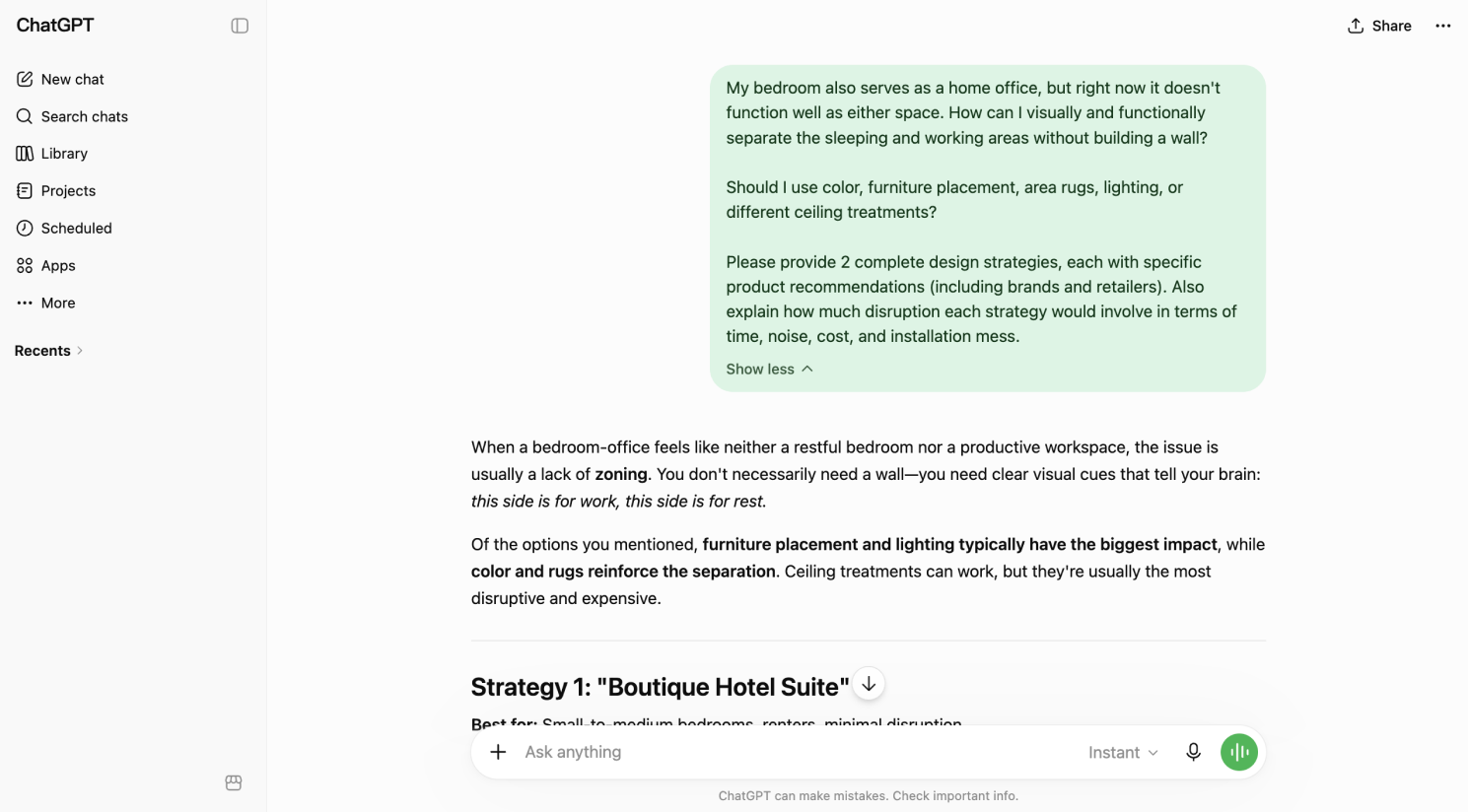
Why it works: Open-plan spaces need structure. This prevents chaos.
Prompt 15: The ceiling height problem
"My room has [high/low] ceilings [8ft/9ft/10ft+], and it makes the space feel [cavernous/cramped/awkward]. I can't change the ceiling height. What can I do with color, lighting, molding, or other elements to make it feel [more balanced/cozier/less empty]?
Give me specific strategies including what colors/materials/finishes to use where, and which changes would have the most impact."
Why it works: Ceiling proportion affects everything. Most people don't know how to fix it.
6 best prompts for smarter shopping & budgeting
If you are on a tight budget for home interior redesign, well, you might also ask ChatGPT for much smarter shopping and budgeting. Here are 6 good text prompt examples you can try to get clues.
Prompt 16: The budget allocation blueprint
"I have a total budget of $[5,000/15,000/etc.] to redo my [entire home/specific room]. Here's what I want: [list priorities: new sofa, paint, lighting, flooring, etc.]. I can't do it all, so I need to prioritize ruthlessly.
Walk me through:
- What has the most visual impact per dollar?
- What will wear out fastest and should have cheaper options?
- What should I invest in quality on because I'll use it daily/it's hard to replace?
- Create a prioritized spending breakdown for me by item, showing what to splurge on and what to save on.
- What can I DIY vs. need to hire for?"
Why it works: This is the question every budget-conscious person asks. Few get a good answer.
Prompt 17: The designer vs. DIY furniture picker
"I'm considering buying [specific item: sofa/bed/dining table] in the [budget range]. I've found these options: [list 3-4 options with prices and links/descriptions]. As someone who doesn't know if I'm getting ripped off or making a terrible mistake, which should I choose? What should I actually be evaluating in a [furniture piece]? Is the cheapest option a trap? Is the most expensive option a luxury I don't need?"
Why it works: People get paralyzed by options. This provides decision criteria.
Prompt 18: The "hidden costs" preventing
Design any room, shop or space with DecAI in less 30 seconds! It's free!
"I'm planning to [paint my walls/refinish my floors/install new lighting]. I have a budget of $[amount]. The work involves [describe your specific situation]. Before I go buy materials, what am I probably forgetting? What hidden costs or logistical problems come with this project? What do people usually underestimate?
Walk me through the actual process step-by-step so I know what to expect and can budget realistically."
Why it works: Most projects go over budget because people forget prep, primer, tools, cleanup.
Prompt 19: The smart online shopping strategy
"I want to furnish/decorate my [room] in a cohesive way without overspending. I'm thinking of shopping at [list stores you're considering: IKEA, West Elm, Amazon, local thrift stores, etc.]. Here's what I've found so far: [describe pieces or paste links]. Is this a good strategy, or am I setting myself up for a mismatched room? What's the best mix of retailers to get quality and cohesion without paying designer prices? Should I buy some things secondhand and new?"

Why it works: Everyone assumes their random shopping strategy is bad. This validates or corrects it.
If you're facing similar furniture shopping challenges, be sure to check out our guide to the 20 best online furniture stores, where you can find quality pieces for every style and budget while shopping more confidently and cost-effectively.
Prompt 20: "This item is expensive, but should I buy it anyway?"
"I'm considering buying [specific item] at [specific price]. It's [describe: a really nice sofa I love / a lighting fixture that would solve my dark room problem / etc.]. It's more than I planned to spend.
Here's my situation: [describe: I'll have it for 10+ years / my back pain will improve if I have good seating / the room depends on this statement piece / etc.]. Am I making a smart investment or getting seduced by marketing? What questions should I ask myself?"
Why it works: Permission-seeking is real. A thoughtful response helps people decide.
Prompt 21: The thrifting & secondhand strategy
"I want to buy [specific pieces: mid-century chairs / a nice coffee table / bookshelf, etc.] secondhand to save money. What should I look for? What red flags mean 'don't buy this'? How do I know if something is actually valuable or just looks cool? Where should I search (Facebook Marketplace, estate sales, thrift stores, consignment)? And realistically, how much time will this take compared to just buying new? When is thrifting worth it vs. when should I just buy new?"
Why it works: Secondhand shopping feels complicated. This demystifies it.
4 best prompts for design communication & execution
"Why don't my contractors understand me?" If you've ever struggled to communicate your ideas to contractors, designers, or family members involved in a project, the following prompts can give you some ideas of how to better explain your ideas more clearly.
Prompt 22: The contractor brief document
"I'm hiring a [contractor/carpenter/painter/electrician] to do [specific work]. I want to create a clear brief so there's no misunderstanding.
Help me structure a document that includes:
- What exactly I want done (be specific, not vague)
- Reference images with annotations explaining what I want (not what I don't want)
- Specific materials and finishes by name
- A timeline and budget range
- What I'm responsible for vs. what they're responsible for
- What happens if something goes wrong.
Walk me through how to format this so it's clear but not threatening."
Why it works: A written brief prevents 80% of contractor problems. Most people never create one.
Prompt 23: "Describe this picture like a contractor"
"I love [this design/this room/this concept] [describe or reference image]. But when I showed it to my contractor, he didn't get it. Help me translate this into contractor language. What specific terms should I use? What measurements or materials should I specify? What questions is the contractor probably thinking and how should I answer them preemptively?
Give me a script for how to describe what I want in a way a tradesperson would actually understand and be able to execute."
Why it works: Designers and contractors speak different languages. Translation is key.
Prompt 24: The conflict resolution
"My contractor is doing [describe what's happening: pushing back on my design choice / suggesting something different / saying it will cost way more than quoted / etc.]. I think [describe your concern]. Before this becomes a fight, how should I approach this conversation? Should I be concerned about the cost difference / the design change / etc.? How do I respectfully push back if I think I'm right? Or should I defer to their expertise? Walk me through the conversation."
Why it works: Most people avoid conflict until it's too late. This teaches proactive communication.
Prompt 25: The project reality check
"I'm about to start a home improvement project: [describe the project in detail]. Here's my timeline: [describe when you want it done]. Here's what I'm most anxious about: [specific concerns]. Before I commit, am I being realistic? What am I probably underestimating in terms of time, mess, cost, or logistics? What should I prepare for? What's the best way to minimize disruption to my actual life? Is this a good time to do this project, or should I wait?"
Why it works: Pre-project anxiety is often justified. Naming the risks helps you plan for them.
These are all the 25 tested text prompt examples for you to create a better interior design. While they may not cover every situation you'll encounter, they should surely give you a solid understanding of how to structure effective prompts and better discuss your problem with ChatGPT.
Tips to write better AI prompts for your interior design project
Great prompts don't happen by accident. So, we’ve also crafted six tips that help to improve the quality of responses you get from ChatGPT.
1.Be specific
Vague prompts produce vague answers. Instead of "design a bedroom," say "design a 12x14 ft master bedroom for a couple in their 40s who love Japandi style, work from home occasionally, and have a budget of $18,000 for furnishings." Every additional detail narrows the output and makes it more actionable.
2.Give the AI a role
Starting your prompt with "Act as an experienced interior designer" or "You are a luxury hospitality designer" or “” dramatically changes the tone, vocabulary, and depth of the response. ChatGPT adjusts its persona based on the role you assign, so give it a specific, credible one that matches your project needs.

3. Add constraints
Constraints are your secret weapon. Budget limits, room dimensions, specific lifestyle requirements, client demographics — these parameters force ChatGPT to be practical rather than aspirational. They also mirror how real design projects work, which makes the output more directly usable.
4. Ask for multiple outputs
Instead of asking for one solution, ask for three or five. "Give me 5 distinct living room concepts" forces ChatGPT to explore different directions rather than defaulting to the most obvious one. You can then cherry-pick the best ideas and combine them.
5. Combine with AI visualization tools
ChatGPT is exceptional at generating ideas, writing briefs, and structuring thinking, but it cannot show you what any of it actually looks like.
This is where pairing it with a professional home interior design tool makes all the difference. DecAI™ is purpose-built for exactly this workflow: once ChatGPT has helped you define a design concept, take that concept into DecAI™, upload a photo of the actual space, choose a style, and generate a photorealistic rendering in under 30 seconds. You can then refine individual elements — furniture, wall colors, flooring, lighting — with just a few clicks. Together, these two tools cover the entire concept-to-visualization pipeline.
6. Iterate your prompts
Your first prompt is rarely your best. Treat each ChatGPT conversation as a dialogue: review the response, identify what's missing or off-target, and follow up with a refined or more specific prompt. Use phrases like "Now make the color palette warmer," "Add more detail about the furniture placement," or "Rewrite this in a more formal tone." The best results come from 3–4 rounds of refinement.
Limitations of ChatGPT in Interior Design
While ChatGPT is a powerful tool for interior design, it has limitations that make it incomplete on its own, such as the following:
- It cannot generate real visuals and designs directly - ChatGPT only provides text descriptions, mood board outlines, and layout plans, not actual images or renders, which means you still need to visualize the ideas yourself or hire a designer to create visuals, which takes time and money.
- It lacks spatial accuracy - ChatGPT can’t verify if a layout or furniture placement will fit your actual space. It may suggest a sofa that’s too large for your room or a layout that doesn’t account for windows or doors. DecAI™ lets you upload your space’s photo, so the design is tailored to your room’s size and shape—ensuring spatial accuracy every time.
- It cannot test real layouts - ChatGPT can’t let you actually “test” a layout or color palette in your space. You can’t move furniture around or adjust colors to see how they look together.
In short, because of these limitations, ChatGPT isn’t ideal for direct interior design. That’s why we recommend pairing it with professional interior design tools like DecAI™ to ensure a smooth and efficient design workflow.
How to use DecAI™ to instantly visualize your ideas in just 3 simple steps
Now that you have ChatGPT prompts to fully explore your design ideas, it is time to use a professional, free interior design tool like DecAI™ to quickly visualize and refine your room or space ideas in simple 3 steps, 100% free to start.
It's a powerful AI home design tool that lets you visualize any interior, exterior, garden, or other commercial space in under 30 seconds, no 3D modeling, no rendering, no design skills required.
Simply follow 3 simple steps to turn ideas into real interior designs:
Step 1: Upload your space photo
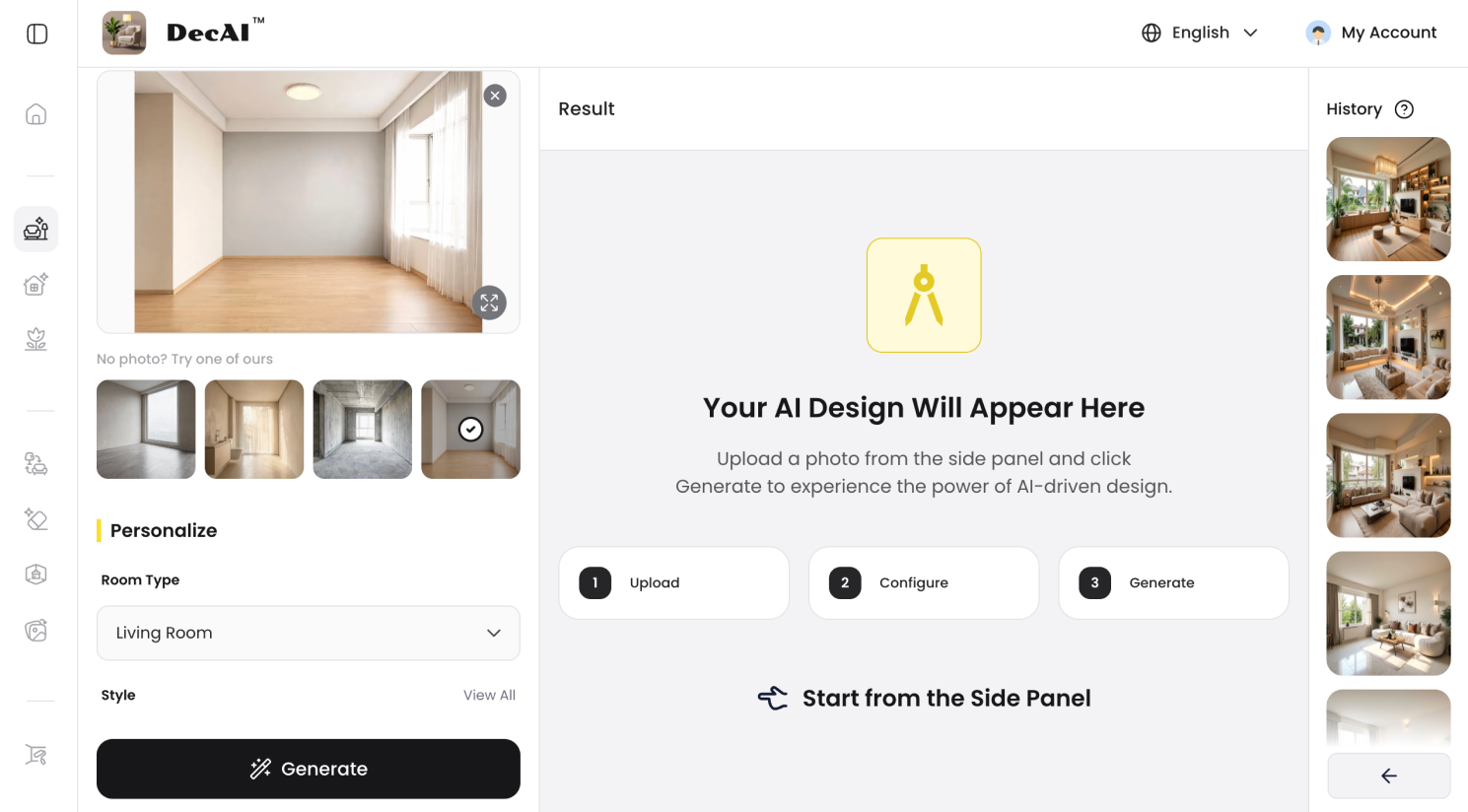
Take a clear photo of your space — whether it’s an interior, exterior, garden, or any area — and simply upload it to DecAI™.
Step 2: Choose a style or type your ChatGPT prompts
Select a design style or enter your ChatGPT prompt to define your vision and requirements.
Step 3: Let AI generate the design
DecAI™ automatically detects key elements like layout, dimensions, lighting, and structure to generate a realistic design in under 30 seconds.
Step 4: Refine details with clicks
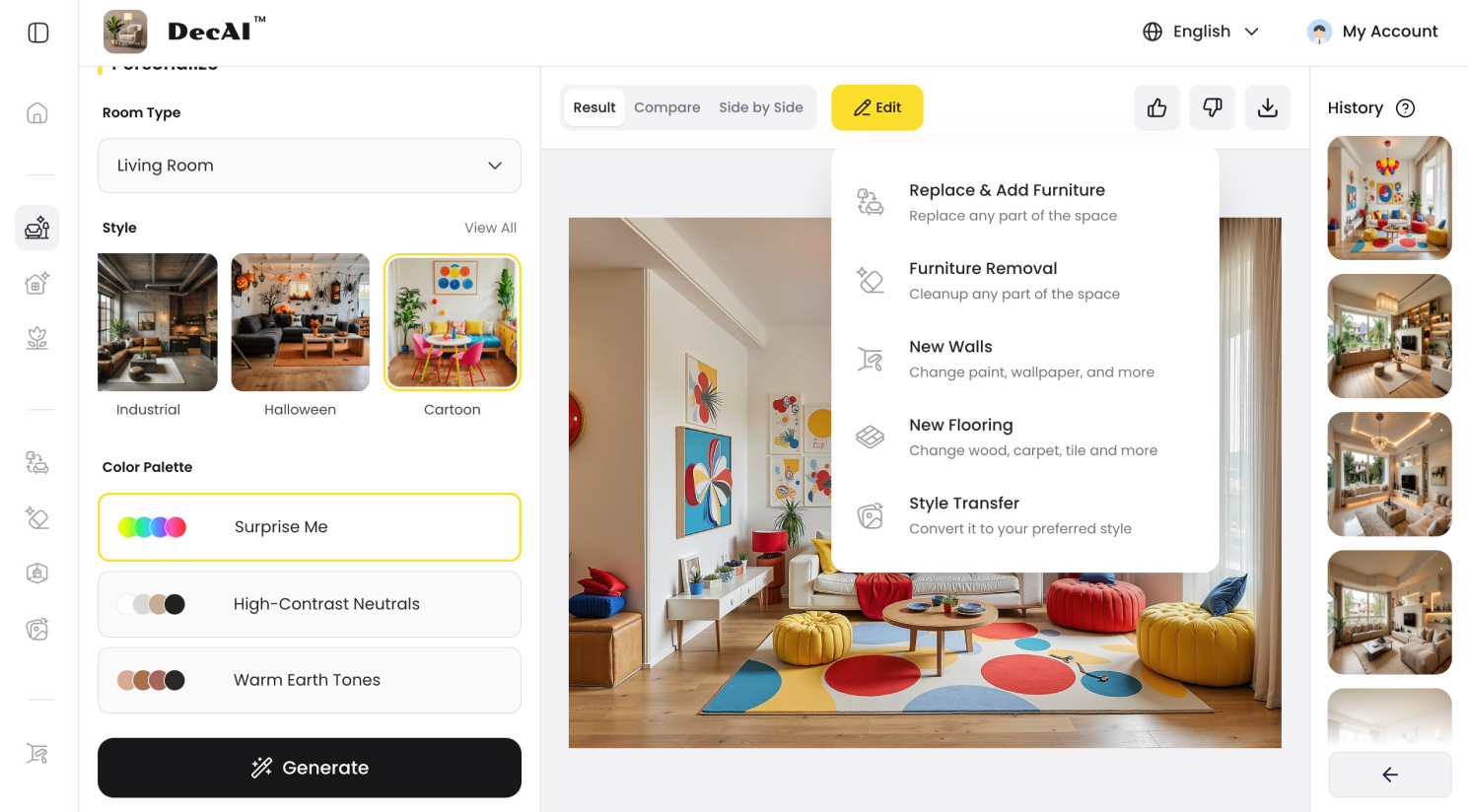
Click “Edit” to fine-tune details such as furniture, decors, colors, walls, and floors, until the design matches exactly what you have in mind.
Trusted by over 41 million users across 170+ countries, DecAI™ has earned a 4.6+ popularity rating for its combination of speed, realism, and ease of use. It's available on web, iOS, Android, and iPad — and you can firstly try its Free-forever plan to fully explore all features before any purchase.
ChatGPT vs. DecAI™: Which One Should You Use?
As we’ve learned above, for designers and architects, using them together would be the best solution to streamline your whole design process.
However, understanding what each tool does best will help you use them at the right moment in your workflow.
ChatGPT excels at the thinking and writing phases of a project: generating concept ideas, writing design briefs, drafting client communications, solving specific design problems, and organizing your thoughts. It's your intelligent design assistant for everything that happens on paper.
DecAI™ excels at the visualization & design phase: turning those concepts into images your clients can actually love. While ChatGPT requires you to craft, refine, and re-craft prompts to get useful output, DecAI™ operates on a simple three-step workflow — upload, choose, generate — and lets you refine the output visually with clicks rather than more writing.
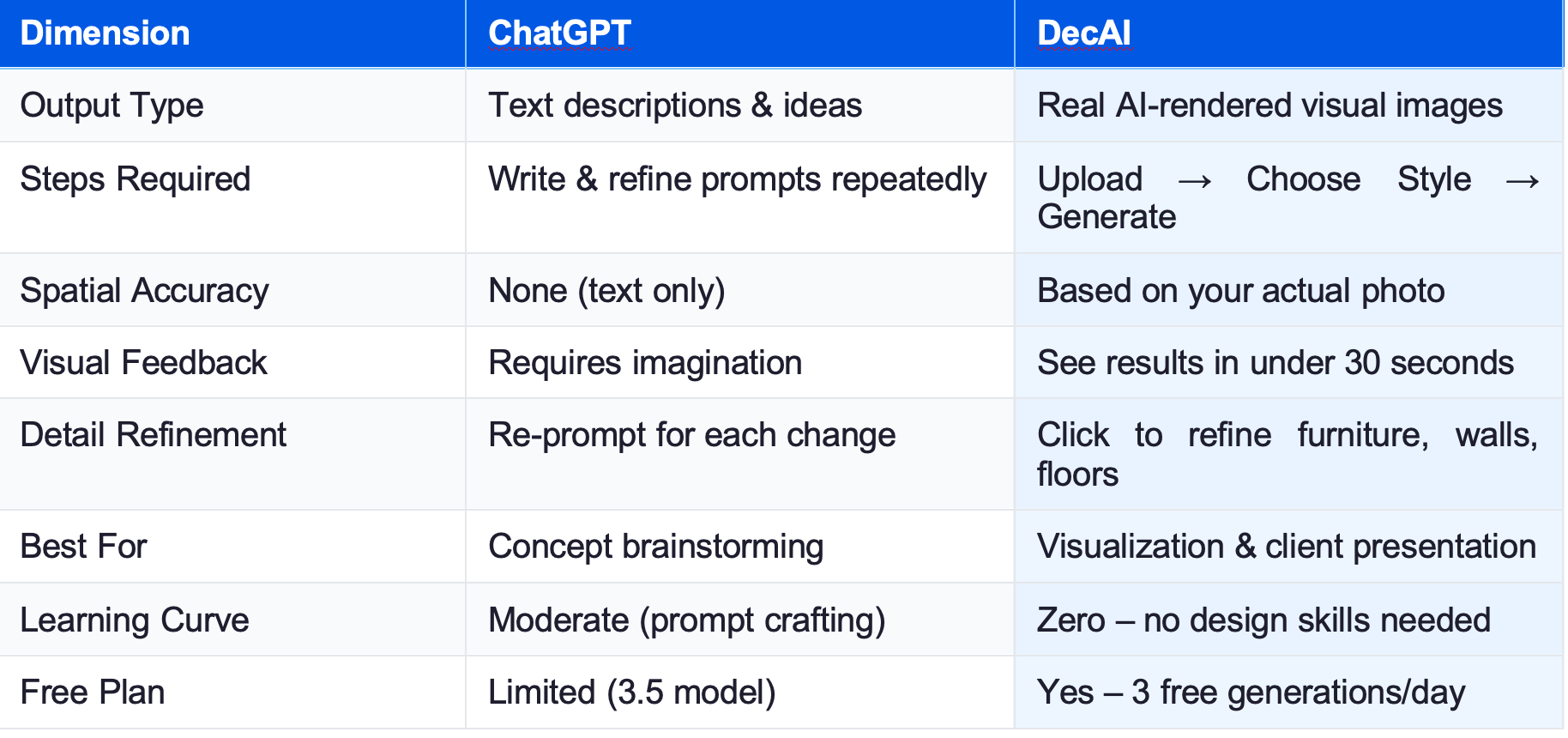
Overall, we do recommend you to use them together: use ChatGPT to think, plan, and write, and use DecAI™ to visualize, refine and share.
FAQS:
1.Can ChatGPT design a room?
Seriously, no. ChatGPT can design a room in detail—providing text-based descriptions of layouts, color palettes, materials, furniture placement, and styling tips. However, it cannot generate visuals or ensure spatial accuracy. To turn ChatGPT’s room design into a usable visual, you will need to use DecAI™ to visualize it in seconds.
2.Can ChatGPT generate actual interior design renders or floor plans?
No. ChatGPT is a text-based AI and cannot generate visual content (renders, floor plans, or images)—this is one of its biggest limitations for interior designers. DecAI™ solves this by letting you upload your space, choose a style, and generate professional designs with clear floors, furnitures, staging and decors in seconds, for free. It’s the perfect tool to bridge the gap between text and visuals.
3.How does DecAI™ compare to other interior design AI tools?
Unlike other interior design AI tools, DecAI™ is built for speed, simplicity, and professionalism—perfect for designers/architects.
It requires just 3 steps (upload, choose style, generate) to create pro-level designs, lets you refine details with clicks, and offers a free trial (no credit card). Unlike tools that require complex prompts, DecAI™ is intuitive and focuses on solving ChatGPT’s key limitations (visuals, spatial accuracy).
It’s also tailored to real spaces, using your uploaded photo to ensure designs are spatially accurate.
4.Are the ChatGPT prompts in this article customizable for my specific space or style?
Yes. No matter whether it is an example or template, you can feel free to customize it for your specific projects and style. The more accurate details you provide, the more tailored and useful ChatGPT's response will be.
5.Is there a free trial for DecAI™, and what does it include?
Yes. As a matter of fact, DecAI™ provides a free-forever plan which allows you to generate one design on the web version and three designs on its iOS or Android mobile versions per day. You can access this plan to test and confirm whether it is a good option for your next project.
7.How do I combine ChatGPT with AI design tools?
Take DecAI™ as an example, you can simply brainstorm and explore ideas with ChatGPT, and then, turn your ideas to real interior designs with DecAI™ with ease.
Wrap up
In 2026, the best interior designers and architects don’t just use AI—they use the right AI tools together. In other words, ChatGPT is a powerful tool for generating interior design ideas and solving design challenges while DecAI™ complements it by turning those ideas into real, visual designs based on your space.
By combining both, you can move seamlessly from idea, visualization to refinement, making your entire design process faster and more efficient.
We hope these 25 ChatGPT interior design prompts, templates, and examples help you work smarter, spark new ideas, and elevate your design projects
-----------------------------------------------------
If you believe that any material on this site infringes your intellectual property rights, please contact the author at decaiwebteam@outlook.com with details of your claim.
Redesign any home interior, exterior & garden in seconds
Share this Post:
'%3e%3cpath%20d='M17.9995%2035.999C17.0317%2035.999%2016.0619%2035.9219%2015.1161%2035.7696C10.9414%2035.0973%207.11524%2032.9513%204.34408%2029.7273C1.54287%2026.4683%200%2022.3035%200%2017.9995C0%208.07403%208.07503%200%2017.9995%200C27.924%200%2036%208.07503%2036%2017.9995C36%2022.3696%2034.4151%2026.5835%2031.5357%2029.8646C28.6844%2033.1156%2024.7671%2035.2326%2020.5052%2035.8267C19.6806%2035.9419%2018.8371%2036%2017.9995%2036V35.999ZM17.9995%201.20123C8.73726%201.20123%201.20224%208.73626%201.20224%2017.9985C1.20224%2026.2919%207.13427%2033.2659%2015.3075%2034.5814C16.9546%2034.8469%2018.6808%2034.8659%2020.3389%2034.6345C28.5812%2033.4863%2034.7968%2026.334%2034.7968%2017.9985C34.7968%208.73626%2027.2617%201.20123%2017.9985%201.20123H17.9995Z'%20fill='%23FF0209'/%3e%3cpath%20d='M29.0557%2014.3621C28.9184%2013.0276%2028.6208%2011.5539%2027.5268%2010.7784C26.6782%2010.1773%2025.5642%2010.1553%2024.5242%2010.1563C22.3251%2010.1583%2020.126%2010.1603%2017.9269%2010.1623C15.812%2010.1643%2013.6971%2010.1663%2011.5821%2010.1683C10.6985%2010.1683%209.8399%2010.1002%209.01937%2010.4819C8.31406%2010.8105%207.76303%2011.4347%207.43241%2012.1289C6.97156%2013.0957%206.87438%2014.1898%206.81927%2015.2588C6.71708%2017.2044%206.7281%2019.156%206.85133%2021.0996C6.9405%2022.5193%207.16792%2024.0872%208.26496%2024.9919C9.23777%2025.7934%2010.6103%2025.8325%2011.8707%2025.8335C15.8741%2025.8365%2019.8776%2025.8395%2023.881%2025.8435C24.394%2025.8435%2024.93%2025.8345%2025.453%2025.7774C26.4829%2025.6661%2027.4637%2025.3716%2028.1249%2024.6092C28.7922%2023.8407%2028.9635%2022.7698%2029.0657%2021.7569C29.3121%2019.3003%2029.3091%2016.8177%2029.0557%2014.3621ZM15.6116%2021.4453V14.5545L21.5797%2017.9999L15.6116%2021.4453Z'%20fill='%23FF0209'/%3e%3c/g%3e%3cdefs%3e%3cclipPath%20id='clip0_13816_41422'%3e%3crect%20width='36'%20height='36'%20fill='white'/%3e%3c/clipPath%3e%3c/defs%3e%3c/svg%3e)
'%3e%3cpath%20d='M17.9995%2036C17.0327%2036%2016.0619%2035.9229%2015.1161%2035.7696C10.9414%2035.0973%207.11524%2032.9513%204.34408%2029.7273C1.54287%2026.4683%200%2022.3035%200%2017.9995C0%208.07403%208.07503%200%2017.9995%200C27.924%200%2036%208.07503%2036%2017.9995C36%2022.3696%2034.4151%2026.5835%2031.5357%2029.8646C28.6844%2033.1156%2024.7671%2035.2326%2020.5052%2035.8267C19.6806%2035.9419%2018.8371%2036%2017.9995%2036ZM17.9995%201.20224C8.73726%201.20224%201.20224%208.73726%201.20224%2017.9995C1.20224%2026.2919%207.13427%2033.2669%2015.3075%2034.5824C16.9556%2034.8479%2018.6808%2034.8669%2020.3389%2034.6355C28.5812%2033.4873%2034.7968%2026.335%2034.7968%2017.9995C34.7968%208.73726%2027.2617%201.20224%2017.9985%201.20224H17.9995Z'%20fill='url(%23paint0_linear_13816_41436)'/%3e%3cpath%20d='M23.4463%207.55469H12.549C9.53841%207.55469%207.08984%2010.0032%207.08984%2013.0138V22.9834C7.08984%2025.994%209.53841%2028.4426%2012.549%2028.4426H23.4463C26.4569%2028.4426%2028.9054%2025.994%2028.9054%2022.9834V13.0138C28.9054%2010.0032%2026.4569%207.55469%2023.4463%207.55469ZM9.01543%2013.0138C9.01543%2011.0652%2010.6004%209.48027%2012.549%209.48027H23.4463C25.3949%209.48027%2026.9799%2011.0652%2026.9799%2013.0138V22.9834C26.9799%2024.932%2025.3949%2026.517%2023.4463%2026.517H12.549C10.6004%2026.517%209.01543%2024.932%209.01543%2022.9834V13.0138Z'%20fill='url(%23paint1_linear_13816_41436)'/%3e%3cpath%20d='M17.9964%2023.0749C20.7966%2023.0749%2023.0749%2020.7966%2023.0749%2017.9964C23.0749%2015.1962%2020.7966%2012.918%2017.9964%2012.918C15.1962%2012.918%2012.918%2015.1962%2012.918%2017.9964C12.918%2020.7966%2015.1962%2023.0749%2017.9964%2023.0749ZM17.9964%2014.8446C19.7346%2014.8446%2021.1483%2016.2582%2021.1483%2017.9964C21.1483%2019.7347%2019.7346%2021.1483%2017.9964%2021.1483C16.2582%2021.1483%2014.8446%2019.7347%2014.8446%2017.9964C14.8446%2016.2582%2016.2582%2014.8446%2017.9964%2014.8446Z'%20fill='url(%23paint2_linear_13816_41436)'/%3e%3cpath%20d='M23.5482%2013.741C24.3026%2013.741%2024.9168%2013.1269%2024.9168%2012.3725C24.9168%2011.618%2024.3026%2011.0039%2023.5482%2011.0039C22.7938%2011.0039%2022.1797%2011.618%2022.1797%2012.3725C22.1797%2013.1269%2022.7938%2013.741%2023.5482%2013.741Z'%20fill='url(%23paint3_linear_13816_41436)'/%3e%3c/g%3e%3cdefs%3e%3clinearGradient%20id='paint0_linear_13816_41436'%20x1='5.27482'%20y1='30.7312'%20x2='30.7242'%20y2='5.28083'%20gradientUnits='userSpaceOnUse'%3e%3cstop%20stop-color='%23FAAD4F'/%3e%3cstop%20offset='0.35'%20stop-color='%23DD2A7B'/%3e%3cstop%20offset='0.62'%20stop-color='%239537B0'/%3e%3cstop%20offset='1'%20stop-color='%23515BD4'/%3e%3c/linearGradient%3e%3clinearGradient%20id='paint1_linear_13816_41436'%20x1='8.92225'%20y1='27.074'%20x2='27.073'%20y2='8.92324'%20gradientUnits='userSpaceOnUse'%3e%3cstop%20stop-color='%23FAAD4F'/%3e%3cstop%20offset='0.35'%20stop-color='%23DD2A7B'/%3e%3cstop%20offset='0.62'%20stop-color='%239537B0'/%3e%3cstop%20offset='1'%20stop-color='%23515BD4'/%3e%3c/linearGradient%3e%3clinearGradient%20id='paint2_linear_13816_41436'%20x1='14.4077'%20y1='21.5861'%20x2='21.5861'%20y2='14.4077'%20gradientUnits='userSpaceOnUse'%3e%3cstop%20stop-color='%23FAAD4F'/%3e%3cstop%20offset='0.35'%20stop-color='%23DD2A7B'/%3e%3cstop%20offset='0.62'%20stop-color='%239537B0'/%3e%3cstop%20offset='1'%20stop-color='%23515BD4'/%3e%3c/linearGradient%3e%3clinearGradient%20id='paint3_linear_13816_41436'%20x1='22.5814'%20y1='13.3393'%20x2='24.515'%20y2='11.4057'%20gradientUnits='userSpaceOnUse'%3e%3cstop%20stop-color='%23FAAD4F'/%3e%3cstop%20offset='0.35'%20stop-color='%23DD2A7B'/%3e%3cstop%20offset='0.62'%20stop-color='%239537B0'/%3e%3cstop%20offset='1'%20stop-color='%23515BD4'/%3e%3c/linearGradient%3e%3cclipPath%20id='clip0_13816_41436'%3e%3crect%20width='36'%20height='36'%20fill='white'/%3e%3c/clipPath%3e%3c/defs%3e%3c/svg%3e)
'%3e%3cpath%20d='M17.9995%2035.999C17.0317%2035.999%2016.0619%2035.9219%2015.1161%2035.7696C10.9414%2035.0973%207.11524%2032.9513%204.34408%2029.7273C1.54287%2026.4683%200%2022.3035%200%2017.9995C0%208.07403%208.07502%200%2017.9995%200C27.924%200%2036%208.07503%2036%2017.9995C36%2022.3696%2034.415%2026.5835%2031.5357%2029.8646C28.6844%2033.1156%2024.7671%2035.2326%2020.5052%2035.8267C19.6806%2035.9419%2018.8371%2036%2017.9995%2036V35.999ZM17.9995%201.20123C8.73725%201.20123%201.20224%208.73626%201.20224%2017.9985C1.20224%2026.2919%207.13427%2033.2659%2015.3075%2034.5814C16.9545%2034.8469%2018.6808%2034.8659%2020.3388%2034.6345C28.5812%2033.4863%2034.7968%2026.334%2034.7968%2017.9985C34.7968%208.73626%2027.2617%201.20123%2017.9985%201.20123H17.9995Z'%20fill='%23007EBB'/%3e%3cpath%20d='M9.06639%2012.124C8.60253%2011.6932%208.37109%2011.1602%208.37109%2010.526C8.37109%209.89184%208.60253%209.33481%209.06639%208.90401C9.53026%208.47321%2010.1274%208.25781%2010.8587%208.25781C11.5901%208.25781%2012.1642%208.47321%2012.627%208.90401C13.0909%209.33481%2013.3223%209.87581%2013.3223%2010.526C13.3223%2011.1762%2013.0909%2011.6932%2012.627%2012.124C12.1631%2012.5548%2011.5741%2012.7702%2010.8587%2012.7702C10.1434%2012.7702%209.52926%2012.5548%209.06639%2012.124ZM12.9326%2014.5946V27.7962H8.76182V14.5946H12.9326Z'%20fill='%23007EBB'/%3e%3cpath%20d='M26.8196%2015.9006C27.7283%2016.8875%2028.1832%2018.243%2028.1832%2019.9682V27.5663H24.2208V20.5042C24.2208%2019.6346%2023.9954%2018.9583%2023.5445%2018.4764C23.0937%2017.9945%2022.4876%2017.7541%2021.7262%2017.7541C20.9647%2017.7541%2020.3586%2017.9955%2019.9078%2018.4764C19.4569%2018.9583%2019.2315%2019.6346%2019.2315%2020.5042V27.5663H15.2461V14.5611H19.2315V16.2863C19.6353%2015.7113%2020.1793%2015.2574%2020.8636%2014.9228C21.5468%2014.5892%2022.3163%2014.4219%2023.1708%2014.4219C24.6937%2014.4219%2025.9099%2014.9158%2026.8186%2015.9016L26.8196%2015.9006Z'%20fill='%23007EBB'/%3e%3c/g%3e%3cdefs%3e%3cclipPath%20id='clip0_13816_41425'%3e%3crect%20width='36'%20height='36'%20fill='white'/%3e%3c/clipPath%3e%3c/defs%3e%3c/svg%3e)
'%3e%3cpath%20d='M18%2035.999C17.0322%2035.999%2016.0623%2035.9219%2015.1166%2035.7696C10.9417%2035.0973%207.11544%2032.9513%204.3442%2029.7273C1.54291%2026.4683%200%2022.3035%200%2017.9995C0%208.07403%208.07526%200%2018%200C27.9248%200%2036%208.07503%2036%2017.9995C36%2022.3696%2034.415%2026.5835%2031.5356%2029.8646C28.6842%2033.1156%2024.7668%2035.2326%2020.5047%2035.8267C19.6802%2035.9419%2018.8366%2036%2017.999%2036L18%2035.999ZM18%201.20123C8.73751%201.20123%201.20227%208.73626%201.20227%2017.9985C1.20227%2026.2919%207.13448%2033.2659%2015.3079%2034.5814C16.955%2034.8469%2018.6813%2034.8659%2020.3394%2034.6345C28.582%2033.4863%2034.7977%2026.334%2034.7977%2017.9985C34.7977%208.73626%2027.2625%201.20123%2018%201.20123Z'%20fill='black'/%3e%3cpath%20d='M7%208.09163H13.5067L19.521%2016.1816L27.0073%207.90625L28.786%207.93715L20.4078%2017.3454L29%2028.901H22.4959L16.8193%2021.362L9.8847%2029.0864H8.13428L15.9583%2020.26L7%208.09163ZM12.8931%209.28633H9.45676L23.2048%2027.6754H26.5793L12.8931%209.28633Z'%20fill='black'/%3e%3c/g%3e%3cdefs%3e%3cclipPath%20id='clip0_13886_43848'%3e%3crect%20width='36'%20height='36'%20fill='white'/%3e%3c/clipPath%3e%3c/defs%3e%3c/svg%3e)
'%3e%3cpath%20d='M17.9995%2035.999C17.0327%2035.999%2016.0619%2035.9219%2015.1161%2035.7686C10.9414%2035.0963%207.11524%2032.9503%204.34408%2029.7263C1.54287%2026.4673%200%2022.3025%200%2017.9995C0%208.07403%208.07503%200%2017.9995%200C27.924%200%2036%208.07503%2036%2017.9995C36%2022.3696%2034.415%2026.5835%2031.5357%2029.8646C28.6844%2033.1156%2024.7671%2035.2326%2020.5052%2035.8267C19.6806%2035.9419%2018.8371%2036%2017.9995%2036V35.999ZM17.9995%201.20123C8.73726%201.20123%201.20224%208.73626%201.20224%2017.9985C1.20224%2026.2909%207.13428%2033.2659%2015.3075%2034.5814C16.9556%2034.8469%2018.6808%2034.8659%2020.3389%2034.6345C28.5812%2033.4863%2034.7968%2026.334%2034.7968%2017.9985C34.7968%208.73626%2027.2617%201.20123%2017.9985%201.20123H17.9995Z'%20fill='%231877F7'/%3e%3cpath%20d='M20.5337%2014.9635V18.7536H25.2225L24.4801%2023.8601H20.5337V35.624C19.7423%2035.7342%2018.9328%2035.7913%2018.1112%2035.7913C17.1625%2035.7913%2016.2317%2035.7151%2015.324%2035.5689V23.8601H11V18.7536H15.324V14.1169C15.324%2011.2396%2017.6564%208.90625%2020.5347%208.90625V8.90926C20.5428%208.90926%2020.5508%208.90625%2020.5588%208.90625H25.2235V13.3215H22.1758C21.2691%2013.3215%2020.5347%2014.0558%2020.5347%2014.9625L20.5337%2014.9635Z'%20fill='%231877F7'/%3e%3c/g%3e%3cdefs%3e%3cclipPath%20id='clip0_13816_41433'%3e%3crect%20width='36'%20height='36'%20fill='white'/%3e%3c/clipPath%3e%3c/defs%3e%3c/svg%3e)
'%3e%3cpath%20d='M17.9995%2035.999C17.0327%2035.999%2016.0619%2035.9219%2015.1161%2035.7686C10.9414%2035.0963%207.11524%2032.9503%204.34408%2029.7263C1.54287%2026.4673%200%2022.3025%200%2017.9995C0%208.07403%208.07503%200%2017.9995%200C27.924%200%2036%208.07503%2036%2017.9995C36%2022.3696%2034.415%2026.5835%2031.5357%2029.8646C28.6844%2033.1156%2024.7671%2035.2326%2020.5052%2035.8267C19.6806%2035.9419%2018.8371%2036%2017.9995%2036V35.999ZM17.9995%201.20123C8.73726%201.20123%201.20224%208.73626%201.20224%2017.9985C1.20224%2026.2909%207.13428%2033.2659%2015.3075%2034.5814C16.9556%2034.8469%2018.6808%2034.8659%2020.3389%2034.6345C28.5812%2033.4863%2034.7968%2026.334%2034.7968%2017.9985C34.7968%208.73626%2027.2617%201.20123%2017.9985%201.20123H17.9995Z'%20fill='%232A91F7'/%3e%3cg%20clip-path='url(%23clip1_13816_41442)'%3e%3cpath%20d='M16.3345%2018.834C16.6924%2019.3124%2017.149%2019.7083%2017.6733%2019.9947C18.1976%2020.2812%2018.7774%2020.4516%2019.3734%2020.4942C19.9693%2020.5369%2020.5675%2020.4509%2021.1273%2020.2421C21.6871%2020.0333%2022.1954%2019.7065%2022.6178%2019.284L25.1178%2016.784C25.8768%2015.9981%2026.2968%2014.9456%2026.2873%2013.8531C26.2778%2012.7606%2025.8396%2011.7156%2025.0671%2010.943C24.2946%2010.1705%2023.2495%209.73231%2022.157%209.72281C21.0645%209.71332%2020.012%2010.1333%2019.2262%2010.8923L17.7928%2012.3173M19.6678%2017.1673C19.3099%2016.6889%2018.8533%2016.293%2018.329%2016.0065C17.8047%2015.7201%2017.2249%2015.5497%2016.6289%2015.507C16.033%2015.4643%2015.4348%2015.5503%2014.875%2015.7592C14.3152%2015.968%2013.8069%2016.2947%2013.3845%2016.7173L10.8845%2019.2173C10.1255%2020.0031%209.70551%2021.0557%209.715%2022.1481C9.72449%2023.2406%2010.1627%2024.2857%2010.9352%2025.0582C11.7078%2025.8307%2012.7528%2026.269%2013.8453%2026.2784C14.9378%2026.2879%2015.9903%2025.868%2016.7761%2025.109L18.2011%2023.684'%20stroke='%232A91F7'%20stroke-width='1.66667'%20stroke-linecap='round'%20stroke-linejoin='round'/%3e%3c/g%3e%3c/g%3e%3cdefs%3e%3cclipPath%20id='clip0_13816_41442'%3e%3crect%20width='36'%20height='36'%20fill='white'/%3e%3c/clipPath%3e%3cclipPath%20id='clip1_13816_41442'%3e%3crect%20width='20'%20height='20'%20fill='white'%20transform='translate(8%208)'/%3e%3c/clipPath%3e%3c/defs%3e%3c/svg%3e)
Redesign any home interior, exterior & garden in seconds