
AI or Interior Designer: How to Choose for Your Home & Budget

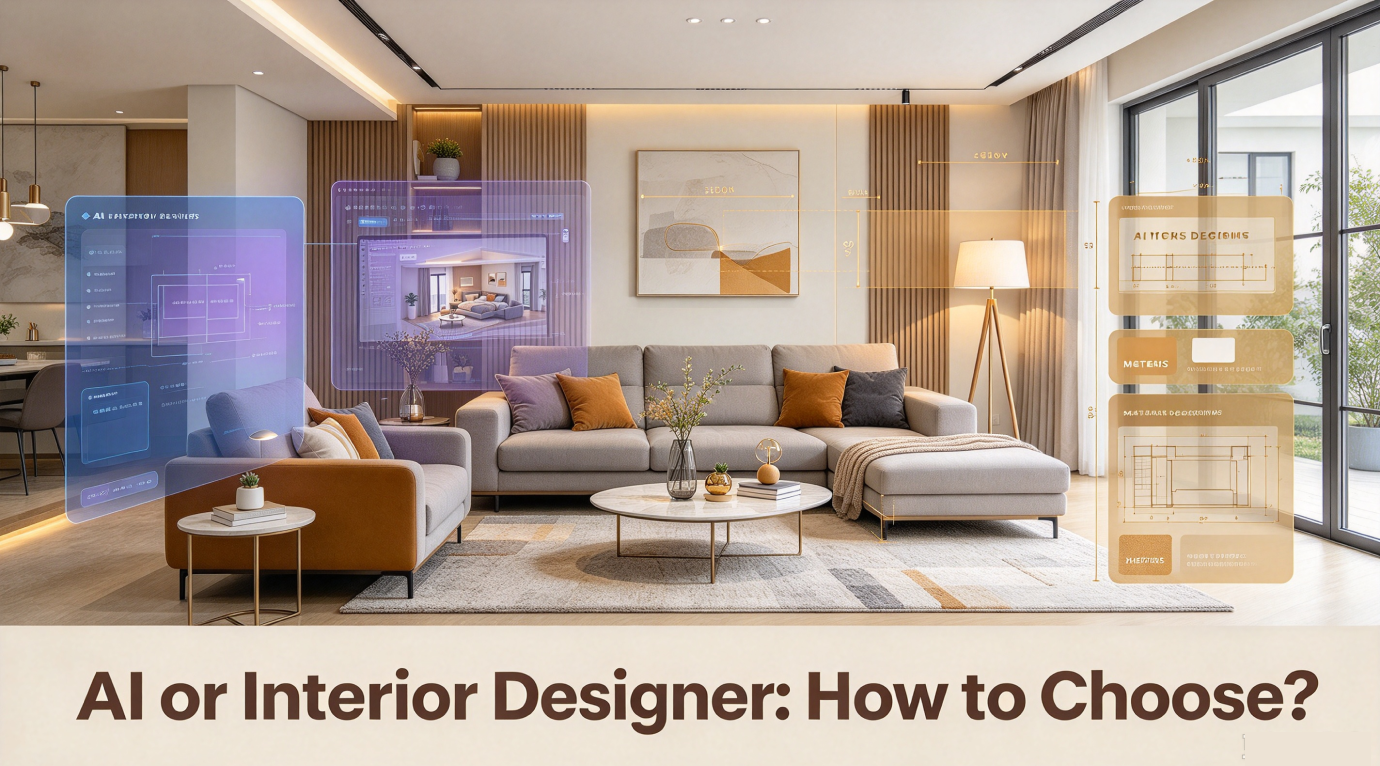
AI or an interior designer? At first, it might seem like you have to choose one or the other.
With AI, you can generate room makeovers in seconds, experiment with different styles, and explore ideas without spending much on design fees. Or you can hire a professional interior designer to understand your needs, work through the details, and help turn your ideas into a beautiful, livable space.
But what if the best approach isn't choosing between them at all?
For many homeowners, AI can be a great place to start, while professional guidance becomes valuable when the project gets more complicated.
So, before you spend money on either option, let's explore what AI and interior designers actually do best, where each falls short, and how to choose the right approach for your home, needs, and budget.
Design any room, shop or space with DecAI in less 30 seconds! It's free!
What AI does surprisingly well in interior design?
AI interior design tools are especially useful when you have ideas for your home but aren't quite sure how they'll look in your actual space.
Instead of imagining everything in your head—or moving furniture, repainting walls, or buying new decor just to see what works—you can use AI to experiment with different possibilities and visualize them in your own room, without making any real-world changes.
Here are six things AI does surprisingly well:
- Visualize room makeovers in seconds: Turn a photo of your existing room into realistic-looking design concepts, making it easier to picture potential changes before committing.
- Explore different styles without commitment: Experiment with modern, Japandi, minimalist, farmhouse, or luxury interiors without changing anything in your actual home.
- Test colors and materials in your own space: See how different wall colors, flooring materials, furniture finishes, and textures could look together before buying.
- Compare multiple design ideas at little cost: Generate several makeover concepts, compare your favorites, and narrow down your options without paying for each new idea.
- Turn inspiration into something you can actually see: Go beyond Pinterest boards and vague ideas by exploring how your favorite looks might translate into your own room.
- Make interior design more accessible: Explore decorating ideas and experiment with your space even if you have no design experience or a limited budget.
That's what makes AI interior design tools so appealing to homeowners, renters, and DIY enthusiasts. You don't need professional design skills or a big budget to start exploring what your space could become.
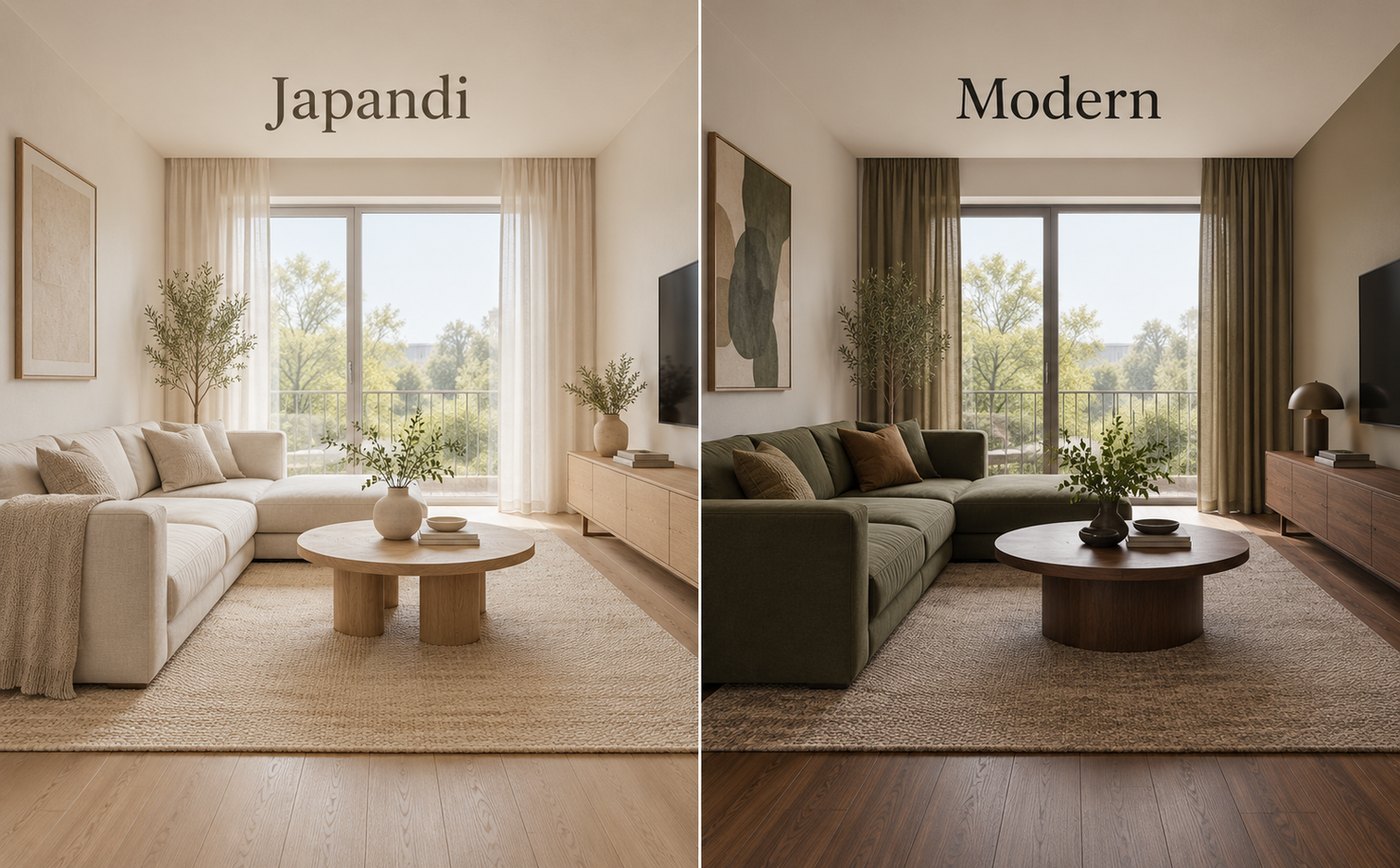
Different interior design examples made with AI tools
What human interior designers bring to the table that AI can't
While AI is great for exploring ideas and visualizing different looks virtually, human interior designers bring something more to the table: real-world experience, creative judgment, and a deeper understanding of how people actually live in their homes.
Here are some things professional interior designers can do that AI tools can't fully replace:
- See and understand your space in person: A designer can visit your home, take measurements, spot layout problems, and find practical solutions that might not be obvious from a photo.
- Handle the technical details: From lighting and space planning to material selection and building requirements, qualified designers can help assess whether your ideas are practical, safe, and achievable.
- Get to know you and how you live: A good designer takes time to understand your routines, preferences, needs, and budget—not just the style you like.
- Help you choose materials that work in real life: Designers can see and feel actual samples, assess their quality and durability, and help you avoid finishes that look great in pictures but disappoint in person.
- Connect you with the right people and products: Many designers have relationships with furniture suppliers, craftspeople, and contractors, making it easier to source products and bring a design together.
- Turn ideas into a finished space: Depending on their services, designers can coordinate purchases, deliveries, contractors, and installations, helping you manage the project from planning to completion.
In short, interior designers go beyond making a space look beautiful. They help solve real-world design challenges, bring creativity and personal touches to every detail, and turn your ideas into a home that truly works for you.
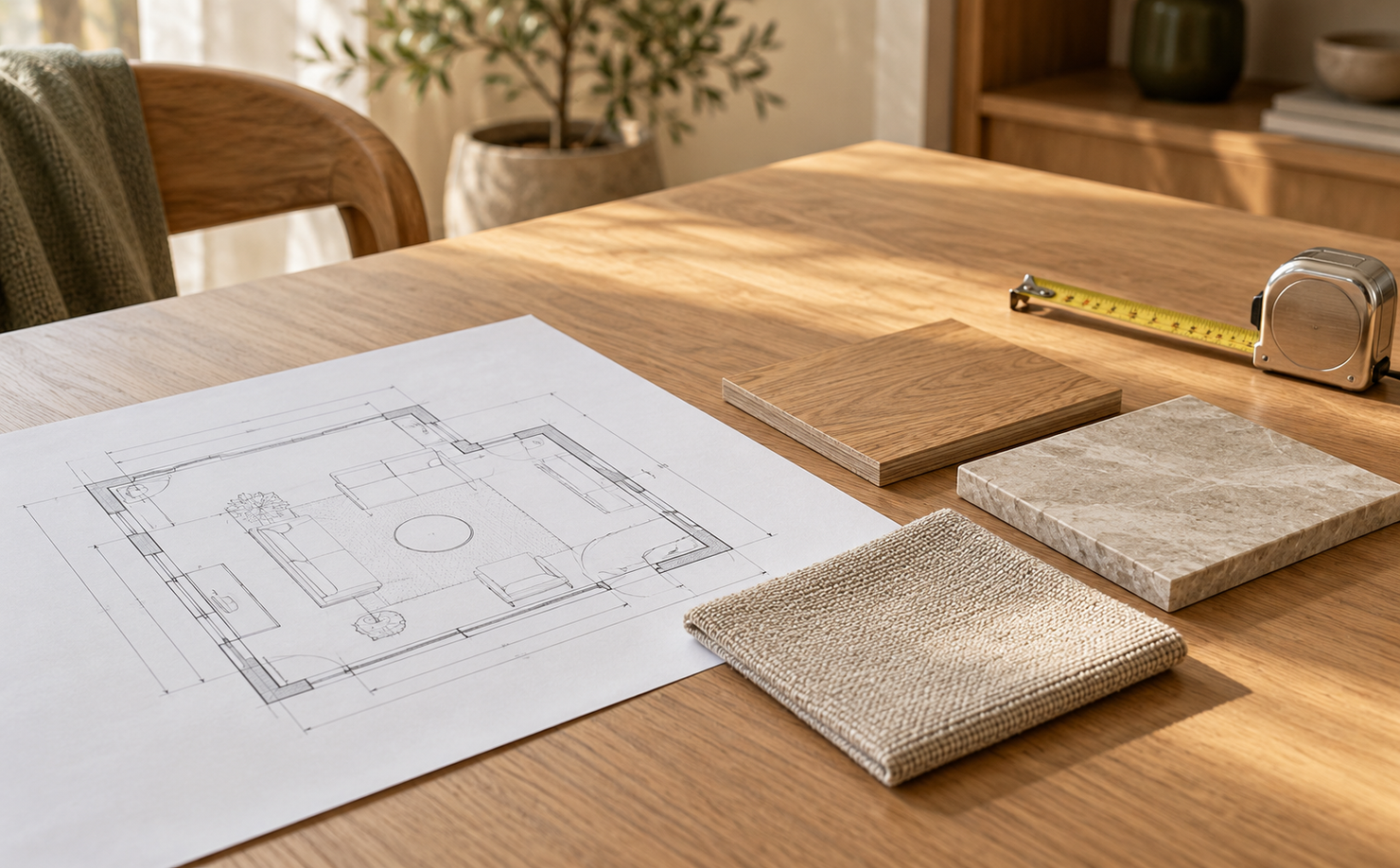
AI or interior designer, what's the difference?
AI tools and professional interior designers can both help you create a home you love, but they work in very different ways.
So, how do they actually compare? Let's look at the differences in cost, speed, and capabilities first, then see how each performs in real-life home design projects.
Differences in cost, speed and capabilities
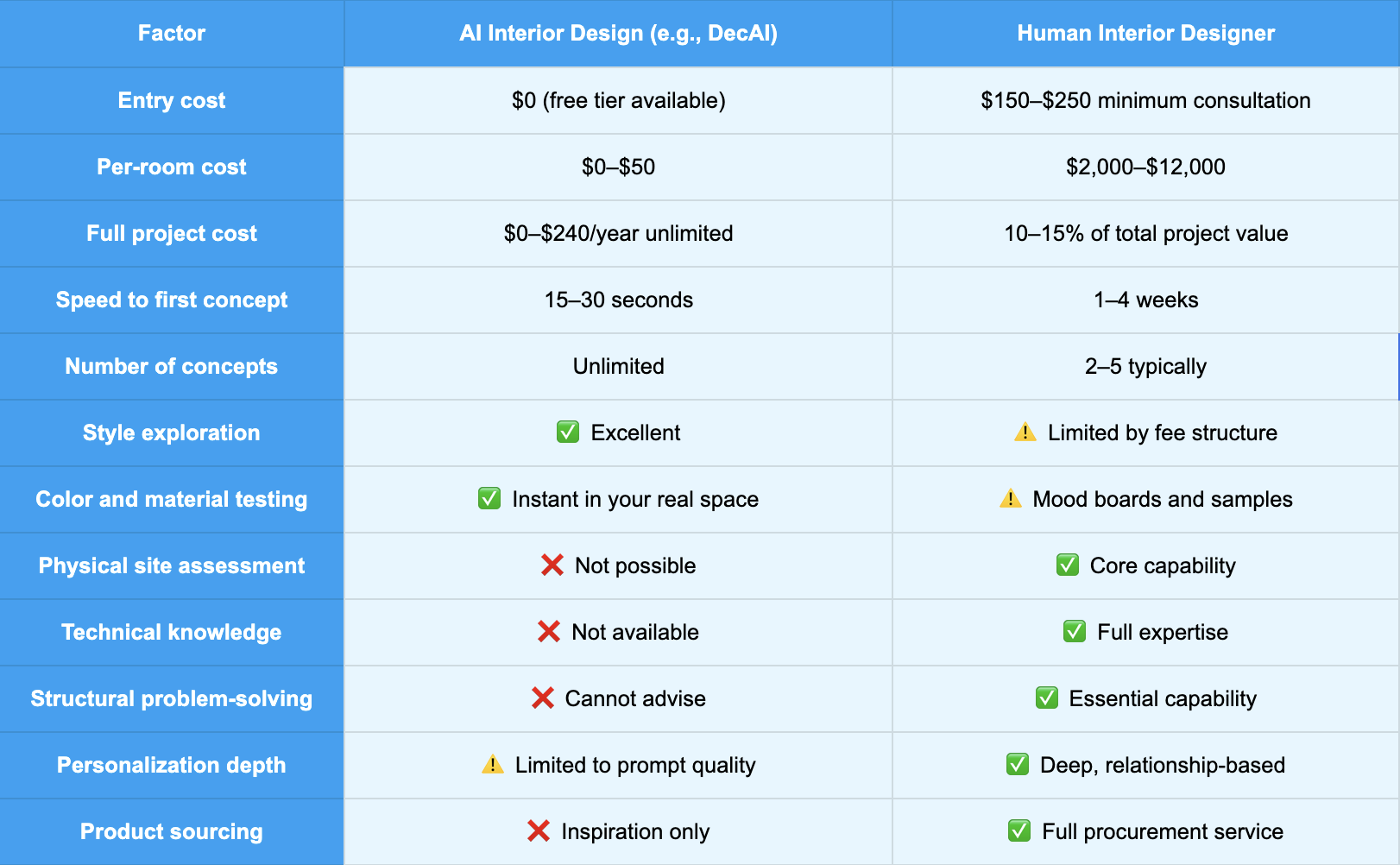
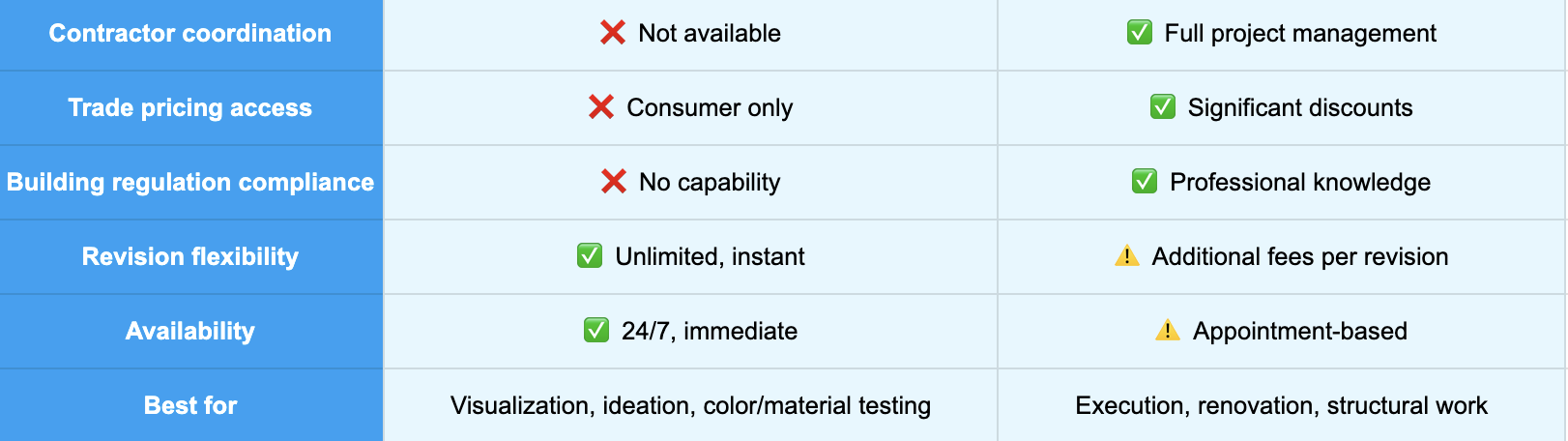
From how much you pay to how quickly you see results, here's a side-by-side look at what AI interior design tools and human designers have to offer.
The complete side-by-side comparison
Differences in real-life design projects
The differences become even clearer when you look at actual home projects. Here are three common situations where AI and professional designers can play very different roles.
Scenario 1: Refreshing a living room without renovating
What AI delivers:
Multiple photorealistic visualizations of the room in different design directions, within minutes, for free or minimal cost. Color testing, furniture style comparison, material direction testing — all in the actual room.
What a designer delivers:
A professionally designed direction with sourced and specified furniture, a shopping list with trade pricing, and potentially an in-home consultation to assess the space.
Which makes more sense:
For a budget-conscious living room refresh that doesn't involve structural changes, AI can be a practical starting point. It helps you explore design directions and narrow down your preferences at a fraction of the cost of hiring a designer. If you need help with measurements, furniture selection, or other practical decisions, a targeted professional consultation can fill the gaps.
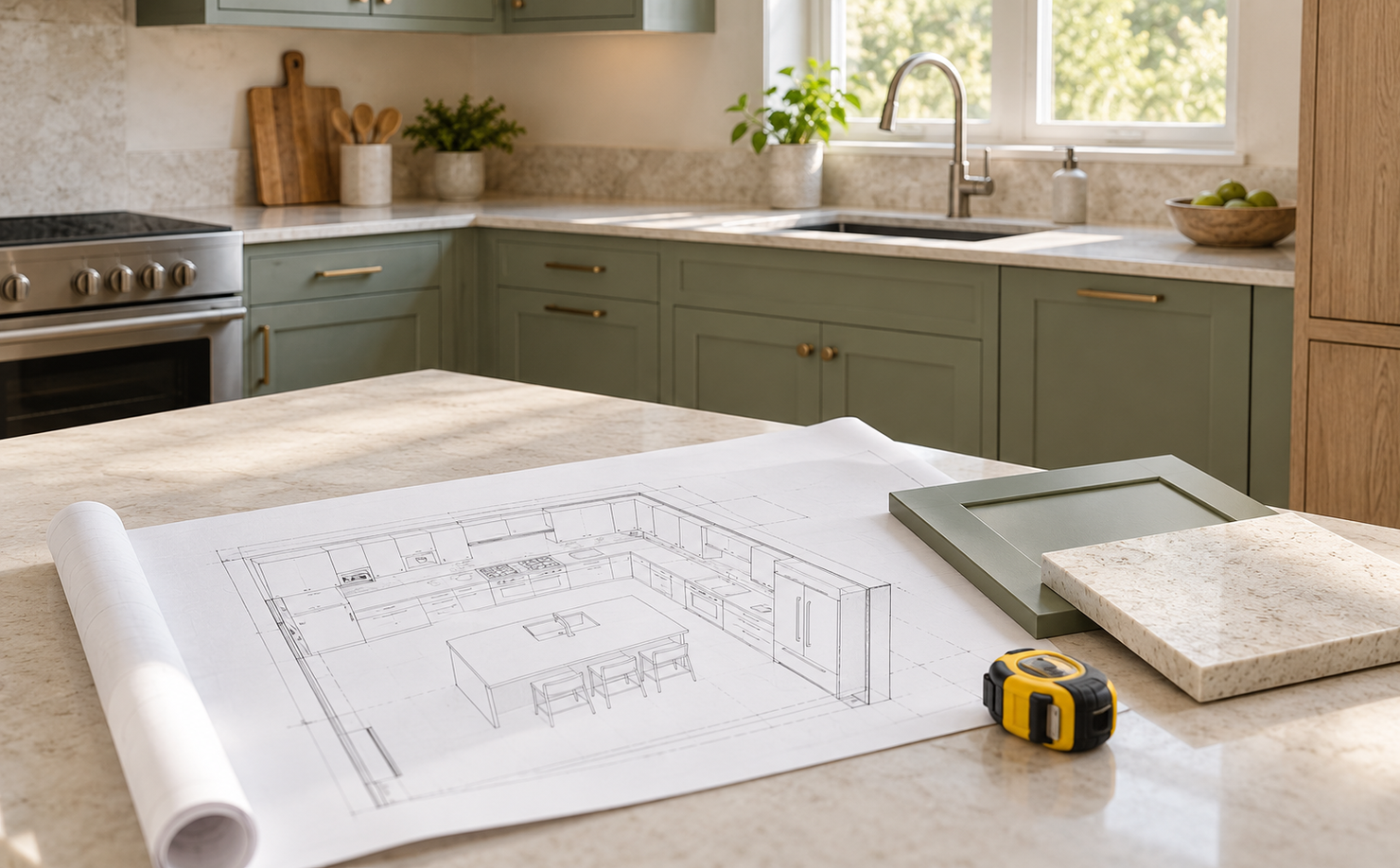
Scenario 2: renovating a kitchen
What AI delivers:
Visual concepts of different kitchen aesthetic directions — cabinet colors, worktop materials, backsplash styles, flooring — applied to a photo of the existing kitchen. Useful for determining the desired direction before briefing a designer or contractor.
What a designer delivers:
Technical layout assessment, cabinet specification, contractor coordination, material procurement at trade pricing, building regulation guidance, and full project management from concept to completion.
Which makes more sense:
For a kitchen renovation involving layout changes, plumbing, electrical work, or structural alterations, professional expertise is essential. AI can still be incredibly helpful at the beginning, allowing you to explore ideas and communicate your preferences more clearly before the actual planning starts.
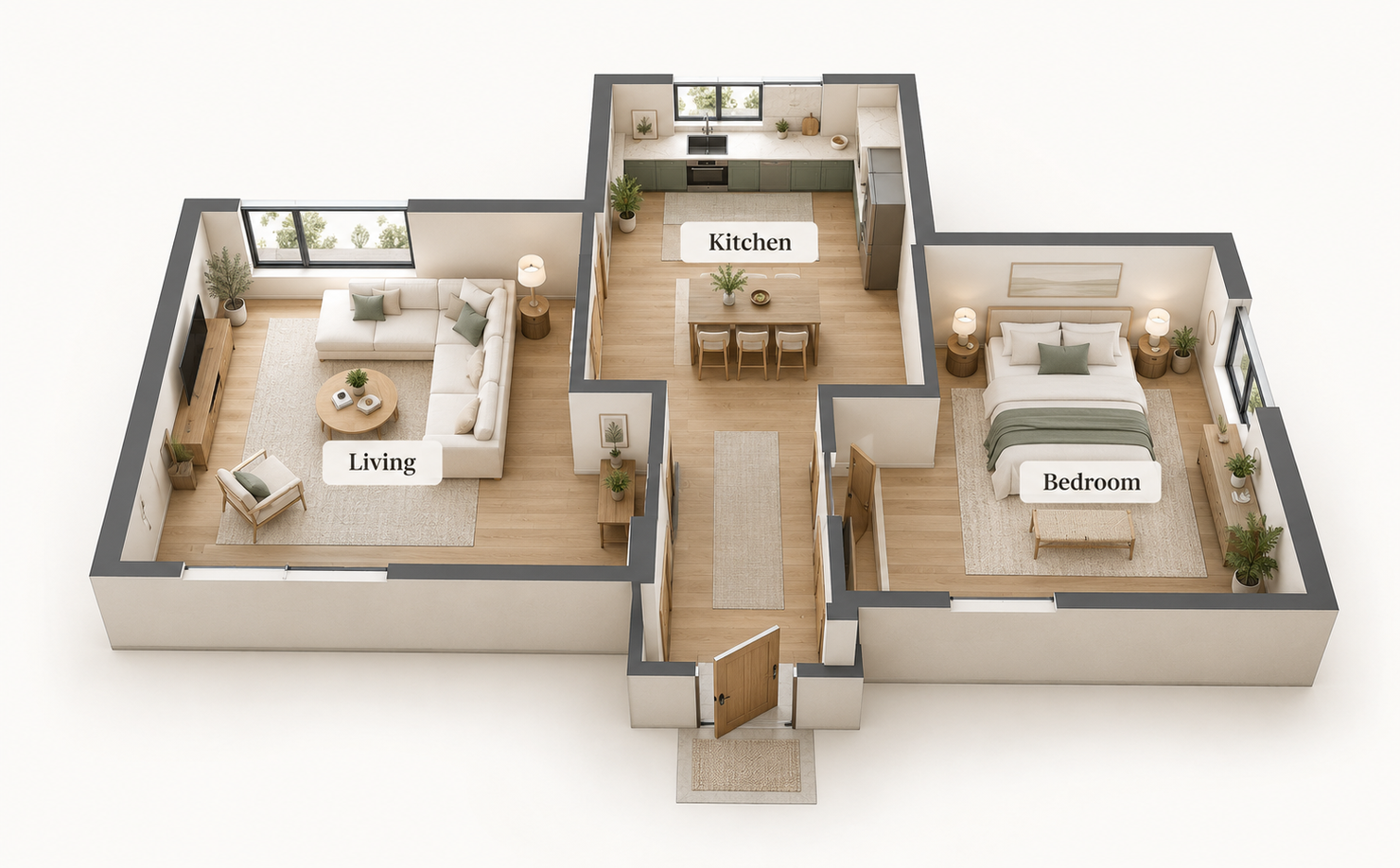
Scenario 3: designing an entire home
What AI delivers:
Room-by-room visualization of potential directions, color palette testing across multiple rooms for consistency, quick generation of variations for client review.
What a designer delivers:
A coherent design vision across all rooms, professional specification of all materials and furniture, contractor management, trade sourcing, budget tracking, and end-to-end project management.
Which makes more sense:
For a whole-home design project, a professional designer is often worth the investment, especially when you're renovating several rooms or need help coordinating the work. AI can complement the process by making it easier to explore ideas, compare options, and communicate your vision.
See? AI and interior designers aren't necessarily competing for the same role. AI helps you explore what's possible, while professional designers help determine what's practical and bring those ideas to life. Depending on your project, you may benefit from one, the other, or both.
When is AI interior design actually the better choise?
AI interior design tools are often a great fit for projects focused on visual changes rather than construction. Whether you're refreshing a bedroom, experimenting with living room styles, or planning renter-friendly updates, AI can help you explore ideas without a major upfront investment.
Design any room, shop or space with DecAI in less 30 seconds! It's free!
So, try to choose AI interior design tools when you face the following cases:
1.Your budget is tight
If you want to design your space for less than a designer’s consultation fee — AI tools at $0–$200 cover everything through visualization and direction-finding.
2.You’re at the early idea stage
You’re not ready to commit to a direction and need to explore what’s possible before investing in professional guidance. AI is the fastest and cheapest exploration tool available.
3.You’re refreshing, not renovating
If the project involves changing furniture, colors, textiles, and decor — but not walls, plumbing, or electrical — AI visualization gives you all the design guidance you need to make those decisions confidently.
4.You’re renting and have limitations
A renter can now get a well-considered, shoppable design concept for their living room without spending $3,000 on a designer who may not even take that project. AI tools are particularly well-suited to renter constraints — testing what’s achievable without structural changes.
5.You want to prepare for a designer conversation
Using AI to clarify your direction before your first designer consultation saves significant fee time on the discovery phase and produces a more efficient, more focused professional engagement.
6.You’re confident in your own vision and need visualization
If you have a clear aesthetic direction but need to see it applied to your actual room before buying, AI is the fastest and most affordable visualization tool available.
7.Your project is a single room with no technical complexity
AI tools cost $0–$50 per room. Interior designers cost $1,500–$5,000 per room for design fees alone. For a straightforward single-room refresh, AI delivers the planning and visualization value at a fraction of the cost.
When is hiring an interior designer worth the time and money?
When your project involves complex planning, technical decisions, or extensive coordination, professional design support can be worth the investment.
Here are eight situations where professional design expertise can make a meaningful difference:
1.Your project involves structural changes
Moving walls, changing room configurations, adding or removing architectural features — anything that touches the building’s structure rather than its surface requires professional assessment and typically professional management.
2.You’re renovating a bathroom or kitchen
AI tools cannot navigate building regulations or evaluate construction challenges. Kitchen and bathroom renovations involve plumbing, electrical, ventilation, and often building permit requirements — all of which require professional expertise.
3.Your budget is significant and the stakes are high
When you’re spending $50,000+ on a renovation, the cost of a designer’s fee — typically 10–15% of project value — is justified by the protection it provides against expensive mistakes, the access to trade pricing it enables, and the coordination value it delivers.
4.You need someone to manage contractors
A professional designer takes on the full service of sourcing real furniture, managing contractors, navigating codes, and coordinating installation — the parts AI cannot do.
5.You have a complex spatial problem
An unusual floor plan, awkward proportions, challenging light conditions, or a room that has never quite worked despite multiple attempts — professional spatial problem-solving is genuinely worth the investment.
6.You want access to trade-only products
Some of the most exceptional furniture, fabric, and material options are only available through trade accounts that professional designers hold. If your vision requires these products, you need professional access to source them.
7.You’re buying or building a significant property
For a property that represents a major financial investment, professional interior design protects and potentially enhances that investment’s value. The resale premium of a professionally designed home is well-documented in premium real estate markets.
8.You genuinely don’t have time to be involved
A full-service designer manages everything — from first concept to final installation. If your life doesn’t allow for the time investment that self-directed design requires, delegating to a professional is the right call.
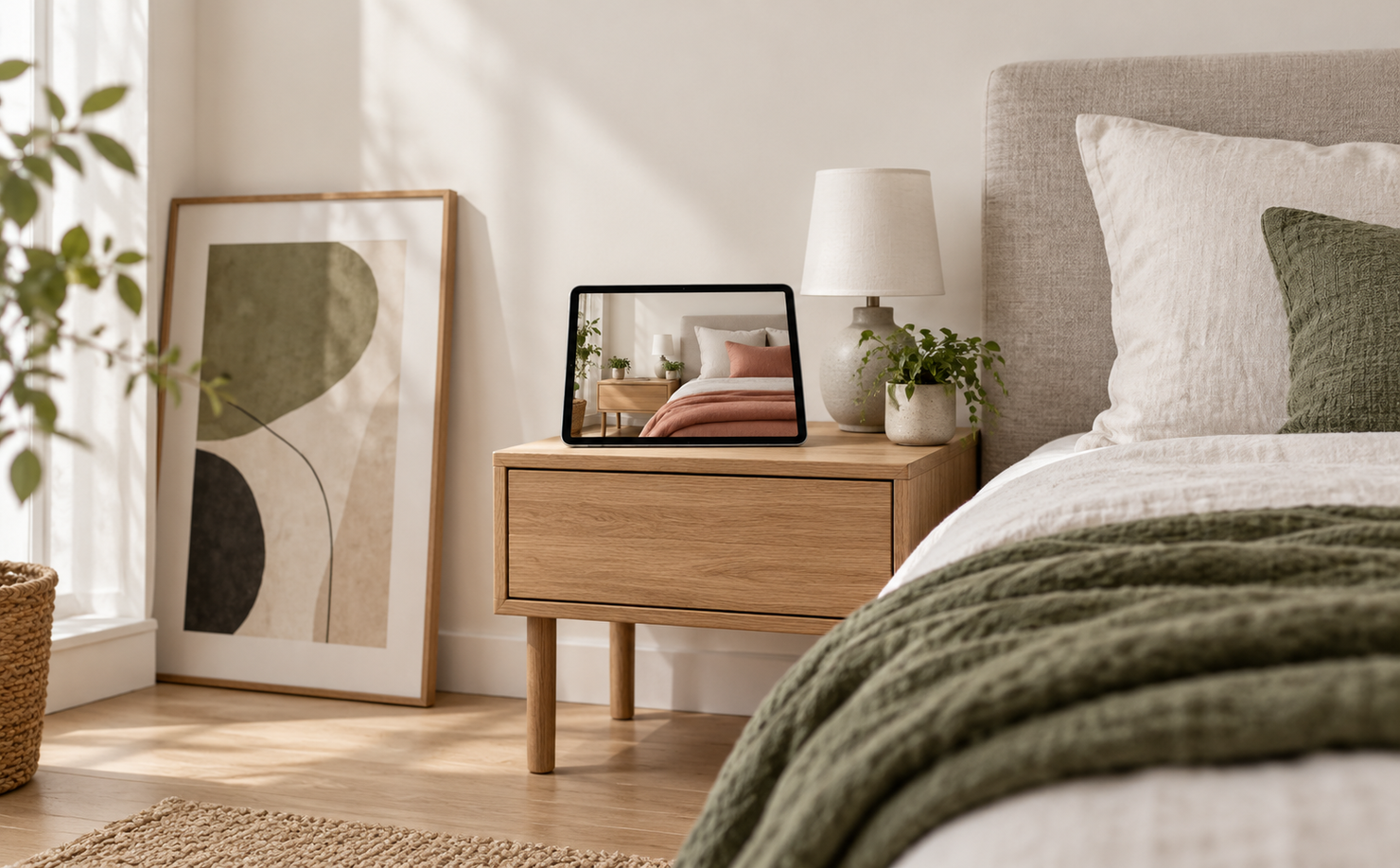
AI or interior designer: how to choose for your home and budget
So, should you use AI, hire an interior designer, or combine both?
The answer really depends on what you're planning to do, how much you're willing to spend, and how much professional help you'll need along the way.
Rather than choosing one over the other, here's a simple three-step approach to finding what works best for you.
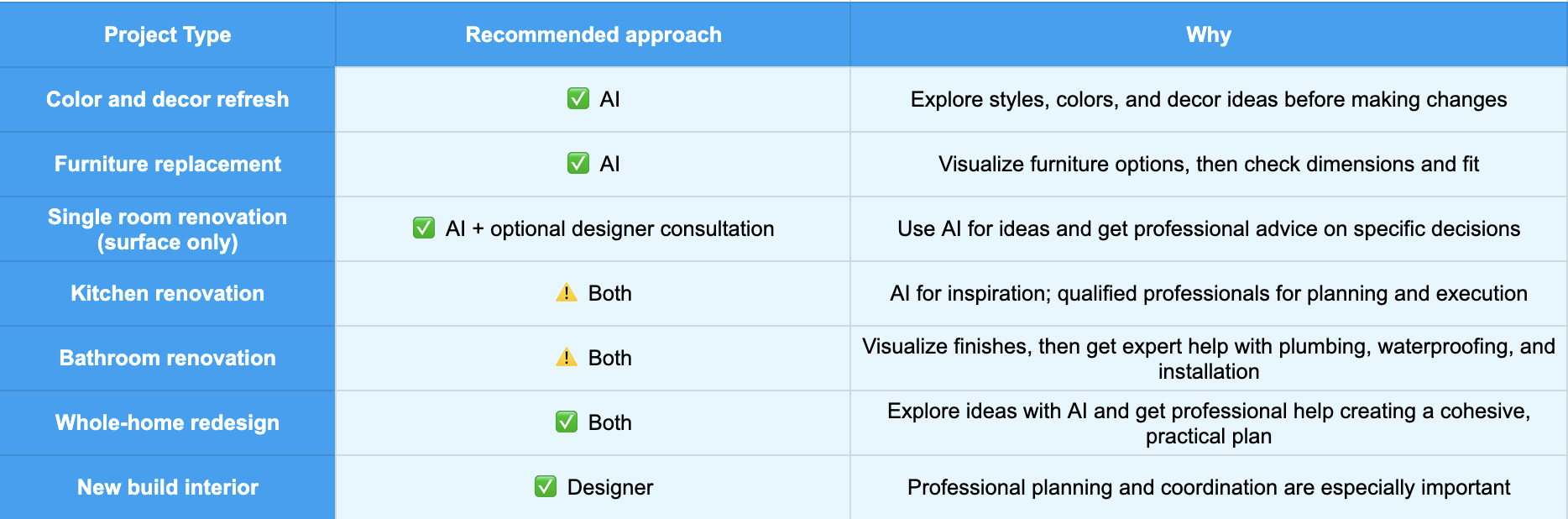
Step 1: Figure out what your project actually needs
First, think about the changes you want to make. Are you simply refreshing your room with new colors and furniture, or are you planning a major renovation?
For smaller decorating projects, AI might be all you need to get started. But if your plans involve complex layouts, construction, or multiple rooms, professional guidance becomes much more important.
Here's a quick guide to help you decide:
Step 2: Be realistic about your budget
Next, think about how much you can comfortably spend—not just on design help, but on the furniture, materials, and actual changes you want to make.
If you're working with a small budget, AI can help you explore ideas without spending much upfront. With a larger budget or more complicated project, investing in professional advice may help you avoid costly mistakes.
Here's a general guide to choosing an approach based on your available budget:
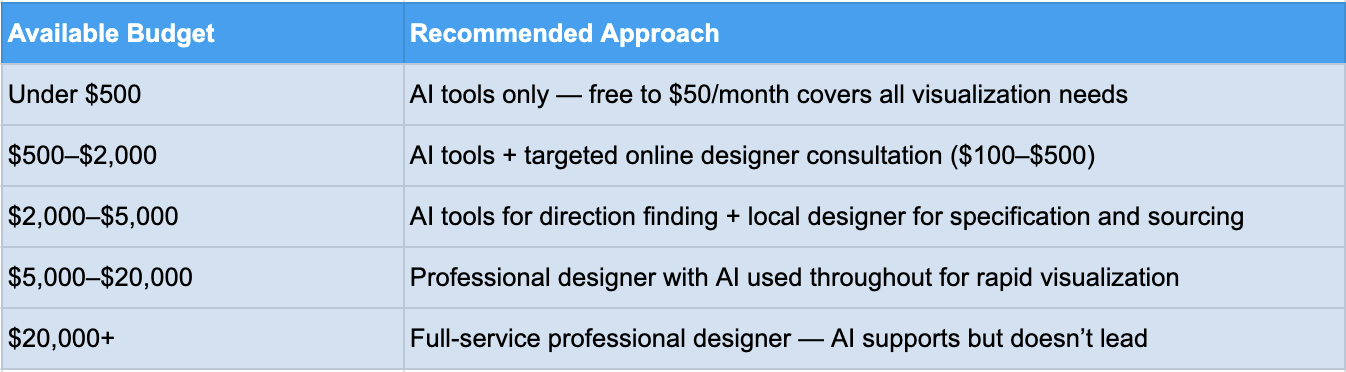
Note: These are general suggestions, not fixed spending rules. The best approach also depends on your project scope, location, and whether your budget includes furniture, materials, labor, and design fees.
Step 3: Choose the right AI interior design tool or professional help
Once you know what your project needs and how much you can spend, it's time to choose the right kind of help.
If you're starting with AI, look for a tool that lets you work with photos of your actual space, explore different styles, and make changes without starting over every time.
For instance, DecAI, a powerful AI home design platform that allows you to redesign your interior in just seconds simply by uploading a photo. With over 30 design styles, 15 room types, 130 textures, and smart AI agent, even the completely new beginner can visualize and test their room, decorating, wall, floor or entire home ideas with ease.
(For more inspiration, explore these 15 interior design tools or follow our step-by-step guide on how to do interior design with AI.
If you need professional help, think about what you actually want from a designer. Do you need a quick consultation, help choosing furniture, a complete room design, or someone to coordinate an entire renovation? Not every project requires a full-service designer.
And remember, you don't have to stick with just one approach. You can start with AI to figure out what you like, then bring those ideas to a professional when you need help making them work in real life.
Ultimately, the best choice isn't necessarily the cheapest or most advanced option. It's the one that gives you the right support for the home you're trying to create.
FAQs
1. Can AI completely replace an interior designer?
Not completely. AI can help with design inspiration, room visualization, and early-stage planning, but it can't replace the hands-on expertise needed for physical assessments, technical decisions, and project coordination. Professional designers may also use AI to explore ideas and communicate concepts more efficiently.
2. Is using AI cheaper than hiring an interior designer?
Yes, generally speaking. AI interior design tools are much more affordable than hiring a professional designer, especially if you just want to explore ideas or visualize a room makeover. However, the total cost of your project still depends on the furniture, materials, and work involved.
So, don't just compare the upfront fees—consider the potential costs of mistakes, revisions, and getting the design right in real life.
3. Should I combine AI and an interior designer for a better home?
Yes, especially when they serve different purposes. AI can help you explore styles and clarify your preferences, while a professional designer can assess the practical details and develop a workable plan. However, you don't need both for every project. A simple room refresh may be manageable on your own, while a complex renovation may benefit from professional involvement.
4. Can AI help with furniture placement and room layouts?
Yes, but it depends on the AI tool you're using. Some tools can help you explore furniture arrangements and room layouts, while others focus more on visual changes.
For example, DecAI has a dedicated furniture addition and replacement feature that lets you add or swap specific pieces of furniture and decor while keeping your room's existing layout. However, AI-generated results aren't always dimensionally accurate, so it's still important to check measurements before making any real changes.
5. What can’t AI interior design tools do?
Photo-based tools like Decai cannot physically inspect your home, test how materials feel, or manage installation. Generated objects may also lack an exact purchasable equivalent. Capabilities vary across products, so check whether your chosen tool supplies concepts, dimensioned plans, product information, or some combination of these.
6. Is hiring an interior designer worth it for just one room?
It depends on the room and what the project involves.
- For a single bedroom refresh — new colors, new furniture, new textiles — AI tools provide sufficient design guidance for most homeowners at a fraction of the designer cost.
- For a single bathroom or kitchen renovation involving plumbing, tiling, electrical work, and contractor coordination — professional expertise is worth the investment even for a single room.
7. Can I use AI-Generated designs as inspiration for a professional?
Yes. Share the images alongside original room photos, measurements, budget, and must-keep items. Explain which details appeal to you. This gives the professional a clearer brief while leaving room to adjust the idea around actual products, dimensions, and practical requirements.
9. Do I need AI or an interior designer if I’m only redecorating?
It depends. You may need neither if you already know what you want and can make the selections confidently. AI is useful when visualization is the sticking point. Professional advice becomes helpful when you struggle with scale, coordination, or purchase decisions you are uncomfortable making alone.
------------------------------------
If you believe that any material on this site infringes your intellectual property rights, please contact the author at decaiwebteam@outlook.com with details of your claim.
Redesign any home interior, exterior & garden in seconds
Share this Post:


Redesign any home interior, exterior & garden in seconds