

10 Best Free AI Tools for Exterior Design in 2026 (Fully Tested & Compared)


Still guessing how your house or shop would look with a new facade, a fresh coat of paint, or a completely different architectural style? You’re not alone, but the good news is, you don’t have to guess anymore.
Today, AI tools especially for exterior design make it possible to upload a photo of your home and instantly see realistic transformations in different styles. Whether you're planning a renovation, improving curb appeal, or just exploring ideas, these tools help you move from “maybe” to “this works” in minutes.
In this guide, we’ve tested and compared 10 of the best free AI tools for exterior design in 2026, breaking them down by features, pricing, strengths, and real use cases — so you can quickly find the one that actually fits your needs.
If you want the fastest way to test multiple exterior styles with minimal effort, tools like our free AI exterior design tool,are a great starting point, especially for beginners who want instant results without complexity.
Design any room, shop or space with DecAI in less 30 seconds! It's free!
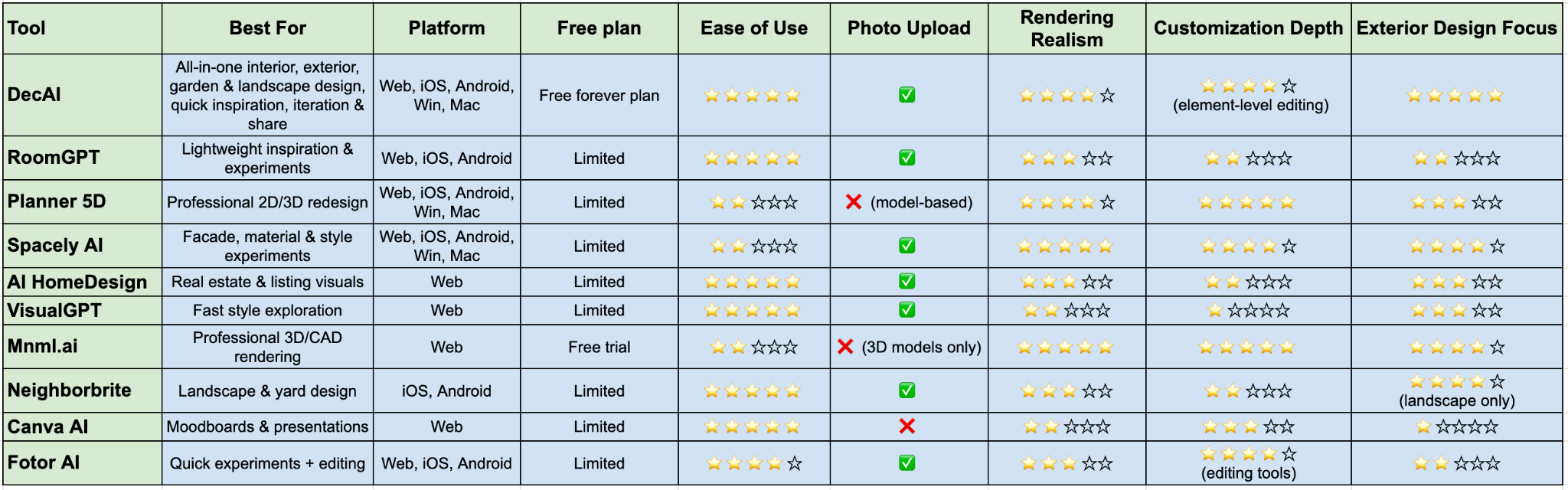
10 Best free AI tools for exterior design at a glance
Before we dive into the full introduction, here's a quick overview of all 10 tools and where they stand:
What are AI tools for exterior design?
AI tools for exterior design are some smart, fast AI tools that turn ideas for house facades, gardens, and landscaping into realistic visual designs in seconds. Instead of spending hours sketching, modeling, or rendering from scratch, you can simply upload a photo of your house or storefront and let AI generate different design options in seconds.
Some of these tools are built specifically for home renovation and exterior design, while others are more general AI image generators that can still work well if you use the right prompts.
What makes them so popular is how easy they are to use. There’s almost no learning curve, even if you’ve never done any design work before, you can still create convincing, professional-looking results. So, in this aspect, they are almost useful for anyone, such as:
• Homeowners exploring renovation ideas before hiring a contractor
• Real estate agents showing a property's makeover potential
• Remodelers creating quick concept visuals for clients
• Architects and designers using AI for early-stage ideation
• Store or shop owners testing storefront or facade directions
In short, whether you have a design background or not, the right AI exterior design tool can help you visualize ideas faster, make better decisions, and save both time and money.
10 best free AI tools for exterior design in 2026
To help you choose the best fit quickly, we’ll introduce these tools based on free plan generosity, ease of use, photo upload capability, rendering realism, customization depth, and relevance to exterior design specifically.
1.DecAI - best for fast interior and exterior design, all in one place

Platform: Web, iOS, Android, Win and Mac
Pricing: Free-forever plan; Premium plans starting at $0.16 per day;
DecAI is a fast, free AI-powered exterior design tool that brings your ideas, whether it’s new colors, styles, or even seasonal and festive decorations, to life in under 30 seconds.
What makes it stand out is that it is one of the few truly all-in-one online tools that covers exterior facades, garden and landscaping design, shop fronts, interior rooms, floor finishes, and wall treatments — all from a single photo upload workflow.
It’s highly beginner-friendly, making it easy for non-designers to quickly get started, while still offering enough flexibility for professionals to quickly explore concepts, present ideas, and iterate on designs efficiently from start to finish.
Key features:
- Covers exterior, interior, garden, and shopfront design in one platform
- Generate full exterior redesigns or makeovers in under 30 seconds
- 30+ design styles and 15 building types
- Beginner-friendly with no design skills required
- Fine-tune elements like walls, floors, and details after generation
- Works seamlessly on both mobile and desktop
- Easy to explore, compare, and share designs
Pros:
- Fully AI-driven workflow (not partially manual)
- No learning curve, no manual editing
- Whole design workflow covered, from start to finish, inside and out
- A library of design examples and inspirations for ideas
- Material-level or element-specific editing
Cons:
- Inspiration library is still growing
- Free plan comes with limited access
2.RoomGPT - best for lightweight inspiration and experiments
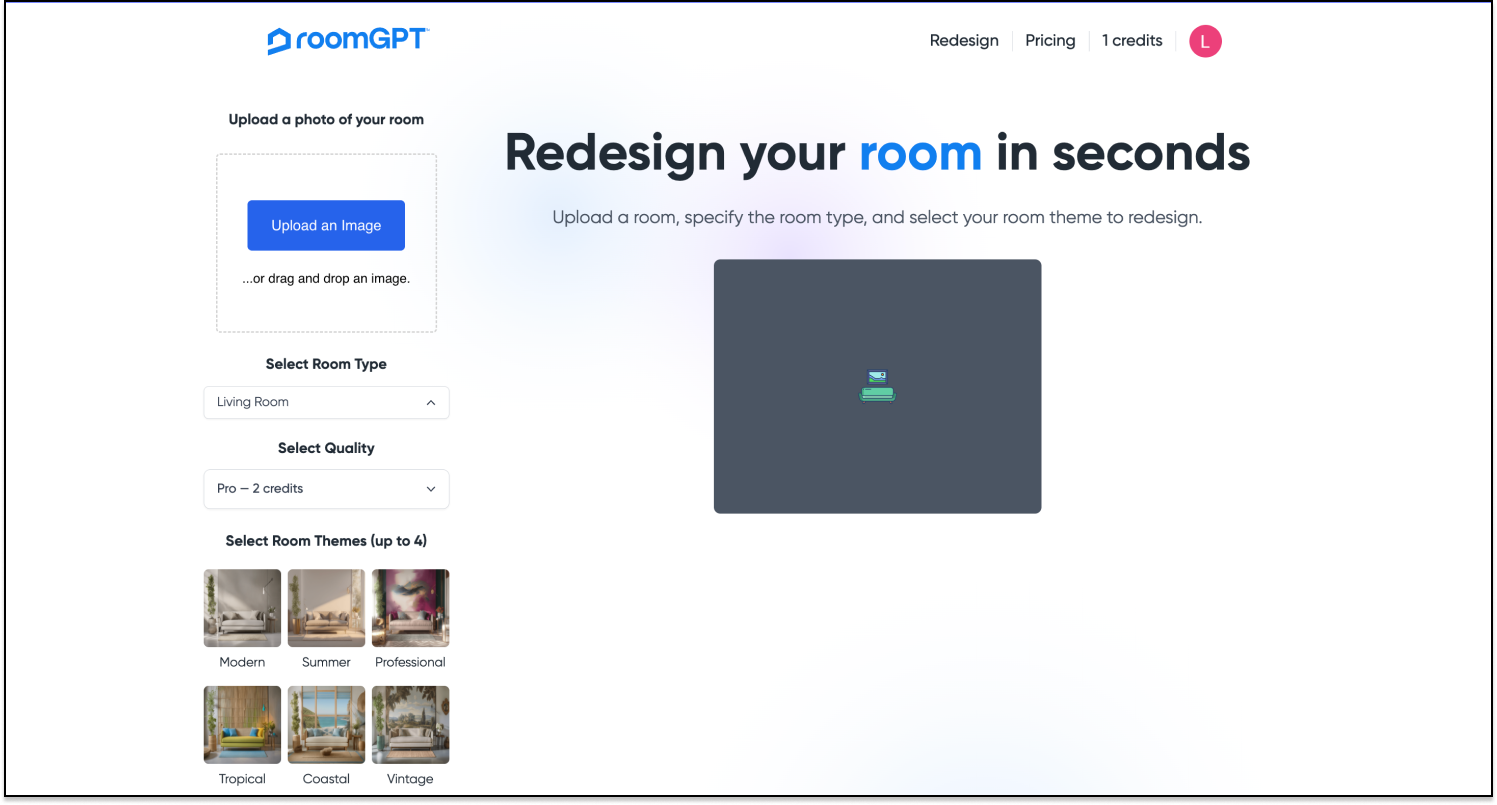
Platform supported: web, iOS, Android
Pricing: Free plan; Premium plans starting at $9 per month;
RoomGPT is honestly popular for its interior design capabilities, and its exterior capabilities are good enough for people who want a free, lightweight AI tool to quickly test their ideas before committing to anything, it remains one of the easiest entry points available.
Key features:
- Lightweight AI generation
- Beginner-friendly experience
- Quick concept output
- Good for inspiration-based usage
Pros:
- Easy to try
- Useful for quick ideas
- Good for casual users
Cons:
- Limited free plan
- Not dedicated to exterior design
- Limited customization
3.Planner 5D - best for professional 2D/3D exterior redesign

Platform: Web, iOS, Android, Win, Mac
Pricing: Free plan; Premium plans starting at $4.99 per month;
Planner 5D takes a different approach from most tools on this list. Rather than purely photo-based generation, it combines AI with a drag-and-drop 3D modeler, allowing users to experiment with different furniture arrangements, color schemes, and decor styles, and generate photorealistic renders once the design is set.
For exterior design, it's most useful for visualizing the overall structure, massing, and proportions of a space.
Key features:
• Home planning and visualization
• Interior and exterior support
• Better structured than one-click concept tools
• Useful for renovation planning
Pros:
- 2D and 3D modeling gives you spatial precision
- Good for projects where layout and scale matter
- Works well for under-construction homes where there's no existing photo to upload
- Strong for planning interior layouts alongside exterior concepts
Cons:
- Much steeper learning curve than photo-first tools
- Exterior design support is more limited compared to the interior toolkit
- AI rendering features largely locked behind paywall
4.Spacely AI - best for professional facade, material and style experiments

Platform: Web, iOS, Android, Win, Mac
Pricing: Free plan; Premium plans starting at $4.99 per month;
Spacely AI is useful when you want fast visual ideas and style experimentation. It excels at turning existing 3D models or photos into photorealistic renders in seconds, and supports professional workflows including AI virtual staging, style transfer, and collage-to-render.
For exterior design, it works best when you have a structured brief — specific style direction, material preferences, and client requirements — rather than open-ended exploration.
Key features:
- Quickly test materials and finishes
- Useful for style exploration
- Supports residential and some commercial directions
- Helpful for inspiration-led workflows
Pros:
- Professional-grade output quality
- Supports 3D model imports
- Excellent for client presentations and architectural pitches
- Strong style transfer and rendering fidelity
Cons:
- Limited free plan
- Not beginner-friendly, designed for professionals
5.AI HomeDesign - best for real estate and listing-oriented visuals
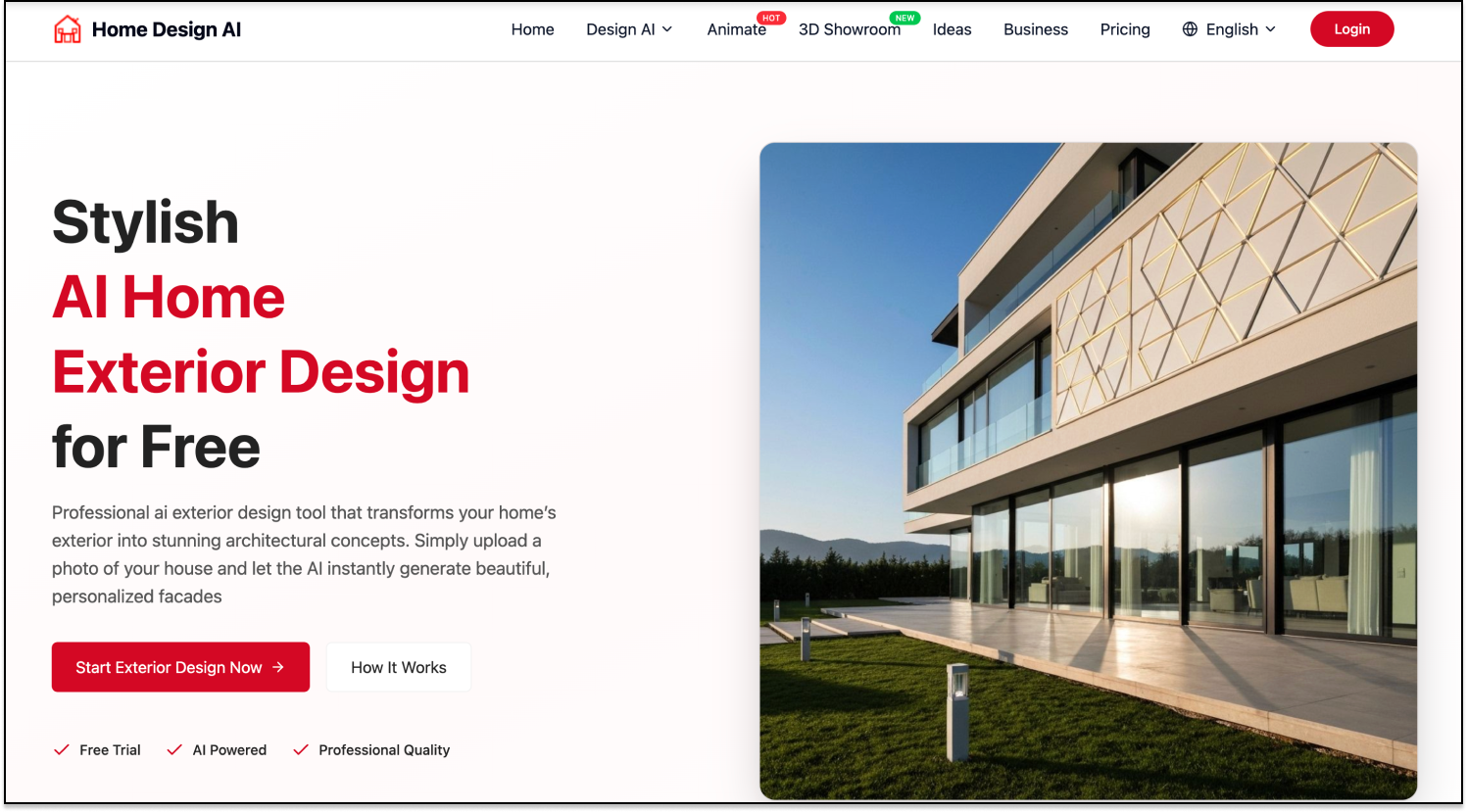
Platform: Web
Pricing: Free plan; Premium plans starting at $19 per month;
AI HomeDesign is a lightweight tool built specifically around photo-based redesigns. It is useful for people who care about presentation value, listing visuals, or renovation-before-and-after concepts.
Though it won't give you the depth of customization or photorealism of the top tools, but for a quick gut-check on whether a style direction works for your property. So, it is especially ideal for agents and marketers, but homeowners can also use it for exterior ideation.
Key features:
• Property-focused visual enhancement
• Renovation concept support
• Good for presentation-ready output
• Helpful for marketing use cases
Pros:
- Simple, fast, no setup required
- Good for early-stage concept exploration
- Works directly in browser
Cons:
- Limited free access
- Less deep than professional design software
6.VisualGPT - best for exterior style exploration
Design any room, shop or space with DecAI in less 30 seconds! It's free!
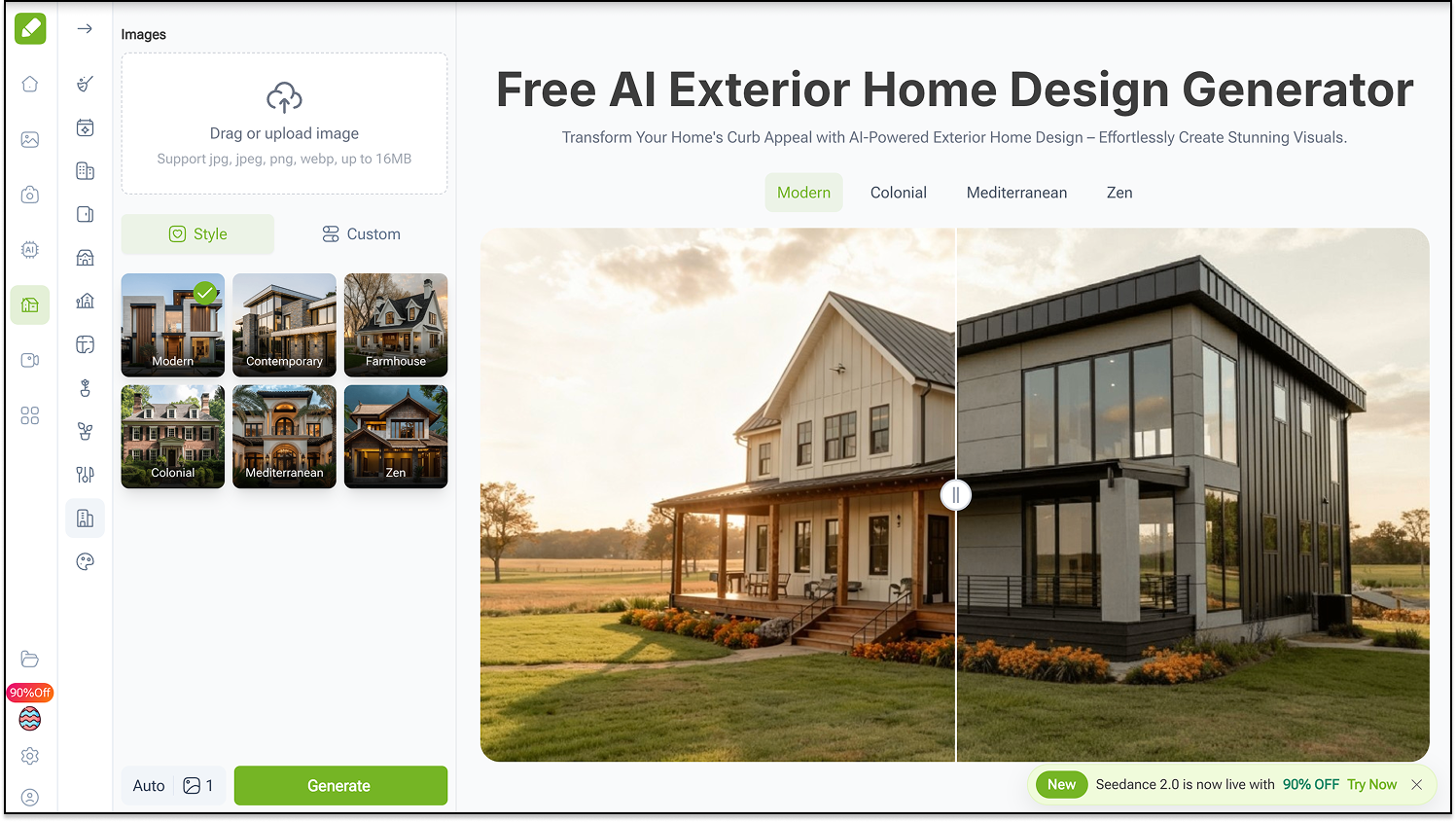
Platform: Web
Pricing:
VisualGPT is a simple, no-friction tool built around one core strength: the AI detects your home's structure and applies the selected style with minimal modification, maximizing style impact while keeping the architecture intact.
It won't give you the depth of customization or photorealism of the top tools, but for a quick preview on whether a style direction works for your property.
Key features:
- Structure-preserving AI redesign
- Multiple architectural style presets
- No login or account required
- Download and share output directly
Pros:
- Completely free with no signup
- Structure-preservation reduces unrealistic outputs
- Zero learning curve
Cons:
- No material-level or element-specific editing
- Render quality is functional rather than photorealistic
- Not suitable for detailed renovation planning
7.Mnml.ai - best for professional 3D or CAD quality design

Platform: Web
Pricing: free trial available; Premium plans starting at $24 per month
Mnml.ai is not a tool for casual homeowners — and it doesn't try to be. It's a professional AI rendering platform built for architects and designers, transforming SketchUp, Revit, Blender, Lumion, and V-Ray models into photorealistic CGI in seconds.
Its free trial gives you enough access to evaluate the output quality, but ongoing use requires a paid plan. For professional studios, the time saved per project easily justifies the cost. For everyday homeowners, one of the consumer-focused tools on this list will serve you better.
Key features:
- integrate with SketchUp, Revit, Blender, and Lumion models
- Photorealistic exterior and interior rendering
- Text prompt and style preset controls
- AI-driven masking for targeted area edits
Pros:
- Production-quality renders suitable for client presentations
- Supports all major 3D modeling software
- Fast rendering without manual lighting setup
Cons:
- Limited free trial
- Not built for photo-upload workflows
- Requires 3D modeling knowledge to get full value
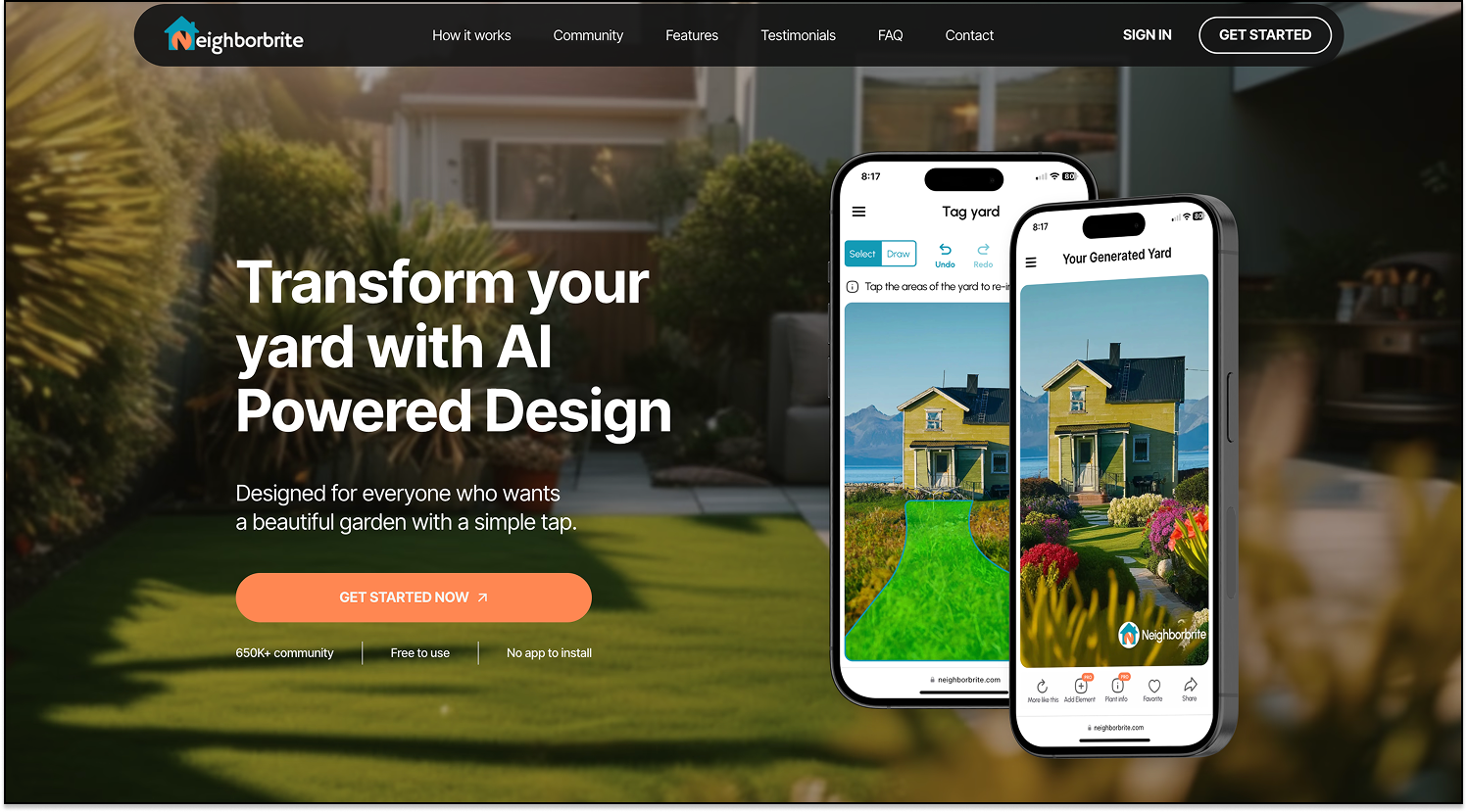
8.Neighborbrite - best for landscape design
Platform: Android and iOS only
Pricing: Free plan; Premium plans starting at $24.99;
Neighborbrite takes a narrower but genuinely useful angle: rather than redesigning your entire exterior, it focuses specifically on yards, gardens, and outdoor spaces. What makes it stand out is its localized plant intelligence — the AI suggests plants matched to your specific climate and growing conditions, something most exterior design tools don't offer at all. It works best alongside a facade-focused tool like DecAI or REimagineHome: use those for the building, and Neighborbrite for the landscape around it.
Key features:
- AI-powered yard and garden redesign from photo
- Locally appropriate plant suggestions based on your location
- Landscaping style presets
- Outdoor living space visualization
Pros:
- Completely free, no account required
- Localized plant recommendations
- Simple, focused workflow
Cons:
- Covers landscaping only — no facade or building support
- Best used as a supporting tool, not a standalone exterior design solution
- Limited style variety compared to full exterior tools
9.Canva AI - best for moodboard and early exterior mockups

Platform: Web
Pricing: Free plan; Premium plans starting at $120 user/year;
Canva AI isn't a traditional exterior design tool, it won't generate a photorealistic render from your building photo. But for turning rough ideas into shareable concept boards, it's hard to beat. Designers, agencies, and real estate teams use it to present exterior direction to clients before committing to a full render workflow.
Key features:
- AI image generation
- Design presentation tools
- Easy collaboration
- Strong for moodboards and renovation idea communication
- 30+ style presets for quick visual direction-setting
Pros:
- Easy to use
- Great for presentations
Cons:
- Limited free plan
- Not focused on exterior design
10.Fotor AI - best for quick exterior design experiment

Platform: Web, iOS and Android
Pricing: Free plan; Premium plan starting at $2.91 per month;
Fotor AI lets you visualize building exteriors, facades, and structural ideas in seconds.
What makes Fotor different from the other tools on this list is that it's primarily an image editing platform with AI design capabilities layered on top — rather than a dedicated design tool. So, you can generate an exterior render and immediately refine it using Fotor's inpainting, background replacement, and object swap tools — a useful combination for users who want more post-generation control.
Key features:
• AI image editing and generation
• Useful for quick concept tests
• Good for visual experimentation
• Allow home exterior prompts
Pros:
- Combines AI exterior design with full image editing capabilities
- Inpainting tool lets you modify specific areas of the generated design
- Available on mobile and desktop
- Good for creating polished before-and-after visuals
Cons:
- Limited free plan
- Not designed specifically for exterior design
How to choose the right AI tool for exterior design?
Still struggling to decide even after comparing the pros and cons of these 10 AI tools? Here are a few practical tips to help you narrow down your choice based on what your project actually needs:
- Figure out your actual needs first - Are you redesigning a home facade, testing paint colors, exploring architectural styles, or presenting ideas to a client? Your goal will quickly filter out tools that don’t fit.
- Match the tool with your project type - Some tools work better for residential homes, while others are more suitable for commercial buildings, shopfronts, or landscape-focused design. So make sure to match the tools with your project type.
- Check whether the tool supports photo upload - if you already have a real property image, you might not need to start from scratch with a traditional tool. Choosing a tool that supports photo-based redesigns would help you get more accurate, realistic results in a much shorter time.
- Test and compare free plans - Free plans vary enormously. So, always try the free versions or plans of these AI tools first. Compare output quality, style variety, and how closely the results match your expectations
- Confirm the learning curve - If you’re a beginner, go for tools with simple upload-and-generate workflows. More advanced platforms may offer better control but require more time to learn.
- Confirm the pricing and cost - Don’t just look at free trials. Make sure to also check subscription plans, credit systems, and any limits on image generation to understand whether the tool is truly worth paying for.
If possible, also list out all requirements and considerations that you or your team need, and confirm them one by one to ensure that your choice has met the needs of all parts.
Are free AI tools for exterior design worth using?
Absolutely yes! Similar free AI exterior design tools are definitely worth trying, especially when you use them for the right purpose.
They’re particularly useful for:
- Quickly exploring and collecting design ideas
- Comparing different exterior styles and directions
- Communicating ideas with family, clients, or contractors
- Narrowing down style preferences before investing money
In short, they’re perfect for early-stage design work, such as brainstorming ideas, exploring possibilities, supporting decision-making, improving communication, and preparing for real estate or renovation planning, etc.
However, they do have clear limitations.
They are not suitable for tasks like:
- Creating construction-ready drawings
- Ensuring building code compliance
- Producing detailed renovation specifications
- Handling budgeting or contractor-level scoping
- Making final architectural or engineering decisions
So, try to use them at the right stages of your design workflow. In other words, use them as a visual thinking and exploration tool, not as a replacement for professional design or architectural work.
FAQs
1.Which AI is best for exterior design?
Honestly, there is no such “best” answer. The answer can vary depending on your goals.
For instance, for most people, DecAI is the strongest all-round option. It's fast, beginner-friendly, covers exterior facades, gardens, shop fronts, and interiors in one platform, and is free to get started. If photorealistic render quality is your top priority and you're working on a professional project, REimagineHome would be the right tool you should try.
2.Is there a free AI tool to redesign house exterior?
Yes. Tools like DecAI offer free access with no credit card required. Simply upload a photo of your house exteriors, choose a style, and the AI will auto analyze the architectural features, and apply the professional design principles to generate the best exterior redesign for you in less than 30 seconds.
In just seconds, you can quickly explore and compare multiple design ideas or styles to find the best fit—without any messy manual work or guesswork.
3. How to use AI for exterior design?
The process is straightforward across most tools: take a clear photo of your home or building exterior (ideally in daylight, capturing the full facade), upload it to your chosen AI tool, select a style direction or describe what you want, and hit generate.
Take the free DecAI as an example, it helps to return a result in less than 30 seconds. From there, you can even continuously refine the details till it fully presents whatever you imagine in your mind for late sharing or demonstration.
4.Is AI exterior design truly free?
Yes. Honestly, most AI tools on the market are free with limits. They may limit the number of renders, add watermarks, require login, or restrict downloads unless you upgrade.
5.Is there a free AI home exterior design without login?
Yes. Some tools may allow limited use without login, but most of them require signup, so even a first-come user can save, track, and manage their designs, projects, and preferences more easily.
6.Can AI redesign the outside of my house?
Yes. AI can help generate redesign ideas for siding, color schemes, roofing, facade styles, windows, and landscaping.
For example, with an AI exterior design tool like DecAI, you can simply upload a photo of your house exterior and instantly explore different styles, colors, and even seasonal or festive decorations—all within seconds.
7.Can I design a shop front or commercial exterior?
Yes. All of these AI tools above, like free DecAI, help to create concept visuals for a shop front, cafe exterior, retail facade, or other commercial exterior. These outputs are generally best for early idea exploration rather than technical build planning.
8.How accurate are AI exterior design results?
As long as you upload the right, clear photo of your house exterior, the results are usually accurate enough for inspiration and concept comparison.
9.Can I use AI to choose exterior paint colors?
Yes. One of the key advantages of AI exterior design tools is that they allow you to quickly preview how your house would look with different colors, materials, and finishes. So, it would be quite simple to form different exterior paint colors.
11.Is there one AI tool that covers both interior and exterior design?
Yes. Some all-in-one tools like DecAI and Planner 5D support both interior spaces, exterior facades, and garden or landscaping design within a single platform.
And DecAI is especially suitable for users without design experience, offering a simple and intuitive workflow. Planner 5D, on the other hand, is often better suited for professional designers and architects who need more control and precision.
--------------------------------------
If you believe that any material on this site infringes your intellectual property rights, please contact the author at decaiwebteam@outlook.com with details of your claim.
Redesign any home interior, exterior & garden in seconds
Share this Post:
'%3e%3cpath%20d='M17.9995%2035.999C17.0317%2035.999%2016.0619%2035.9219%2015.1161%2035.7696C10.9414%2035.0973%207.11524%2032.9513%204.34408%2029.7273C1.54287%2026.4683%200%2022.3035%200%2017.9995C0%208.07403%208.07503%200%2017.9995%200C27.924%200%2036%208.07503%2036%2017.9995C36%2022.3696%2034.4151%2026.5835%2031.5357%2029.8646C28.6844%2033.1156%2024.7671%2035.2326%2020.5052%2035.8267C19.6806%2035.9419%2018.8371%2036%2017.9995%2036V35.999ZM17.9995%201.20123C8.73726%201.20123%201.20224%208.73626%201.20224%2017.9985C1.20224%2026.2919%207.13427%2033.2659%2015.3075%2034.5814C16.9546%2034.8469%2018.6808%2034.8659%2020.3389%2034.6345C28.5812%2033.4863%2034.7968%2026.334%2034.7968%2017.9985C34.7968%208.73626%2027.2617%201.20123%2017.9985%201.20123H17.9995Z'%20fill='%23FF0209'/%3e%3cpath%20d='M29.0557%2014.3621C28.9184%2013.0276%2028.6208%2011.5539%2027.5268%2010.7784C26.6782%2010.1773%2025.5642%2010.1553%2024.5242%2010.1563C22.3251%2010.1583%2020.126%2010.1603%2017.9269%2010.1623C15.812%2010.1643%2013.6971%2010.1663%2011.5821%2010.1683C10.6985%2010.1683%209.8399%2010.1002%209.01937%2010.4819C8.31406%2010.8105%207.76303%2011.4347%207.43241%2012.1289C6.97156%2013.0957%206.87438%2014.1898%206.81927%2015.2588C6.71708%2017.2044%206.7281%2019.156%206.85133%2021.0996C6.9405%2022.5193%207.16792%2024.0872%208.26496%2024.9919C9.23777%2025.7934%2010.6103%2025.8325%2011.8707%2025.8335C15.8741%2025.8365%2019.8776%2025.8395%2023.881%2025.8435C24.394%2025.8435%2024.93%2025.8345%2025.453%2025.7774C26.4829%2025.6661%2027.4637%2025.3716%2028.1249%2024.6092C28.7922%2023.8407%2028.9635%2022.7698%2029.0657%2021.7569C29.3121%2019.3003%2029.3091%2016.8177%2029.0557%2014.3621ZM15.6116%2021.4453V14.5545L21.5797%2017.9999L15.6116%2021.4453Z'%20fill='%23FF0209'/%3e%3c/g%3e%3cdefs%3e%3cclipPath%20id='clip0_13816_41422'%3e%3crect%20width='36'%20height='36'%20fill='white'/%3e%3c/clipPath%3e%3c/defs%3e%3c/svg%3e)
'%3e%3cpath%20d='M17.9995%2036C17.0327%2036%2016.0619%2035.9229%2015.1161%2035.7696C10.9414%2035.0973%207.11524%2032.9513%204.34408%2029.7273C1.54287%2026.4683%200%2022.3035%200%2017.9995C0%208.07403%208.07503%200%2017.9995%200C27.924%200%2036%208.07503%2036%2017.9995C36%2022.3696%2034.4151%2026.5835%2031.5357%2029.8646C28.6844%2033.1156%2024.7671%2035.2326%2020.5052%2035.8267C19.6806%2035.9419%2018.8371%2036%2017.9995%2036ZM17.9995%201.20224C8.73726%201.20224%201.20224%208.73726%201.20224%2017.9995C1.20224%2026.2919%207.13427%2033.2669%2015.3075%2034.5824C16.9556%2034.8479%2018.6808%2034.8669%2020.3389%2034.6355C28.5812%2033.4873%2034.7968%2026.335%2034.7968%2017.9995C34.7968%208.73726%2027.2617%201.20224%2017.9985%201.20224H17.9995Z'%20fill='url(%23paint0_linear_13816_41436)'/%3e%3cpath%20d='M23.4463%207.55469H12.549C9.53841%207.55469%207.08984%2010.0032%207.08984%2013.0138V22.9834C7.08984%2025.994%209.53841%2028.4426%2012.549%2028.4426H23.4463C26.4569%2028.4426%2028.9054%2025.994%2028.9054%2022.9834V13.0138C28.9054%2010.0032%2026.4569%207.55469%2023.4463%207.55469ZM9.01543%2013.0138C9.01543%2011.0652%2010.6004%209.48027%2012.549%209.48027H23.4463C25.3949%209.48027%2026.9799%2011.0652%2026.9799%2013.0138V22.9834C26.9799%2024.932%2025.3949%2026.517%2023.4463%2026.517H12.549C10.6004%2026.517%209.01543%2024.932%209.01543%2022.9834V13.0138Z'%20fill='url(%23paint1_linear_13816_41436)'/%3e%3cpath%20d='M17.9964%2023.0749C20.7966%2023.0749%2023.0749%2020.7966%2023.0749%2017.9964C23.0749%2015.1962%2020.7966%2012.918%2017.9964%2012.918C15.1962%2012.918%2012.918%2015.1962%2012.918%2017.9964C12.918%2020.7966%2015.1962%2023.0749%2017.9964%2023.0749ZM17.9964%2014.8446C19.7346%2014.8446%2021.1483%2016.2582%2021.1483%2017.9964C21.1483%2019.7347%2019.7346%2021.1483%2017.9964%2021.1483C16.2582%2021.1483%2014.8446%2019.7347%2014.8446%2017.9964C14.8446%2016.2582%2016.2582%2014.8446%2017.9964%2014.8446Z'%20fill='url(%23paint2_linear_13816_41436)'/%3e%3cpath%20d='M23.5482%2013.741C24.3026%2013.741%2024.9168%2013.1269%2024.9168%2012.3725C24.9168%2011.618%2024.3026%2011.0039%2023.5482%2011.0039C22.7938%2011.0039%2022.1797%2011.618%2022.1797%2012.3725C22.1797%2013.1269%2022.7938%2013.741%2023.5482%2013.741Z'%20fill='url(%23paint3_linear_13816_41436)'/%3e%3c/g%3e%3cdefs%3e%3clinearGradient%20id='paint0_linear_13816_41436'%20x1='5.27482'%20y1='30.7312'%20x2='30.7242'%20y2='5.28083'%20gradientUnits='userSpaceOnUse'%3e%3cstop%20stop-color='%23FAAD4F'/%3e%3cstop%20offset='0.35'%20stop-color='%23DD2A7B'/%3e%3cstop%20offset='0.62'%20stop-color='%239537B0'/%3e%3cstop%20offset='1'%20stop-color='%23515BD4'/%3e%3c/linearGradient%3e%3clinearGradient%20id='paint1_linear_13816_41436'%20x1='8.92225'%20y1='27.074'%20x2='27.073'%20y2='8.92324'%20gradientUnits='userSpaceOnUse'%3e%3cstop%20stop-color='%23FAAD4F'/%3e%3cstop%20offset='0.35'%20stop-color='%23DD2A7B'/%3e%3cstop%20offset='0.62'%20stop-color='%239537B0'/%3e%3cstop%20offset='1'%20stop-color='%23515BD4'/%3e%3c/linearGradient%3e%3clinearGradient%20id='paint2_linear_13816_41436'%20x1='14.4077'%20y1='21.5861'%20x2='21.5861'%20y2='14.4077'%20gradientUnits='userSpaceOnUse'%3e%3cstop%20stop-color='%23FAAD4F'/%3e%3cstop%20offset='0.35'%20stop-color='%23DD2A7B'/%3e%3cstop%20offset='0.62'%20stop-color='%239537B0'/%3e%3cstop%20offset='1'%20stop-color='%23515BD4'/%3e%3c/linearGradient%3e%3clinearGradient%20id='paint3_linear_13816_41436'%20x1='22.5814'%20y1='13.3393'%20x2='24.515'%20y2='11.4057'%20gradientUnits='userSpaceOnUse'%3e%3cstop%20stop-color='%23FAAD4F'/%3e%3cstop%20offset='0.35'%20stop-color='%23DD2A7B'/%3e%3cstop%20offset='0.62'%20stop-color='%239537B0'/%3e%3cstop%20offset='1'%20stop-color='%23515BD4'/%3e%3c/linearGradient%3e%3cclipPath%20id='clip0_13816_41436'%3e%3crect%20width='36'%20height='36'%20fill='white'/%3e%3c/clipPath%3e%3c/defs%3e%3c/svg%3e)
'%3e%3cpath%20d='M17.9995%2035.999C17.0317%2035.999%2016.0619%2035.9219%2015.1161%2035.7696C10.9414%2035.0973%207.11524%2032.9513%204.34408%2029.7273C1.54287%2026.4683%200%2022.3035%200%2017.9995C0%208.07403%208.07502%200%2017.9995%200C27.924%200%2036%208.07503%2036%2017.9995C36%2022.3696%2034.415%2026.5835%2031.5357%2029.8646C28.6844%2033.1156%2024.7671%2035.2326%2020.5052%2035.8267C19.6806%2035.9419%2018.8371%2036%2017.9995%2036V35.999ZM17.9995%201.20123C8.73725%201.20123%201.20224%208.73626%201.20224%2017.9985C1.20224%2026.2919%207.13427%2033.2659%2015.3075%2034.5814C16.9545%2034.8469%2018.6808%2034.8659%2020.3388%2034.6345C28.5812%2033.4863%2034.7968%2026.334%2034.7968%2017.9985C34.7968%208.73626%2027.2617%201.20123%2017.9985%201.20123H17.9995Z'%20fill='%23007EBB'/%3e%3cpath%20d='M9.06639%2012.124C8.60253%2011.6932%208.37109%2011.1602%208.37109%2010.526C8.37109%209.89184%208.60253%209.33481%209.06639%208.90401C9.53026%208.47321%2010.1274%208.25781%2010.8587%208.25781C11.5901%208.25781%2012.1642%208.47321%2012.627%208.90401C13.0909%209.33481%2013.3223%209.87581%2013.3223%2010.526C13.3223%2011.1762%2013.0909%2011.6932%2012.627%2012.124C12.1631%2012.5548%2011.5741%2012.7702%2010.8587%2012.7702C10.1434%2012.7702%209.52926%2012.5548%209.06639%2012.124ZM12.9326%2014.5946V27.7962H8.76182V14.5946H12.9326Z'%20fill='%23007EBB'/%3e%3cpath%20d='M26.8196%2015.9006C27.7283%2016.8875%2028.1832%2018.243%2028.1832%2019.9682V27.5663H24.2208V20.5042C24.2208%2019.6346%2023.9954%2018.9583%2023.5445%2018.4764C23.0937%2017.9945%2022.4876%2017.7541%2021.7262%2017.7541C20.9647%2017.7541%2020.3586%2017.9955%2019.9078%2018.4764C19.4569%2018.9583%2019.2315%2019.6346%2019.2315%2020.5042V27.5663H15.2461V14.5611H19.2315V16.2863C19.6353%2015.7113%2020.1793%2015.2574%2020.8636%2014.9228C21.5468%2014.5892%2022.3163%2014.4219%2023.1708%2014.4219C24.6937%2014.4219%2025.9099%2014.9158%2026.8186%2015.9016L26.8196%2015.9006Z'%20fill='%23007EBB'/%3e%3c/g%3e%3cdefs%3e%3cclipPath%20id='clip0_13816_41425'%3e%3crect%20width='36'%20height='36'%20fill='white'/%3e%3c/clipPath%3e%3c/defs%3e%3c/svg%3e)
'%3e%3cpath%20d='M18%2035.999C17.0322%2035.999%2016.0623%2035.9219%2015.1166%2035.7696C10.9417%2035.0973%207.11544%2032.9513%204.3442%2029.7273C1.54291%2026.4683%200%2022.3035%200%2017.9995C0%208.07403%208.07526%200%2018%200C27.9248%200%2036%208.07503%2036%2017.9995C36%2022.3696%2034.415%2026.5835%2031.5356%2029.8646C28.6842%2033.1156%2024.7668%2035.2326%2020.5047%2035.8267C19.6802%2035.9419%2018.8366%2036%2017.999%2036L18%2035.999ZM18%201.20123C8.73751%201.20123%201.20227%208.73626%201.20227%2017.9985C1.20227%2026.2919%207.13448%2033.2659%2015.3079%2034.5814C16.955%2034.8469%2018.6813%2034.8659%2020.3394%2034.6345C28.582%2033.4863%2034.7977%2026.334%2034.7977%2017.9985C34.7977%208.73626%2027.2625%201.20123%2018%201.20123Z'%20fill='black'/%3e%3cpath%20d='M7%208.09163H13.5067L19.521%2016.1816L27.0073%207.90625L28.786%207.93715L20.4078%2017.3454L29%2028.901H22.4959L16.8193%2021.362L9.8847%2029.0864H8.13428L15.9583%2020.26L7%208.09163ZM12.8931%209.28633H9.45676L23.2048%2027.6754H26.5793L12.8931%209.28633Z'%20fill='black'/%3e%3c/g%3e%3cdefs%3e%3cclipPath%20id='clip0_13886_43848'%3e%3crect%20width='36'%20height='36'%20fill='white'/%3e%3c/clipPath%3e%3c/defs%3e%3c/svg%3e)
'%3e%3cpath%20d='M17.9995%2035.999C17.0327%2035.999%2016.0619%2035.9219%2015.1161%2035.7686C10.9414%2035.0963%207.11524%2032.9503%204.34408%2029.7263C1.54287%2026.4673%200%2022.3025%200%2017.9995C0%208.07403%208.07503%200%2017.9995%200C27.924%200%2036%208.07503%2036%2017.9995C36%2022.3696%2034.415%2026.5835%2031.5357%2029.8646C28.6844%2033.1156%2024.7671%2035.2326%2020.5052%2035.8267C19.6806%2035.9419%2018.8371%2036%2017.9995%2036V35.999ZM17.9995%201.20123C8.73726%201.20123%201.20224%208.73626%201.20224%2017.9985C1.20224%2026.2909%207.13428%2033.2659%2015.3075%2034.5814C16.9556%2034.8469%2018.6808%2034.8659%2020.3389%2034.6345C28.5812%2033.4863%2034.7968%2026.334%2034.7968%2017.9985C34.7968%208.73626%2027.2617%201.20123%2017.9985%201.20123H17.9995Z'%20fill='%231877F7'/%3e%3cpath%20d='M20.5337%2014.9635V18.7536H25.2225L24.4801%2023.8601H20.5337V35.624C19.7423%2035.7342%2018.9328%2035.7913%2018.1112%2035.7913C17.1625%2035.7913%2016.2317%2035.7151%2015.324%2035.5689V23.8601H11V18.7536H15.324V14.1169C15.324%2011.2396%2017.6564%208.90625%2020.5347%208.90625V8.90926C20.5428%208.90926%2020.5508%208.90625%2020.5588%208.90625H25.2235V13.3215H22.1758C21.2691%2013.3215%2020.5347%2014.0558%2020.5347%2014.9625L20.5337%2014.9635Z'%20fill='%231877F7'/%3e%3c/g%3e%3cdefs%3e%3cclipPath%20id='clip0_13816_41433'%3e%3crect%20width='36'%20height='36'%20fill='white'/%3e%3c/clipPath%3e%3c/defs%3e%3c/svg%3e)
'%3e%3cpath%20d='M17.9995%2035.999C17.0327%2035.999%2016.0619%2035.9219%2015.1161%2035.7686C10.9414%2035.0963%207.11524%2032.9503%204.34408%2029.7263C1.54287%2026.4673%200%2022.3025%200%2017.9995C0%208.07403%208.07503%200%2017.9995%200C27.924%200%2036%208.07503%2036%2017.9995C36%2022.3696%2034.415%2026.5835%2031.5357%2029.8646C28.6844%2033.1156%2024.7671%2035.2326%2020.5052%2035.8267C19.6806%2035.9419%2018.8371%2036%2017.9995%2036V35.999ZM17.9995%201.20123C8.73726%201.20123%201.20224%208.73626%201.20224%2017.9985C1.20224%2026.2909%207.13428%2033.2659%2015.3075%2034.5814C16.9556%2034.8469%2018.6808%2034.8659%2020.3389%2034.6345C28.5812%2033.4863%2034.7968%2026.334%2034.7968%2017.9985C34.7968%208.73626%2027.2617%201.20123%2017.9985%201.20123H17.9995Z'%20fill='%232A91F7'/%3e%3cg%20clip-path='url(%23clip1_13816_41442)'%3e%3cpath%20d='M16.3345%2018.834C16.6924%2019.3124%2017.149%2019.7083%2017.6733%2019.9947C18.1976%2020.2812%2018.7774%2020.4516%2019.3734%2020.4942C19.9693%2020.5369%2020.5675%2020.4509%2021.1273%2020.2421C21.6871%2020.0333%2022.1954%2019.7065%2022.6178%2019.284L25.1178%2016.784C25.8768%2015.9981%2026.2968%2014.9456%2026.2873%2013.8531C26.2778%2012.7606%2025.8396%2011.7156%2025.0671%2010.943C24.2946%2010.1705%2023.2495%209.73231%2022.157%209.72281C21.0645%209.71332%2020.012%2010.1333%2019.2262%2010.8923L17.7928%2012.3173M19.6678%2017.1673C19.3099%2016.6889%2018.8533%2016.293%2018.329%2016.0065C17.8047%2015.7201%2017.2249%2015.5497%2016.6289%2015.507C16.033%2015.4643%2015.4348%2015.5503%2014.875%2015.7592C14.3152%2015.968%2013.8069%2016.2947%2013.3845%2016.7173L10.8845%2019.2173C10.1255%2020.0031%209.70551%2021.0557%209.715%2022.1481C9.72449%2023.2406%2010.1627%2024.2857%2010.9352%2025.0582C11.7078%2025.8307%2012.7528%2026.269%2013.8453%2026.2784C14.9378%2026.2879%2015.9903%2025.868%2016.7761%2025.109L18.2011%2023.684'%20stroke='%232A91F7'%20stroke-width='1.66667'%20stroke-linecap='round'%20stroke-linejoin='round'/%3e%3c/g%3e%3c/g%3e%3cdefs%3e%3cclipPath%20id='clip0_13816_41442'%3e%3crect%20width='36'%20height='36'%20fill='white'/%3e%3c/clipPath%3e%3cclipPath%20id='clip1_13816_41442'%3e%3crect%20width='20'%20height='20'%20fill='white'%20transform='translate(8%208)'/%3e%3c/clipPath%3e%3c/defs%3e%3c/svg%3e)
Redesign any home interior, exterior & garden in seconds