
How to Decorate a Room With AI Like a Pro: A Step-by-Step Guide for Beginners


Decorating is always one of the most fun parts of making a home your own. But once you actually get started, it can quickly turn into a series of difficult decisions and unexpected challenges.
What style feels right for your space? What furniture and decor should stay, and what should go? Will that sofa work with your flooring? Does that wall color match your furniture? And will all those pieces you love actually look good together?
The good news is, you don't have to figure everything out in your head anymore. With the right AI tool, you can easily experiment with different ideas, visualize them in your own room, and keep refining the details until you find a look you truly love.
So, we've put together this beginner-friendly guide to show you how to decorate a room with AI like a pro, step by step—from preparing your space and finding your style to writing prompts, trying different makeovers, refining the details, and finally turning your favorite design into a practical shopping plan.
Design any room, shop or space with DecAI in less 30 seconds! It's free!
Why Decorate a Room With AI?
AI is useful when you have an idea but struggle to picture the whole room. A visual preview gives you something specific to react to: perhaps the curtains feel too heavy, the room needs more contrast, or the sofa looks better once the surrounding accessories change.
The main benefits are straightforward:
- Explore combinations before buying. See how a proposed palette, rug, lighting, and artwork might relate to one another.
- Discover your preferences. Comparing a restrained scheme with a more colorful option can reveal what you like faster than collecting unrelated inspiration images.
- Make decisions together. A shared visual helps household members discuss the same idea.
- Focus your shopping. Once you know the look you want, you can search for pieces with a clearer purpose.
Treat the image as a preview of a possible direction. Furniture dimensions, fabric quality, paint appearance, and prices still need checking in the real world.
What You Need Before You Start
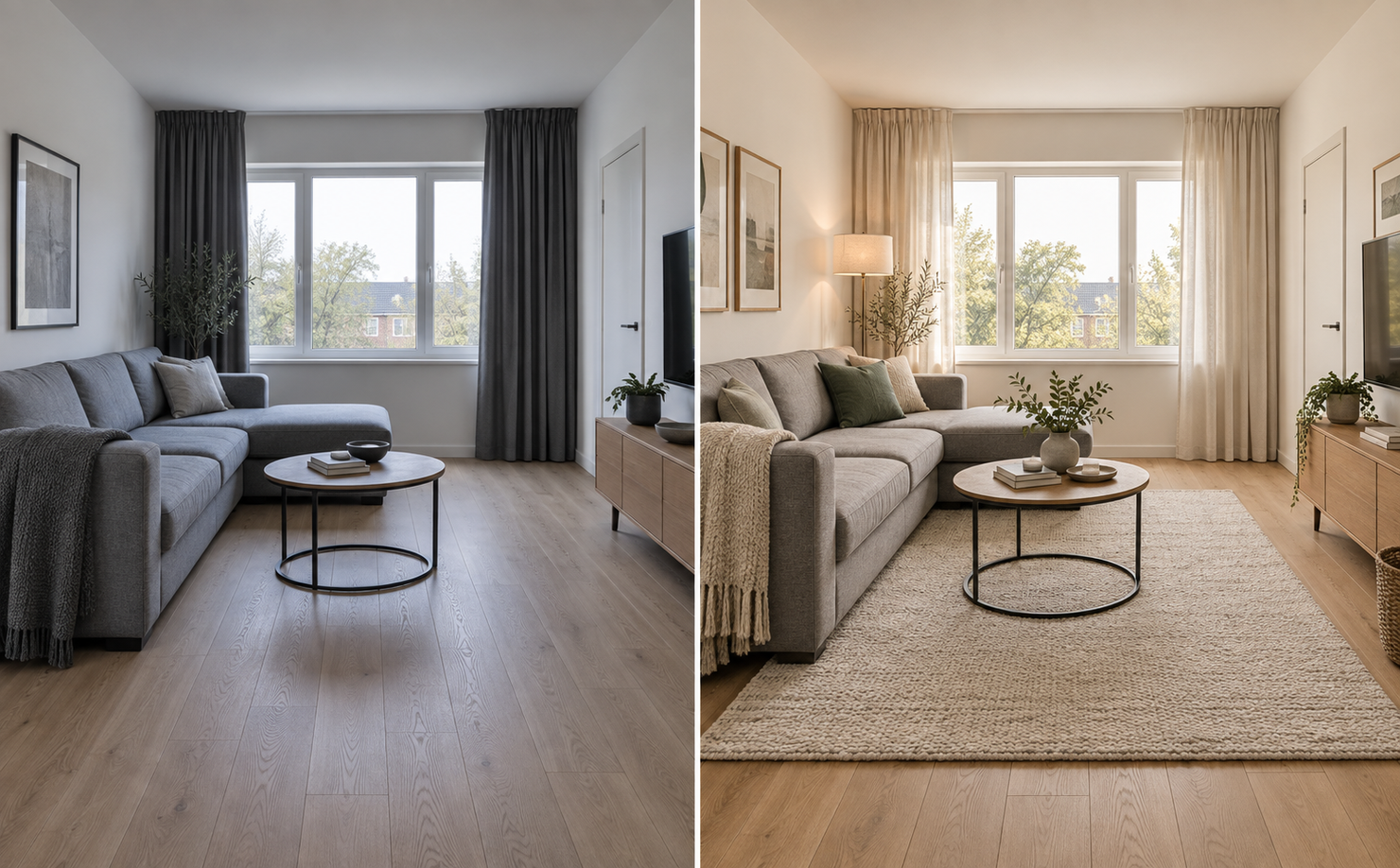
Preparation takes about 15 minutes. It makes the difference between a generic output and a genuinely useful, specific visualization for your actual room.
1. A Clear Idea of What You Want to Change
Simply create a list of the main things you want to change, such as the wall color, furniture, flooring, décor, layout, and more. After doing all of these things, you are now completely ready to start.
Write it down before you open any tool. Be as specific as possible:
- Is it a full room overhaul or a focused refresh?
- Are you changing the wall color, the furniture, the flooring, or all three?
- Are there pieces you definitely want to keep?
- What is your budget range?
2. Your Room's Approximate Measurements
You don't need construction-grade precision, but knowing your room's rough dimensions — length, width, ceiling height — helps you evaluate whether the AI-generated furniture scale is realistic for your actual space.
3. A Mood Board or Inspiration Collection
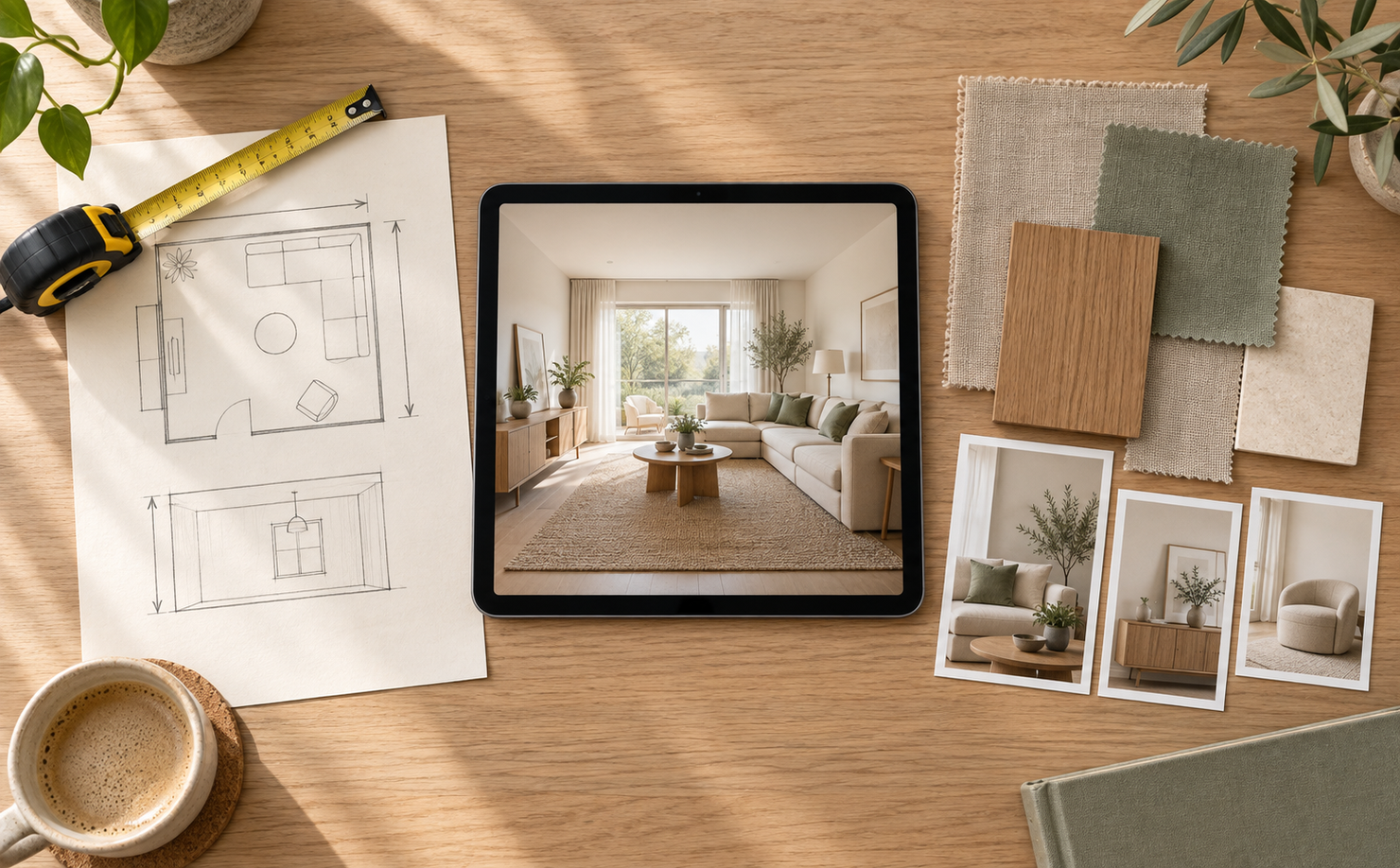
Spend 10–15 minutes on Pinterest, Instagram, Dezeen, or Architectural Digest collecting 5–8 images of rooms that appeal to you. Look for patterns in what attracts you — the color families, the material types, the furniture forms. These will become your style reference images for the AI.
4. A Defined Style Direction
Based on your mood board, identify your preferred style direction. This doesn't need to be precise — "warm and natural" or "dark and dramatic" is enough to start. Here are the most popular directions for 2026:
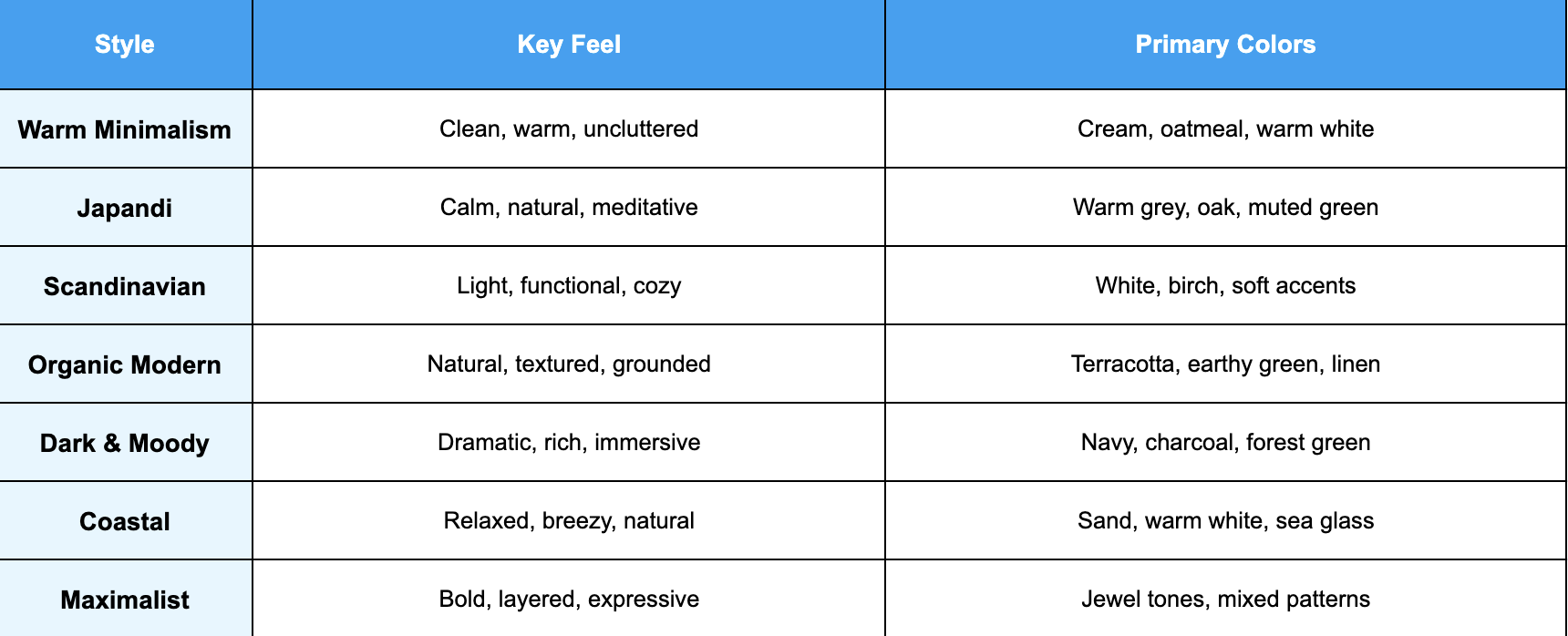
Stype direction you can try in 2026
5. Your Room Photo — Shot Correctly
This is the single most important preparation step. The quality of your AI decoration output depends directly on the quality of your input photo.
Photo requirements:
- Shoot during daytime with maximum natural light
- Clear the room of obvious clutter before shooting — the AI designs around whatever it sees
- Shoot from a corner or doorway that captures as much of the room as possible
- Avoid shooting directly into a bright window — it silhouettes furniture and reduces accuracy
- Take 3–4 photos from different angles — you'll use different angles for different design aspects
How to Decorate a Room With AI Like a Pro Designer Step by Step
A useful decorating process starts with clear constraints and becomes more specific as you progress. These seven steps take you from your current room to a concept worth developing.
Step 1: Clear the Space and Shoot the Perfect Photo
The foundation of every AI room decoration result is the photo you start with. The quality of your AI room decoration results depends heavily on the photo you start with. You do not need a professional camera — a smartphone works fine — but a few things matter.
Step 2: Choose the Right AI Design Tool
This is where many beginners go wrong—choosing a tool based on name recognition or a viral post instead of considering what they actually need it to do.
And most AI room design and decorating tools on the market fall into two types:
1.Photo-based AI room design and decorating tools
This type of AI room tools, like DecAI, often let you upload a photo of your existing room, choose a style or describe what you want, and generate a photorealistic redesign in seconds. There’s no need to create a floor plan or learn complicated design software, making them ideal for homeowners, renters, and beginners who want to quickly explore decorating ideas before making real changes.
2.Layout and floor planning tools
These tools focus more on building a room from scratch or creating a digital floor plan, often with 2D and 3D views. They usually take more time to learn and set up, but they’re better suited to projects where accurate dimensions, furniture placement, and room layouts matter.
For most beginners decorating an existing room, a photo-based AI tool is usually the easier place to start. And this is where DecAI stands out: it combines fast photo-based visualization with detailed editing, style transfer, furniture changes, wall and floor design, decluttering, and an AI designer—all in one place.
DecAI is a free AI room design and decorating platform that lets you start with a photo of your actual room, explore different ideas in seconds, and keep refining individual details until you find a design you love.
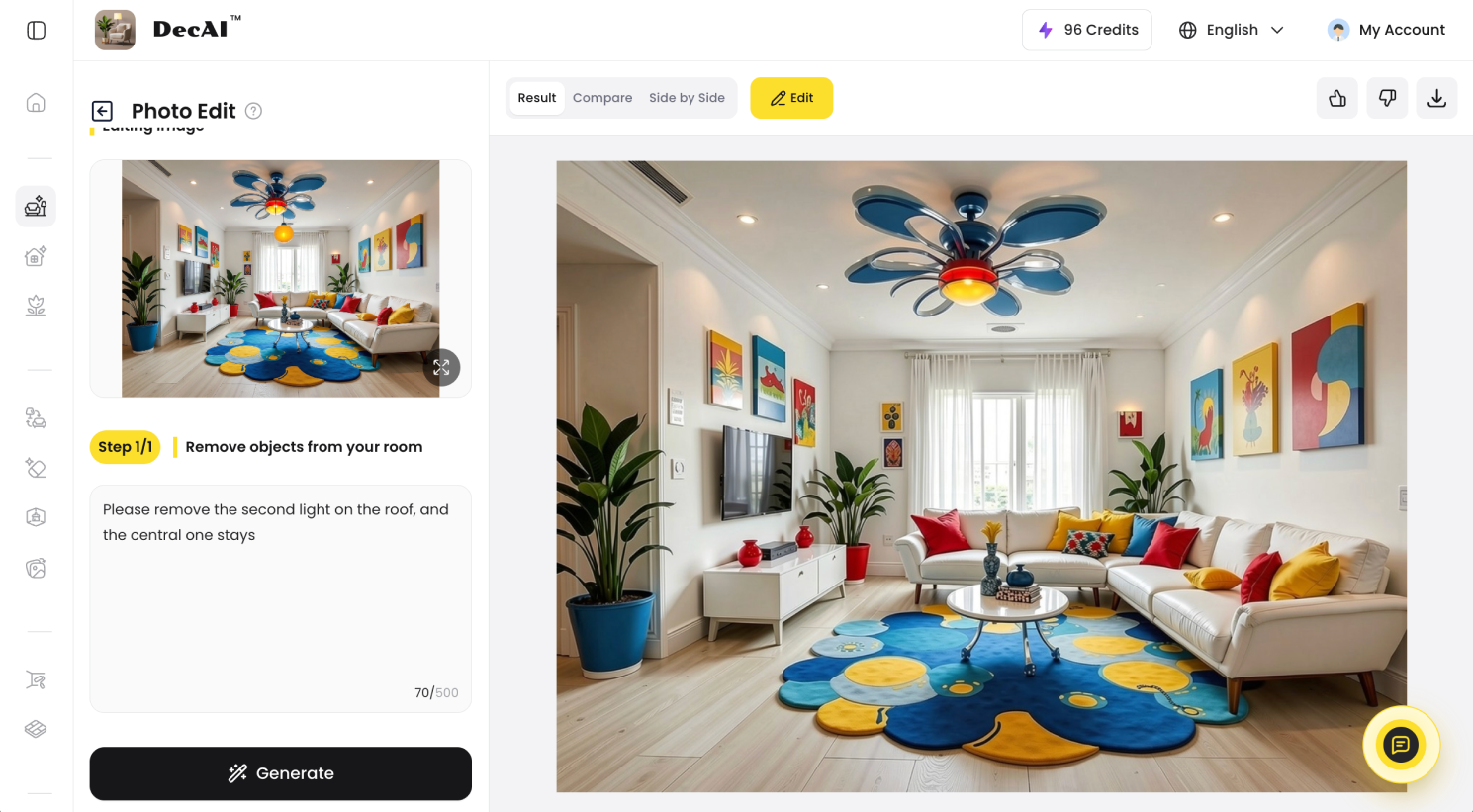
Try to decorating with DecAI
What makes DecAI specifically the right choice:
1. Instant photorealistic results — upload a room photo and see a complete redesign in under 30 seconds. No floor plan, no CAD knowledge, no technical skills required.
2. Style transfer from any inspiration image — not limited to preset style labels. Upload any Pinterest screenshot, Instagram image, magazine photo, or Dezeen feature as your style reference, and DecAI transfers that exact aesthetic — the palette, the materials, the furniture forms, the lighting mood — to your actual room. This is the feature that most differentiates DecAI from competitors that only offer preset style menus.
3. Genuine detail refinement — not all AI room decoration tools allow you to refine specific details after the initial generation. DecAI does. This means you can adjust wall colors, swap furniture styles, test different flooring, and edit individual elements without starting from scratch — an enormous advantage over tools that require a full regeneration every time you want to test one change.
4.Complete decoration workflow in one tool — from first visualization through to refined, shareable final design, DecAI handles every step without requiring you to switch between platforms. This end-to-end capability is what makes it genuinely suitable for taking an idea from concept to confident purchasing decision.
5.Smart AI Designer — Want to refine your design without repeatedly adjusting settings? Simply tell DecAI’s AI Designer what you want to change and continue developing your idea through conversation.
6. Generous free plan — no credit card required. The free tier is substantial enough to fully explore and refine a room design before deciding whether to upgrade.
7. Full mobile capability — available on iOS, Android, iPad, and Web, with full cross-device sync. Generate a concept on your phone while standing in the room, refine it on your tablet, and share the final result from your desktop.
Try DecAI Free → Decorate Your Room in Seconds
Step 3: Select a Design Style That Works With What You Own
Pick one starting direction, then describe what you like about it.
“Scandinavian” might mean pale woods, simple shapes, and soft textiles to you. “Modern farmhouse” might mean relaxed fabrics and rustic accents. Those concrete preferences help you judge the results more effectively than a style label alone.
Try completing this sentence:
Design any room, shop or space with DecAI in less 30 seconds! It's free!
"I want this room to feel ___, using ___ colors and ___ materials, while keeping ___."
For our example:
"I want this living room to feel warm and relaxed, using oatmeal and muted green colors with woven textiles and wood accents, while keeping the gray sofa and existing flooring."
You can explore another direction later. Start with a coherent brief so the first result tells you something useful.
Also consider how you live. A room used for movie nights, pets, and everyday lounging needs different choices from a space reserved for occasional entertaining. Your style should make those routines comfortable.
Step 4: Give the AI a Clear, Detailed Prompt
A prompt is simply the instruction you give the tool. The most useful details explain your goal, identify what must remain, and name the changes you want to see.
Use this formula:
"Room + goal + items to keep + desired changes + style + restrictions."
Here is a prompt for the example living room:
"Decorate this living room so it feels warmer and more welcoming. Keep the existing gray sofa, coffee table, wood flooring, white walls, doors, and windows. Keep the furniture in its current positions. Add an oatmeal rug, muted green cushions, simple curtains, a floor lamp, and restrained artwork. Use a relaxed Scandinavian style. Keep doorways clear and avoid built-in features or renovation work."
Compare that with “Make my living room beautiful.” The detailed version gives you specific requirements against which to assess the image.
If it is for a much smaller project, shorten the instruction:
"Refresh the area around this sofa with a rug, cushions, and artwork. Keep the sofa, flooring, and wall color unchanged. Use warm neutrals with small terracotta accents."
Where a tool supports only presets, choose the closest available settings and use text instructions in its editing workflow if offered.
A budget can also guide the brief. However, typing “under $800” does not establish that the pictured objects are available at that price. Actual product research comes later.
Step 5: Generate Several Versions and Compare Them Fairly
Try generating several versions, whether they explore different colors and styles or simply offer slight variations of the same idea. Compare the results and choose the one that best fits your space, needs, and personal taste.
Step 6: Refine the Details of Your Favorite Version
This is where DecAI's advantage over most AI room decoration tools becomes most tangible.
Many advanced AI tools allow you to upload your custom furniture photo to see how they fit into your redesigned space. But beyond furniture placement, detail refinement is about fine-tuning the specific elements that move a design from "close to right" to "exactly right."
Not all AI room decoration tools allow genuine detail refinement after initial generation — most require you to start entirely from scratch with a new prompt if you want to change one element.
However, with DecAI, you can straightly click "Edit" on its top toolbar to chage furniture, wall, floor or even design style or simply activate its AI agent to give your requirements with just simple chats.
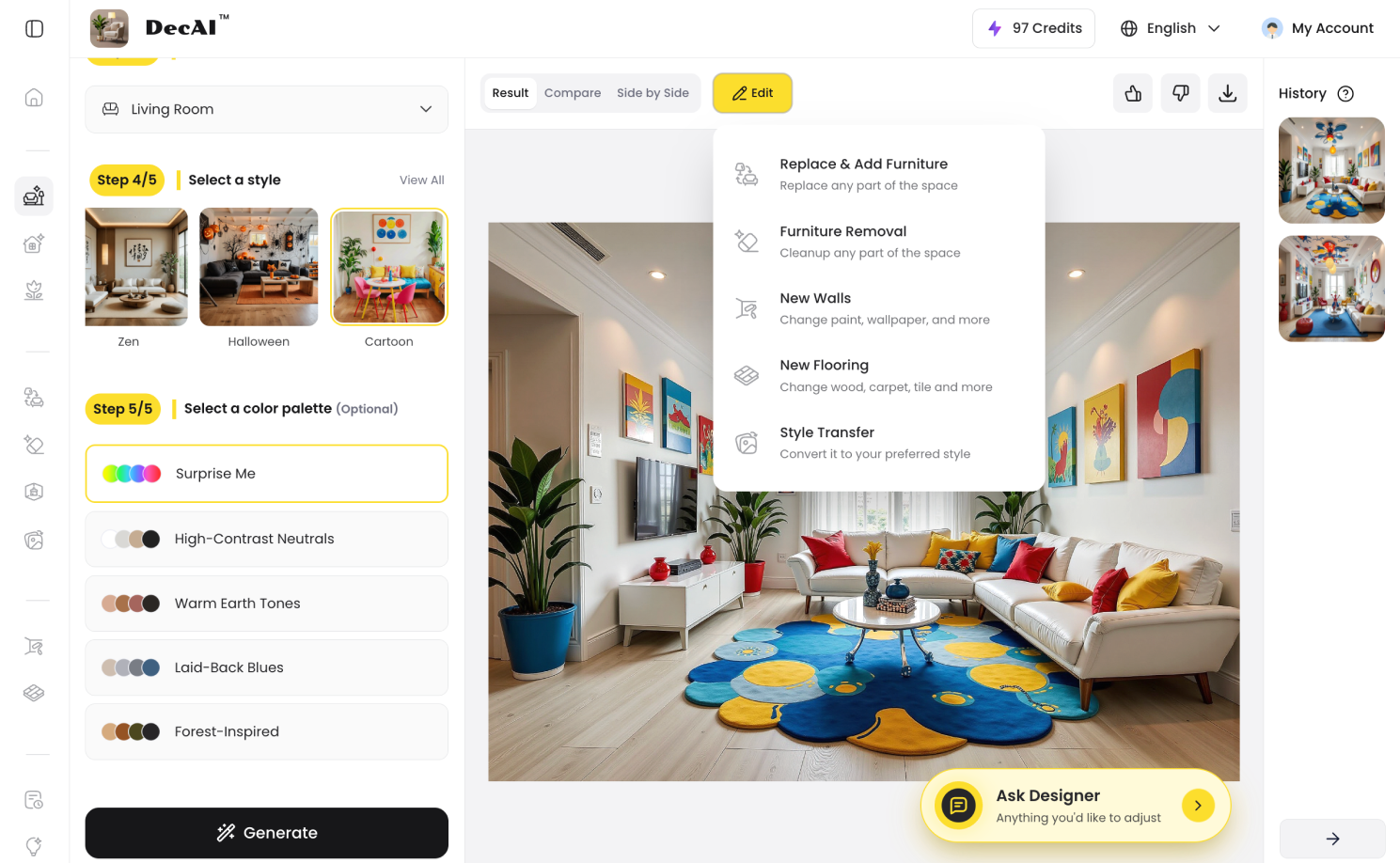
Step 7: Turn the Concept Into a Real Plan
Open the chosen image beside a blank shopping list. Separate what you already own from what the concept asks you to buy.
Then translate each proposed purchase into a description you can search for. “The nice lamp in the corner” becomes “slim floor lamp with a fabric shade.” Add the size, finish, and practical requirements that matter in your room.
Here is an illustrative shopping plan for an $800 decorating budget. These figures are spending caps, not researched product prices.

A sample shopping plan for your reference
The caps total $800, but you can move money between categories as you find real products.
If a generated item has no exact match, identify what makes it useful: its shape, color, texture, or visual weight. Search for those qualities. You can often preserve the design direction without reproducing every object.
Keep unverified products on a shortlist until you have checked specifications and total cost.
Pro Tips for Realistic AI Makeovers
A few habits make the process easier to control.
1.Start with a limited scope.
Choose a room, seating area, or decorating problem. A brief such as “make this sofa area feel warmer” gives you a more manageable task than changing the entire home.
2.Use instructions you can evaluate.
“Add simple curtains and a warm neutral rug” provides visible criteria. Broad adjectives such as “perfect” or “luxurious” leave much more open to interpretation.
3.Preserve the original and your favorite versions.
Keep a small folder containing the source photo, shortlisted concepts, and final reference. This makes it easier to recover an earlier direction if later edits become less convincing.
4.Add everyday requirements to your shopping notes.
Your visual brief might mention a pale rug, while your product requirements specify easy cleaning. Treat both as necessary. Appearance alone will not tell you how an item performs.
5.Test physical samples in the room.
Use the image to narrow a color or material direction. Then check relevant paint, fabric, or flooring samples in the actual space before committing. The reviewed decorating guidance also emphasizes checking real measurements and materials when translating AI concepts into purchases.
6.Leave room for personal belongings.
Include the reading chair you love, a framed photograph, or the collection you want to display. Name these items in the brief if they matter to the final arrangement.

FAQs
1. Can ChatGPT Decorate My Room?
Yes. You can upload a photo of your room and ask ChatGPT for decorating ideas and suggestions. However, for more practical room visualization, you can use a dedicated AI room design and decorating tool like DecAI to preview new décor, colors, furniture, and styles in your actual space with just a few clicks.
2. Which AI Is Best for Room Decoration?
For the photo-based workflow in this guide, DecAI is a practical choice because it combines concept generation with refinement. If your priority is creating a room model using entered dimensions, Planner 5D may suit that task better. Choose according to the decisions you need to make.
3. How Do I Ask AI to Decorate a Room?
Well, while using AI tools like DecAI, first start by uploading a clear photo of your room, then tell the AI what you want to change. For better results, include the room type, desired style, colors and materials, items you want to keep, and specific changes you want to make. The more specific your instructions are, the easier it is for AI to create a design that matches your vision.
4. Can I Decorate My Room With AI for Free?
You can start exploring with a free trial or plan where offered. DecAI currently provides a Free-forever plan for you to explore all advanced features with ease.
5. Can I Change Just One Item in an AI Room Design?
Yes, if the tool supports targeted editing. For instance, DecAI’s furniture replacement and addition tool lets you easily replace or add a specific piece of furniture or décor, while experimenting with different styles, colors, and materials. It’s a simple way to preview small room updates without redesigning the entire space.
------------------------------------
If you believe that any material on this site infringes your intellectual property rights, please contact the author at decaiwebteam@outlook.com with details of your claim.
Redesign any home interior, exterior & garden in seconds
Share this Post:


Redesign any home interior, exterior & garden in seconds