
12 Best Bedroom Design Tools for Beginners Who Want Professional Results

These days, designing a bedroom does not require a degree or experience as long as you choose the right tools. What used to demand years of training — proportions, color theory, lighting, spatial flow — has been distilled into tools that guide you step by step, showing exactly how your choices will look before you commit.
That's why the right tool matters: it lets you see, plan and test your space before you buy furniture, repaint a wall, or drag a heavy dresser across the room just to find out it doesn't work.
So let's make that choice easy. We tested 12 of the best beginner-friendly bedroom design tools, from AI visualizers that turn one photo into several styled versions of your room, to simple drag-and-drop planners, to full 3D builders for anyone who wants to explore every detail, also covering both free and paid options, AI and non-AI alike.
Design any room, shop or space with DecAI in less 30 seconds! It's free!
What You Actually Need From a Bedroom Design Tool
Before diving into the list, it's worth pausing to figure out what you actually want from a bedroom design tool. For most beginners, a good tool helps with at least one of these
- Visualizing a new bedroom style from a real photo
- Planning bed, dresser, desk, rug, and nightstand placement
- Measuring the room before buying furniture
- Testing wall colors and material combinations
- Previewing furniture from real retailers
- Creating a mood board or shopping plan
- Sharing a clear concept with a partner, landlord, contractor, or decorator
And that's just the short list — there are plenty of other needs depending on your project. So before you pick anything, jot down what matters most to you. That way, you're choosing a tool that fits your actual goals, not just the one with the flashiest homepage.

How Should You Choose a Bedroom Design Tool for Your Home or Project
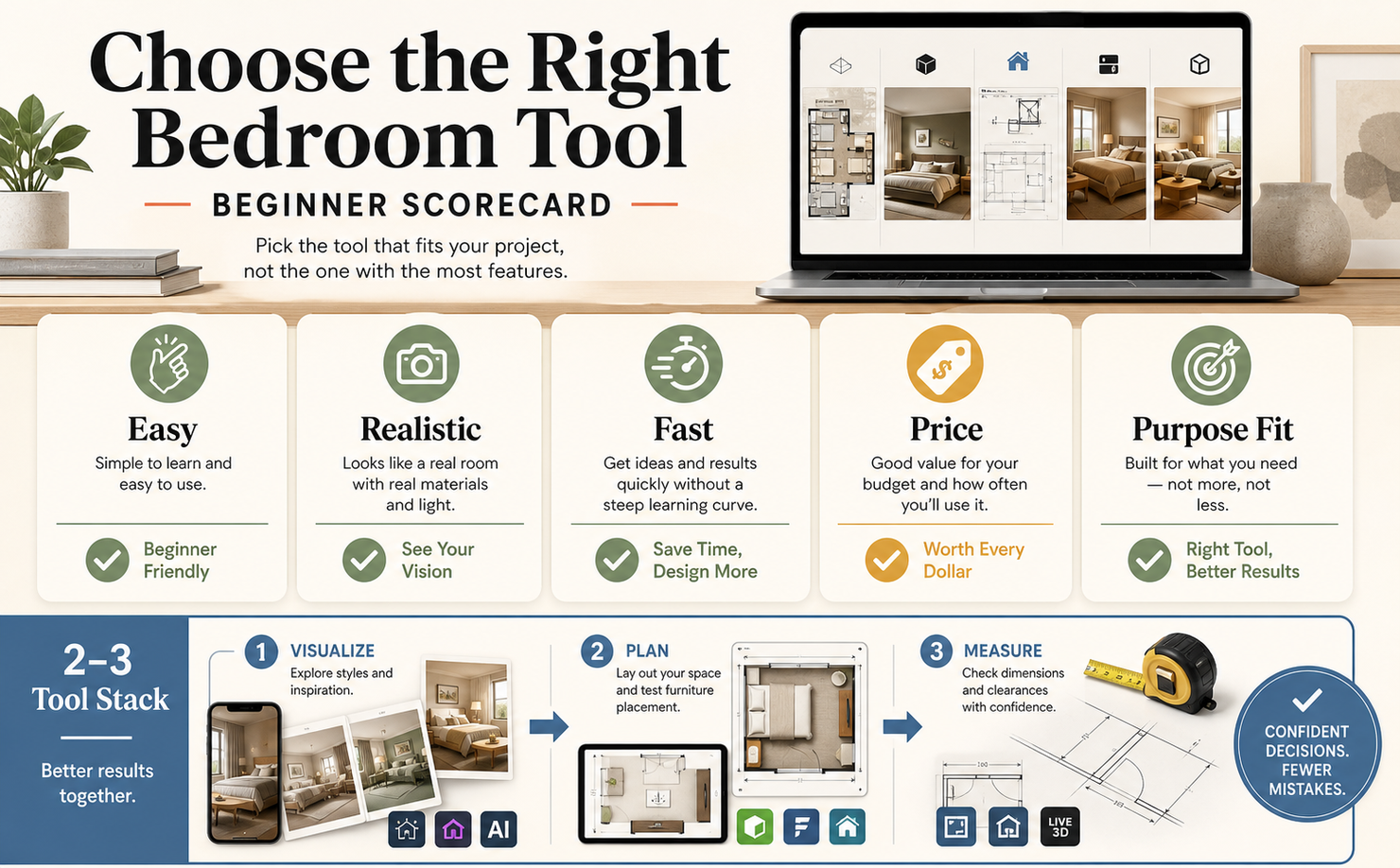
With dozens of tools claiming to be "the best," it's easy to get overwhelmed before you've even started designing. To keep things simple, judge each tool against a few practical criteria:
- Ease of use — You shouldn't need a tutorial just to get started. The best beginner tools feel intuitive within the first few minutes.
- Realistic output — Look for results that actually resemble your room, not a generic stock render that could belong to anyone.
- Speed — As a beginner, you'll want to try several ideas before settling on one, so a tool that gives fast results matters more than you'd think.
- Price — Many great options are free or low-cost, which is ideal while you're still exploring what you like.
- Purpose fit — The "best" tool isn't universal — it's the one that solves the specific problem you identified earlier, whether that's visualizing, planning, measuring, or something else entirely.
In some cases, no single tool can do everything perfectly. Instead, you may get better results by using two or three tools together—one for visualizing styles, one for planning layouts, and another for measurements—rather than relying on a single app for the entire process.
12 Best Bedroom Design Tools for You to Always Get Pro Results
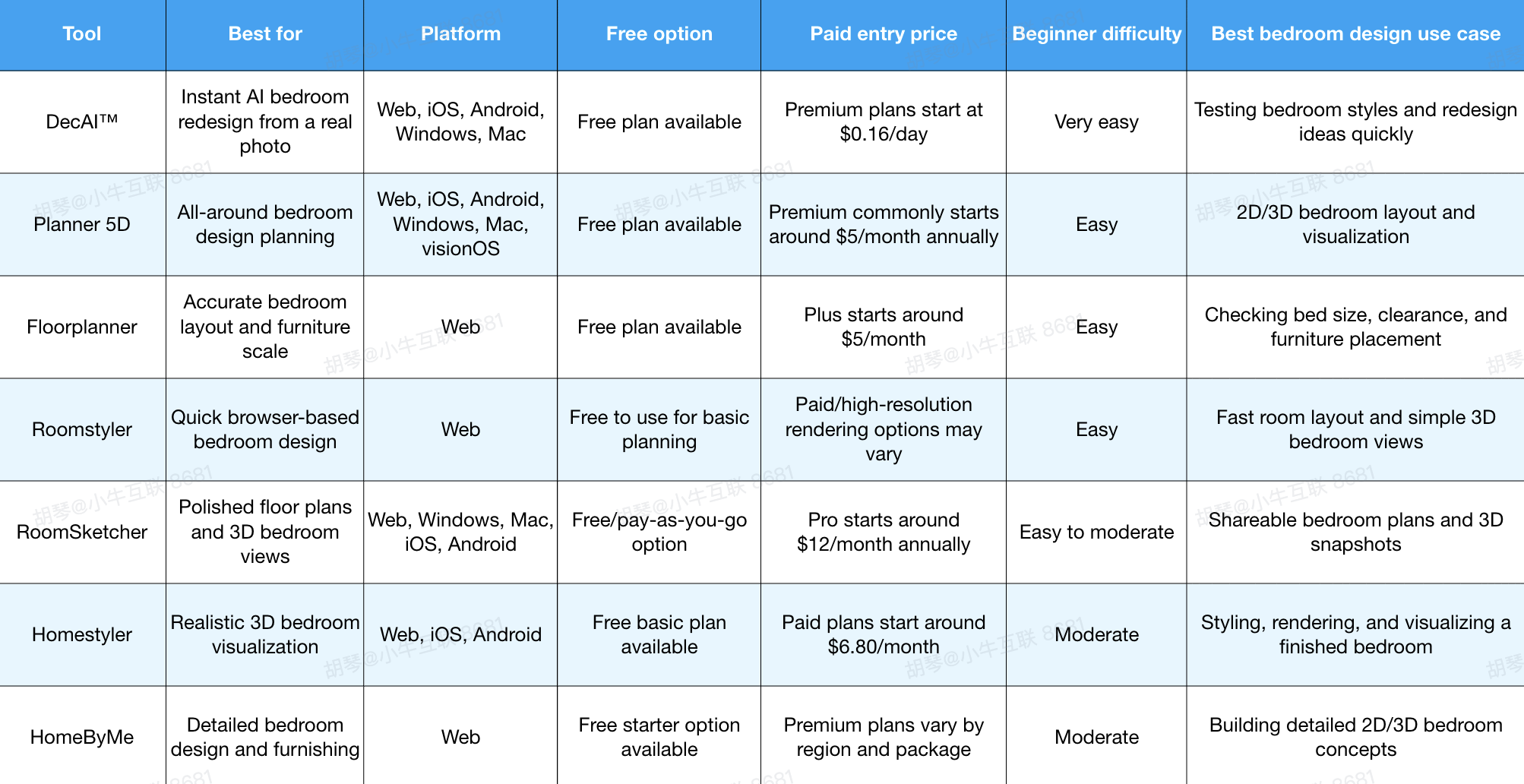
Let's firstly have a quick overview of these bedroom tools:
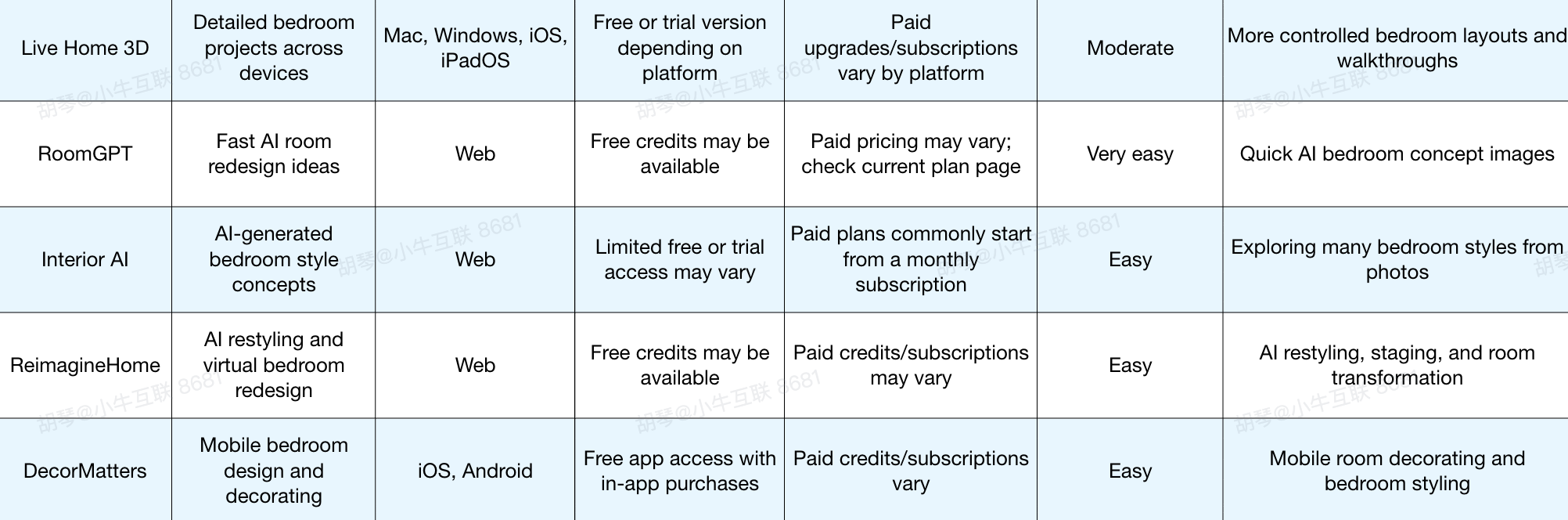
1.DecAI™ - Best for Instant AI Bedroom Redesign From a Real Photo

Platform: Web, iOS, Android, Windows, Mac
Pricing: Free plan available. Premium plans start at $0.16 per day.
DecAI™ is one of the most beginner-friendly bedroom design tools if you want to start from your actual room instead of a blank floor plan.
Simply upload a photo of your bedroom, choose a style or design direction, and the tool generates AI redesign ideas quickly. For beginners, this is useful because it removes the hardest early step: imagining what your real bedroom could become. It is especially helpful for testing style, color direction, furniture refresh ideas, and decor possibilities before moving into measured planning.
DecAI™ makes bedroom or home design quite easy and fast for everyone!
Why to choose:
- You can start with a real bedroom photo, not a technical drawing.
- It is fast enough to compare several bedroom styles in one session.
- It works well for users who do not know interior design terms.
- It supports bedroom redesign, furniture refresh, wall updates, cluster cleaningup and style transfer.
- It is useful before buying furniture because it helps clarify the visual direction.
Reasons to avoid:
- It is not a precise floor plan tool, so you still need measurements for bed size, wardrobe placement, and walking clearance.
DecAI™ is a strong first step when your bedroom feels outdated, unfinished, or hard to imagine.
Instead of starting with dimensions, you can start with the feeling you want: warmer, cleaner, more luxurious, more minimalist, or more relaxing, all with simple clicks and AI prompts.
2.Planner 5D - Best All-Around Bedroom Design Planner for Beginners
Platform: Web, iOS, Android, Windows, Mac, visionOS
Pricing: Free plan available. Premium plans commonly start around $5 per month when billed annually.
Planner 5D is a flexible 2D and 3D home design tool that works well for bedroom planning. Beginners can create a room layout, add furniture, switch between 2D and 3D views, and test different materials or decor. It is broader than an AI redesign tool, which means it takes more time, but it also gives you more control. For a bedroom, that control is useful when you need to plan a bed, desk, wardrobe, rug, and storage together.
Why to choose:
- It combines 2D layout planning with 3D visualization.
- It is beginner-friendly compared with more technical design software.
- It has furniture and decor libraries for building a complete bedroom.
- It works across many devices, which is useful if you start on desktop and continue on mobile.
- It is good for users who want one general bedroom design tool instead of several smaller tools.
Reasons to avoid:
- Some assets, AI features, HD visuals, or advanced exports may require a paid plan.
Planner 5D is a good choice when you want a complete bedroom planner but do not want professional CAD software. It is especially useful for testing layout alternatives: bed centered on the main wall, bed under the window, desk near natural light, dresser opposite the bed, or wardrobe along the longest wall.
3.Floorplanner - Best for Accurate Bedroom Layout and Furniture Scale
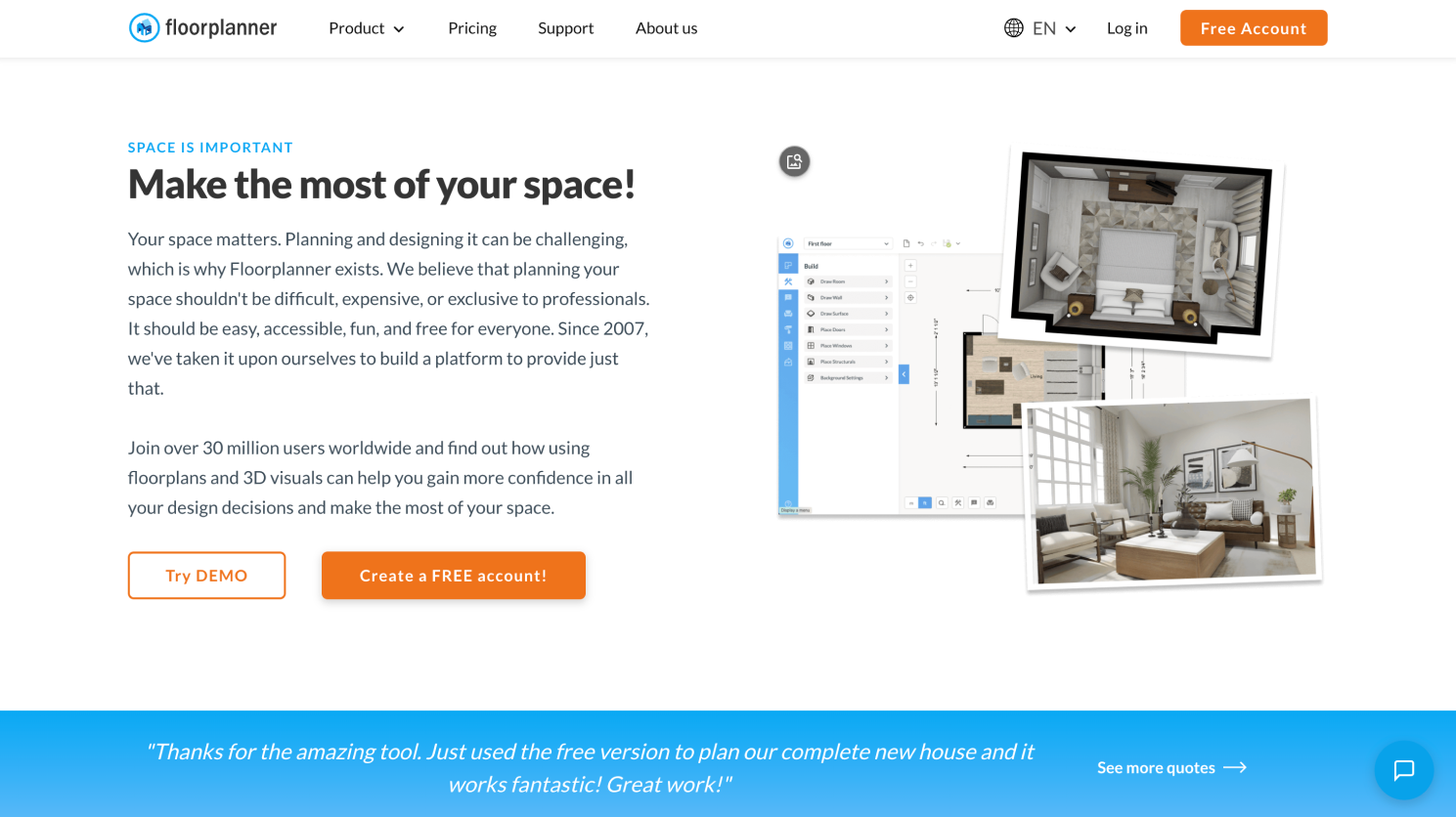
Platform: Web
Pricing: Free plan available for casual use. Paid plans start around $5 per month, and credit-based upgrades are available for extra features.
Floorplanner is one of the most practical bedroom layout tools because it focuses on accurate room planning. You can draw a room, add dimensions, place furniture, and see how the arrangement works. For bedroom design, this matters more than many beginners expect. A bedroom can look good in a render but fail if drawers cannot open, the walkway is too narrow, or the bed blocks a closet door.
Why to choose:
- It is strong for room dimensions and furniture scale.
- It helps test bed size before buying.
- It is useful for checking clearance around wardrobes, dressers, windows, and doors.
- It runs in a browser, so there is no heavy installation.
- It is a good bridge between simple planning and more polished 3D visualization.
Reasons to avoid:
- It is more layout-focused than style-focused, so it may not be the best tool for quick decorative inspiration.
Floorplanner is one of the best bedroom design tools for beginners who are worried about fit. If you are deciding between a full, queen, king, or storage bed, this type of tool can save you from a costly mistake. Use it before buying the largest item in the room.
4.Roomstyler - Best for Quick Browser-Based Bedroom Design
Platform: Web
Pricing: Basic planning is generally free to use.
Roomstyler is a browser-based room design tool that lets users create a room layout and view it in 3D. It is lighter than some full home design platforms, which makes it appealing for beginners who want to test a bedroom idea quickly. You can arrange furniture, experiment with room structure, and create a visual plan without installing software. It is a useful tool when you want speed more than deep customization.
Why to choose:
- It is quick to start and easy to understand.
- It works well for simple bedroom layouts.
- It offers 3D visualization without a heavy learning curve.
- It is useful for testing furniture arrangement before moving real items.
- It is browser-based, so it is convenient for casual planning.
Reasons to avoid:
- It may feel limited if you want advanced custom furniture, detailed lighting control, or highly realistic rendering.
Roomstyler is especially useful for small bedrooms, guest rooms, and quick makeovers. If you simply want to know whether the bed should go on one wall or another, it may be faster than a more complex tool.
5.RoomSketcher - Best for Polished Bedroom Floor Plans and 3D Views
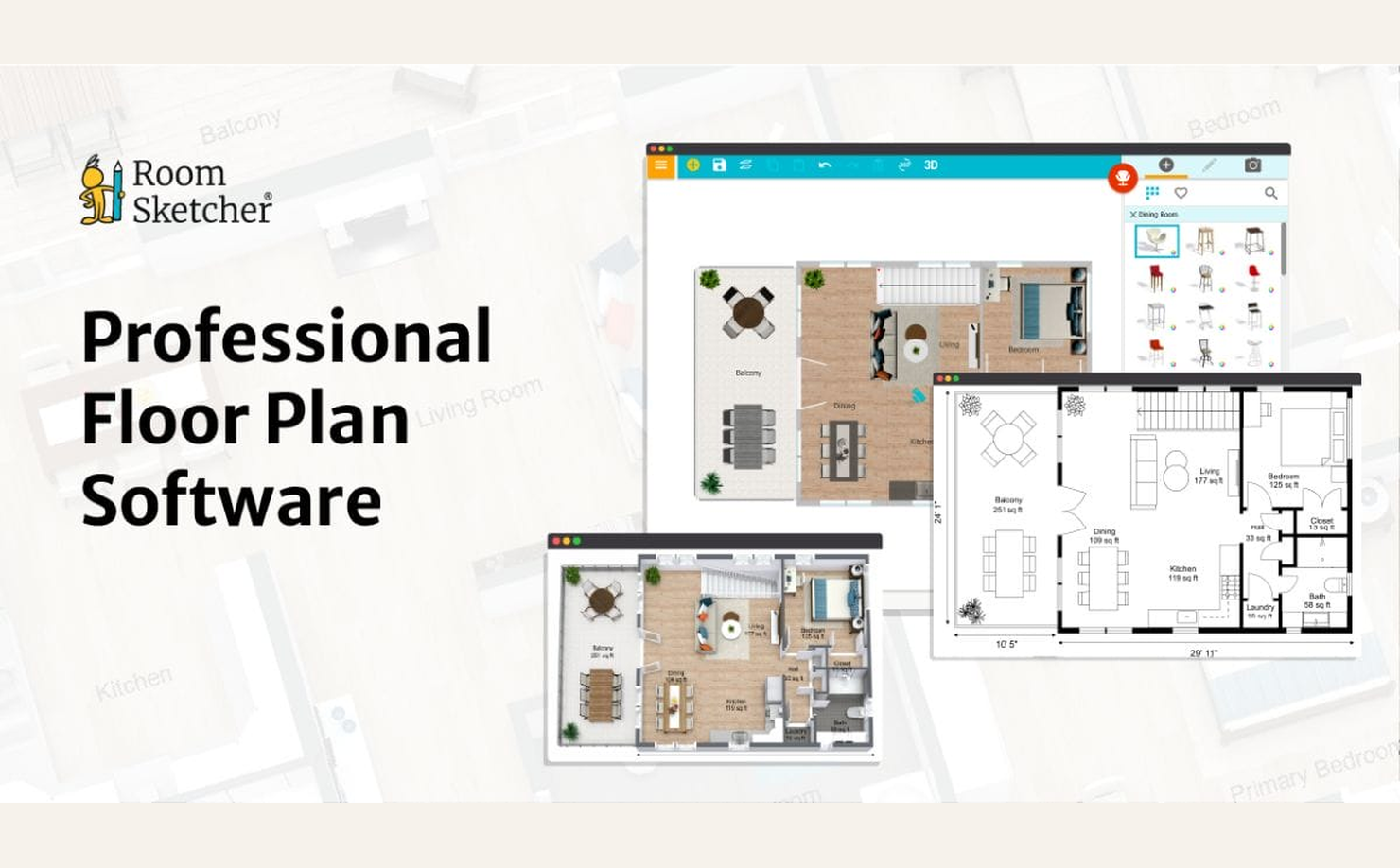
Platform: Web, Windows, Mac, iOS, Android
Pricing: Free/pay-as-you-go option available. Pro plans start around $12 per month when billed annually.
RoomSketcher is a floor plan and room visualization tool that works well when you want a cleaner, more polished bedroom plan. It lets users create 2D floor plans, furnish rooms, and generate 3D views. For beginners, its advantage is that the output can look more organized and presentable than a rough sketch. This makes it useful if you need to share a bedroom plan with a partner, roommate, landlord, decorator, or contractor.
Why to choose:
- It produces clean 2D and 3D room plans.
- It is useful for measured bedroom layouts.
- It can help communicate your idea to someone else.
- It supports furniture placement and visual planning.
- It is a good option when you want a more finished planning document.
Reasons to avoid:
- Some of the most useful 3D and output features require paid access or credits.
RoomSketcher is not only about designing for yourself. It is good when the bedroom decision involves other people. If you need to explain why a bed should move, why a wardrobe does not fit, or why a dresser blocks circulation, a polished floor plan helps.
6.Homestyler - Best for Realistic 3D Bedroom Visualization
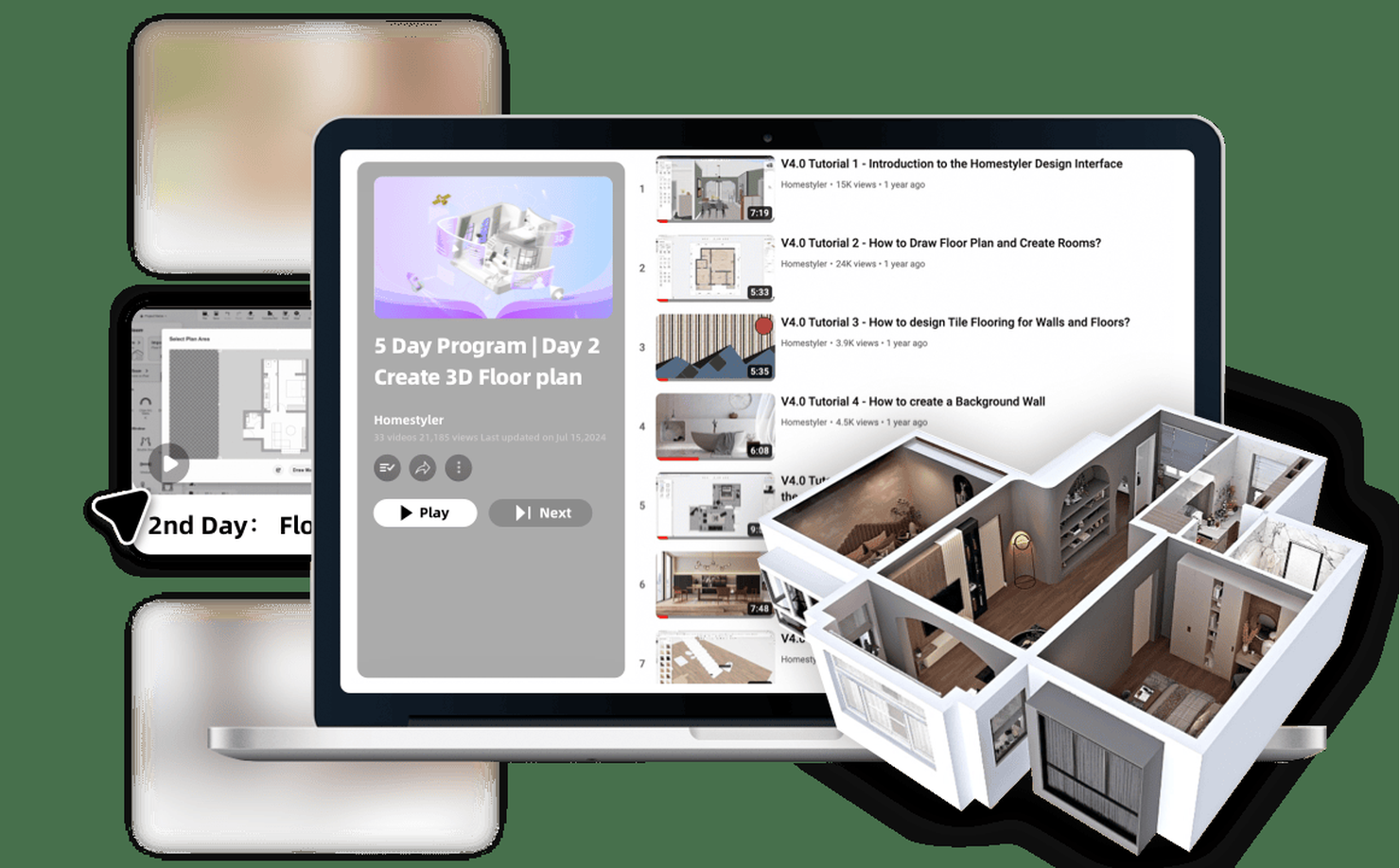
Platform: Web, iOS, Android
Pricing: Free basic plan available. Paid plans start around $6.80 per month, though render credits, assets, and plan details may vary.
Homestyler is useful for beginners who want their bedroom design to look more realistic. It supports 3D room planning, furniture placement, materials, lighting, and rendering. Compared with a simple layout tool, Homestyler is better for seeing the mood of a finished bedroom. You can test whether a dark accent wall, upholstered bed, wood nightstands, warm lighting, or textured rug works together visually.
Why to choose:
- It is strong for realistic 3D room scenes.
- It includes many furniture and material options.
- It is useful for checking the finished look, not just the floor plan.
- It helps beginners understand how colors, furniture, and lighting work together.
- It can create more presentation-ready bedroom visuals.
Reasons to avoid:
- The interface and asset options may feel busy for complete beginners.
Homestyler is best after you already have a rough layout. If you use it too early, you may spend too much time styling a room that has not been measured correctly. Use it when you want to turn a practical layout into a more polished bedroom design.
7.HomeByMe - Best for Detailed Bedroom Design and Furnishing
Platform: Web
Pricing: Free starter options are available. Paid plans and packs vary by region and feature level.
HomeByMe is a 3D home design tool that helps users create room layouts, furnish spaces, and visualize finished interiors. For bedroom projects, it is useful when you want more detail than a quick AI concept but still want a beginner-accessible interface. You can build the room, place furniture, adjust views, and create a more complete bedroom concept. It works well for users who want to plan the whole room rather than just one style image.
Why to choose:
- It supports both planning and furnishing.
- It is good for creating a complete bedroom concept.
- It can help visualize furniture, decor, and layout together.
- It is easier for beginners than professional modeling software.
- It is useful for users who want a more detailed 3D room experience.
Reasons to avoid:
- Free usage may be limited by project count, image exports, or rendering options.
HomeByMe is a strong choice for bedrooms where multiple decisions overlap: bed placement, wardrobe location, rug size, seating, lighting, and decor. It is not the fastest tool, but it can give you a fuller picture of the room.
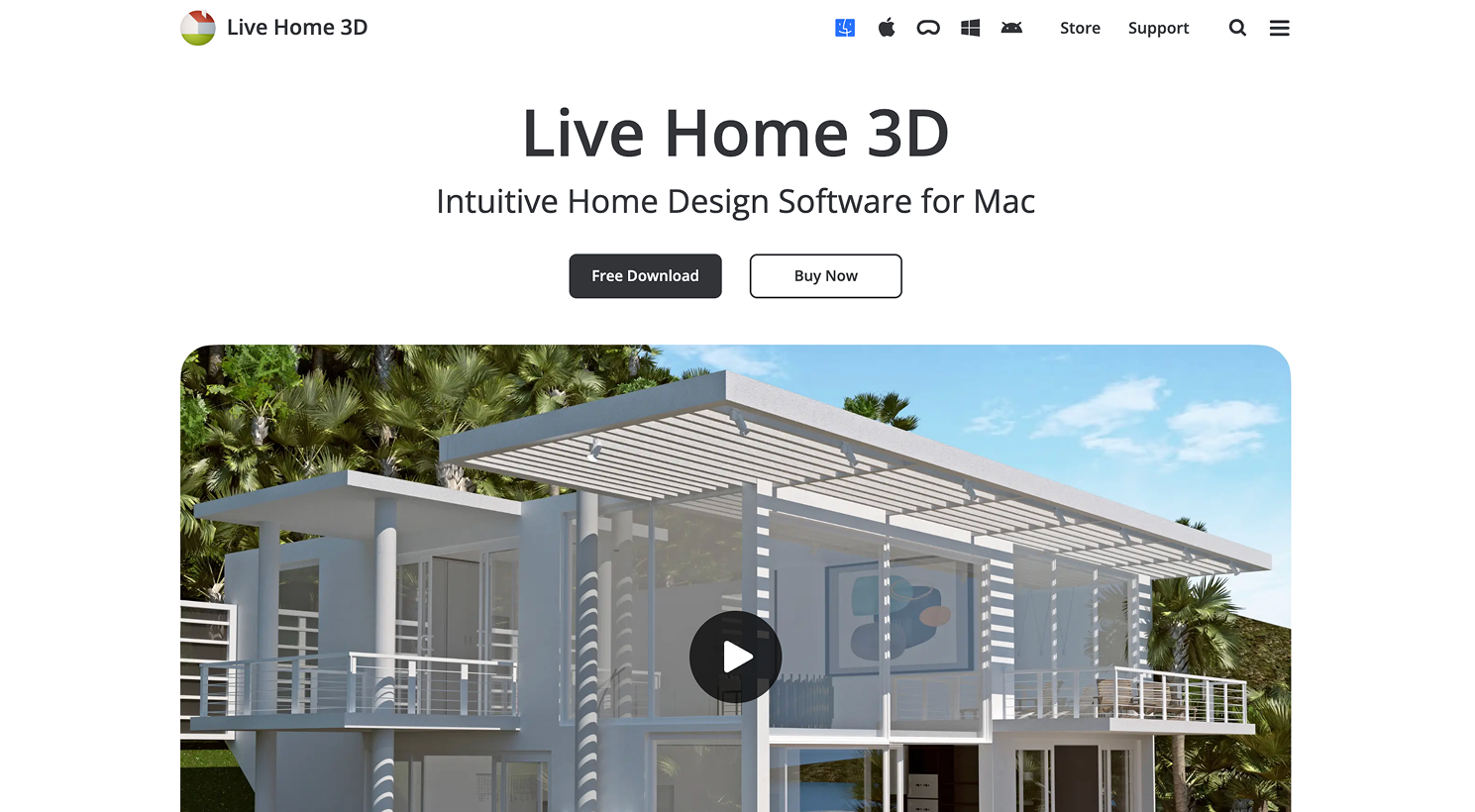
8.Live Home 3D - Best for Detailed Bedroom Projects on Desktop and Mobile
Design any room, shop or space with DecAI in less 30 seconds! It's free!
Platform: Mac, Windows, iOS, iPadOS
Pricing: Free or trial access may be available depending on platform. Paid upgrades and subscriptions vary by device and feature set.
Live Home 3D is a more detailed home design app for users who want control over layout, materials, lighting, and views. It is not limited to bedrooms, but it works well for bedroom projects that need more precision than a quick browser planner. You can design in 2D, view in 3D, adjust materials, and create walkthrough-style views. It is especially useful for users who are comfortable spending more time refining a design.
Why to choose:
- It offers more control than very simple room planners.
- It supports detailed 2D and 3D design workflows.
- It works well for users in the Apple ecosystem, while also supporting Windows.
- It is useful for custom room shapes or more involved bedroom projects.
- It can help refine materials, lighting, and room views.
Reasons to avoid:
- It may feel heavier than necessary if you only want a quick AI bedroom makeover.
Live Home 3D is a good choice when your bedroom is not a simple rectangle or when you want to model details carefully. For example, it can be useful for attic bedrooms, rooms with angled walls, or bedrooms that include a work zone.
9.RoomGPT - Best for Fast AI Room Redesign Ideas
Platform: Web
Pricing: Free credits may be available. Paid pricing and credit packages may vary.
RoomGPT is an AI room redesign tool that lets users generate room concepts from photos. For bedroom design, it is useful when you want fast visual ideas without learning 3D software. You upload a bedroom image, select a style, and get AI-generated room redesign concepts. It is best used as an inspiration and direction tool, not as a measured planning solution.
Why to choose:
- It is easy for beginners.
- It can create quick bedroom style concepts from a photo.
- It is useful for comparing broad directions before making decisions.
- It does not require 2D drawing or 3D modeling skills.
- It can help users who feel creatively stuck.
Reasons to avoid:
- AI concepts may not preserve exact measurements, furniture sizes, or architectural details.
RoomGPT is helpful when you know your bedroom needs a change but cannot describe the style yet. It can show you possibilities quickly. However, before buying furniture based on an AI image, confirm the layout with a measured planner.
10.Interior AI - Best for AI-Generated Bedroom Style Concepts

Platform: Web
Pricing: Limited free or trial access may vary. Paid plans are usually subscription-based.
Interior AI focuses on generating interior design concepts from room photos and style inputs. For bedroom design, it is useful when you want to explore multiple visual directions quickly. You can test how a bedroom might look in different styles, such as minimalist, industrial, tropical, modern, Scandinavian, or luxury. It is especially helpful in the early stage, when your biggest challenge is choosing a style.
Why to choose:
- It is useful for fast style exploration.
- It can generate multiple bedroom looks from a real image.
- It helps beginners see possibilities they may not have considered.
- It works well before deeper layout planning.
- It is good for renters and homeowners who want concept-level redesign ideas.
Reasons to avoid:
- Like most AI image tools, it may prioritize visual impression over exact layout accuracy.
Interior AI is not the tool you use to confirm whether your dresser fits beside the closet. It is the tool you use when you want to see whether your bedroom should become warmer, darker, simpler, brighter, or more dramatic.
11.ReimagineHome - Best for AI Restyling and Virtual Bedroom Redesign
Platform: Web
Pricing: Free credits may be available.
ReimagineHome is an AI-powered design tool for restyling and virtually redesigning interiors. For bedrooms, it can help users test new looks without building a room model manually. It is useful for homeowners, renters, real estate users, and anyone who wants a quick “what could this room become?” view. It can support style transformation, staging-like concepts, and visual room refreshes.
Why to choose:
- It works from room images.
- It is useful for fast bedroom restyling.
- It can help users compare design directions before committing.
- It is easier than learning 3D planning software.
- It is good for early-stage bedroom makeovers.
Reasons to avoid:
- It should not be treated as a precise furniture plan or construction-ready design.
ReimagineHome is best when the bedroom already exists and you want to see alternate versions of it. It can help you move beyond vague ideas like “make it cozy” or “make it modern” by showing visual options.
12.DecorMatters - Best for Mobile Bedroom Design and Room Decorating

Platform: iOS, Android
Pricing: Free app access with in-app purchases. Paid credits or subscriptions may vary by app store and region.
DecorMatters is a mobile-focused interior design and decorating app. For bedroom projects, it can help users experiment with room styling, decor combinations, furniture placement, and visual design ideas from a phone. It is more decor-oriented than a precise CAD-style planner, but it still fits this list because it helps users create and test bedroom design results directly. It is a good option for beginners who prefer app-based design instead of desktop tools.
Why to choose:
- It is mobile-friendly and easy to access.
- It is useful for bedroom decorating and styling.
- It helps users test furniture and decor combinations.
- It works well for casual beginner projects.
- It is less intimidating than full design software.
Reasons to avoid:
- It may not be the best choice for precise measurements or technical floor planning.
DecorMatters is useful when your bedroom layout is mostly settled, but the room still feels unfinished. It can help test decor ideas, furniture combinations, and visual direction before you start buying.
AI Bedroom Design Tools vs 3D Bedroom Planners: Which Should You Use?
The most common beginner mistake is expecting one tool to do everything. AI bedroom design tools and 3D bedroom planners solve different problems.
About AI bedroom design tools
AI bedroom design tools are best for visual direction. They help you see what your bedroom could look like with a different style, color palette, furniture mood, or decor approach. Tools like DecAI™ is useful when you want quick before-and-after ideas from a real room photo.
They are excellent for questions like:
- What style suits this bedroom?
- Would a warmer look make the room feel cozier?
- Could this room work with a modern or Japandi design?
- What if I changed the bed, wall color, rug, and lighting?
- How can I make this room feel more finished?
About 3D bedroom planners
3D bedroom planners are best for layout and scale. Tools like Planner 5D, Floorplanner, Roomstyler, RoomSketcher, Homestyler, HomeByMe, and Live Home 3D are better when you need to know whether the design will physically work.
They are better for questions like:
- Will this bed size fit?
- How much walking space do I have?
- Can I add a desk?
- Will the dresser drawers open fully?
- Should the wardrobe go beside the bed or opposite it?
- Is there enough space for two nightstands?
The best beginner workflow usually uses both types. Start with an AI bedroom design tool to find a look you like. Then use a 2D or 3D planner to test whether the design is practical in the real room.
AI gives you direction. Planning gives you confidence. So, choose between them based on your actual cases and needs.
How to Design Your Bedroom Step by Step
If you are redesigning a bedroom from scratch, do not start by buying furniture. Start by designing the room as below:
Step 1: take clear photos of the bedroom
Shoot from corners if possible, and include the bed wall, windows, closet doors, main entrance, and any awkward areas. These photos will help AI tools generate better concepts and help you remember the room’s real constraints.
Step 2: measure the bedroom.
At minimum, write down the room length, width, window position, door swing, closet location, outlet positions, and ceiling height if relevant. Measure large furniture you plan to keep, such as your current bed frame, dresser, desk, or wardrobe.
Step 3: use an AI tool such as DecAI™ to explore style directions.
Try two or three styles, not ten. Too many options can make the decision harder. Look for the style that works with your room’s actual light, floor color, wall shape, and furniture needs.
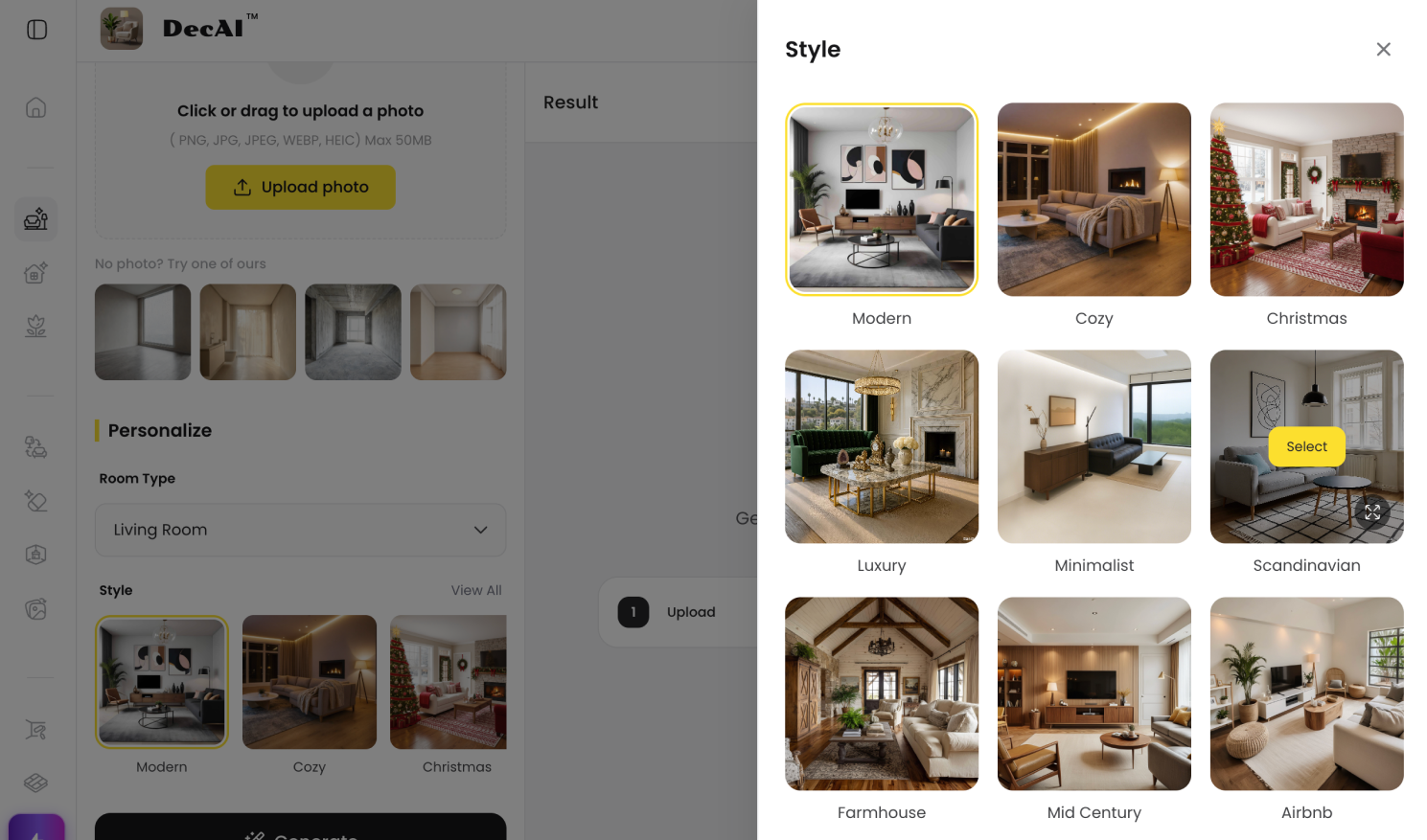
With DecAI™, you can quickly explore over 30 bedroom design styles within minutes or seconds and decide on the best fit.
Step 4: use a planner such as Floorplanner to test the layout.
This is where the design becomes real. Check the bed size, walking paths, drawer clearance, closet access, and nightstand placement.
Step 5: refine the design in 3D.
Use Homestyler, HomeByMe, Live Home 3D, or Planner 5D if you want a more realistic visual. This is the stage where you can test materials, lighting, wall color, rug placement, and decor.
Step 6: create your shopping and decorating plan.
Only buy after the layout works. A beautiful bedroom design is not only about style. It is about proportion, comfort, storage, lighting, and movement.
FAQs
1.What is the best bedroom design tool for beginners?
DecAI™ is one of the best starting tools for beginners because it can generate bedroom redesign ideas from a real room photo. If you need measured layout planning, Planner 5D or Floorplanner may be better.
2.Can I design my bedroom online for free?
Yes. Many bedroom design tools offer free plans, free credits, or limited free access. DecAI™, for example, offers a Free Forever plan that lets you explore its core features at no cost, so you can see whether it meets your needs before upgrading to a paid plan.
3.What is the easiest bedroom design app to use?
AI tools are usually the easiest because you can upload a photo and generate ideas quickly. DecAI™ is completely one of that type and also allows a completely new beginner to visualize their room ideas with just a few clicks, all without any design experience or degree.
4.Are AI bedroom design tools accurate?
Yes. AI bedroom design tools are generally accurate enough for visualization, inspiration, and early-stage planning. They can realistically generate different bedroom styles, furniture layouts, color palettes, and decor ideas based on your room photo. However, the results are intended as design concepts rather than construction-ready plans.
5.What is the best 3D bedroom planner?
Planner 5D, Homestyler, HomeByMe, RoomSketcher, and Live Home 3D are all strong options. Planner 5D is good for beginners, Homestyler is strong for realistic visuals, and Floorplanner is better if layout accuracy matters most.
6.Can I upload a photo of my bedroom and redesign it?
Yes. Tools like DecAI™ let users work from room photos, so you can visualize all possible bedroom ideas or go over 30 + design styles on your real room photo in the quickest way.
7.Do I need measurements before using a bedroom design tool?
For AI redesign, you can start with photos. For furniture planning, you should measure the room. Measurements help prevent common mistakes, especially with beds, wardrobes, dressers, desks, and storage furniture.
8.Should I use an AI design tool or a 3D room planner?
It depends on your needs and where you are in the design process. If you want to quickly explore ideas, visualize different styles, or decide on the overall design direction, an AI design tool like DecAI™ is the better choice. However, if you're at a later stage and need precise floor plans, room layouts, or accurate measurements, a 3D room planner is more suitable.
In many cases, the best approach is to use both: start with an AI design tool to generate and refine ideas, then use a 3D room planner to finalize the layout and dimensions before bringing your design to life.
--------------------------------------
If you believe that any material on this site infringes your intellectual property rights, please contact the author at decaiwebteam@outlook.com with details of your claim.
Redesign any home interior, exterior & garden in seconds
Share this Post:
'%3e%3cpath%20d='M17.9995%2035.999C17.0317%2035.999%2016.0619%2035.9219%2015.1161%2035.7696C10.9414%2035.0973%207.11524%2032.9513%204.34408%2029.7273C1.54287%2026.4683%200%2022.3035%200%2017.9995C0%208.07403%208.07503%200%2017.9995%200C27.924%200%2036%208.07503%2036%2017.9995C36%2022.3696%2034.4151%2026.5835%2031.5357%2029.8646C28.6844%2033.1156%2024.7671%2035.2326%2020.5052%2035.8267C19.6806%2035.9419%2018.8371%2036%2017.9995%2036V35.999ZM17.9995%201.20123C8.73726%201.20123%201.20224%208.73626%201.20224%2017.9985C1.20224%2026.2919%207.13427%2033.2659%2015.3075%2034.5814C16.9546%2034.8469%2018.6808%2034.8659%2020.3389%2034.6345C28.5812%2033.4863%2034.7968%2026.334%2034.7968%2017.9985C34.7968%208.73626%2027.2617%201.20123%2017.9985%201.20123H17.9995Z'%20fill='%23FF0209'/%3e%3cpath%20d='M29.0557%2014.3621C28.9184%2013.0276%2028.6208%2011.5539%2027.5268%2010.7784C26.6782%2010.1773%2025.5642%2010.1553%2024.5242%2010.1563C22.3251%2010.1583%2020.126%2010.1603%2017.9269%2010.1623C15.812%2010.1643%2013.6971%2010.1663%2011.5821%2010.1683C10.6985%2010.1683%209.8399%2010.1002%209.01937%2010.4819C8.31406%2010.8105%207.76303%2011.4347%207.43241%2012.1289C6.97156%2013.0957%206.87438%2014.1898%206.81927%2015.2588C6.71708%2017.2044%206.7281%2019.156%206.85133%2021.0996C6.9405%2022.5193%207.16792%2024.0872%208.26496%2024.9919C9.23777%2025.7934%2010.6103%2025.8325%2011.8707%2025.8335C15.8741%2025.8365%2019.8776%2025.8395%2023.881%2025.8435C24.394%2025.8435%2024.93%2025.8345%2025.453%2025.7774C26.4829%2025.6661%2027.4637%2025.3716%2028.1249%2024.6092C28.7922%2023.8407%2028.9635%2022.7698%2029.0657%2021.7569C29.3121%2019.3003%2029.3091%2016.8177%2029.0557%2014.3621ZM15.6116%2021.4453V14.5545L21.5797%2017.9999L15.6116%2021.4453Z'%20fill='%23FF0209'/%3e%3c/g%3e%3cdefs%3e%3cclipPath%20id='clip0_13816_41422'%3e%3crect%20width='36'%20height='36'%20fill='white'/%3e%3c/clipPath%3e%3c/defs%3e%3c/svg%3e)
'%3e%3cpath%20d='M17.9995%2036C17.0327%2036%2016.0619%2035.9229%2015.1161%2035.7696C10.9414%2035.0973%207.11524%2032.9513%204.34408%2029.7273C1.54287%2026.4683%200%2022.3035%200%2017.9995C0%208.07403%208.07503%200%2017.9995%200C27.924%200%2036%208.07503%2036%2017.9995C36%2022.3696%2034.4151%2026.5835%2031.5357%2029.8646C28.6844%2033.1156%2024.7671%2035.2326%2020.5052%2035.8267C19.6806%2035.9419%2018.8371%2036%2017.9995%2036ZM17.9995%201.20224C8.73726%201.20224%201.20224%208.73726%201.20224%2017.9995C1.20224%2026.2919%207.13427%2033.2669%2015.3075%2034.5824C16.9556%2034.8479%2018.6808%2034.8669%2020.3389%2034.6355C28.5812%2033.4873%2034.7968%2026.335%2034.7968%2017.9995C34.7968%208.73726%2027.2617%201.20224%2017.9985%201.20224H17.9995Z'%20fill='url(%23paint0_linear_13816_41436)'/%3e%3cpath%20d='M23.4463%207.55469H12.549C9.53841%207.55469%207.08984%2010.0032%207.08984%2013.0138V22.9834C7.08984%2025.994%209.53841%2028.4426%2012.549%2028.4426H23.4463C26.4569%2028.4426%2028.9054%2025.994%2028.9054%2022.9834V13.0138C28.9054%2010.0032%2026.4569%207.55469%2023.4463%207.55469ZM9.01543%2013.0138C9.01543%2011.0652%2010.6004%209.48027%2012.549%209.48027H23.4463C25.3949%209.48027%2026.9799%2011.0652%2026.9799%2013.0138V22.9834C26.9799%2024.932%2025.3949%2026.517%2023.4463%2026.517H12.549C10.6004%2026.517%209.01543%2024.932%209.01543%2022.9834V13.0138Z'%20fill='url(%23paint1_linear_13816_41436)'/%3e%3cpath%20d='M17.9964%2023.0749C20.7966%2023.0749%2023.0749%2020.7966%2023.0749%2017.9964C23.0749%2015.1962%2020.7966%2012.918%2017.9964%2012.918C15.1962%2012.918%2012.918%2015.1962%2012.918%2017.9964C12.918%2020.7966%2015.1962%2023.0749%2017.9964%2023.0749ZM17.9964%2014.8446C19.7346%2014.8446%2021.1483%2016.2582%2021.1483%2017.9964C21.1483%2019.7347%2019.7346%2021.1483%2017.9964%2021.1483C16.2582%2021.1483%2014.8446%2019.7347%2014.8446%2017.9964C14.8446%2016.2582%2016.2582%2014.8446%2017.9964%2014.8446Z'%20fill='url(%23paint2_linear_13816_41436)'/%3e%3cpath%20d='M23.5482%2013.741C24.3026%2013.741%2024.9168%2013.1269%2024.9168%2012.3725C24.9168%2011.618%2024.3026%2011.0039%2023.5482%2011.0039C22.7938%2011.0039%2022.1797%2011.618%2022.1797%2012.3725C22.1797%2013.1269%2022.7938%2013.741%2023.5482%2013.741Z'%20fill='url(%23paint3_linear_13816_41436)'/%3e%3c/g%3e%3cdefs%3e%3clinearGradient%20id='paint0_linear_13816_41436'%20x1='5.27482'%20y1='30.7312'%20x2='30.7242'%20y2='5.28083'%20gradientUnits='userSpaceOnUse'%3e%3cstop%20stop-color='%23FAAD4F'/%3e%3cstop%20offset='0.35'%20stop-color='%23DD2A7B'/%3e%3cstop%20offset='0.62'%20stop-color='%239537B0'/%3e%3cstop%20offset='1'%20stop-color='%23515BD4'/%3e%3c/linearGradient%3e%3clinearGradient%20id='paint1_linear_13816_41436'%20x1='8.92225'%20y1='27.074'%20x2='27.073'%20y2='8.92324'%20gradientUnits='userSpaceOnUse'%3e%3cstop%20stop-color='%23FAAD4F'/%3e%3cstop%20offset='0.35'%20stop-color='%23DD2A7B'/%3e%3cstop%20offset='0.62'%20stop-color='%239537B0'/%3e%3cstop%20offset='1'%20stop-color='%23515BD4'/%3e%3c/linearGradient%3e%3clinearGradient%20id='paint2_linear_13816_41436'%20x1='14.4077'%20y1='21.5861'%20x2='21.5861'%20y2='14.4077'%20gradientUnits='userSpaceOnUse'%3e%3cstop%20stop-color='%23FAAD4F'/%3e%3cstop%20offset='0.35'%20stop-color='%23DD2A7B'/%3e%3cstop%20offset='0.62'%20stop-color='%239537B0'/%3e%3cstop%20offset='1'%20stop-color='%23515BD4'/%3e%3c/linearGradient%3e%3clinearGradient%20id='paint3_linear_13816_41436'%20x1='22.5814'%20y1='13.3393'%20x2='24.515'%20y2='11.4057'%20gradientUnits='userSpaceOnUse'%3e%3cstop%20stop-color='%23FAAD4F'/%3e%3cstop%20offset='0.35'%20stop-color='%23DD2A7B'/%3e%3cstop%20offset='0.62'%20stop-color='%239537B0'/%3e%3cstop%20offset='1'%20stop-color='%23515BD4'/%3e%3c/linearGradient%3e%3cclipPath%20id='clip0_13816_41436'%3e%3crect%20width='36'%20height='36'%20fill='white'/%3e%3c/clipPath%3e%3c/defs%3e%3c/svg%3e)
'%3e%3cpath%20d='M17.9995%2035.999C17.0317%2035.999%2016.0619%2035.9219%2015.1161%2035.7696C10.9414%2035.0973%207.11524%2032.9513%204.34408%2029.7273C1.54287%2026.4683%200%2022.3035%200%2017.9995C0%208.07403%208.07502%200%2017.9995%200C27.924%200%2036%208.07503%2036%2017.9995C36%2022.3696%2034.415%2026.5835%2031.5357%2029.8646C28.6844%2033.1156%2024.7671%2035.2326%2020.5052%2035.8267C19.6806%2035.9419%2018.8371%2036%2017.9995%2036V35.999ZM17.9995%201.20123C8.73725%201.20123%201.20224%208.73626%201.20224%2017.9985C1.20224%2026.2919%207.13427%2033.2659%2015.3075%2034.5814C16.9545%2034.8469%2018.6808%2034.8659%2020.3388%2034.6345C28.5812%2033.4863%2034.7968%2026.334%2034.7968%2017.9985C34.7968%208.73626%2027.2617%201.20123%2017.9985%201.20123H17.9995Z'%20fill='%23007EBB'/%3e%3cpath%20d='M9.06639%2012.124C8.60253%2011.6932%208.37109%2011.1602%208.37109%2010.526C8.37109%209.89184%208.60253%209.33481%209.06639%208.90401C9.53026%208.47321%2010.1274%208.25781%2010.8587%208.25781C11.5901%208.25781%2012.1642%208.47321%2012.627%208.90401C13.0909%209.33481%2013.3223%209.87581%2013.3223%2010.526C13.3223%2011.1762%2013.0909%2011.6932%2012.627%2012.124C12.1631%2012.5548%2011.5741%2012.7702%2010.8587%2012.7702C10.1434%2012.7702%209.52926%2012.5548%209.06639%2012.124ZM12.9326%2014.5946V27.7962H8.76182V14.5946H12.9326Z'%20fill='%23007EBB'/%3e%3cpath%20d='M26.8196%2015.9006C27.7283%2016.8875%2028.1832%2018.243%2028.1832%2019.9682V27.5663H24.2208V20.5042C24.2208%2019.6346%2023.9954%2018.9583%2023.5445%2018.4764C23.0937%2017.9945%2022.4876%2017.7541%2021.7262%2017.7541C20.9647%2017.7541%2020.3586%2017.9955%2019.9078%2018.4764C19.4569%2018.9583%2019.2315%2019.6346%2019.2315%2020.5042V27.5663H15.2461V14.5611H19.2315V16.2863C19.6353%2015.7113%2020.1793%2015.2574%2020.8636%2014.9228C21.5468%2014.5892%2022.3163%2014.4219%2023.1708%2014.4219C24.6937%2014.4219%2025.9099%2014.9158%2026.8186%2015.9016L26.8196%2015.9006Z'%20fill='%23007EBB'/%3e%3c/g%3e%3cdefs%3e%3cclipPath%20id='clip0_13816_41425'%3e%3crect%20width='36'%20height='36'%20fill='white'/%3e%3c/clipPath%3e%3c/defs%3e%3c/svg%3e)
'%3e%3cpath%20d='M18%2035.999C17.0322%2035.999%2016.0623%2035.9219%2015.1166%2035.7696C10.9417%2035.0973%207.11544%2032.9513%204.3442%2029.7273C1.54291%2026.4683%200%2022.3035%200%2017.9995C0%208.07403%208.07526%200%2018%200C27.9248%200%2036%208.07503%2036%2017.9995C36%2022.3696%2034.415%2026.5835%2031.5356%2029.8646C28.6842%2033.1156%2024.7668%2035.2326%2020.5047%2035.8267C19.6802%2035.9419%2018.8366%2036%2017.999%2036L18%2035.999ZM18%201.20123C8.73751%201.20123%201.20227%208.73626%201.20227%2017.9985C1.20227%2026.2919%207.13448%2033.2659%2015.3079%2034.5814C16.955%2034.8469%2018.6813%2034.8659%2020.3394%2034.6345C28.582%2033.4863%2034.7977%2026.334%2034.7977%2017.9985C34.7977%208.73626%2027.2625%201.20123%2018%201.20123Z'%20fill='black'/%3e%3cpath%20d='M7%208.09163H13.5067L19.521%2016.1816L27.0073%207.90625L28.786%207.93715L20.4078%2017.3454L29%2028.901H22.4959L16.8193%2021.362L9.8847%2029.0864H8.13428L15.9583%2020.26L7%208.09163ZM12.8931%209.28633H9.45676L23.2048%2027.6754H26.5793L12.8931%209.28633Z'%20fill='black'/%3e%3c/g%3e%3cdefs%3e%3cclipPath%20id='clip0_13886_43848'%3e%3crect%20width='36'%20height='36'%20fill='white'/%3e%3c/clipPath%3e%3c/defs%3e%3c/svg%3e)
'%3e%3cpath%20d='M17.9995%2035.999C17.0327%2035.999%2016.0619%2035.9219%2015.1161%2035.7686C10.9414%2035.0963%207.11524%2032.9503%204.34408%2029.7263C1.54287%2026.4673%200%2022.3025%200%2017.9995C0%208.07403%208.07503%200%2017.9995%200C27.924%200%2036%208.07503%2036%2017.9995C36%2022.3696%2034.415%2026.5835%2031.5357%2029.8646C28.6844%2033.1156%2024.7671%2035.2326%2020.5052%2035.8267C19.6806%2035.9419%2018.8371%2036%2017.9995%2036V35.999ZM17.9995%201.20123C8.73726%201.20123%201.20224%208.73626%201.20224%2017.9985C1.20224%2026.2909%207.13428%2033.2659%2015.3075%2034.5814C16.9556%2034.8469%2018.6808%2034.8659%2020.3389%2034.6345C28.5812%2033.4863%2034.7968%2026.334%2034.7968%2017.9985C34.7968%208.73626%2027.2617%201.20123%2017.9985%201.20123H17.9995Z'%20fill='%231877F7'/%3e%3cpath%20d='M20.5337%2014.9635V18.7536H25.2225L24.4801%2023.8601H20.5337V35.624C19.7423%2035.7342%2018.9328%2035.7913%2018.1112%2035.7913C17.1625%2035.7913%2016.2317%2035.7151%2015.324%2035.5689V23.8601H11V18.7536H15.324V14.1169C15.324%2011.2396%2017.6564%208.90625%2020.5347%208.90625V8.90926C20.5428%208.90926%2020.5508%208.90625%2020.5588%208.90625H25.2235V13.3215H22.1758C21.2691%2013.3215%2020.5347%2014.0558%2020.5347%2014.9625L20.5337%2014.9635Z'%20fill='%231877F7'/%3e%3c/g%3e%3cdefs%3e%3cclipPath%20id='clip0_13816_41433'%3e%3crect%20width='36'%20height='36'%20fill='white'/%3e%3c/clipPath%3e%3c/defs%3e%3c/svg%3e)
'%3e%3cpath%20d='M17.9995%2035.999C17.0327%2035.999%2016.0619%2035.9219%2015.1161%2035.7686C10.9414%2035.0963%207.11524%2032.9503%204.34408%2029.7263C1.54287%2026.4673%200%2022.3025%200%2017.9995C0%208.07403%208.07503%200%2017.9995%200C27.924%200%2036%208.07503%2036%2017.9995C36%2022.3696%2034.415%2026.5835%2031.5357%2029.8646C28.6844%2033.1156%2024.7671%2035.2326%2020.5052%2035.8267C19.6806%2035.9419%2018.8371%2036%2017.9995%2036V35.999ZM17.9995%201.20123C8.73726%201.20123%201.20224%208.73626%201.20224%2017.9985C1.20224%2026.2909%207.13428%2033.2659%2015.3075%2034.5814C16.9556%2034.8469%2018.6808%2034.8659%2020.3389%2034.6345C28.5812%2033.4863%2034.7968%2026.334%2034.7968%2017.9985C34.7968%208.73626%2027.2617%201.20123%2017.9985%201.20123H17.9995Z'%20fill='%232A91F7'/%3e%3cg%20clip-path='url(%23clip1_13816_41442)'%3e%3cpath%20d='M16.3345%2018.834C16.6924%2019.3124%2017.149%2019.7083%2017.6733%2019.9947C18.1976%2020.2812%2018.7774%2020.4516%2019.3734%2020.4942C19.9693%2020.5369%2020.5675%2020.4509%2021.1273%2020.2421C21.6871%2020.0333%2022.1954%2019.7065%2022.6178%2019.284L25.1178%2016.784C25.8768%2015.9981%2026.2968%2014.9456%2026.2873%2013.8531C26.2778%2012.7606%2025.8396%2011.7156%2025.0671%2010.943C24.2946%2010.1705%2023.2495%209.73231%2022.157%209.72281C21.0645%209.71332%2020.012%2010.1333%2019.2262%2010.8923L17.7928%2012.3173M19.6678%2017.1673C19.3099%2016.6889%2018.8533%2016.293%2018.329%2016.0065C17.8047%2015.7201%2017.2249%2015.5497%2016.6289%2015.507C16.033%2015.4643%2015.4348%2015.5503%2014.875%2015.7592C14.3152%2015.968%2013.8069%2016.2947%2013.3845%2016.7173L10.8845%2019.2173C10.1255%2020.0031%209.70551%2021.0557%209.715%2022.1481C9.72449%2023.2406%2010.1627%2024.2857%2010.9352%2025.0582C11.7078%2025.8307%2012.7528%2026.269%2013.8453%2026.2784C14.9378%2026.2879%2015.9903%2025.868%2016.7761%2025.109L18.2011%2023.684'%20stroke='%232A91F7'%20stroke-width='1.66667'%20stroke-linecap='round'%20stroke-linejoin='round'/%3e%3c/g%3e%3c/g%3e%3cdefs%3e%3cclipPath%20id='clip0_13816_41442'%3e%3crect%20width='36'%20height='36'%20fill='white'/%3e%3c/clipPath%3e%3cclipPath%20id='clip1_13816_41442'%3e%3crect%20width='20'%20height='20'%20fill='white'%20transform='translate(8%208)'/%3e%3c/clipPath%3e%3c/defs%3e%3c/svg%3e)
Redesign any home interior, exterior & garden in seconds