

11 Tested Free Online Blueprint Makers to Create Floor Plans Faster & Easier in 2026


Creating a floor plan used to require graph paper, CAD expertise, or hiring a professional before you even knew exactly what you wanted. In 2026, that first planning stage is completely changed. With the right tools, you can sketch a room online, scan a space with your phone, experiment with furniture layouts, generate 3D previews, and share designs with your team—all within minutes.
That's where free online blueprint makers come in.
The challenge, however, is choosing the right tool. Some are designed for simple floor planning, while others focus on 3D visualization, construction drawings, collaboration, or AI-powered design generation. With so many options available, finding the best fit for your project can quickly become overwhelming.
To save you time, we've fully tested and handpicked 11 of the best free online blueprint makers in 2026. Whether you're creating floor plans, house layouts, construction drawings, architectural blueprints, or 2D and 3D visualizations, you'll find a tool that fits your workflow. From beginner-friendly drag-and-drop planners to advanced AI-powered layout generators, this guide will help you choose the right solution and start designing faster.
Design any room, shop or space with DecAI in less 30 seconds! It's free!
What Is an Online Blueprint Maker?
An online blueprint maker is a web-based tool that allows you to create floor plans, house layouts, construction drawings, and architectural blueprints directly from your browser—without installing complex design software.
Depending on the tool, you can draw rooms, add walls, doors, windows, furniture, measurements, and other structural elements using drag-and-drop editors or AI-assisted features. Many modern blueprint makers also support 2D floor plans, 3D visualizations, collaboration, and real-time sharing, making it easier to plan and communicate design ideas.
Today, online blueprint makers are used by homeowners, remodelers, real estate professionals, interior designers, architects, contractors, and property developers to quickly visualize spaces before construction or renovation begins.
The biggest advantage is accessibility. Instead of spending weeks learning professional CAD software, users can create, edit, and share blueprints online in just a few hours—or even minutes.

What Makes a Great Free Online Blueprint Maker?
Before jumping into the tool list, it's worth understanding what actually makes a blueprint maker useful. While many tools claim to help you create floor plans and blueprints, the best ones make the process both accurate and easy—even if you have no design experience.
A good blueprint maker should allow you to draw walls quickly, adjust room dimensions accurately, and keep everything aligned with a snap-to-grid system. It should also provide a solid library of furniture, doors, windows, and other architectural elements so you can create realistic layouts without starting from scratch.
Most importantly, modern blueprint tools should let you switch between 2D and 3D views. A floor plan may look perfect on paper, but a 3D preview helps you understand how the space will actually feel and function in real life.
To help you to evaluate and choose the right online blueprint creators for your project, here are 5 key criterias you can follow:
- Drawing accuracy - make sure the tool you choose allows you to precisely drawing the walls, floor plans and more. Accurate measurements are essential for creating blueprints that can be used for planning or construction.
- Ease of use - The best tools help beginners create professional-looking blueprints without requiring CAD experience or a steep learning curve.
- 3D preview quality - A good 3D view makes it easier to spot layout issues, test ideas, and visualize the finished space before making real-world changes.
- Export options - Flexible export formats make it easier to share plans with clients, contractors, or team members.
- Free trial or plan - Some tools offer genuinely useful free plans, while others lock most features behind a paywall. Always choose the one with free trial or pricing plan, so you can fully test its features before doing any purchase, avoid unnecessary payment.
In short, the highest-rated blueprint maker isn't necessarily the best one for you. The right choice is the tool that best matches your project goals, skill level, and workflow.
11 Best Free Online Blutprint Markers to Create Floor Plans Faster & Easier
A quick overview of these 11 free online blueprint creators:
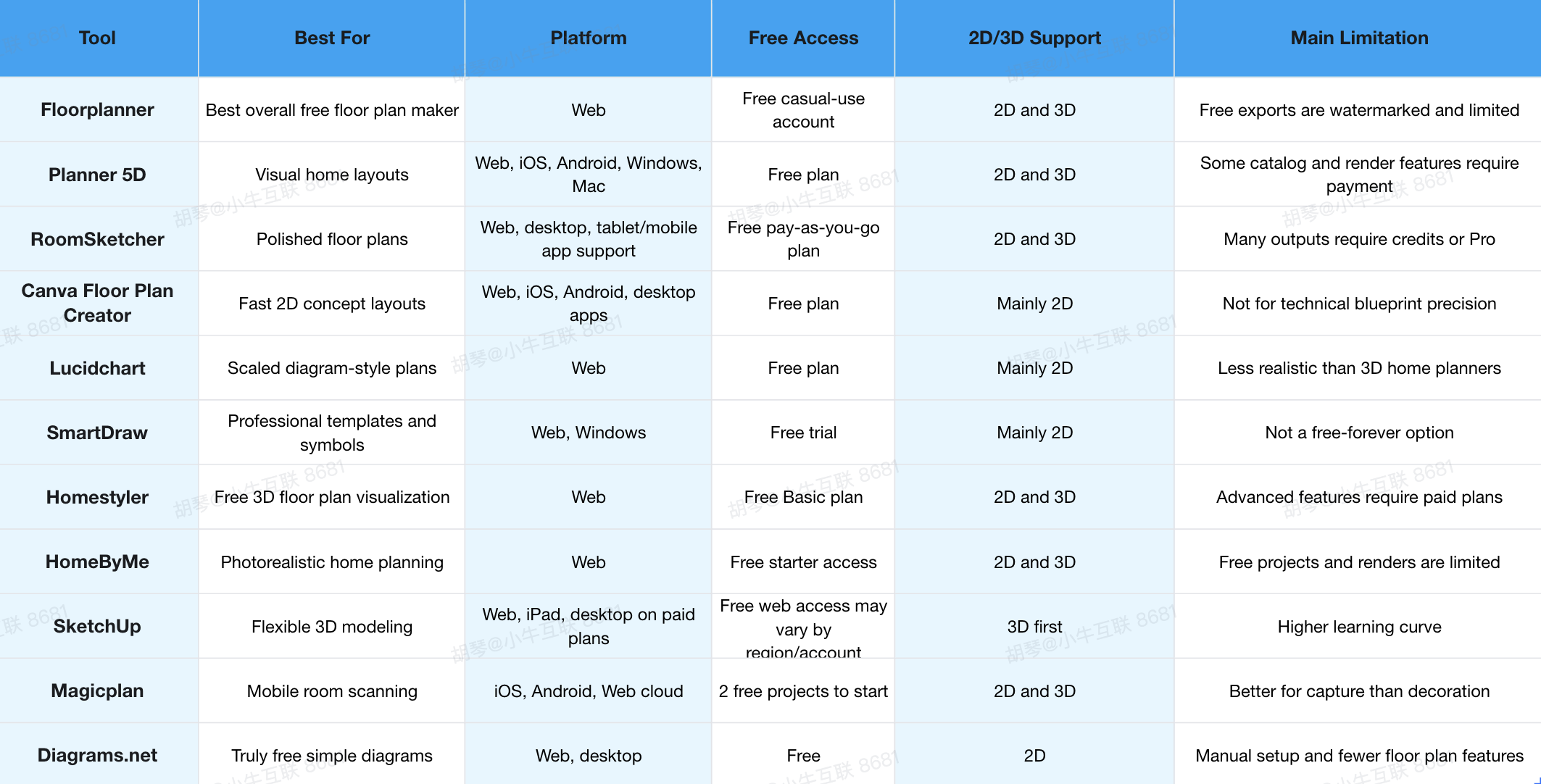
1. Floorplanner - Best Overall Free Online Floor Plan Maker
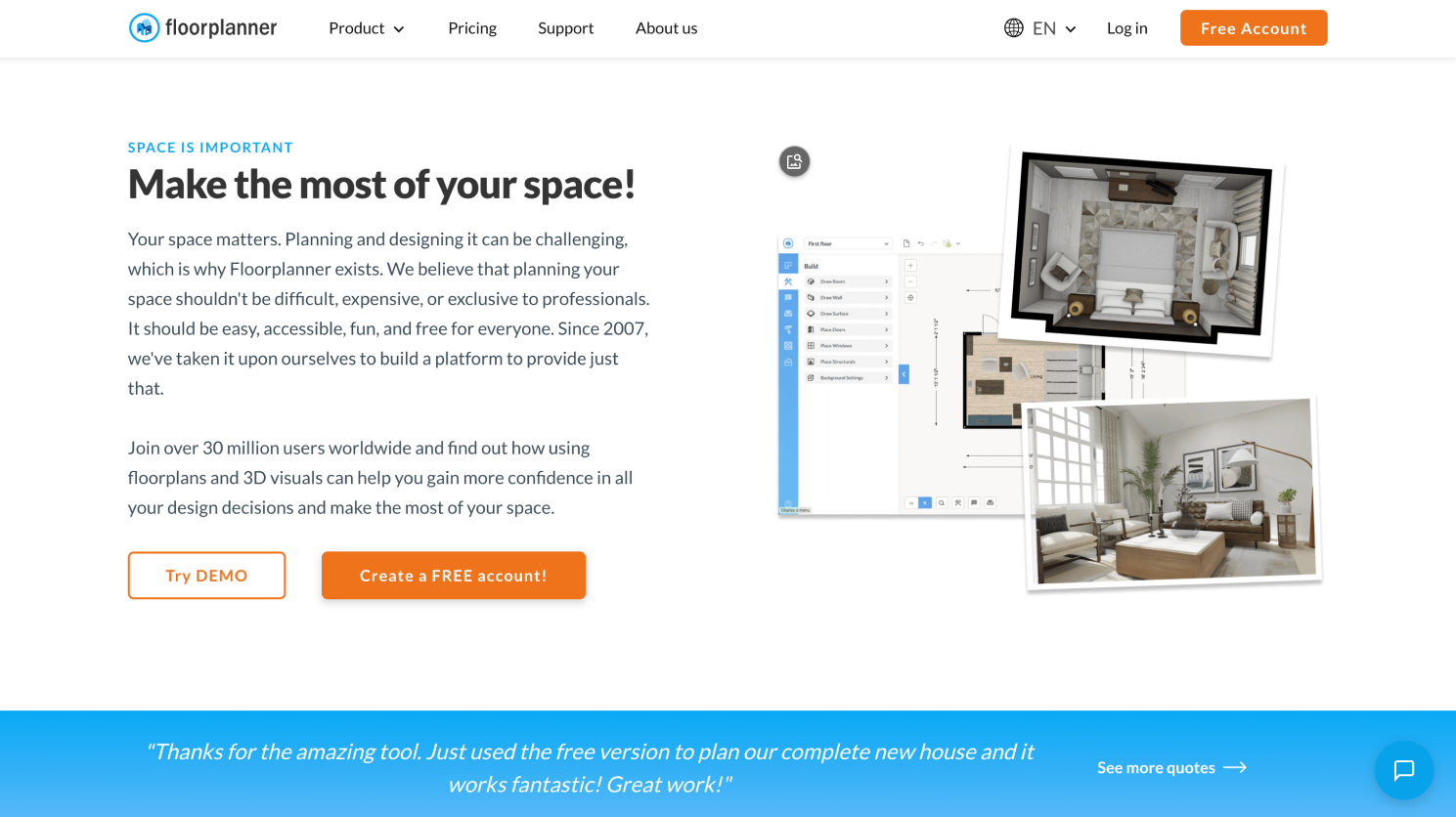
Platform: Web
Pricing: Free account available for casual use. Floorplanner states that users can create up to 5 free projects, with limits on floors, designs, and SD watermarked exports.
Floorplanner is one of the strongest choices if you want a practical balance between easy drawing and visual feedback. You can create a 2D layout, add furniture and finishes, then view the space in 3D without installing desktop software. For homeowners, renters, and DIY renovators, that is often enough to understand whether a room layout actually works.
The biggest reason Floorplanner stands out is its low friction. You do not need to think like an architect to start building walls and arranging rooms. It feels closer to a guided planning workspace than a technical CAD program, which makes it a good first stop for most people searching for free online blueprint makers.
Why to choose:
- Good balance of 2D drawing and 3D preview.
- Free casual-use projects are useful for early planning.
- Beginner-friendly interface for home layouts.
- Helpful for testing furniture placement and room flow.
- Works directly in the browser.
Reasons to avoid:
- Free exports are limited and watermarked.
- High-resolution visuals and advanced project features require credits.
- Not designed for permit-ready technical drawings.
Choose Floorplanner if you want the best all-around starting point for personal floor planning.
2. Planner 5D - Best for 2D and 3D Home Layouts

Platform: Web, iOS, Android, Windows, Mac
Pricing: Free plan available.
Planner 5D is a visual home design tool that lets users create layouts in 2D and then explore them in 3D. It is especially useful if your goal is not just to draw walls, but to imagine how the room will look once furniture, materials, and decor are added. The experience is more home-design oriented than diagram-oriented.
For beginners, Planner 5D feels approachable because it lets you start with layout basics and gradually add detail. You can use it for room planning, apartment layouts, small home concepts, or early renovation ideas. It is not the most technical tool on this list, but it is one of the easier ways to move from blank layout to visual concept.
Why to choose:
- Works across many devices.
- Strong for 2D-to-3D home visualization.
- Good for furniture placement and interior layout planning.
- Easier than traditional CAD for beginners.
- Useful for homeowners who care about how the space will feel.
Reasons to avoid:
- Some furniture, rendering, and premium features may require payment.
- Large 3D projects can feel heavier than simple 2D tools.
- Not ideal if you only need a clean technical diagram.
Choose Planner 5D if you want floor planning and interior visualization in one workflow.
3. RoomSketcher - Best for Polished Floor Plans and Real Estate Use

Platform: RoomSketcher App, with support across common desktop and mobile/tablet workflows
Pricing: Free pay-as-you-go plan available with limited features.
RoomSketcher is a better fit when you need floor plans that look polished enough to show someone else. It is popular with homeowners, real estate professionals, remodelers, and users who need presentable 2D or 3D plans rather than rough sketches. The free plan is useful for trying the app, but many of the stronger floor plan outputs sit behind credits or subscriptions.
The tool is particularly helpful if you care about measurements, room size, total area, branding, print-to-scale options, or clean visual presentation. Compared with more casual blueprint makers, RoomSketcher feels closer to a production tool. That makes it less “free and unlimited,” but more reliable when the final output matters.
Why to choose:
- Professional-looking 2D and 3D floor plan options.
- Good fit for real estate listings, renovation briefs, and client-facing layouts.
- Supports measurements and area calculations.
- Offers ordered floor plan services if you want help redrawing.
- Better presentation quality than many free casual tools.
Reasons to avoid:
- The free plan is limited.
- Credits are needed for many outputs.
- Not the cheapest choice if you only need one quick sketch.
Choose RoomSketcher if you need a clean, shareable floor plan rather than a quick private draft.
4. Canva Floor Plan Creator - Best for Quick 2D Concept Layouts
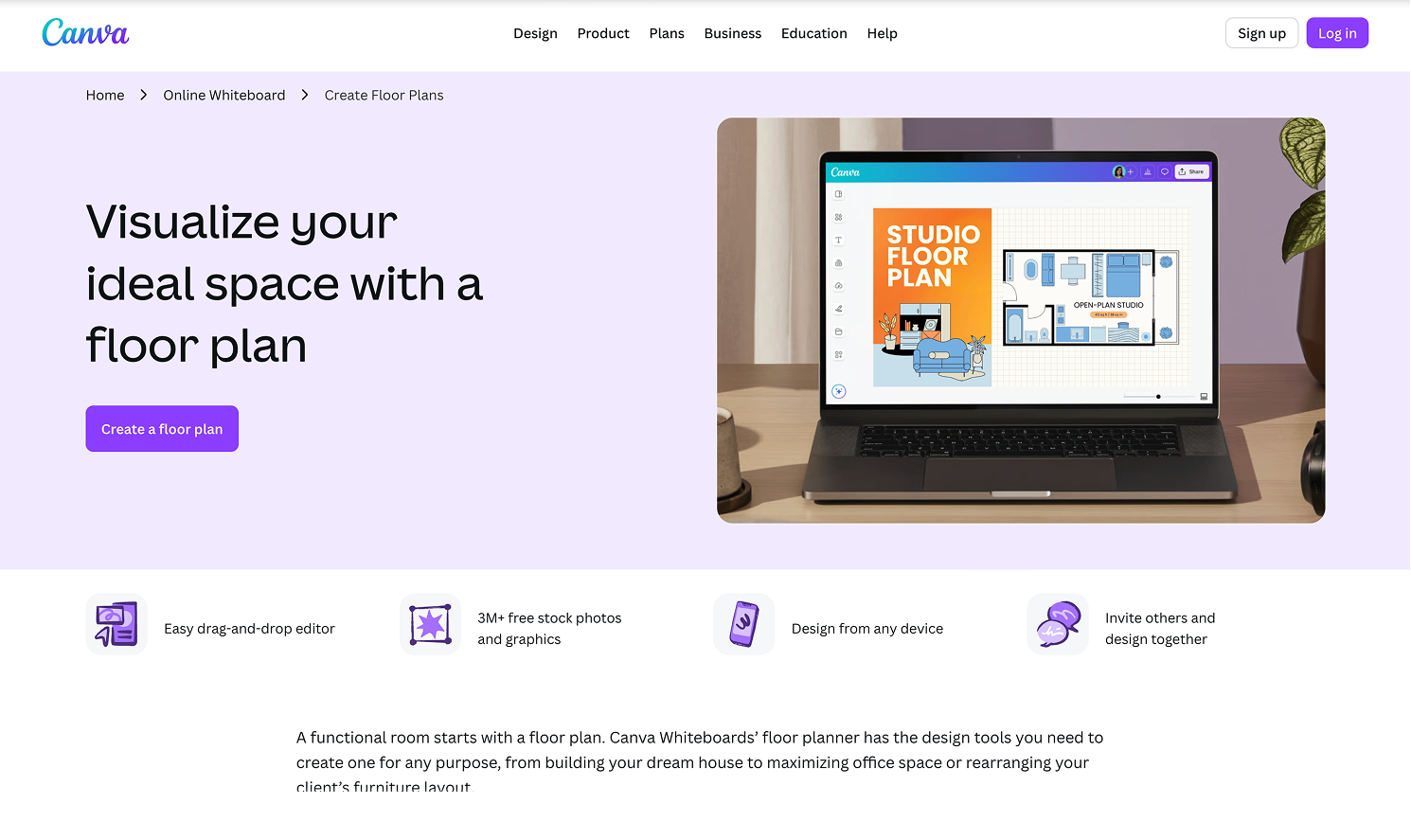
Platform: Web, iOS, Android, desktop apps
Pricing: Free plan available.
Canva’s floor plan creator is not a CAD tool, and that is exactly why some users will like it. It works best for quick 2D room concepts, simple office layouts, class projects, mood boards, and collaborative planning. Canva emphasizes editable templates, drag-and-drop design, an infinite canvas, and easy sharing.
If you want to make a simple floor plan without learning a dedicated planning app, Canva can be surprisingly useful. You can add shapes for walls, doors, windows, furniture, fixtures, labels, notes, and mood board references. It is especially good when the plan is part of a larger presentation or planning document.
Why to choose:
- Very easy for non-designers.
- Good templates for quick starts.
- Strong collaboration and sharing tools.
- Useful when combining a floor plan with notes, colors, and inspiration images.
- Works well for simple home, office, classroom, or event layouts.
Reasons to avoid:
- Not built for precise technical blueprint drafting.
- Scale and measurement control are limited compared with dedicated floor plan tools.
- 3D visualization is not the main use case.
Choose Canva if speed, simplicity, and collaboration matter more than technical precision.
5. Lucidchart - Best for Scaled Diagram-Style Floor Plans

Platform: Web
Pricing: Free plan available.
Lucidchart is a diagramming platform, but its floor plan features make it useful for offices, event spaces, warehouses, retail layouts, and simple home plans. It offers floor plan templates, shape libraries, scale tools, sharing, comments, and presentation mode. That makes it a strong choice when your floor plan needs to live inside a team planning workflow.
Lucidchart is less about photorealistic interiors and more about clear communication. If you need to show traffic flow, desk placement, reception layouts, emergency planning, or facility organization, it can be more practical than a decorative 3D home planner. The scale tools are also helpful when proportion matters.
Why to choose:
- Good floor plan templates and shape libraries.
- Scale tools help maintain proportion.
- Strong collaboration, commenting, and sharing.
- Useful for offices, events, facilities, and operations teams.
- Presentation mode helps explain layout decisions.
Reasons to avoid:
- Not as immersive as 3D home design tools.
- Free plan limits may be restrictive for frequent users.
- Less focused on interior styling and realistic previews.
Choose Lucidchart if your “blueprint” is mainly a clear, collaborative planning diagram.
6. SmartDraw - Best for Blueprint Templates and Professional Symbols

Platform: Web, Windows
Pricing: Free trial available.
SmartDraw is a strong option for users who want floor plan templates, professional symbols, and more structured diagramming than a casual room planner. SmartDraw’s floor plan maker supports built-in scales, metric and imperial options, furniture and fixture graphics, textures, and alignment tools. It is useful for home plans, office layouts, commercial floor plans, landscape planning, evacuation plans, and other scaled diagrams.
Its strength is not playful 3D visualization. Its strength is producing a diagram that looks organized and professional. If your floor plan needs symbols, labels, scale, and a business-ready feel, SmartDraw deserves attention.
Why to choose:
- Strong library of floor plan templates and symbols.
- Useful for residential, commercial, office, and safety layouts.
- Built-in scales help with proportion.
- Good option for users who also need other diagrams.
- More professional-looking than simple whiteboard tools.
Reasons to avoid:
- Not a free-forever tool.
- Less suitable for users who want immersive 3D room previews.
- May be more than a casual DIY user needs.
Design any room, shop or space with DecAI in less 30 seconds! It's free!
Choose SmartDraw if you want structured, symbol-rich floor plans and do not mind moving beyond a free trial.
7. Homestyler - Best Free 3D Floor Plan Visualization
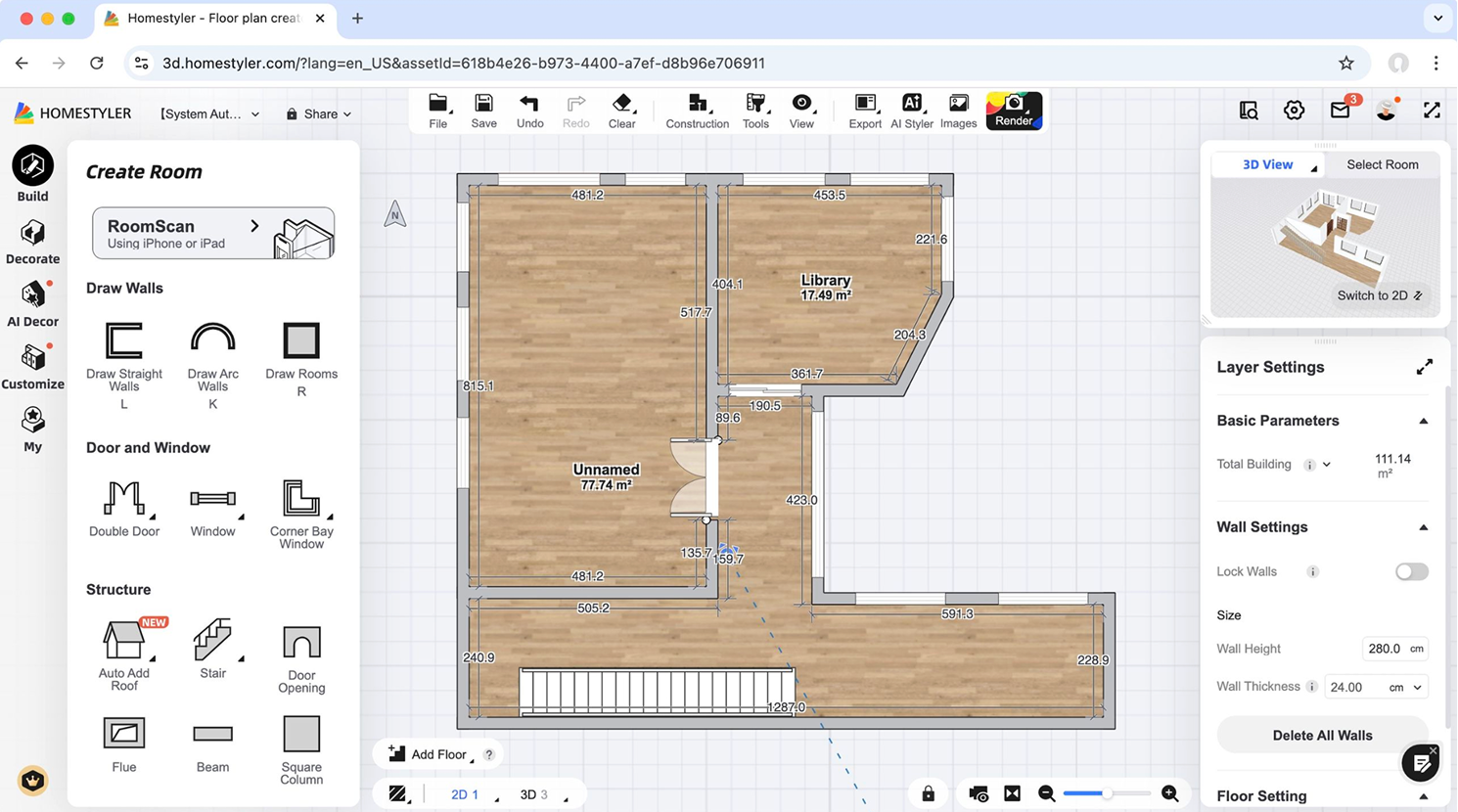
Platform: Web
Pricing: Free Basic plan available.
Homestyler is a good choice when you want your floor plan to become a realistic-looking design scene. Its Basic plan includes a cloud-based 3D floor planner, unlimited 1K rendering, free 3D models and materials, and limited access to AI features. That gives beginners a lot to explore before paying.
This tool is especially useful for people planning interiors, furniture placement, finishes, and room atmosphere. You can draw a layout, furnish the space, test styles, and create visual outputs that are easier for family members, clients, or project partners to understand. It is less about technical blueprints and more about visual confidence.
Why to choose:
- Free cloud-based 3D floor planner.
- Large library of 3D models and materials.
- Good for furniture and finish visualization.
- Useful for interior design concepts.
- Stronger visual output than many basic blueprint tools.
Reasons to avoid:
- Advanced design, rendering, and AI features require paid plans.
- More manual design work than one-click AI tools.
- Not ideal for construction documentation.
Choose Homestyler if you want to see how a layout could actually look in 3D.
8. HomeByMe - Best for Photorealistic Home Planning
Platform: Web
Pricing: Free starter access is available.
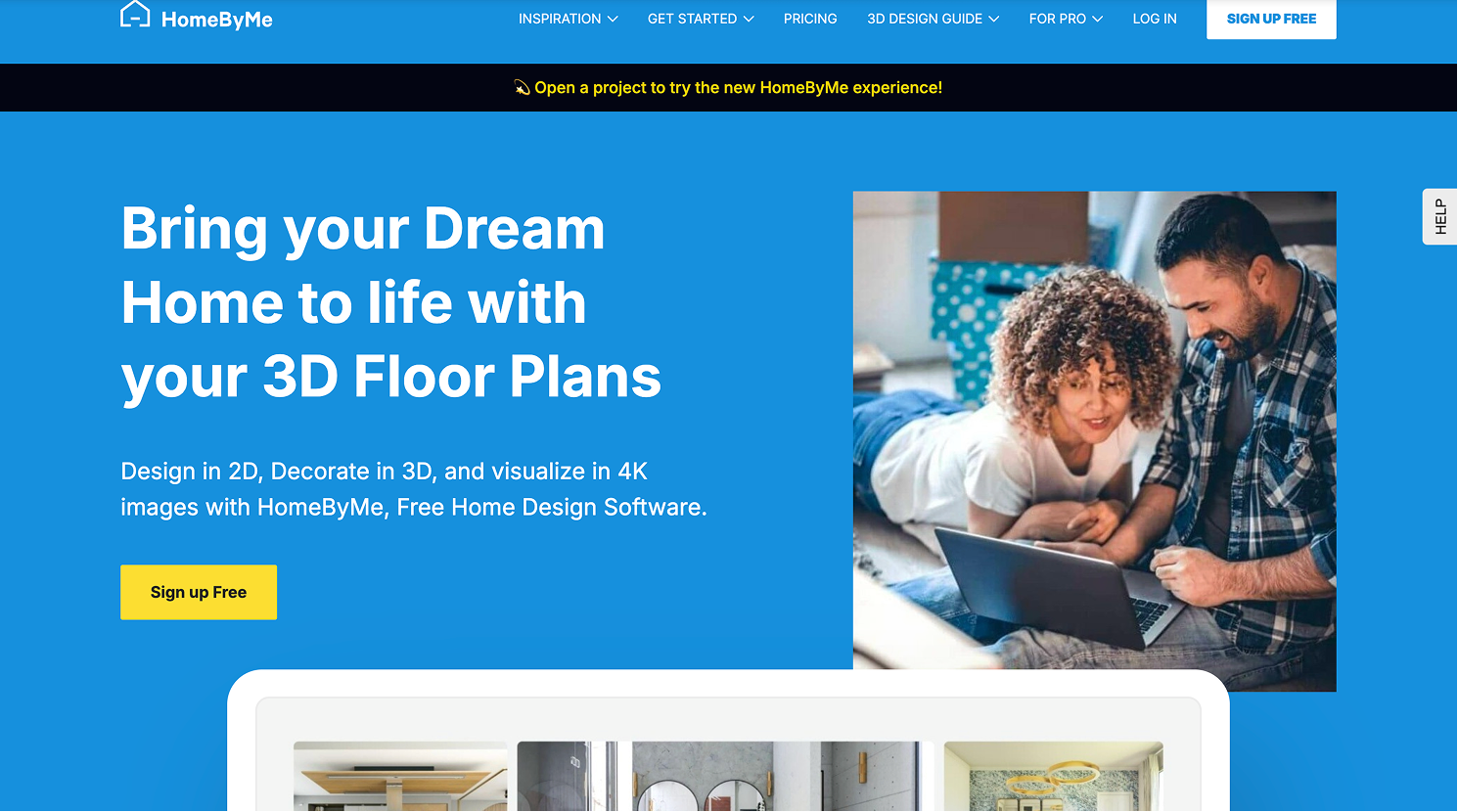
HomeByMe is built around 3D home design and photorealistic visual planning. It is useful when a plain 2D blueprint is not enough and you want to preview furniture, materials, room proportions, and the look of a finished design. For homeowners and DIY renovators, that can make decisions easier before spending money.
The tool is a good fit for visual home planning rather than technical drafting. You can start with a layout, move into 3D, and generate images that help you compare design directions. If you are choosing between open-plan furniture arrangements, kitchen ideas, or bedroom layouts, HomeByMe can make the plan feel more real.
Why to choose:
- Strong visual home planning experience.
- Good for 2D-to-3D layout workflows.
- Helpful for renovation previews and furniture planning.
- Better for presentation than rough sketch tools.
- Useful when design atmosphere matters.
Reasons to avoid:
- Free projects and renders are limited.
- Not the fastest option for a very simple 2D diagram.
- Technical blueprint features are not the main focus.
Choose HomeByMe if realistic home visualization is more important than unlimited free drafting.
9. SketchUp - Best for Flexible 3D Modeling
Platform: Web and iPad on SketchUp Go; desktop modeler on higher paid plans
Pricing: Free web access may vary by account, region, and current product packaging; Public pricing starts at $19.99/month.
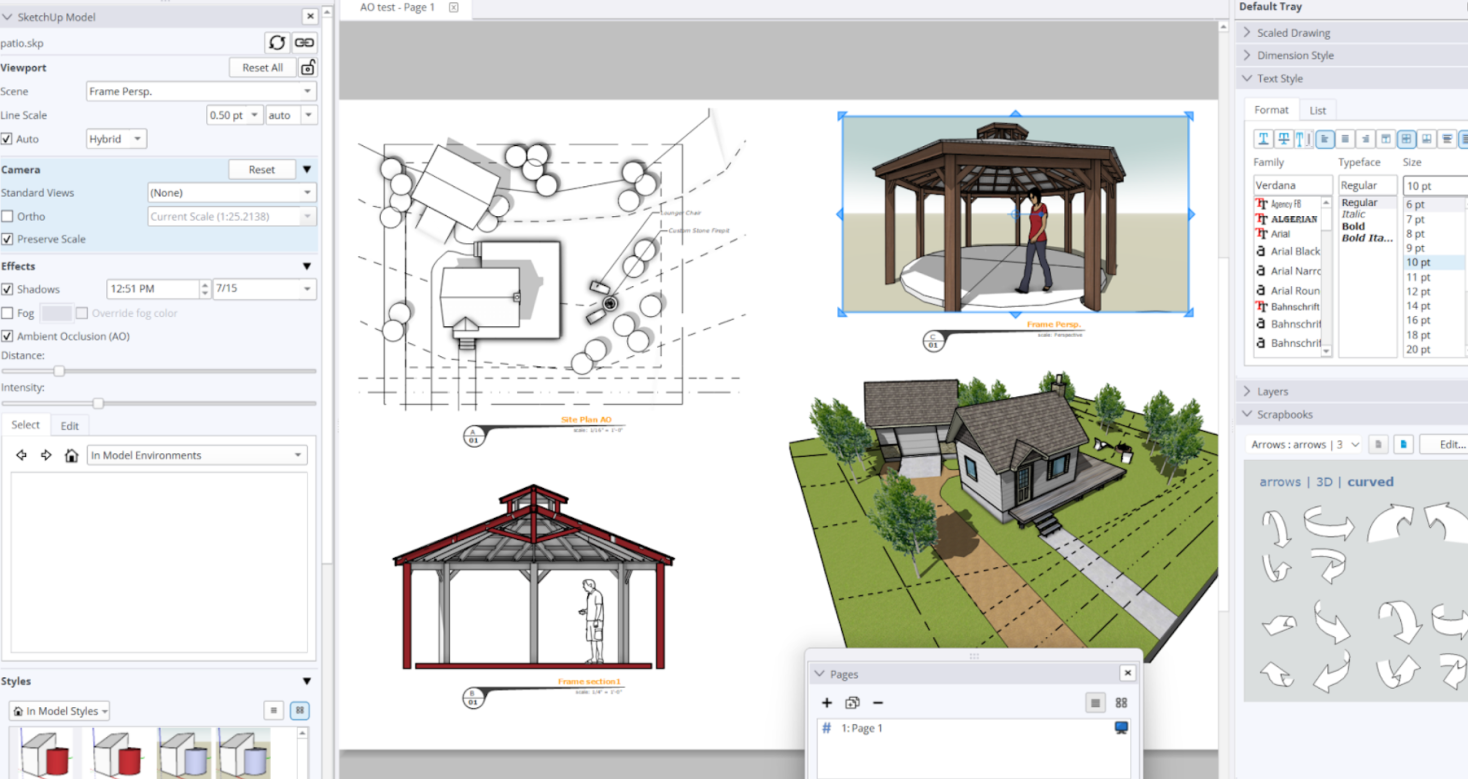
SketchUp is different from most tools in this list. It is a full 3D modeling environment, not a simple drag-and-drop floor plan maker. That makes it powerful for custom forms, furniture, built-ins, outdoor structures, and more detailed spatial thinking. It also means the learning curve is higher.
For floor plans, SketchUp is best when you want flexibility and are willing to learn. It can be overkill for someone who only wants to draw a bedroom layout in 15 minutes. But if you want to model a remodel, a custom studio, a tiny house concept, or a room with unusual geometry, SketchUp gives you more freedom than most template-based planners.
Why to choose:
- Very flexible for 3D modeling.
- Good for custom spaces and unusual layouts.
- Strong ecosystem and learning resources.
- Useful beyond floor plans.
- Better for users who want design control rather than presets.
Reasons to avoid:
- Higher learning curve.
- Paid plans are more expensive than casual floor plan tools.
- Not the fastest option for a basic 2D blueprint.
Choose SketchUp if you want modeling freedom and do not mind learning a more serious 3D tool.
10. Magicplan - Best for Mobile Room Scanning and Measurements
Platform: iOS, Android, Web cloud
Pricing: Magicplan currently promotes 2 free projects to start. Paid plans are project-based, with plan details depending on project volume and account needs.
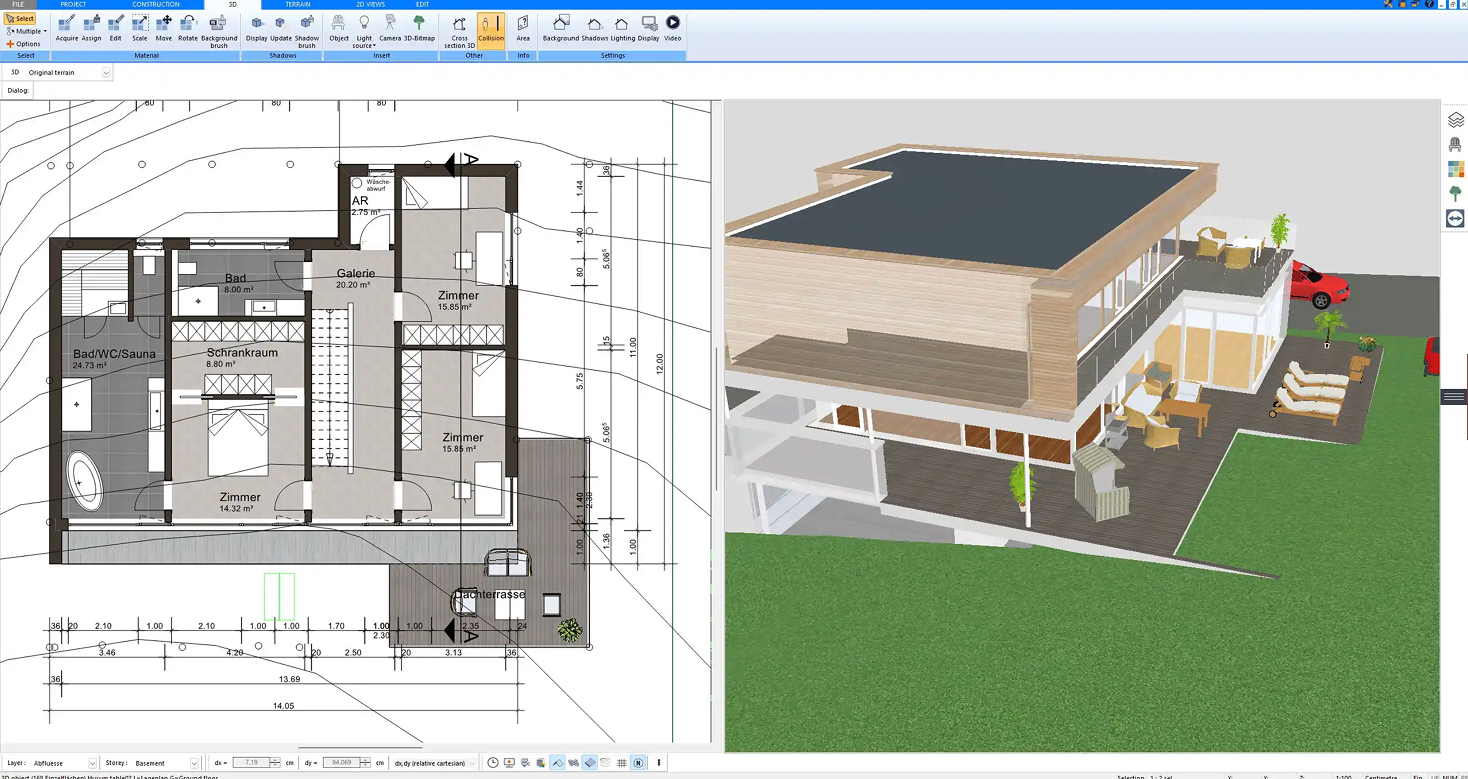
Magicplan is the best fit when the floor plan begins with a real room, not a blank canvas. Instead of manually drawing every wall first, you can use a phone or tablet to capture measurements, sketch rooms, document spaces, add photos, and generate reports. On compatible iOS devices, LiDAR support can make room capture even more useful.
This makes Magicplan especially valuable for contractors, restoration teams, insurance documentation, property managers, real estate professionals, and serious DIY users. It is less about decorating a dream room and more about capturing what exists accurately enough to plan from it.
Why to choose:
- Fast mobile room capture.
- Useful for real measurements and field documentation.
- Supports reports, photos, notes, and project data.
- Good for professionals who work on-site.
- Helps reduce manual measuring time.
Reasons to avoid:
- Not mainly a decorative interior design tool.
- Free access is limited to starter projects.
- Best features make the most sense for mobile-first workflows.
Choose Magicplan if you need to scan, measure, and document real spaces quickly.
11. diagrams.net - Best Truly Free No-Login Diagram Blueprint Tool

Platform: Web, desktop
Pricing: Free plan available.
Diagram net is not a dedicated home design platform, but it is one of the most useful free diagramming tools for simple blueprint-style layouts. You can create basic 2D floor plans with shapes, lines, grids, labels, and exported files without dealing with subscriptions or complex setup. For simple office seating plans, classroom layouts, storage maps, or room diagrams, that may be enough.
The tradeoff is that you do more manual work. You will not get the same purpose-built wall tools, automatic room calculations, 3D previews, furniture catalogs, or photorealistic rendering that dedicated floor plan makers provide. But for a free, lightweight, no-fuss option, it is hard to ignore.
Why to choose:
- Free and lightweight.
- No heavy design software required.
- Good for simple 2D diagrams.
- Useful for quick office, event, or room maps.
- Easy export and file storage options.
Reasons to avoid:
- Not purpose-built for architectural planning.
- No realistic 3D visualization.
- Manual setup can slow down larger plans.
Choose diagrams.net if you need a free simple layout diagram more than a full home design tool.
Pair Your Blueprint Maker with DecAI™ for Faster Floor & Room Design
A blueprint shows you the structure of a space. It tells you where the walls, doors, windows, and rooms are located. But it can't show is how that space will actually look and feel once it's finished — the colors, the materials, the lighting, the furniture arrangement and the whole room atmosphere. That's why you are recommended to pair your blueprint maker tool with the free AI home design tool, DecAI™.
DecAI™, honestly, isn't a blueprint maker, nor is it designed to replace tools like Floorplanner, RoomSketcher, Magicplan, or Lucidchart for creating technical layouts and measurements. Instead, it complements those tools by helping you visualize design ideas on real spaces before making any costly decisions.
Simply upload a photo of your room, and DecAI™ can instantly generate different design concepts, flooring options, wall colors, furniture arrangements, and room styles based on your space. You can even upload inspiration images from Pinterest, Instagram, or design websites and see those styles applied to your own room in seconds.
And here is the optimal workflow you can follow to speed up your whole floor, room and home design:
Step 1. Create your blueprint
Use your preferred blueprint maker to create the floor plan and room layout. Focus on getting the dimensions and structure right.
Step 2. Visualize your design ideas with DecAI™
Upload photos of your rooms to DecAI™ and explore different styles, materials, color palettes, furniture arrangements, and renovation ideas before making any real-world changes.

Step 3. Refine both to improve your design
Adjust the blueprint layout based on what you see in DecAI™, and update the DecAI™ visualization based on what the blueprint confirms is spatially possible. Move back and forth between the two tools until you find a layout and design direction that works both functionally and visually.
In short, think of your blueprint maker as the tool that plans the space, and DecAI™ as the tool that helps you bring that space to life. Use them together to create a faster, smarter, and more confident home design workflow.
FAQS
1.What is the best free online blueprint maker in 2026?
Floorplanner is the best overall starting point for many users because it combines free casual-use projects, browser-based drawing, and 2D/3D planning. However, the best choice depends on your use case. Magicplan is better for scanning real rooms, RoomSketcher is better for polished outputs, and Canva is better for quick 2D concept plans.
2.What is the easiest floor plan maker for beginners?
Canva is one of the easiest for simple 2D plans because it uses familiar drag-and-drop design tools. Floorplanner is a better beginner choice if you want a more dedicated floor plan tool with 3D preview. Planner 5D is also beginner-friendly for visual home layouts.
3.Which free blueprint maker supports 3D views?
Floorplanner, Planner 5D, RoomSketcher, Homestyler, HomeByMe, SketchUp, and Magicplan all support 3D workflows in different ways. Some free plans limit render quality, export options, or advanced 3D features, so check the plan details before starting a large project.
4.Can I scan a room and turn it into a floor plan?
Yes. Magicplan is one of the strongest options for scanning and documenting rooms with a phone or tablet. It is especially useful for measuring real spaces, creating field reports, adding photos, and building project documentation.
5.Can I use these tools for permit drawings?
Usually not by themselves. Some tools can create clean scaled drawings, but permit requirements vary by location and project type. For construction approval, consult an architect, designer, engineer, or local permitting professional.
6.Can I create a blueprint online for free without CAD experience?
Yes. These days, most modern online blueprint makers are designed for beginners, so you don’t need any CAD or technical drafting experience. With drag-and-drop tools, snap-to-grid layouts, and pre-made templates, you can easily create accurate floor plans directly in your browser.
7.What is the difference between a blueprint and a floor plan?
A floor plan is a simplified visual layout of a space showing room structure, walls, doors, and furniture placement. A blueprint is more technical and detailed, often including precise measurements, construction specifications, and architectural details used for building or renovation.
8.Which free blueprint maker is best for professional use?
For professional use, the best tools are typically those that offer accurate measurements, export options (like PDF or DWG), collaboration features, and 3D visualization. Tools such as RoomSketcher, Planner 5D, and other CAD-level platforms are commonly used depending on the workflow and project complexity.
9.Can I export my blueprint as a PDF for free?
Yes, many free blueprint makers like Planner 5D, allow PDF export, but with limitations. Some restrict resolution, watermark the file, or limit the number of exports. Free plans are usually enough for basic sharing, while high-quality or professional exports may require a paid upgrade.
Conclusion
Free online blueprint makers can make floor planning faster, easier, and less intimidating in 2026. The key is choosing based on your workflow, not just choosing the tool with the longest feature list.
We hope this guide to the 11 best free online blueprint makers helps you find the right solution for yourself or your team, and we would also recommend you to use the right blueprint maker and DecAI™, a fast free AI home design tool, together to streamline your whole home design workflow.
--------------------------------------
If you believe that any material on this site infringes your intellectual property rights, please contact the author at decaiwebteam@outlook.com with details of your claim.
Redesign any home interior, exterior & garden in seconds
Share this Post:
'%3e%3cpath%20d='M17.9995%2035.999C17.0317%2035.999%2016.0619%2035.9219%2015.1161%2035.7696C10.9414%2035.0973%207.11524%2032.9513%204.34408%2029.7273C1.54287%2026.4683%200%2022.3035%200%2017.9995C0%208.07403%208.07503%200%2017.9995%200C27.924%200%2036%208.07503%2036%2017.9995C36%2022.3696%2034.4151%2026.5835%2031.5357%2029.8646C28.6844%2033.1156%2024.7671%2035.2326%2020.5052%2035.8267C19.6806%2035.9419%2018.8371%2036%2017.9995%2036V35.999ZM17.9995%201.20123C8.73726%201.20123%201.20224%208.73626%201.20224%2017.9985C1.20224%2026.2919%207.13427%2033.2659%2015.3075%2034.5814C16.9546%2034.8469%2018.6808%2034.8659%2020.3389%2034.6345C28.5812%2033.4863%2034.7968%2026.334%2034.7968%2017.9985C34.7968%208.73626%2027.2617%201.20123%2017.9985%201.20123H17.9995Z'%20fill='%23FF0209'/%3e%3cpath%20d='M29.0557%2014.3621C28.9184%2013.0276%2028.6208%2011.5539%2027.5268%2010.7784C26.6782%2010.1773%2025.5642%2010.1553%2024.5242%2010.1563C22.3251%2010.1583%2020.126%2010.1603%2017.9269%2010.1623C15.812%2010.1643%2013.6971%2010.1663%2011.5821%2010.1683C10.6985%2010.1683%209.8399%2010.1002%209.01937%2010.4819C8.31406%2010.8105%207.76303%2011.4347%207.43241%2012.1289C6.97156%2013.0957%206.87438%2014.1898%206.81927%2015.2588C6.71708%2017.2044%206.7281%2019.156%206.85133%2021.0996C6.9405%2022.5193%207.16792%2024.0872%208.26496%2024.9919C9.23777%2025.7934%2010.6103%2025.8325%2011.8707%2025.8335C15.8741%2025.8365%2019.8776%2025.8395%2023.881%2025.8435C24.394%2025.8435%2024.93%2025.8345%2025.453%2025.7774C26.4829%2025.6661%2027.4637%2025.3716%2028.1249%2024.6092C28.7922%2023.8407%2028.9635%2022.7698%2029.0657%2021.7569C29.3121%2019.3003%2029.3091%2016.8177%2029.0557%2014.3621ZM15.6116%2021.4453V14.5545L21.5797%2017.9999L15.6116%2021.4453Z'%20fill='%23FF0209'/%3e%3c/g%3e%3cdefs%3e%3cclipPath%20id='clip0_13816_41422'%3e%3crect%20width='36'%20height='36'%20fill='white'/%3e%3c/clipPath%3e%3c/defs%3e%3c/svg%3e)
'%3e%3cpath%20d='M17.9995%2036C17.0327%2036%2016.0619%2035.9229%2015.1161%2035.7696C10.9414%2035.0973%207.11524%2032.9513%204.34408%2029.7273C1.54287%2026.4683%200%2022.3035%200%2017.9995C0%208.07403%208.07503%200%2017.9995%200C27.924%200%2036%208.07503%2036%2017.9995C36%2022.3696%2034.4151%2026.5835%2031.5357%2029.8646C28.6844%2033.1156%2024.7671%2035.2326%2020.5052%2035.8267C19.6806%2035.9419%2018.8371%2036%2017.9995%2036ZM17.9995%201.20224C8.73726%201.20224%201.20224%208.73726%201.20224%2017.9995C1.20224%2026.2919%207.13427%2033.2669%2015.3075%2034.5824C16.9556%2034.8479%2018.6808%2034.8669%2020.3389%2034.6355C28.5812%2033.4873%2034.7968%2026.335%2034.7968%2017.9995C34.7968%208.73726%2027.2617%201.20224%2017.9985%201.20224H17.9995Z'%20fill='url(%23paint0_linear_13816_41436)'/%3e%3cpath%20d='M23.4463%207.55469H12.549C9.53841%207.55469%207.08984%2010.0032%207.08984%2013.0138V22.9834C7.08984%2025.994%209.53841%2028.4426%2012.549%2028.4426H23.4463C26.4569%2028.4426%2028.9054%2025.994%2028.9054%2022.9834V13.0138C28.9054%2010.0032%2026.4569%207.55469%2023.4463%207.55469ZM9.01543%2013.0138C9.01543%2011.0652%2010.6004%209.48027%2012.549%209.48027H23.4463C25.3949%209.48027%2026.9799%2011.0652%2026.9799%2013.0138V22.9834C26.9799%2024.932%2025.3949%2026.517%2023.4463%2026.517H12.549C10.6004%2026.517%209.01543%2024.932%209.01543%2022.9834V13.0138Z'%20fill='url(%23paint1_linear_13816_41436)'/%3e%3cpath%20d='M17.9964%2023.0749C20.7966%2023.0749%2023.0749%2020.7966%2023.0749%2017.9964C23.0749%2015.1962%2020.7966%2012.918%2017.9964%2012.918C15.1962%2012.918%2012.918%2015.1962%2012.918%2017.9964C12.918%2020.7966%2015.1962%2023.0749%2017.9964%2023.0749ZM17.9964%2014.8446C19.7346%2014.8446%2021.1483%2016.2582%2021.1483%2017.9964C21.1483%2019.7347%2019.7346%2021.1483%2017.9964%2021.1483C16.2582%2021.1483%2014.8446%2019.7347%2014.8446%2017.9964C14.8446%2016.2582%2016.2582%2014.8446%2017.9964%2014.8446Z'%20fill='url(%23paint2_linear_13816_41436)'/%3e%3cpath%20d='M23.5482%2013.741C24.3026%2013.741%2024.9168%2013.1269%2024.9168%2012.3725C24.9168%2011.618%2024.3026%2011.0039%2023.5482%2011.0039C22.7938%2011.0039%2022.1797%2011.618%2022.1797%2012.3725C22.1797%2013.1269%2022.7938%2013.741%2023.5482%2013.741Z'%20fill='url(%23paint3_linear_13816_41436)'/%3e%3c/g%3e%3cdefs%3e%3clinearGradient%20id='paint0_linear_13816_41436'%20x1='5.27482'%20y1='30.7312'%20x2='30.7242'%20y2='5.28083'%20gradientUnits='userSpaceOnUse'%3e%3cstop%20stop-color='%23FAAD4F'/%3e%3cstop%20offset='0.35'%20stop-color='%23DD2A7B'/%3e%3cstop%20offset='0.62'%20stop-color='%239537B0'/%3e%3cstop%20offset='1'%20stop-color='%23515BD4'/%3e%3c/linearGradient%3e%3clinearGradient%20id='paint1_linear_13816_41436'%20x1='8.92225'%20y1='27.074'%20x2='27.073'%20y2='8.92324'%20gradientUnits='userSpaceOnUse'%3e%3cstop%20stop-color='%23FAAD4F'/%3e%3cstop%20offset='0.35'%20stop-color='%23DD2A7B'/%3e%3cstop%20offset='0.62'%20stop-color='%239537B0'/%3e%3cstop%20offset='1'%20stop-color='%23515BD4'/%3e%3c/linearGradient%3e%3clinearGradient%20id='paint2_linear_13816_41436'%20x1='14.4077'%20y1='21.5861'%20x2='21.5861'%20y2='14.4077'%20gradientUnits='userSpaceOnUse'%3e%3cstop%20stop-color='%23FAAD4F'/%3e%3cstop%20offset='0.35'%20stop-color='%23DD2A7B'/%3e%3cstop%20offset='0.62'%20stop-color='%239537B0'/%3e%3cstop%20offset='1'%20stop-color='%23515BD4'/%3e%3c/linearGradient%3e%3clinearGradient%20id='paint3_linear_13816_41436'%20x1='22.5814'%20y1='13.3393'%20x2='24.515'%20y2='11.4057'%20gradientUnits='userSpaceOnUse'%3e%3cstop%20stop-color='%23FAAD4F'/%3e%3cstop%20offset='0.35'%20stop-color='%23DD2A7B'/%3e%3cstop%20offset='0.62'%20stop-color='%239537B0'/%3e%3cstop%20offset='1'%20stop-color='%23515BD4'/%3e%3c/linearGradient%3e%3cclipPath%20id='clip0_13816_41436'%3e%3crect%20width='36'%20height='36'%20fill='white'/%3e%3c/clipPath%3e%3c/defs%3e%3c/svg%3e)
'%3e%3cpath%20d='M17.9995%2035.999C17.0317%2035.999%2016.0619%2035.9219%2015.1161%2035.7696C10.9414%2035.0973%207.11524%2032.9513%204.34408%2029.7273C1.54287%2026.4683%200%2022.3035%200%2017.9995C0%208.07403%208.07502%200%2017.9995%200C27.924%200%2036%208.07503%2036%2017.9995C36%2022.3696%2034.415%2026.5835%2031.5357%2029.8646C28.6844%2033.1156%2024.7671%2035.2326%2020.5052%2035.8267C19.6806%2035.9419%2018.8371%2036%2017.9995%2036V35.999ZM17.9995%201.20123C8.73725%201.20123%201.20224%208.73626%201.20224%2017.9985C1.20224%2026.2919%207.13427%2033.2659%2015.3075%2034.5814C16.9545%2034.8469%2018.6808%2034.8659%2020.3388%2034.6345C28.5812%2033.4863%2034.7968%2026.334%2034.7968%2017.9985C34.7968%208.73626%2027.2617%201.20123%2017.9985%201.20123H17.9995Z'%20fill='%23007EBB'/%3e%3cpath%20d='M9.06639%2012.124C8.60253%2011.6932%208.37109%2011.1602%208.37109%2010.526C8.37109%209.89184%208.60253%209.33481%209.06639%208.90401C9.53026%208.47321%2010.1274%208.25781%2010.8587%208.25781C11.5901%208.25781%2012.1642%208.47321%2012.627%208.90401C13.0909%209.33481%2013.3223%209.87581%2013.3223%2010.526C13.3223%2011.1762%2013.0909%2011.6932%2012.627%2012.124C12.1631%2012.5548%2011.5741%2012.7702%2010.8587%2012.7702C10.1434%2012.7702%209.52926%2012.5548%209.06639%2012.124ZM12.9326%2014.5946V27.7962H8.76182V14.5946H12.9326Z'%20fill='%23007EBB'/%3e%3cpath%20d='M26.8196%2015.9006C27.7283%2016.8875%2028.1832%2018.243%2028.1832%2019.9682V27.5663H24.2208V20.5042C24.2208%2019.6346%2023.9954%2018.9583%2023.5445%2018.4764C23.0937%2017.9945%2022.4876%2017.7541%2021.7262%2017.7541C20.9647%2017.7541%2020.3586%2017.9955%2019.9078%2018.4764C19.4569%2018.9583%2019.2315%2019.6346%2019.2315%2020.5042V27.5663H15.2461V14.5611H19.2315V16.2863C19.6353%2015.7113%2020.1793%2015.2574%2020.8636%2014.9228C21.5468%2014.5892%2022.3163%2014.4219%2023.1708%2014.4219C24.6937%2014.4219%2025.9099%2014.9158%2026.8186%2015.9016L26.8196%2015.9006Z'%20fill='%23007EBB'/%3e%3c/g%3e%3cdefs%3e%3cclipPath%20id='clip0_13816_41425'%3e%3crect%20width='36'%20height='36'%20fill='white'/%3e%3c/clipPath%3e%3c/defs%3e%3c/svg%3e)
'%3e%3cpath%20d='M18%2035.999C17.0322%2035.999%2016.0623%2035.9219%2015.1166%2035.7696C10.9417%2035.0973%207.11544%2032.9513%204.3442%2029.7273C1.54291%2026.4683%200%2022.3035%200%2017.9995C0%208.07403%208.07526%200%2018%200C27.9248%200%2036%208.07503%2036%2017.9995C36%2022.3696%2034.415%2026.5835%2031.5356%2029.8646C28.6842%2033.1156%2024.7668%2035.2326%2020.5047%2035.8267C19.6802%2035.9419%2018.8366%2036%2017.999%2036L18%2035.999ZM18%201.20123C8.73751%201.20123%201.20227%208.73626%201.20227%2017.9985C1.20227%2026.2919%207.13448%2033.2659%2015.3079%2034.5814C16.955%2034.8469%2018.6813%2034.8659%2020.3394%2034.6345C28.582%2033.4863%2034.7977%2026.334%2034.7977%2017.9985C34.7977%208.73626%2027.2625%201.20123%2018%201.20123Z'%20fill='black'/%3e%3cpath%20d='M7%208.09163H13.5067L19.521%2016.1816L27.0073%207.90625L28.786%207.93715L20.4078%2017.3454L29%2028.901H22.4959L16.8193%2021.362L9.8847%2029.0864H8.13428L15.9583%2020.26L7%208.09163ZM12.8931%209.28633H9.45676L23.2048%2027.6754H26.5793L12.8931%209.28633Z'%20fill='black'/%3e%3c/g%3e%3cdefs%3e%3cclipPath%20id='clip0_13886_43848'%3e%3crect%20width='36'%20height='36'%20fill='white'/%3e%3c/clipPath%3e%3c/defs%3e%3c/svg%3e)
'%3e%3cpath%20d='M17.9995%2035.999C17.0327%2035.999%2016.0619%2035.9219%2015.1161%2035.7686C10.9414%2035.0963%207.11524%2032.9503%204.34408%2029.7263C1.54287%2026.4673%200%2022.3025%200%2017.9995C0%208.07403%208.07503%200%2017.9995%200C27.924%200%2036%208.07503%2036%2017.9995C36%2022.3696%2034.415%2026.5835%2031.5357%2029.8646C28.6844%2033.1156%2024.7671%2035.2326%2020.5052%2035.8267C19.6806%2035.9419%2018.8371%2036%2017.9995%2036V35.999ZM17.9995%201.20123C8.73726%201.20123%201.20224%208.73626%201.20224%2017.9985C1.20224%2026.2909%207.13428%2033.2659%2015.3075%2034.5814C16.9556%2034.8469%2018.6808%2034.8659%2020.3389%2034.6345C28.5812%2033.4863%2034.7968%2026.334%2034.7968%2017.9985C34.7968%208.73626%2027.2617%201.20123%2017.9985%201.20123H17.9995Z'%20fill='%231877F7'/%3e%3cpath%20d='M20.5337%2014.9635V18.7536H25.2225L24.4801%2023.8601H20.5337V35.624C19.7423%2035.7342%2018.9328%2035.7913%2018.1112%2035.7913C17.1625%2035.7913%2016.2317%2035.7151%2015.324%2035.5689V23.8601H11V18.7536H15.324V14.1169C15.324%2011.2396%2017.6564%208.90625%2020.5347%208.90625V8.90926C20.5428%208.90926%2020.5508%208.90625%2020.5588%208.90625H25.2235V13.3215H22.1758C21.2691%2013.3215%2020.5347%2014.0558%2020.5347%2014.9625L20.5337%2014.9635Z'%20fill='%231877F7'/%3e%3c/g%3e%3cdefs%3e%3cclipPath%20id='clip0_13816_41433'%3e%3crect%20width='36'%20height='36'%20fill='white'/%3e%3c/clipPath%3e%3c/defs%3e%3c/svg%3e)
'%3e%3cpath%20d='M17.9995%2035.999C17.0327%2035.999%2016.0619%2035.9219%2015.1161%2035.7686C10.9414%2035.0963%207.11524%2032.9503%204.34408%2029.7263C1.54287%2026.4673%200%2022.3025%200%2017.9995C0%208.07403%208.07503%200%2017.9995%200C27.924%200%2036%208.07503%2036%2017.9995C36%2022.3696%2034.415%2026.5835%2031.5357%2029.8646C28.6844%2033.1156%2024.7671%2035.2326%2020.5052%2035.8267C19.6806%2035.9419%2018.8371%2036%2017.9995%2036V35.999ZM17.9995%201.20123C8.73726%201.20123%201.20224%208.73626%201.20224%2017.9985C1.20224%2026.2909%207.13428%2033.2659%2015.3075%2034.5814C16.9556%2034.8469%2018.6808%2034.8659%2020.3389%2034.6345C28.5812%2033.4863%2034.7968%2026.334%2034.7968%2017.9985C34.7968%208.73626%2027.2617%201.20123%2017.9985%201.20123H17.9995Z'%20fill='%232A91F7'/%3e%3cg%20clip-path='url(%23clip1_13816_41442)'%3e%3cpath%20d='M16.3345%2018.834C16.6924%2019.3124%2017.149%2019.7083%2017.6733%2019.9947C18.1976%2020.2812%2018.7774%2020.4516%2019.3734%2020.4942C19.9693%2020.5369%2020.5675%2020.4509%2021.1273%2020.2421C21.6871%2020.0333%2022.1954%2019.7065%2022.6178%2019.284L25.1178%2016.784C25.8768%2015.9981%2026.2968%2014.9456%2026.2873%2013.8531C26.2778%2012.7606%2025.8396%2011.7156%2025.0671%2010.943C24.2946%2010.1705%2023.2495%209.73231%2022.157%209.72281C21.0645%209.71332%2020.012%2010.1333%2019.2262%2010.8923L17.7928%2012.3173M19.6678%2017.1673C19.3099%2016.6889%2018.8533%2016.293%2018.329%2016.0065C17.8047%2015.7201%2017.2249%2015.5497%2016.6289%2015.507C16.033%2015.4643%2015.4348%2015.5503%2014.875%2015.7592C14.3152%2015.968%2013.8069%2016.2947%2013.3845%2016.7173L10.8845%2019.2173C10.1255%2020.0031%209.70551%2021.0557%209.715%2022.1481C9.72449%2023.2406%2010.1627%2024.2857%2010.9352%2025.0582C11.7078%2025.8307%2012.7528%2026.269%2013.8453%2026.2784C14.9378%2026.2879%2015.9903%2025.868%2016.7761%2025.109L18.2011%2023.684'%20stroke='%232A91F7'%20stroke-width='1.66667'%20stroke-linecap='round'%20stroke-linejoin='round'/%3e%3c/g%3e%3c/g%3e%3cdefs%3e%3cclipPath%20id='clip0_13816_41442'%3e%3crect%20width='36'%20height='36'%20fill='white'/%3e%3c/clipPath%3e%3cclipPath%20id='clip1_13816_41442'%3e%3crect%20width='20'%20height='20'%20fill='white'%20transform='translate(8%208)'/%3e%3c/clipPath%3e%3c/defs%3e%3c/svg%3e)
Redesign any home interior, exterior & garden in seconds