

10 Best Free AI Tools for Virtual Room Staging: What You Actually Get?


An empty room can be full of potential—but convincing buyers or even yourself of that potential isn't always easy. AI virtual staging promises to turn vacant spaces into beautifully furnished rooms in seconds. But here's the catch: free generations don't always mean free, usable images. Some tools add watermarks, restrict downloads, or run out of credits before you get the result you want.
So, which free AI virtual staging tools are actually worth your time? We've compared 10 of the best free AI virtual room staging tools for you to choose the best fit fast, we are handpicked them all based on free credits, export limits, staging features, pricing, and real-world use cases. Whether you're furnishing an empty room, experimenting with design ideas, or preparing property photos, we hope this artilce will give you some clues to choose the right one.
Design any room, shop or space with DecAI in less 30 seconds! It's free!
10 Best Free AI Tools for Virtual Room Staging in 2026
Free AI virtual staging tools aren't all designed for the same purpose. Some specialize in furnishing empty rooms for real estate listings, while others let you experiment with furniture, redesign existing spaces, or create additional marketing content.
Here are 10 tools worth considering, including what you can get for free, where each one works best, and the limitations to know before you start.
1. DecAI — Best for Exploring and Refining Room Staging Ideas
Platform: Web, iOS, and Android.
Pricing: First web design free, with a watermark on free exports. Plus is listed at $19.99/month.
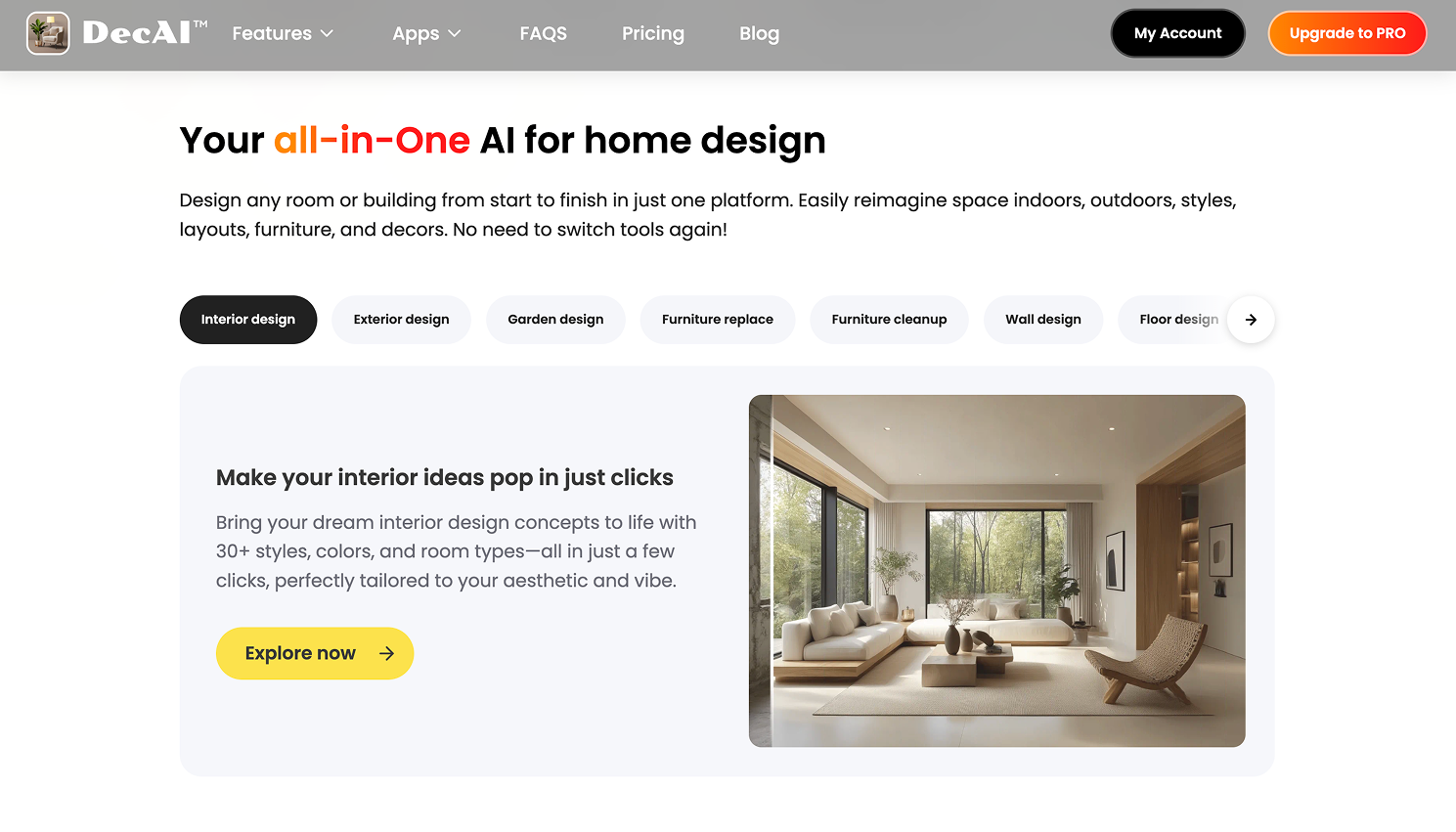
DecAI is a free AI-driven virtual staging tool that helps you to furnish an empty room in over 30 design styles in under 30 seconds. It is more than a one-time free AI room staging generator, which allows you to directly edit the furniture, wall, floor or design style based on your perferences, or directly ask the AI agent to refine the details with just natural AI chats after the first-time generation. Simply upload a photo of your space and the AI will do the rest for you in just seconds.
Most importantly, beyond virtual staging, DecAI, as an all-in-one AI home design platform, also covers everything from interior and exterior design to garden makeovers, wall and floor updates, room decluttering, and style transfers—all in one place.
Whether you're a complete beginner or an experienced designer, DecAI makes it easy to visualize, experiment with, and refine your home design ideas without complicated software or professional design skills.
Why Choose It
- Visualize furnishing ideas using your own room photos.
- Explore furniture, styles, colors, and interior finishes at just fingertips.
- Refine design concepts with smart AI agent.
- 30 + design styles, 15+ room types & 130+ material options
- All-in-one home design platform
What to Consider
- Only the first web design is free.
- Free exports include a watermark.
- Advanced editing features may require a paid plan.
Best For: Homeowners, renters, and design enthusiasts exploring furnishing ideas before making decorating decisions.
2. REimagineHome — Best for Staging and Targeted Room Edits
Platform: Web.
Pricing: Five free designs for new users. Essential plan starts at approximately $19/month.
Overview
REimagineHome combines AI virtual staging with a broader range of room-editing capabilities. You can furnish empty spaces, remove existing furniture, redesign occupied rooms, and make selective changes to interiors.
This flexibility is particularly helpful when your starting photo isn't completely empty. Instead of switching between separate tools for decluttering and staging, you can explore both workflows within one platform.
Its free allowance also gives you more opportunities to experiment than tools limited to a single generation, although revisions can use up those designs quickly.
Why Choose It
- Stage empty rooms or redesign furnished spaces.
- Remove or replace furniture within existing interiors.
- Explore several concepts using introductory free designs.
What to Consider
- Free designs can run out after multiple revisions.
- Advanced features may require higher paid tiers.
- Free export conditions need confirmation before use.
Best For: Users who need both virtual staging and targeted editing of existing room photos.
3. QuickStage — Best for Staging Empty Rooms Without Signing Up

Platform: Web.
Pricing: Three free photos without an account or credit card. Additional images cost $1 each with pay-as-you-go credits; subscriptions start at $19.99/month.
Overview
QuickStage takes a straightforward approach to AI virtual staging. Upload a photo of an empty room, choose your preferred furnishing direction, and receive the staged result through an email link.
Its biggest advantage is the simplicity of its free offer. According to its published information, the three introductory images are full quality and watermark-free, making it an appealing option for users who want to try staging without immediately committing to a subscription.
Unlike broader AI room design platforms, QuickStage focuses primarily on turning vacant spaces into furnished images.
Why Choose It
- Try three room photos without creating an account.
- Receive full-quality, watermark-free introductory images.
- Purchase additional images without a monthly subscription.
What to Consider
- The free allowance covers only three photos.
- Primarily suited to vacant-room staging.
- Offers less hands-on editing than broader design platforms.
Best For: Individuals and real estate professionals who need a few staged empty-room photos with minimal setup.
4. QuickStaging— Best for Trying One Room Before Paying
Platform: Web.
Pricing: One free room without a credit card. A one-time listing package was displayed at €19 for up to 10 photos.
Overview
QuickStaging offers a simple way to test virtual staging with one empty-room photo. After uploading an image and choosing a furnishing style, users receive a staged result and can review it alongside the original.
The before-and-after comparison is especially useful for checking whether furniture has been added without noticeably changing the room's existing architecture.
The service is positioned primarily toward business customers, making it more relevant to property marketing than casual home decoration.
Why Choose It
- Test one empty room without a credit card.
- Compare staged images with the original photo.
- Explore furnishing styles before purchasing a package.
What to Consider
- The service targets business customers.
- Free staging begins with an empty-room photo.
- One free room offers limited opportunity for revisions.
Best For: Property professionals evaluating virtual staging for a single room before purchasing a larger package.
5. StageHQ — Best for Pay-as-You-Go Virtual Staging
Platform: Web.
Pricing: Three free watermarked previews. Paid image packs start at $19 for 20 images, with non-expiring purchased credits.
Overview
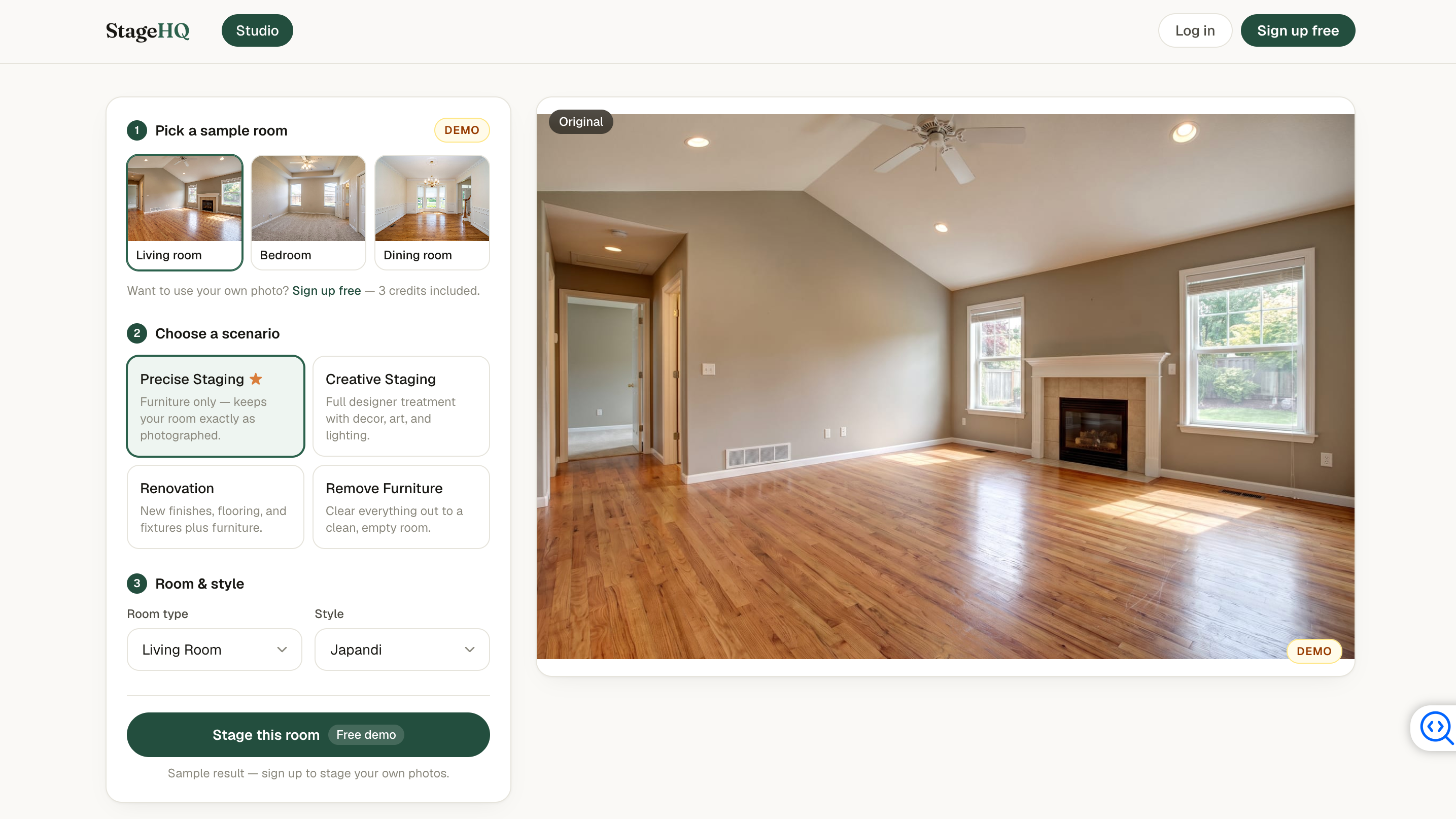
StageHQ is worth considering if you want to evaluate AI virtual staging before paying for finished images. Its free allowance provides three watermarked previews, allowing users to assess how well the tool furnishes their spaces.
Instead of requiring an ongoing subscription, StageHQ offers prepaid image packs. Purchased credits don't expire, making this approach more practical for users who stage properties occasionally rather than every month.
However, its free offer is better suited to evaluating image quality than obtaining finished marketing materials.
Why Choose It
- Preview staged rooms before purchasing images.
- Buy image packs without a recurring subscription.
- Keep purchased credits for future staging projects.
What to Consider
- Free preview images contain watermarks.
- Paid purchases begin with image packs.
- Clean commercial-use images require payment.
Best For: Occasional staging users who prefer prepaid image credits over monthly subscriptions.
6. Roomagen — Best for Virtual Staging and Photo Enhancement
Platform: Web.
Pricing: Six one-time free credits, equivalent to three basic staging generations at two credits each. Starter plan costs $12/month for 60 credits.
Overview
Roomagen combines AI virtual staging with photo enhancement and other editing tools, making it useful for users who want to improve an image as well as furnish the space.
Its credit-based system offers some flexibility, but understanding the cost of each operation is essential. Six free credits may sound generous, yet they cover only three basic generations. Additional edits can reduce the number of staging attempts available.
Free outputs also include watermarks, with resolution restrictions that vary across introductory edits.
Why Choose It
- Combine virtual staging with photo enhancement tools.
- Experiment with several editing operations.
- Try three basic generations using introductory credits.
What to Consider
- Six free credits equal only three basic generations.
- Free images include watermarks and resolution limits.
- Multiple editing operations can exhaust credits quickly.
Best For: Users who want to test virtual staging alongside basic property-photo improvements.
7. Pedra — Best for Real Estate Staging and Marketing

Platform: Web, with related mobile tools for iOS and Android.
Pricing: Free trial includes seven image-generation credits, one video, and one virtual tour. Pro costs €29/month or €239/year.
Overview
Pedra goes beyond adding furniture to empty rooms. It's designed for property marketing workflows, combining virtual staging with image enhancement, video creation, and virtual tours.
This makes Pedra particularly relevant to real estate agents and property marketers who need more than a single furnished image. Users can explore staging concepts and experiment with additional visual content within the same platform.
Its introductory trial offers several opportunities to test the workflow, although different AI operations may consume credits at different rates.
Why Choose It
- Combine staging with broader real estate marketing tools.
- Try image generation, video, and virtual tours.
- Manage multiple property-visualization tasks in one platform.
Design any room, shop or space with DecAI in less 30 seconds! It's free!
What to Consider
- Different operations may have different credit costs.
- Some features are unnecessary for simple room staging.
- Free export and watermark conditions need confirmation.
Best For: Real estate agents and property marketers creating multiple types of property visuals.
8. Stageless AI — Best for Decluttering and Text-Guided Staging
Platform: Web.
Pricing: 20 introductory credits advertised. Paid plans start at €10.99/month.
Overview
Stageless AI combines virtual staging with furniture removal, decluttering, image enhancement, and text-guided editing. It's particularly useful when your starting photo already contains furniture or unwanted objects that need to be removed before staging.
With 20 introductory credits, users can explore different editing and staging features before upgrading. However, the number of finished images depends on how many credits each operation consumes, so it's worth checking the credit requirements before getting started.
Why Choose It
- Remove unwanted furniture before staging a room.
- Make targeted changes using natural language instructions.
- Explore staging, decluttering, and image enhancement tools.
What to Consider
- Credit costs vary depending on the operation.
- Free export conditions and image quality need confirmation.
- Multi-step edits may use up introductory credits quickly.
Best For: Users who want to declutter furnished rooms and experiment with targeted AI staging edits.
9. Stager Go — Best for Staging Photos and Creating Marketing Content

Alt:Stager Go web app interface displaying AI room staging features, photo enhancement tools, and marketing video creation options.
Platform: Web.
Pricing: Free introductory credits available. Basic starts at $9/month, while Pro costs $19/month.
Overview
Stager Go combines AI virtual staging with photo enhancement, animation, and short-form video creation. Instead of simply furnishing an empty room, users can turn staged photos into additional marketing materials for property listings and social media.
Its broader workflow makes it particularly appealing to real estate agents, photographers, and property marketers who need different types of visual content. The platform also advertises free introductory credits, although the exact number should be confirmed before starting a project.
Why Choose It
- Create staged room photos and animated property visuals.
- Turn staging results into social media marketing content.
- Access staging and photo enhancement in one platform.
What to Consider
- The exact free-credit allowance remains unconfirmed.
- Videos and additional edits may consume separate credits.
- Some advanced features may require the Pro plan.
Best For: Real estate agents, photographers, and property marketers who want to create staging images and additional promotional content.
10. Remodel AI — Best for Exploring Room Concepts Across Devices
Platform: Web, iOS, and Android.
Pricing: Three free designs. Pro is displayed at approximately $29/month when billed annually at $349.
Overview
Remodel AI offers AI-powered room visualization as part of a broader home-design toolkit. Users can experiment with different interior styles, compare before-and-after images, and explore how a room might look with updated furnishings or finishes.
Its availability across web and mobile makes it convenient for users who want to explore ideas on different devices.
However, virtual staging is only one part of its broader redesign offering. Users should confirm whether their chosen staging workflow is available within the free plan, particularly when high-resolution downloads and watermark removal are important.
Why Choose It
- Explore room concepts on web and mobile.
- Compare original photos with generated designs.
- Experiment with furnishing and broader remodeling ideas.
What to Consider
- Only three free designs are available.
- HD downloads and watermark removal require Pro.
- The lower displayed monthly price requires annual billing.
Best For: Homeowners and design enthusiasts exploring room furnishing and remodeling concepts across devices.
How to Stage a Room for Free Without Wasting Your Credits
A small trial allowance can answer a useful question if you approach it with a clear brief. Random style changes make the same allowance feel much smaller.
1. Choose One Representative Photo
Start with a room that resembles the work you actually need to do. If your challenge is a narrow bedroom, testing a spacious demonstration living room tells you little about the likely fit.
Use a clear photo showing the main floor area and room boundaries. Keep an untouched original for comparison.
2. Define What Must Stay the Same
Write down the elements that belong to the existing room: doors, windows, flooring, fixed cabinetry, radiators, and visible views.
Then decide what you want added or changed. Separating these two lists makes it easier to recognize when the result has drifted beyond your brief.
3. Pick One Furnishing Direction
Choose the room function and a restrained style before generating. “Compact guest bedroom with warm neutral furnishings” gives you a more useful starting point than requesting several competing aesthetics.
If the tool accepts prompts, a hypothetical brief might read:
"Furnish this empty living room with a compact neutral sofa, one armchair, a small coffee table, and a rug. Keep the existing doors, windows, walls, flooring, and fixed fixtures unchanged. Leave clear access through the room."
This is a starting instruction, not a guarantee that the model will preserve every detail.
4. Reserve Credits for Corrections
For a hypothetical allowance of three generations, use this plan:
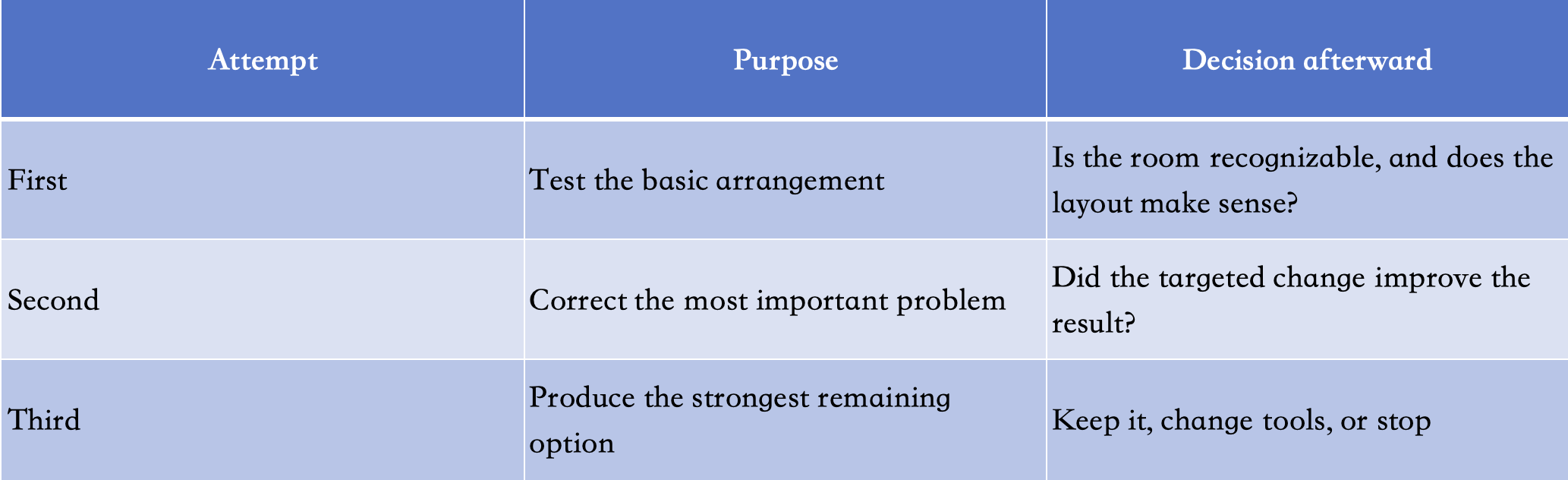
Avoid spending the first two attempts on cosmetic alternatives when the furniture scale is still wrong.
If removal is required first, revise the plan. Your allowance may support only preparation, staging, and one correction.
5. Change One Important Thing at a Time
A request to alter the sofa, lighting, artwork, flooring, and palette gives you several possible explanations for a worse result.
Instead, make the next attempt answer one question. For example: “Use a smaller sofa and retain the current arrangement.” That makes comparison easier and gives each generation a purpose.
6. Check the Download Before Continuing
Download an early result if the service allows it. Inspect the actual file rather than relying on a large workspace preview.
Check resolution, watermark placement, and visible artifacts. Discovering an unsuitable export after using every free credit is an avoidable disappointment.
7. Stop When the Trial Has Answered the Question
You do not need to use every remaining credit. If the first result already demonstrates that the service changes important room details, reconsider the tool or mode.
Likewise, a successful preview may be enough to justify a small paid export purchase. The aim is to complete your task, not maximize the number of generated images.
AI Virtual Staging Mistakes That Can Ruin Your Results
The most expensive mistakes often happen before the final download. They come from an unclear brief, the wrong editing mode, or overlooking a change that matters more than the décor.
Choosing Redesign When You Need Furniture Staging
Redesign can involve new finishes, colors, and broader visual changes. Furniture staging has a narrower purpose.
Select the mode that matches the job. If you are showing an existing room, an imagined new floor or altered window may make the output unsuitable even when the image looks attractive.
Accepting Furniture That Blocks the Room
Inspect access before accessories. Can someone reach the door, approach the window, and move around the main furniture?
An oversized sectional may create a polished image while making the room difficult to understand. A simpler arrangement often communicates its function more clearly.
Letting New Furniture Conceal a Changed Room
A rug can distract from altered flooring, and a tall cabinet can conceal a missing fixture. Compare permanent details with the original rather than assuming the changes stop at the furniture.
Reject an output that no longer represents the room you intended to show.
Spending Every Credit on Different Styles
Switching from coastal to industrial to farmhouse can be entertaining, but it does not resolve an awkward arrangement.
Choose a functional layout first. Explore decorative alternatives after the room works.
Assuming Separate Views Will Match
Two independently generated photos of the same room may contain different furniture, colors, or object positions.
Review them together before using them as one set. If consistency is essential, investigate the tool’s reference or multi-view capabilities before committing to a larger batch.
Treating a Render as a Furniture Measurement
A convincing image does not establish that a particular retail sofa will fit. Perspective can make proportions difficult to judge.
For real furnishing purchases, measure the room, check product dimensions, and allow space for movement. Use the visualization to develop the arrangement.
Confusing a Low Per-Image Rate with a Low Purchase Price
A service may advertise a low unit cost that assumes a large pack or full subscription use.
For a small task, compare the amount you must actually pay. A larger allowance offers little advantage if most of it remains unused.
FAQs
1.Is There a Completely Free AI Virtual Staging Tool?
Yes. Many AI tools like DecAI provide a limited number of free generations or photos. Simply upload your room photo and DecAI will help to generate the virtual staging ideas for you instantly.
2.Can I Stage a Room That Already Contains Furniture?
Yes. For instance, DecAI works with both empty and furnished rooms. If your room already has furniture, you can use DecAI to remove, replace, or rearrange existing pieces and explore different design styles. There's no need to empty your room before getting started.
3.What Is the Difference Between Virtual Staging and AI Room Redesign?
Virtual staging primarily shows how a space could look furnished. AI redesign may also explore finishes, colors, materials, and broader changes. Choose the narrower staging workflow when preserving the existing room is central to the task.
4.Will AI Keep My Doors, Windows, and Room Layout Unchanged?
Yes. DecAI is designed to preserve your room's original structure, including doors, windows, and overall layout, while transforming its furniture and decor. This lets you explore new design possibilities without changing the existing architecture. However, AI-generated results may occasionally vary, so you can further refine the details using DecAI's editing tools or AI Agent.
5.Can I Use Free AI-Staged Images in a Property Listing?
Yes. Images generated with DecAI belong to you, and you're free to use them for both personal and commercial purposes, including real estate listings. If you're using other AI staging tools, be sure to check their usage rights and licensing terms first, as policies may vary.
--------------------------------------
If you believe that any material on this site infringes your intellectual property rights, please contact the author at decaiwebteam@outlook.com with details of your claim.
Redesign any home interior, exterior & garden in seconds
Share this Post:


Redesign any home interior, exterior & garden in seconds