

ChatGPT vs DecAI for Interior Design: Which AI Gives Better Design Results?

AI has become part of everyday interior design much faster than most people expected. Just a few years ago, using AI to redesign a living room or bedroom felt novel—even unrealistic. But in 2026, it’s become a practical, go-to solution.
That’s why more and more people are turning to AI tools for help. If you’re one of them and wondering which to choose between general AI tools like ChatGPT and the dedicated AI interior design tools like DecAI for your home interior design project, you absolutely come to the right place.
In this guide, we’ll compare ChatGPT and DecAI across visuals, speed, usability, and real-room results, so you can quickly decide which one fits your needs best.
Plus, do not forget to give the free AI home interior design AI a try before you make a decision.
Design any room, shop or space with DecAI in less 30 seconds! It's free!
A Quick Comparison
Before diving into the details, let’s first take a quick look at how differently ChatGPT and DecAI work in the interior design field.
- ChatGPT is the stronger tool when the project is still taking shape. It helps with style direction, layout questions, design reasoning, writing, and planning.
- DecAI is stronger when the project has moved into visualization and you want to see believable design options in your actual space.
A quick side-by-side view makes that easier to see:

If you are a homeowner or designer trying to picture a new look in your own living room or home, DecAI will usually feel more immediately useful. If you are still asking yourself what direction the room should go in at all, ChatGPT may be the better place to start.
What Is ChatGPT for Interior Design?
ChatGPT is not an interior design platform in the traditional sense. It is a general AI assistant, which is exactly why so many people end up using it in design work. It is flexible. You can talk to it the way you would talk to a very informed assistant: describe the room, explain what feels wrong, mention the budget, list the pieces you want to keep, and ask for help narrowing the options.
That sounds simple, but it fills a real gap. A lot of people do not need a tool to instantly spit out a pretty room. They need help making decisions. They want to know whether their space would be better off leaning transitional or contemporary. They want to know why their bedroom feels flat, or whether warm white walls will fight with espresso floors, or how to make an open-concept family room feel less scattered.
That is where ChatGPT is genuinely useful.
For interior design, it tends to help most with:
- style exploration
- color and material direction
- furniture planning
- room-by-room problem solving
- client-facing writing and internal notes
- organizing thoughts before moving into visuals
It can also help professionals with the less glamorous side of design work: summarizing client input, drafting presentation copy, rewriting emails, comparing product categories, or turning scattered notes into a cleaner brief. That is not the kind of thing people romanticize about design, but it is absolutely part of the job.
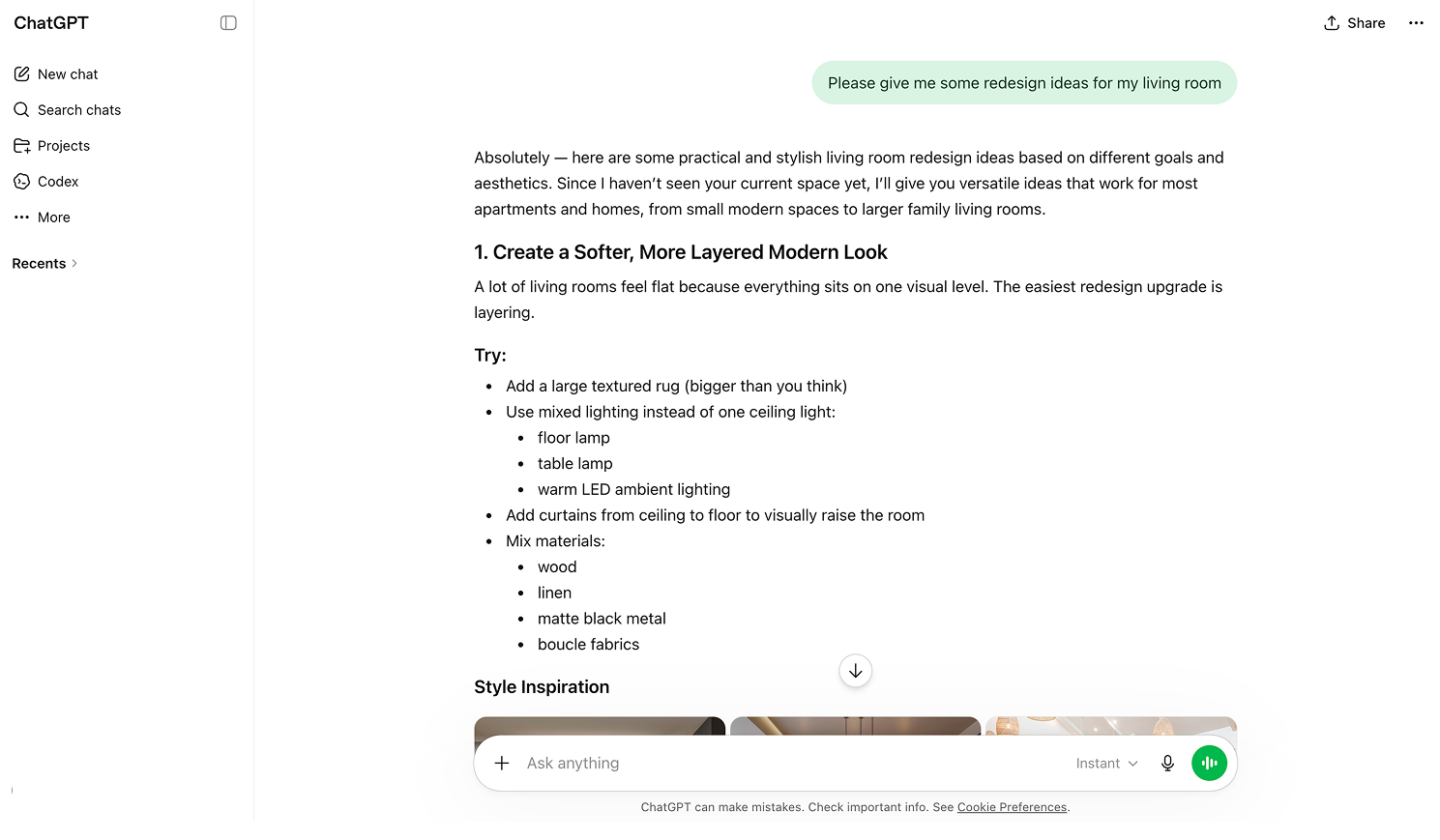
Pros and Cons of ChatGPT
Pros
ChatGPT’s biggest strength is that it can meet you in the messy middle of a project, when you know you want change but have not fully defined what that change should be.
It is particularly good at:
- helping you refine a design direction
- comparing styles without making the conversation feel too technical
- answering follow-up questions naturally
- supporting writing, communication, and documentation
- saving time during the research and planning stages
For designers, it can function almost like a fast second brain. For homeowners, it can make the early part of the process feel less overwhelming.
Cons
Its weaknesses show up when people expect it to behave like a dedicated room transformation tool or design tool.
A few limits are worth being honest about:
- It is not built around room-specific visual redesign.
- The quality of the result depends heavily on how clearly you describe the problem.
- If your prompts are vague, the advice can drift toward the generic.
- It can help you understand a room more easily than it can convincingly show that room transformed.
In short, ChatGPT is better for giving and discuss design ideas with you during the brainstorming or early design stage.
What Is DecAI for Interior Design?
DecAI comes at the same problem from the opposite direction.
Instead of beginning with conversation, it begins with the actual room and space, and directly gives the design results.
You upload a photo, choose a style, and generate a new design version of the space. That immediately changes the kind of value it offers. You are not spending most of your time explaining what you want in abstract terms. You are reacting to something visible.
For a lot of people, that is the difference between a tool that feels interesting and a tool that feels actionable.
DecAI is especially appealing if you already have a real room or space in front of you and the question is no longer, “What styles exist?” but “What would this one actually look like here?” That applies to homeowners refreshing a bedroom, agents staging a listing, designers building first-round concepts, and even small business owners thinking through a cafe or storefront update.
In practical terms, DecAI is built for tasks like these:
- trying out several looks on the same room photo
- previewing a renovation direction before spending money
- testing furniture and finish changes visually
- giving clients options they can react to quickly
- moving from inspiration to a room-specific concept without traditional rendering software
Overall, DecAI excels at generating the room or space designs directly for you, so you can see what you imagine about the room or space changes in your mind and quickly make a decision.
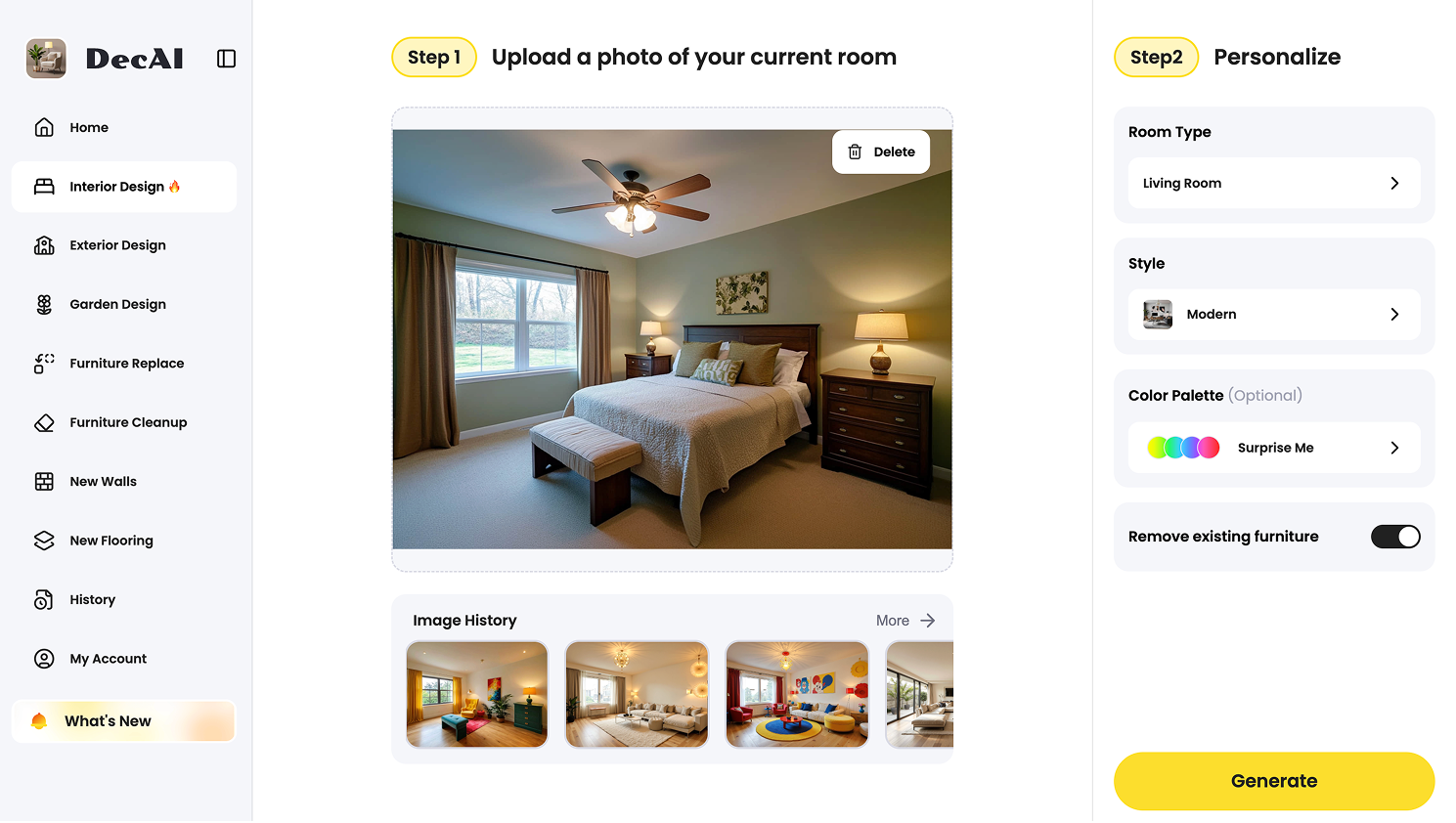
Pros and Cons of DecAI
Pros
DecAI’s strongest quality is that it reduces friction. You do not need to be especially good at prompting, especially fluent in design vocabulary, or especially patient. You upload the room, try a direction, and react.
That makes it especially strong for:
- homeowners who want visual confidence before buying
- designers who need quick concept exploration
- real estate use cases like virtual staging
- client presentations where words are not enough
- fast comparison between different aesthetics
It also suits the way many people naturally make design decisions. Most people do not commit because of a beautifully worded explanation. They commit when they can finally picture the result.
Cons
The tradeoff is that DecAI is narrower.
It is not the tool you reach for when you need to think through a concept in detail, explain the logic behind a palette, or draft a clean client summary. It is also not where you go for deeper design reasoning. A compelling visual can move a project forward, but it does not always answer the practical questions underneath it.
A few limitations stand out:
- It is less helpful for design writing or communication.
- It does not replace critical judgment about budget, construction, or daily function.
- It is strongest in visualization, not explanation.
- It works best when paired with someone who can evaluate the result thoughtfully.
Well, that does not weaken its value. It just defines it more clearly.

ChatGPT vs DecAI: What Are the Differences?
At a glance, both tools can seem like modern shortcuts to the same outcome. In actual use, the differences are much more specific than that.
Core purpose
The cleanest distinction is this: ChatGPT helps you develop the idea, while DecAI helps you picture the idea.
That difference shapes the whole experience. If you are still unsure what your style really is, or why the room feels disconnected, or how to explain what you want, ChatGPT is more useful. If the concept is already forming and what you need now is a visible interpretation of it, DecAI takes the lead.
How you work with them
Design any room, shop or space with DecAI in less 30 seconds! It's free!
ChatGPT asks you to put the problem into words. That can be a strength, because describing a room forces clarity. But it can also be a hurdle. Plenty of people know what they dislike in a room and still cannot describe what they want instead.
DecAI is easier for that kind of user because it is more visual from the beginning. You do not need to write a perfect prompt to start learning something. You just need a room photo and a direction worth testing.
What kind of result you get
This is where expectations matter. ChatGPT gives you guidance, explanation, language, comparisons, and structure. DecAI gives you visual room concepts.
Neither output is inherently better. It depends on where you are in the process. But if someone says they want “better design results,” they often mean they want something they can react to right away. That tends to favor DecAI.
Ease of use
ChatGPT is easy to access, but there is still a skill curve. The better you are at asking targeted questions, the better the response tends to be. Designers often get more out of it because they already know how to describe a problem precisely.
DecAI is easier in a more immediate, mainstream way. It feels closer to how non-designers already think. People are usually much better at saying, “I like this one more,” than at writing a strong design prompt from scratch.
Visual quality
This is one of the clearest differences in the comparison.
ChatGPT can support visual thinking, and it can generate images, but it is not fundamentally organized around room-photo transformation. DecAI is. That focus usually shows in the experience. If your goal is to preview style directions in a specific room, DecAI is more aligned with the job.
That does not mean every output is perfect, or that a generated concept should be treated like a construction-ready plan. It just means DecAI is solving the right problem more directly.
Design advice
Here the advantage flips.
ChatGPT is much better when the room problem is still conceptual. It can talk through competing styles, explain why certain materials feel heavy or cold, suggest ways to make a room feel more layered, or help adapt a design idea to a tighter budget. That conversational flexibility matters, especially when the answer is not obvious.
DecAI is not really built for that kind of back-and-forth. It can help you react to a visual. It is less equipped to help you reason through the design in words.
Workflow value for professionals
For working designers, the distinction is not just about visuals. It is about where time disappears.
ChatGPT helps with many of the invisible tasks that eat up a week:
- clarifying client notes
- drafting concept language
- cleaning up communication
- comparing options
- organizing research
DecAI helps with a different bottleneck: visual concepting. It can shorten the time between “let’s try a few directions” and “here are three options we can actually discuss.” That is meaningful, especially in early presentations.
Which one feels more intuitive?
For most homeowners, DecAI probably feels more intuitive on day one. It asks less verbal precision from the user, and it produces something easier to judge quickly.
ChatGPT often becomes more valuable with repeated use. The more specific you get, the more it starts to feel like a sharp assistant rather than a generic chatbot.
So in a sense, DecAI wins on immediacy, while ChatGPT wins on flexibility.
When to Choose ChatGPT
Choose ChatGPT when the project still needs definition.
That usually includes situations like these:
- You are not sure what style fits your home.
- You want help comparing looks before seeing visuals.
- You need advice on palette, furniture balance, or room flow.
- You are a designer writing briefs, notes, or client-facing language.
- You want to troubleshoot a room before moving into mockups.
- You are trying to make smarter decisions, not just faster ones.
For many users, ChatGPT is most valuable before money is spent. It helps sharpen the judgment behind the purchase.

When to Choose DecAI
Choose DecAI when the next useful step is visual, not conceptual.
That often means:
- you want to preview changes in a real room
- you are comparing multiple aesthetics side by side
- you need a client-friendly concept fast
- you want visual clarity before buying furniture or paint
- you are staging, refreshing, or repositioning a property
- you already have inspiration and want to see it translated into space
- you want to apply some interior design trends to your home or space quickly
If ChatGPT helps answer “What direction makes sense?” DecAI helps answer “Would that direction actually look good here?”

You Are Supposed to Use Them Both Together, If Possible
This is the least flashy answer in the article, but probably the most useful one.
In real projects, these tools work well together because they solve different parts of the same decision chain. One helps you clarify. The other helps you visualize.
A practical workflow might look like this:
- Start in ChatGPT to sort out the brief.
- Use it to narrow the style, mood, palette, and major constraints.
- Move into DecAI once the direction is clear enough to test visually.
- Compare a few room or space concepts.
- Return to ChatGPT if you want help summarizing the direction, building a shopping plan, or preparing presentation language.
That sequence feels natural because it follows how people actually make design decisions. First they talk it through. Then they react to what they see. Then they refine.
For many homeowners and designers, that combination will be more useful than relying on either tool alone.
FAQs
1.Can ChatGPT generate interior design images?
Yes, but it requires you to prompt runs after runs to get what you wants, which can be quite troublesome and time-comsuming. Well, with DecAI, what you need is only three steps: upload, set up and generate, all in just few clicks.
2.Which one is better for idea visualization?
DecAI, as a professional free AI home interior design tool, is much better for you to visualize your home and space design ideas.
3.Which tool is easier for beginners?
Usually DecAI. It is more visual and asks less from the user upfront, even when you do have no any design experiences or skills.
4.Is DecAI actually free to use?
Yes. DecAI offers a free plan, along with paid options for broader use.
5.Can ChatGPT replace an interior designer?
No. It can speed up thinking and communication, but it does not replace judgment, technical knowledge, or experience.
6.Can you use ChatGPT and DecAI together?
Yes, no matter whether you are a professional designer or a beginner, use them together would help you save a lot of uncessary back-and-forth, and save not just hours.
Final Thoughts
If you want help thinking through a room, ChatGPT is better. If you want help seeing a room or space directly transformed, DecAI is better. We hope this guide with detailed comparison between these two tools would help you choose the right tool at the right design stage.
--------------------------------------
If you believe that any material on this site infringes your intellectual property rights, please contact the author at decaiwebteam@outlook.com with details of your claim.
Redesign any home interior, exterior & garden in seconds
Share this Post:
'%3e%3cpath%20d='M17.9995%2035.999C17.0317%2035.999%2016.0619%2035.9219%2015.1161%2035.7696C10.9414%2035.0973%207.11524%2032.9513%204.34408%2029.7273C1.54287%2026.4683%200%2022.3035%200%2017.9995C0%208.07403%208.07503%200%2017.9995%200C27.924%200%2036%208.07503%2036%2017.9995C36%2022.3696%2034.4151%2026.5835%2031.5357%2029.8646C28.6844%2033.1156%2024.7671%2035.2326%2020.5052%2035.8267C19.6806%2035.9419%2018.8371%2036%2017.9995%2036V35.999ZM17.9995%201.20123C8.73726%201.20123%201.20224%208.73626%201.20224%2017.9985C1.20224%2026.2919%207.13427%2033.2659%2015.3075%2034.5814C16.9546%2034.8469%2018.6808%2034.8659%2020.3389%2034.6345C28.5812%2033.4863%2034.7968%2026.334%2034.7968%2017.9985C34.7968%208.73626%2027.2617%201.20123%2017.9985%201.20123H17.9995Z'%20fill='%23FF0209'/%3e%3cpath%20d='M29.0557%2014.3621C28.9184%2013.0276%2028.6208%2011.5539%2027.5268%2010.7784C26.6782%2010.1773%2025.5642%2010.1553%2024.5242%2010.1563C22.3251%2010.1583%2020.126%2010.1603%2017.9269%2010.1623C15.812%2010.1643%2013.6971%2010.1663%2011.5821%2010.1683C10.6985%2010.1683%209.8399%2010.1002%209.01937%2010.4819C8.31406%2010.8105%207.76303%2011.4347%207.43241%2012.1289C6.97156%2013.0957%206.87438%2014.1898%206.81927%2015.2588C6.71708%2017.2044%206.7281%2019.156%206.85133%2021.0996C6.9405%2022.5193%207.16792%2024.0872%208.26496%2024.9919C9.23777%2025.7934%2010.6103%2025.8325%2011.8707%2025.8335C15.8741%2025.8365%2019.8776%2025.8395%2023.881%2025.8435C24.394%2025.8435%2024.93%2025.8345%2025.453%2025.7774C26.4829%2025.6661%2027.4637%2025.3716%2028.1249%2024.6092C28.7922%2023.8407%2028.9635%2022.7698%2029.0657%2021.7569C29.3121%2019.3003%2029.3091%2016.8177%2029.0557%2014.3621ZM15.6116%2021.4453V14.5545L21.5797%2017.9999L15.6116%2021.4453Z'%20fill='%23FF0209'/%3e%3c/g%3e%3cdefs%3e%3cclipPath%20id='clip0_13816_41422'%3e%3crect%20width='36'%20height='36'%20fill='white'/%3e%3c/clipPath%3e%3c/defs%3e%3c/svg%3e)
'%3e%3cpath%20d='M17.9995%2036C17.0327%2036%2016.0619%2035.9229%2015.1161%2035.7696C10.9414%2035.0973%207.11524%2032.9513%204.34408%2029.7273C1.54287%2026.4683%200%2022.3035%200%2017.9995C0%208.07403%208.07503%200%2017.9995%200C27.924%200%2036%208.07503%2036%2017.9995C36%2022.3696%2034.4151%2026.5835%2031.5357%2029.8646C28.6844%2033.1156%2024.7671%2035.2326%2020.5052%2035.8267C19.6806%2035.9419%2018.8371%2036%2017.9995%2036ZM17.9995%201.20224C8.73726%201.20224%201.20224%208.73726%201.20224%2017.9995C1.20224%2026.2919%207.13427%2033.2669%2015.3075%2034.5824C16.9556%2034.8479%2018.6808%2034.8669%2020.3389%2034.6355C28.5812%2033.4873%2034.7968%2026.335%2034.7968%2017.9995C34.7968%208.73726%2027.2617%201.20224%2017.9985%201.20224H17.9995Z'%20fill='url(%23paint0_linear_13816_41436)'/%3e%3cpath%20d='M23.4463%207.55469H12.549C9.53841%207.55469%207.08984%2010.0032%207.08984%2013.0138V22.9834C7.08984%2025.994%209.53841%2028.4426%2012.549%2028.4426H23.4463C26.4569%2028.4426%2028.9054%2025.994%2028.9054%2022.9834V13.0138C28.9054%2010.0032%2026.4569%207.55469%2023.4463%207.55469ZM9.01543%2013.0138C9.01543%2011.0652%2010.6004%209.48027%2012.549%209.48027H23.4463C25.3949%209.48027%2026.9799%2011.0652%2026.9799%2013.0138V22.9834C26.9799%2024.932%2025.3949%2026.517%2023.4463%2026.517H12.549C10.6004%2026.517%209.01543%2024.932%209.01543%2022.9834V13.0138Z'%20fill='url(%23paint1_linear_13816_41436)'/%3e%3cpath%20d='M17.9964%2023.0749C20.7966%2023.0749%2023.0749%2020.7966%2023.0749%2017.9964C23.0749%2015.1962%2020.7966%2012.918%2017.9964%2012.918C15.1962%2012.918%2012.918%2015.1962%2012.918%2017.9964C12.918%2020.7966%2015.1962%2023.0749%2017.9964%2023.0749ZM17.9964%2014.8446C19.7346%2014.8446%2021.1483%2016.2582%2021.1483%2017.9964C21.1483%2019.7347%2019.7346%2021.1483%2017.9964%2021.1483C16.2582%2021.1483%2014.8446%2019.7347%2014.8446%2017.9964C14.8446%2016.2582%2016.2582%2014.8446%2017.9964%2014.8446Z'%20fill='url(%23paint2_linear_13816_41436)'/%3e%3cpath%20d='M23.5482%2013.741C24.3026%2013.741%2024.9168%2013.1269%2024.9168%2012.3725C24.9168%2011.618%2024.3026%2011.0039%2023.5482%2011.0039C22.7938%2011.0039%2022.1797%2011.618%2022.1797%2012.3725C22.1797%2013.1269%2022.7938%2013.741%2023.5482%2013.741Z'%20fill='url(%23paint3_linear_13816_41436)'/%3e%3c/g%3e%3cdefs%3e%3clinearGradient%20id='paint0_linear_13816_41436'%20x1='5.27482'%20y1='30.7312'%20x2='30.7242'%20y2='5.28083'%20gradientUnits='userSpaceOnUse'%3e%3cstop%20stop-color='%23FAAD4F'/%3e%3cstop%20offset='0.35'%20stop-color='%23DD2A7B'/%3e%3cstop%20offset='0.62'%20stop-color='%239537B0'/%3e%3cstop%20offset='1'%20stop-color='%23515BD4'/%3e%3c/linearGradient%3e%3clinearGradient%20id='paint1_linear_13816_41436'%20x1='8.92225'%20y1='27.074'%20x2='27.073'%20y2='8.92324'%20gradientUnits='userSpaceOnUse'%3e%3cstop%20stop-color='%23FAAD4F'/%3e%3cstop%20offset='0.35'%20stop-color='%23DD2A7B'/%3e%3cstop%20offset='0.62'%20stop-color='%239537B0'/%3e%3cstop%20offset='1'%20stop-color='%23515BD4'/%3e%3c/linearGradient%3e%3clinearGradient%20id='paint2_linear_13816_41436'%20x1='14.4077'%20y1='21.5861'%20x2='21.5861'%20y2='14.4077'%20gradientUnits='userSpaceOnUse'%3e%3cstop%20stop-color='%23FAAD4F'/%3e%3cstop%20offset='0.35'%20stop-color='%23DD2A7B'/%3e%3cstop%20offset='0.62'%20stop-color='%239537B0'/%3e%3cstop%20offset='1'%20stop-color='%23515BD4'/%3e%3c/linearGradient%3e%3clinearGradient%20id='paint3_linear_13816_41436'%20x1='22.5814'%20y1='13.3393'%20x2='24.515'%20y2='11.4057'%20gradientUnits='userSpaceOnUse'%3e%3cstop%20stop-color='%23FAAD4F'/%3e%3cstop%20offset='0.35'%20stop-color='%23DD2A7B'/%3e%3cstop%20offset='0.62'%20stop-color='%239537B0'/%3e%3cstop%20offset='1'%20stop-color='%23515BD4'/%3e%3c/linearGradient%3e%3cclipPath%20id='clip0_13816_41436'%3e%3crect%20width='36'%20height='36'%20fill='white'/%3e%3c/clipPath%3e%3c/defs%3e%3c/svg%3e)
'%3e%3cpath%20d='M17.9995%2035.999C17.0317%2035.999%2016.0619%2035.9219%2015.1161%2035.7696C10.9414%2035.0973%207.11524%2032.9513%204.34408%2029.7273C1.54287%2026.4683%200%2022.3035%200%2017.9995C0%208.07403%208.07502%200%2017.9995%200C27.924%200%2036%208.07503%2036%2017.9995C36%2022.3696%2034.415%2026.5835%2031.5357%2029.8646C28.6844%2033.1156%2024.7671%2035.2326%2020.5052%2035.8267C19.6806%2035.9419%2018.8371%2036%2017.9995%2036V35.999ZM17.9995%201.20123C8.73725%201.20123%201.20224%208.73626%201.20224%2017.9985C1.20224%2026.2919%207.13427%2033.2659%2015.3075%2034.5814C16.9545%2034.8469%2018.6808%2034.8659%2020.3388%2034.6345C28.5812%2033.4863%2034.7968%2026.334%2034.7968%2017.9985C34.7968%208.73626%2027.2617%201.20123%2017.9985%201.20123H17.9995Z'%20fill='%23007EBB'/%3e%3cpath%20d='M9.06639%2012.124C8.60253%2011.6932%208.37109%2011.1602%208.37109%2010.526C8.37109%209.89184%208.60253%209.33481%209.06639%208.90401C9.53026%208.47321%2010.1274%208.25781%2010.8587%208.25781C11.5901%208.25781%2012.1642%208.47321%2012.627%208.90401C13.0909%209.33481%2013.3223%209.87581%2013.3223%2010.526C13.3223%2011.1762%2013.0909%2011.6932%2012.627%2012.124C12.1631%2012.5548%2011.5741%2012.7702%2010.8587%2012.7702C10.1434%2012.7702%209.52926%2012.5548%209.06639%2012.124ZM12.9326%2014.5946V27.7962H8.76182V14.5946H12.9326Z'%20fill='%23007EBB'/%3e%3cpath%20d='M26.8196%2015.9006C27.7283%2016.8875%2028.1832%2018.243%2028.1832%2019.9682V27.5663H24.2208V20.5042C24.2208%2019.6346%2023.9954%2018.9583%2023.5445%2018.4764C23.0937%2017.9945%2022.4876%2017.7541%2021.7262%2017.7541C20.9647%2017.7541%2020.3586%2017.9955%2019.9078%2018.4764C19.4569%2018.9583%2019.2315%2019.6346%2019.2315%2020.5042V27.5663H15.2461V14.5611H19.2315V16.2863C19.6353%2015.7113%2020.1793%2015.2574%2020.8636%2014.9228C21.5468%2014.5892%2022.3163%2014.4219%2023.1708%2014.4219C24.6937%2014.4219%2025.9099%2014.9158%2026.8186%2015.9016L26.8196%2015.9006Z'%20fill='%23007EBB'/%3e%3c/g%3e%3cdefs%3e%3cclipPath%20id='clip0_13816_41425'%3e%3crect%20width='36'%20height='36'%20fill='white'/%3e%3c/clipPath%3e%3c/defs%3e%3c/svg%3e)
'%3e%3cpath%20d='M18%2035.999C17.0322%2035.999%2016.0623%2035.9219%2015.1166%2035.7696C10.9417%2035.0973%207.11544%2032.9513%204.3442%2029.7273C1.54291%2026.4683%200%2022.3035%200%2017.9995C0%208.07403%208.07526%200%2018%200C27.9248%200%2036%208.07503%2036%2017.9995C36%2022.3696%2034.415%2026.5835%2031.5356%2029.8646C28.6842%2033.1156%2024.7668%2035.2326%2020.5047%2035.8267C19.6802%2035.9419%2018.8366%2036%2017.999%2036L18%2035.999ZM18%201.20123C8.73751%201.20123%201.20227%208.73626%201.20227%2017.9985C1.20227%2026.2919%207.13448%2033.2659%2015.3079%2034.5814C16.955%2034.8469%2018.6813%2034.8659%2020.3394%2034.6345C28.582%2033.4863%2034.7977%2026.334%2034.7977%2017.9985C34.7977%208.73626%2027.2625%201.20123%2018%201.20123Z'%20fill='black'/%3e%3cpath%20d='M7%208.09163H13.5067L19.521%2016.1816L27.0073%207.90625L28.786%207.93715L20.4078%2017.3454L29%2028.901H22.4959L16.8193%2021.362L9.8847%2029.0864H8.13428L15.9583%2020.26L7%208.09163ZM12.8931%209.28633H9.45676L23.2048%2027.6754H26.5793L12.8931%209.28633Z'%20fill='black'/%3e%3c/g%3e%3cdefs%3e%3cclipPath%20id='clip0_13886_43848'%3e%3crect%20width='36'%20height='36'%20fill='white'/%3e%3c/clipPath%3e%3c/defs%3e%3c/svg%3e)
'%3e%3cpath%20d='M17.9995%2035.999C17.0327%2035.999%2016.0619%2035.9219%2015.1161%2035.7686C10.9414%2035.0963%207.11524%2032.9503%204.34408%2029.7263C1.54287%2026.4673%200%2022.3025%200%2017.9995C0%208.07403%208.07503%200%2017.9995%200C27.924%200%2036%208.07503%2036%2017.9995C36%2022.3696%2034.415%2026.5835%2031.5357%2029.8646C28.6844%2033.1156%2024.7671%2035.2326%2020.5052%2035.8267C19.6806%2035.9419%2018.8371%2036%2017.9995%2036V35.999ZM17.9995%201.20123C8.73726%201.20123%201.20224%208.73626%201.20224%2017.9985C1.20224%2026.2909%207.13428%2033.2659%2015.3075%2034.5814C16.9556%2034.8469%2018.6808%2034.8659%2020.3389%2034.6345C28.5812%2033.4863%2034.7968%2026.334%2034.7968%2017.9985C34.7968%208.73626%2027.2617%201.20123%2017.9985%201.20123H17.9995Z'%20fill='%231877F7'/%3e%3cpath%20d='M20.5337%2014.9635V18.7536H25.2225L24.4801%2023.8601H20.5337V35.624C19.7423%2035.7342%2018.9328%2035.7913%2018.1112%2035.7913C17.1625%2035.7913%2016.2317%2035.7151%2015.324%2035.5689V23.8601H11V18.7536H15.324V14.1169C15.324%2011.2396%2017.6564%208.90625%2020.5347%208.90625V8.90926C20.5428%208.90926%2020.5508%208.90625%2020.5588%208.90625H25.2235V13.3215H22.1758C21.2691%2013.3215%2020.5347%2014.0558%2020.5347%2014.9625L20.5337%2014.9635Z'%20fill='%231877F7'/%3e%3c/g%3e%3cdefs%3e%3cclipPath%20id='clip0_13816_41433'%3e%3crect%20width='36'%20height='36'%20fill='white'/%3e%3c/clipPath%3e%3c/defs%3e%3c/svg%3e)
'%3e%3cpath%20d='M17.9995%2035.999C17.0327%2035.999%2016.0619%2035.9219%2015.1161%2035.7686C10.9414%2035.0963%207.11524%2032.9503%204.34408%2029.7263C1.54287%2026.4673%200%2022.3025%200%2017.9995C0%208.07403%208.07503%200%2017.9995%200C27.924%200%2036%208.07503%2036%2017.9995C36%2022.3696%2034.415%2026.5835%2031.5357%2029.8646C28.6844%2033.1156%2024.7671%2035.2326%2020.5052%2035.8267C19.6806%2035.9419%2018.8371%2036%2017.9995%2036V35.999ZM17.9995%201.20123C8.73726%201.20123%201.20224%208.73626%201.20224%2017.9985C1.20224%2026.2909%207.13428%2033.2659%2015.3075%2034.5814C16.9556%2034.8469%2018.6808%2034.8659%2020.3389%2034.6345C28.5812%2033.4863%2034.7968%2026.334%2034.7968%2017.9985C34.7968%208.73626%2027.2617%201.20123%2017.9985%201.20123H17.9995Z'%20fill='%232A91F7'/%3e%3cg%20clip-path='url(%23clip1_13816_41442)'%3e%3cpath%20d='M16.3345%2018.834C16.6924%2019.3124%2017.149%2019.7083%2017.6733%2019.9947C18.1976%2020.2812%2018.7774%2020.4516%2019.3734%2020.4942C19.9693%2020.5369%2020.5675%2020.4509%2021.1273%2020.2421C21.6871%2020.0333%2022.1954%2019.7065%2022.6178%2019.284L25.1178%2016.784C25.8768%2015.9981%2026.2968%2014.9456%2026.2873%2013.8531C26.2778%2012.7606%2025.8396%2011.7156%2025.0671%2010.943C24.2946%2010.1705%2023.2495%209.73231%2022.157%209.72281C21.0645%209.71332%2020.012%2010.1333%2019.2262%2010.8923L17.7928%2012.3173M19.6678%2017.1673C19.3099%2016.6889%2018.8533%2016.293%2018.329%2016.0065C17.8047%2015.7201%2017.2249%2015.5497%2016.6289%2015.507C16.033%2015.4643%2015.4348%2015.5503%2014.875%2015.7592C14.3152%2015.968%2013.8069%2016.2947%2013.3845%2016.7173L10.8845%2019.2173C10.1255%2020.0031%209.70551%2021.0557%209.715%2022.1481C9.72449%2023.2406%2010.1627%2024.2857%2010.9352%2025.0582C11.7078%2025.8307%2012.7528%2026.269%2013.8453%2026.2784C14.9378%2026.2879%2015.9903%2025.868%2016.7761%2025.109L18.2011%2023.684'%20stroke='%232A91F7'%20stroke-width='1.66667'%20stroke-linecap='round'%20stroke-linejoin='round'/%3e%3c/g%3e%3c/g%3e%3cdefs%3e%3cclipPath%20id='clip0_13816_41442'%3e%3crect%20width='36'%20height='36'%20fill='white'/%3e%3c/clipPath%3e%3cclipPath%20id='clip1_13816_41442'%3e%3crect%20width='20'%20height='20'%20fill='white'%20transform='translate(8%208)'/%3e%3c/clipPath%3e%3c/defs%3e%3c/svg%3e)
Redesign any home interior, exterior & garden in seconds