

How a Freelance Interior Designer Used AI for a Two-Bedroom Apartment Redesign

One of the most frustrating parts of freelance interior design is not always the final design work. For me, it is often the early concept stage. That is where a project can quietly lose time, energy, and profit. A client asks for a few directions, I build mood boards, pull references, explain the concept, and then still hear, "I like parts of it, but I can't really picture it in my apartment."
That is exactly why I wanted to share this story and hopefully offer some useful insights from my experience.
In this project, I used DecAITM to speed up concept iteration for a two-bedroom apartment renovation. My goal was never to replace my design process. Instead, I wanted to generate ideas faster, reduce endless early revision rounds, and help clients react to clearer visuals rather than static mood boards alone.
Surprisingly, it worked far better than I expected.
Let's see how it goes exactly!
Design any room, shop or space with DecAI in less 30 seconds! It's free!
Why This AI Interior Design Case Study Matters
As a freelance interior designer, I wear a lot of hats. I handle discovery, concept development, client communication, revisions, sourcing, and often the presentation side too. That means every slow round of back-and-forth affects not just the project timeline, but also how efficiently I can run my business.
I think many freelance designers face the same issue: clients often need to see something more concrete before they can react clearly. Traditional mood boards are still useful, but they do not always help homeowners imagine the design inside their own home. When that happens, the early concept phase drags on longer than it should.
This case study matters because it shows where AI actually helped me in a real workflow. It did not replace design thinking. It helped me reach stronger client alignment faster.
Project Background: Buget-Friendly Two-Bedroom Apartment Redesign
To let you better understand my case, I think I should firstly explain the background firstly.
This project was for a pair of budget-conscious homeowners renovating a two-bedroom apartment. Like many of my clients, they wanted the space to feel more polished, more functional, and more intentional, but they were also careful about where their money went. They did not want to overspend, and they wanted confidence before making design decisions.
The apartment had a few familiar small-space problems:
- The living-dining area felt visually crowded.
- Storage was important, but the space could not afford bulky solutions.
- The second bedroom needed to work as both a guest room and a part-time home office.
- The clients liked different things stylistically and were not fully aligned yet.
- Most importantly, they struggled to respond to static mood boards.
On paper, the job sounded simple: create concept directions and style options for the renovation. In reality, I knew the biggest risk was getting stuck in slow concept development and too many vague revisions.
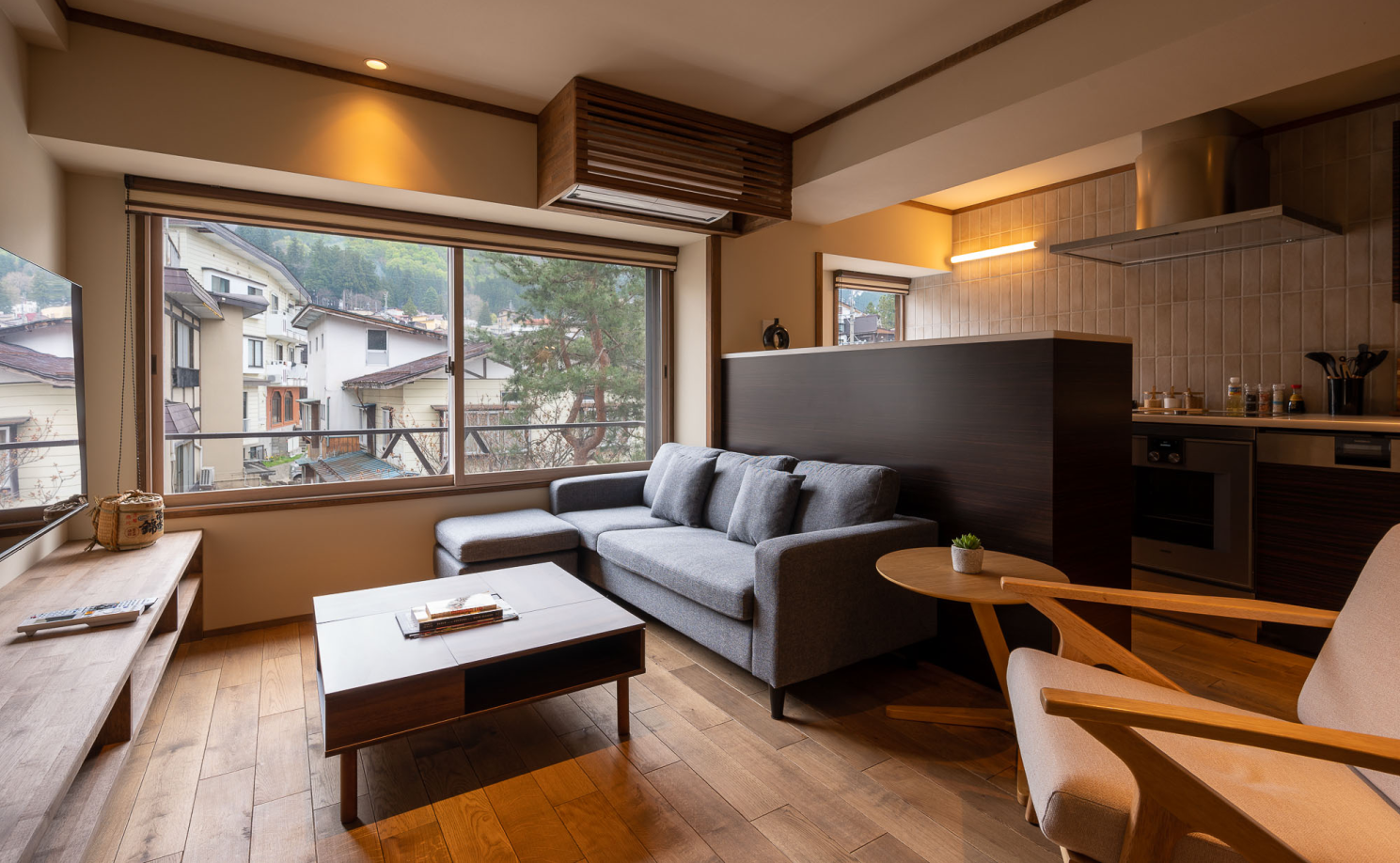
The original living room state of the two-bedroom apartment redesign project
My Original Workflow Problem
Before I started using AI more intentionally, my early concept process was mostly manual. I would gather references, group them into style directions, build a concept presentation, and then refine those directions based on client feedback.
That process worked, but it had three weak points.
1. I was spending too much time on early revisions
The first issue was not that the clients were difficult. It was that their feedback was often too general to be actionable right away. They would say things like:
"I like this, but I'm not sure it feels right."
"Can we try something warmer, but still clean?"
That kind of feedback is normal, but it usually means the client has not fully visualized the concept yet. And when that happens, I end up doing multiple rounds of concept adjustment before we even reach a solid direction.
2. Concept development was slower than I wanted
For a small apartment project, there is only so much time I can reasonably spend building out first-round directions. I still want the work to feel thoughtful and custom, but I also need the process to be efficient.
The manual concept stage was starting to feel too heavy for projects like this. I needed a faster way to test ideas without lowering the quality of the client experience.
3. Mood boards alone were not helping clients react clearly
This was the real problem. Mood boards can communicate tone, color palette, and general direction, but they still ask clients to make a mental leap. They have to imagine how those references would translate into their own apartment.
That was where the hesitation showed up.
I remember thinking very clearly during this project: the issue is not that my clients do not know what they like. The issue is that they need help seeing it in context.
Why I Tried DecAITM
Honestly, at the very beginning, I did not start using DecAITM because I wanted AI to do the design work for me. I tried it because I wanted a faster way to explore concept directions inside the client's real space.
What stood out to me was the workflow. I could upload a photo of the actual apartment, test multiple styles, and generate visual directions quickly. That immediately felt more useful than starting from abstract inspiration alone.
For this project, DecAITM made sense because:
- I wanted to work from the clients' actual rooms.
- I needed to explore several style directions quickly.
- I wanted to help the clients react to visuals instead of flat references.
- I needed a lighter, faster concept workflow before moving into deeper design development.
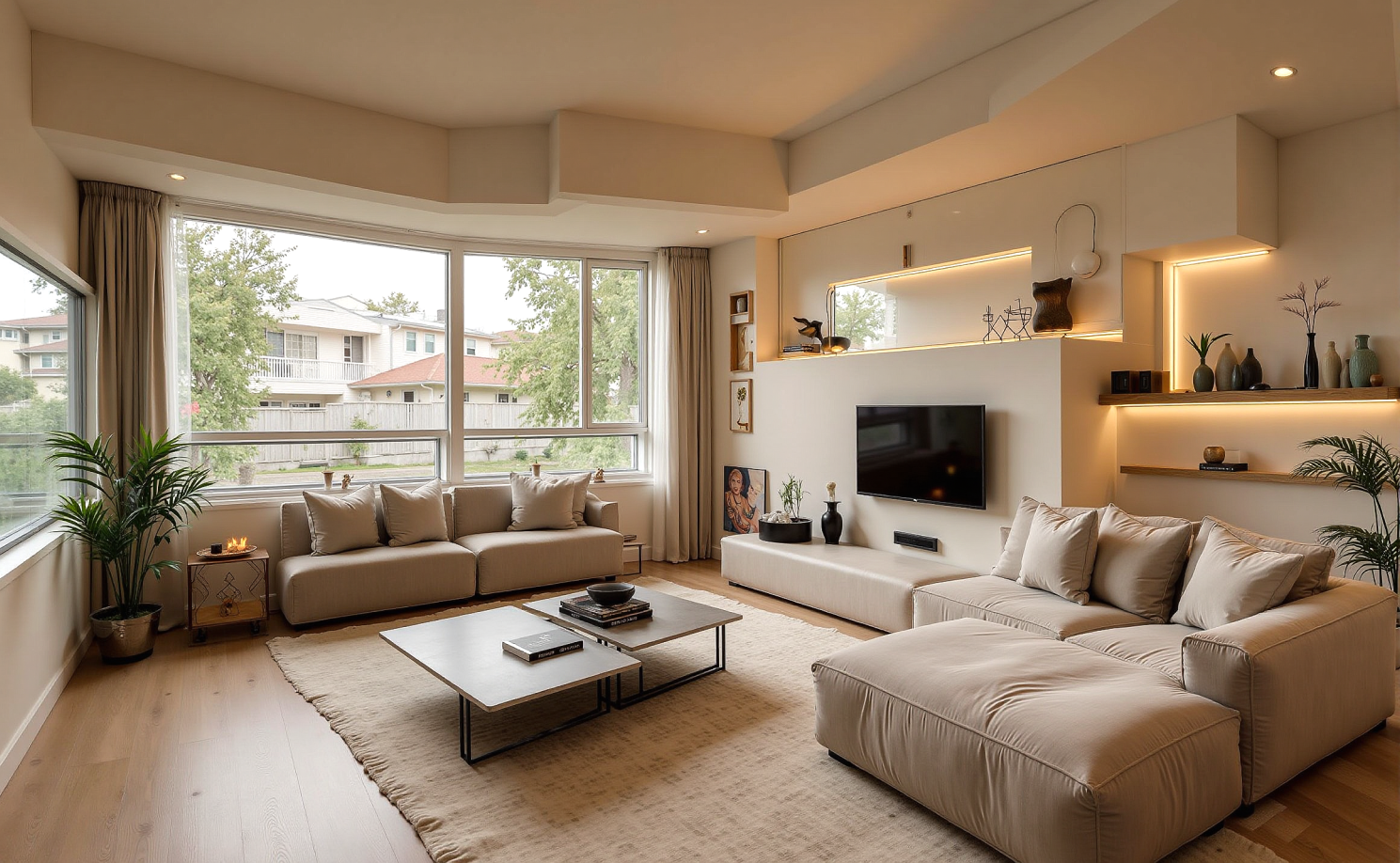
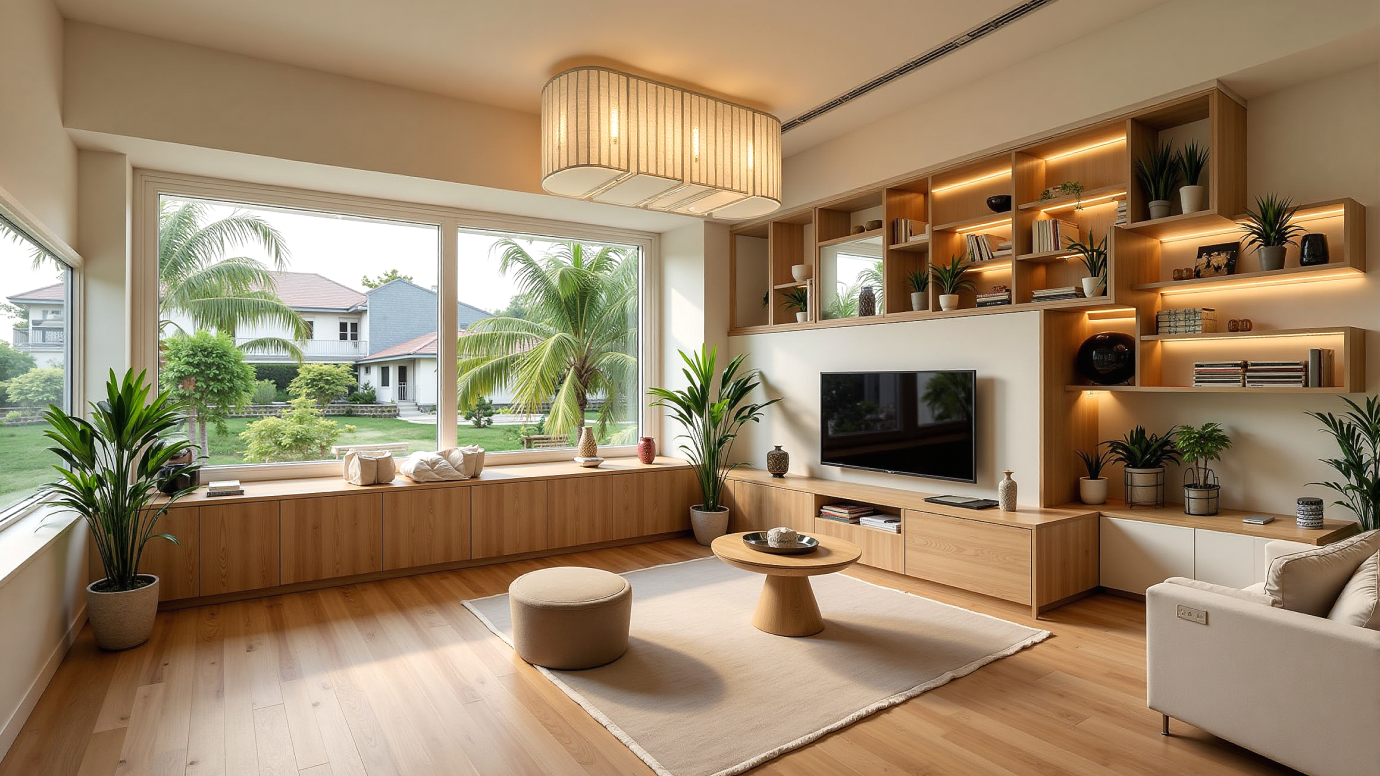
Two bedroom apartment mordern style made by DecAITM
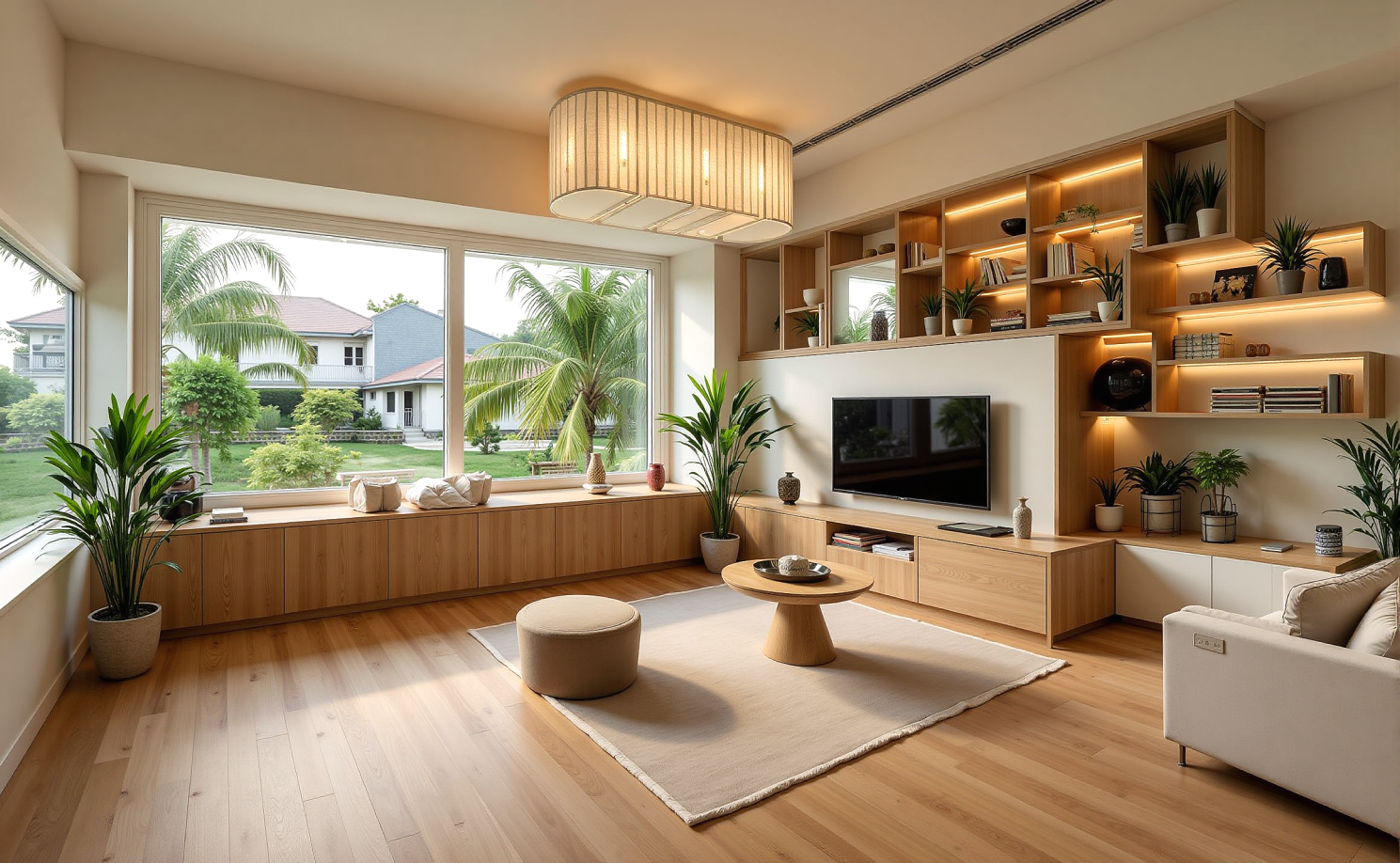
Two bedroom apartment biophilic style made by DecAITM
I also liked that it fit the kind of work I was doing. This was not a large technical planning project. It was a residential redesign where early direction and client confidence mattered a lot.
"I'm not asking AI to design the apartment. I'm asking it to help me get to the right conversation faster."
How I Used DecAITM Step by Step
I used DecAITM during the early concept phase, before detailed sourcing and before locking in a final direction. I treated it as part of my workflow, not as the whole workflow.
Step 1: I photographed the key spaces
I started with clear photos of the apartment, including:
- the living-dining area
- the main bedroom
- the second bedroom
- a transition area near the entry
That mattered because I wanted the clients to see possibilities in their own apartment, not in a generic styled room.
Step 2: I tested multiple style directions
Instead of building one concept and hoping it landed, I explored a range of directions.
For the living area, I tested options that leaned:
- warm minimalist
- soft Japandi
- contemporary natural
- lighter modern
For the second bedroom, I focused on options that balanced calm style with flexibility, since the room had to function as both guest space and part-time office.
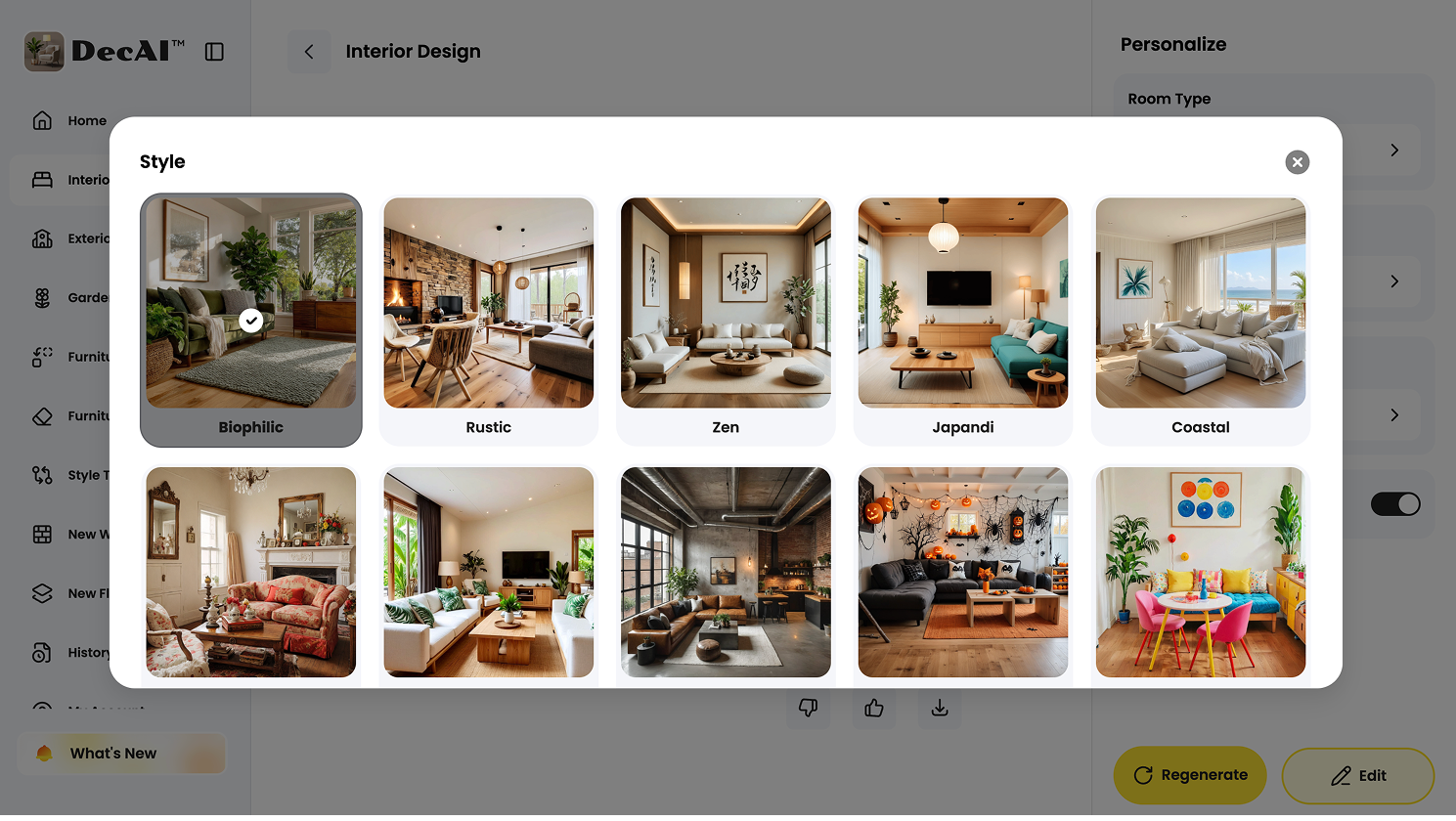
A full set of design style options are available
Step 3: I curated the outputs before showing them to the client
This part is important. I did not just generate images and send everything over. I reviewed the results first, removed weak or unrealistic ones, and selected the directions that actually supported the project.
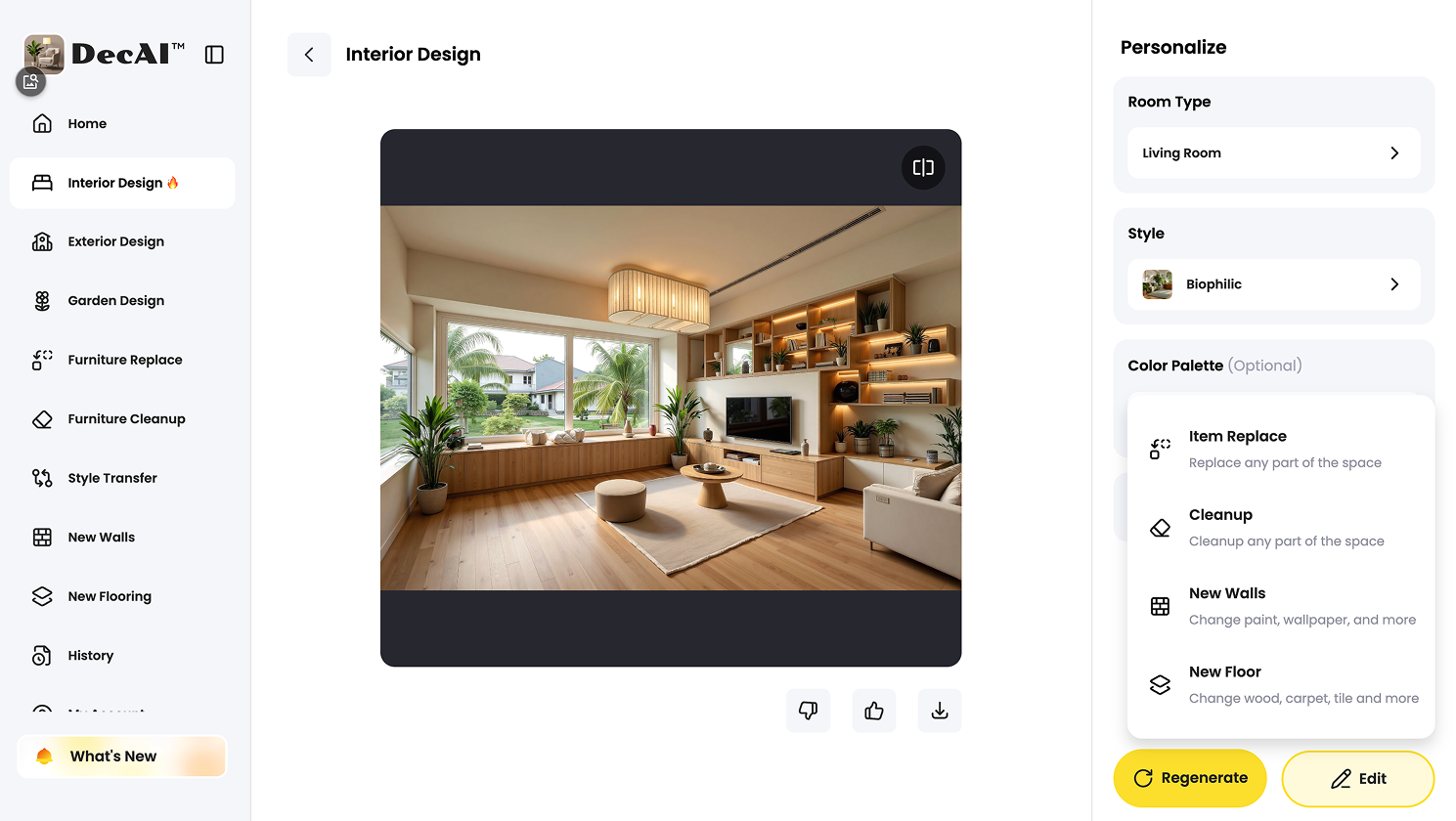
DecAITM also allows you to further edit the output image to the version that you actually vision in your mind.
Then I used those selected visuals to structure the concept presentation. I framed each direction around what it solved, what the mood was, and what could realistically carry into the final design.
That curation step was where my role as the designer stayed central.
Step 4: I used the visuals to narrow the conversation faster
Once the clients saw multiple possibilities in their own apartment, the quality of feedback improved almost immediately.
Instead of vague comments, I started hearing things like:
Design any room, shop or space with DecAI in less 30 seconds! It's free!
"We like the warmth of this one."
"This version makes the room feel less cramped."
"The lighter finishes make the apartment feel more open."
"This bedroom direction feels calmer and more practical."
That was the shift I needed. Once the feedback became specific, the whole project moved faster.
What I Generated in One Afternoon
One of the biggest practical wins for me was output volume.
In one afternoon, I generated more than 12 usable design ideas across the apartment. Not every image was presentation-ready, and not every result was equally strong, but enough were useful that I could build real concept comparisons from them.
That saved time in two ways.
First, it let me explore more broadly without overcommitting to one direction too early.
Second, it helped the clients discover their preferences faster. They did not have to describe their style from scratch. They could react to visible differences in warmth, simplicity, furniture weight, brightness, and overall mood.
For a small apartment project, that was especially helpful because the wrong visual direction can make a compact space feel heavier, darker, or more cluttered very quickly.
Inspiring Facts for You
About this project, I do have several facts I think you should know:
1.My concept-prep time dropped by about 40%
Compared with my usual manual concept process for a similar apartment redesign, I spent about 40% less time preparing early-stage design directions.
That does not mean the entire project took 40% less time. It means the concept phase became meaningfully more efficient, which is exactly where I needed help.
2.I generated 12+ usable ideas in one afternoon
That amount of usable exploration would have taken me much longer if I had built it entirely through traditional reference-based concepting.
For freelance work, that kind of speed matters.
3.I reduced early revision rounds from 5 to 2
This was probably the most valuable result.
On similar projects, I often find myself going through around five early revision rounds before the client and I are fully aligned. On this project, that dropped to two.
That change improved more than just efficiency. It reduced friction, protected my time, and helped the clients feel like the project was moving forward with more confidence.
4.Client feedback became clearer
This was the biggest communication win. Once the clients could see different directions applied to their own apartment, they stopped reacting in vague adjectives and started making clearer decisions.
That alone made the workflow feel more professional and less exhausting.
What Worked Best
Looking back, a few things worked especially well.
Faster ideation inside the real space
I did not have to rely entirely on abstract inspiration. I could test ideas inside the apartment itself, which made early concepting feel more grounded and more relevant.
Better client communication
This was the strongest benefit for me. The visuals helped the clients understand direction much faster than mood boards alone.
Easier comparison between options
Because I could generate multiple believable directions quickly, it became easier to compare what made the apartment feel lighter, warmer, calmer, or more functional.
A strong fit for budget-conscious projects
When clients are budget-sensitive, they want to feel confident before they commit. This workflow helped me create that confidence faster without dragging out the concept stage.
Where AI Did Not Replace Me
I think this part matters just as much as the success points.
DecAITM helped me move faster, but it did not replace the parts of the process that depend on design judgment.
It did not solve the full layout problem
A small apartment redesign still needs human thinking around circulation, scale, storage, and daily function. AI helped me test visual directions, but it did not make the final layout decisions for me.
It did not make budget trade-offs
The clients still needed guidance on what was worth changing, what could stay, and where to spend carefully. That part still depended on me.
It did not replace sourcing or specification
I still had to translate the chosen direction into real materials, furniture, finishes, and practical recommendations.
It still required curation
Not every output was strong. Some were useful only as internal exploration. My job was still to filter, interpret, and present the right ideas.
That is why I see DecAITM as a tool inside my process, not a substitute for it.
Best Insights for Freelance Interior Designers Like You
Based on this project, I think DecAITM is especially useful for freelance designers who need help with:
- early concept packages
- small apartment redesigns
- client consultations and pitches
- style-direction exploration
- projects where clients struggle to react to mood boards
- solo workflows where time efficiency matters
If your main bottleneck is the early concept phase, this kind of tool can make a real difference.
Is DecAITM Worth It for Apartment Redesign Projects?
For the kind of project I described here, I would say yes.
DecAITM was most useful as an early-stage concept accelerator. It helped me generate faster first-pass directions, reduce revision rounds, and improve client clarity. That made it especially valuable for a compact residential project where time, budget sensitivity, and communication efficiency all mattered.
I would not treat it as a replacement for planning, sourcing, or detailed design development. But I would absolutely treat it as a practical way to improve the front end of the workflow.
If your projects often get stuck in the "let's explore a few more directions" stage, this kind of tool is worth considering.
So, if you are interested, go free sign up and start trying it on your own project right now!
FAQs
1. What is an AI interior design case study?
An AI interior design case study is a project-based story that shows how an AI tool was used in a real design workflow, including the problem, process, results, and limitations.
2. Can AI help freelance interior designers reduce revisions?
Yes. In my experience, it can reduce early revisions by helping clients react to clearer visual options sooner.
3. Is DecAITM good for small apartment redesign projects?
Yes, especially for early concept development and style-direction testing in real apartment photos.
4. How many design directions can AI generate in a day?
It depends on the project, but in this case I generated more than 12 usable ideas in one afternoon.
5. Does AI replace mood boards?
Not completely. I still see mood boards as useful, but AI visuals can make client reactions faster and more specific.
6. Can AI replace full interior design planning?
No. It can support concepting and communication, but it does not replace professional judgment, sourcing, layout planning, or implementation.
Final Thoughts
This AI interior design case study reminded me that the best use of AI in freelance design is not to replace the designer. It is to remove friction from the parts of the workflow that slow good decisions down.
For this two-bedroom apartment redesign, DecAITM helped me generate ideas faster, reduce early revisions, and communicate more clearly with clients who needed to see possibilities in their own home before they could commit. For freelance interior designers working on similar residential projects, that can be a very practical advantage.
If you want to test ideas faster without losing your role as the designer leading the project, DecAITM is worth exploring as an early-stage concept tool.
--------------------------------------
If you believe that any material on this site infringes your intellectual property rights, please contact the author at decaiwebteam@outlook.com with details of your claim.
Redesign any home interior, exterior & garden in seconds
Share this Post:
'%3e%3cpath%20d='M17.9995%2035.999C17.0317%2035.999%2016.0619%2035.9219%2015.1161%2035.7696C10.9414%2035.0973%207.11524%2032.9513%204.34408%2029.7273C1.54287%2026.4683%200%2022.3035%200%2017.9995C0%208.07403%208.07503%200%2017.9995%200C27.924%200%2036%208.07503%2036%2017.9995C36%2022.3696%2034.4151%2026.5835%2031.5357%2029.8646C28.6844%2033.1156%2024.7671%2035.2326%2020.5052%2035.8267C19.6806%2035.9419%2018.8371%2036%2017.9995%2036V35.999ZM17.9995%201.20123C8.73726%201.20123%201.20224%208.73626%201.20224%2017.9985C1.20224%2026.2919%207.13427%2033.2659%2015.3075%2034.5814C16.9546%2034.8469%2018.6808%2034.8659%2020.3389%2034.6345C28.5812%2033.4863%2034.7968%2026.334%2034.7968%2017.9985C34.7968%208.73626%2027.2617%201.20123%2017.9985%201.20123H17.9995Z'%20fill='%23FF0209'/%3e%3cpath%20d='M29.0557%2014.3621C28.9184%2013.0276%2028.6208%2011.5539%2027.5268%2010.7784C26.6782%2010.1773%2025.5642%2010.1553%2024.5242%2010.1563C22.3251%2010.1583%2020.126%2010.1603%2017.9269%2010.1623C15.812%2010.1643%2013.6971%2010.1663%2011.5821%2010.1683C10.6985%2010.1683%209.8399%2010.1002%209.01937%2010.4819C8.31406%2010.8105%207.76303%2011.4347%207.43241%2012.1289C6.97156%2013.0957%206.87438%2014.1898%206.81927%2015.2588C6.71708%2017.2044%206.7281%2019.156%206.85133%2021.0996C6.9405%2022.5193%207.16792%2024.0872%208.26496%2024.9919C9.23777%2025.7934%2010.6103%2025.8325%2011.8707%2025.8335C15.8741%2025.8365%2019.8776%2025.8395%2023.881%2025.8435C24.394%2025.8435%2024.93%2025.8345%2025.453%2025.7774C26.4829%2025.6661%2027.4637%2025.3716%2028.1249%2024.6092C28.7922%2023.8407%2028.9635%2022.7698%2029.0657%2021.7569C29.3121%2019.3003%2029.3091%2016.8177%2029.0557%2014.3621ZM15.6116%2021.4453V14.5545L21.5797%2017.9999L15.6116%2021.4453Z'%20fill='%23FF0209'/%3e%3c/g%3e%3cdefs%3e%3cclipPath%20id='clip0_13816_41422'%3e%3crect%20width='36'%20height='36'%20fill='white'/%3e%3c/clipPath%3e%3c/defs%3e%3c/svg%3e)
'%3e%3cpath%20d='M17.9995%2036C17.0327%2036%2016.0619%2035.9229%2015.1161%2035.7696C10.9414%2035.0973%207.11524%2032.9513%204.34408%2029.7273C1.54287%2026.4683%200%2022.3035%200%2017.9995C0%208.07403%208.07503%200%2017.9995%200C27.924%200%2036%208.07503%2036%2017.9995C36%2022.3696%2034.4151%2026.5835%2031.5357%2029.8646C28.6844%2033.1156%2024.7671%2035.2326%2020.5052%2035.8267C19.6806%2035.9419%2018.8371%2036%2017.9995%2036ZM17.9995%201.20224C8.73726%201.20224%201.20224%208.73726%201.20224%2017.9995C1.20224%2026.2919%207.13427%2033.2669%2015.3075%2034.5824C16.9556%2034.8479%2018.6808%2034.8669%2020.3389%2034.6355C28.5812%2033.4873%2034.7968%2026.335%2034.7968%2017.9995C34.7968%208.73726%2027.2617%201.20224%2017.9985%201.20224H17.9995Z'%20fill='url(%23paint0_linear_13816_41436)'/%3e%3cpath%20d='M23.4463%207.55469H12.549C9.53841%207.55469%207.08984%2010.0032%207.08984%2013.0138V22.9834C7.08984%2025.994%209.53841%2028.4426%2012.549%2028.4426H23.4463C26.4569%2028.4426%2028.9054%2025.994%2028.9054%2022.9834V13.0138C28.9054%2010.0032%2026.4569%207.55469%2023.4463%207.55469ZM9.01543%2013.0138C9.01543%2011.0652%2010.6004%209.48027%2012.549%209.48027H23.4463C25.3949%209.48027%2026.9799%2011.0652%2026.9799%2013.0138V22.9834C26.9799%2024.932%2025.3949%2026.517%2023.4463%2026.517H12.549C10.6004%2026.517%209.01543%2024.932%209.01543%2022.9834V13.0138Z'%20fill='url(%23paint1_linear_13816_41436)'/%3e%3cpath%20d='M17.9964%2023.0749C20.7966%2023.0749%2023.0749%2020.7966%2023.0749%2017.9964C23.0749%2015.1962%2020.7966%2012.918%2017.9964%2012.918C15.1962%2012.918%2012.918%2015.1962%2012.918%2017.9964C12.918%2020.7966%2015.1962%2023.0749%2017.9964%2023.0749ZM17.9964%2014.8446C19.7346%2014.8446%2021.1483%2016.2582%2021.1483%2017.9964C21.1483%2019.7347%2019.7346%2021.1483%2017.9964%2021.1483C16.2582%2021.1483%2014.8446%2019.7347%2014.8446%2017.9964C14.8446%2016.2582%2016.2582%2014.8446%2017.9964%2014.8446Z'%20fill='url(%23paint2_linear_13816_41436)'/%3e%3cpath%20d='M23.5482%2013.741C24.3026%2013.741%2024.9168%2013.1269%2024.9168%2012.3725C24.9168%2011.618%2024.3026%2011.0039%2023.5482%2011.0039C22.7938%2011.0039%2022.1797%2011.618%2022.1797%2012.3725C22.1797%2013.1269%2022.7938%2013.741%2023.5482%2013.741Z'%20fill='url(%23paint3_linear_13816_41436)'/%3e%3c/g%3e%3cdefs%3e%3clinearGradient%20id='paint0_linear_13816_41436'%20x1='5.27482'%20y1='30.7312'%20x2='30.7242'%20y2='5.28083'%20gradientUnits='userSpaceOnUse'%3e%3cstop%20stop-color='%23FAAD4F'/%3e%3cstop%20offset='0.35'%20stop-color='%23DD2A7B'/%3e%3cstop%20offset='0.62'%20stop-color='%239537B0'/%3e%3cstop%20offset='1'%20stop-color='%23515BD4'/%3e%3c/linearGradient%3e%3clinearGradient%20id='paint1_linear_13816_41436'%20x1='8.92225'%20y1='27.074'%20x2='27.073'%20y2='8.92324'%20gradientUnits='userSpaceOnUse'%3e%3cstop%20stop-color='%23FAAD4F'/%3e%3cstop%20offset='0.35'%20stop-color='%23DD2A7B'/%3e%3cstop%20offset='0.62'%20stop-color='%239537B0'/%3e%3cstop%20offset='1'%20stop-color='%23515BD4'/%3e%3c/linearGradient%3e%3clinearGradient%20id='paint2_linear_13816_41436'%20x1='14.4077'%20y1='21.5861'%20x2='21.5861'%20y2='14.4077'%20gradientUnits='userSpaceOnUse'%3e%3cstop%20stop-color='%23FAAD4F'/%3e%3cstop%20offset='0.35'%20stop-color='%23DD2A7B'/%3e%3cstop%20offset='0.62'%20stop-color='%239537B0'/%3e%3cstop%20offset='1'%20stop-color='%23515BD4'/%3e%3c/linearGradient%3e%3clinearGradient%20id='paint3_linear_13816_41436'%20x1='22.5814'%20y1='13.3393'%20x2='24.515'%20y2='11.4057'%20gradientUnits='userSpaceOnUse'%3e%3cstop%20stop-color='%23FAAD4F'/%3e%3cstop%20offset='0.35'%20stop-color='%23DD2A7B'/%3e%3cstop%20offset='0.62'%20stop-color='%239537B0'/%3e%3cstop%20offset='1'%20stop-color='%23515BD4'/%3e%3c/linearGradient%3e%3cclipPath%20id='clip0_13816_41436'%3e%3crect%20width='36'%20height='36'%20fill='white'/%3e%3c/clipPath%3e%3c/defs%3e%3c/svg%3e)
'%3e%3cpath%20d='M17.9995%2035.999C17.0317%2035.999%2016.0619%2035.9219%2015.1161%2035.7696C10.9414%2035.0973%207.11524%2032.9513%204.34408%2029.7273C1.54287%2026.4683%200%2022.3035%200%2017.9995C0%208.07403%208.07502%200%2017.9995%200C27.924%200%2036%208.07503%2036%2017.9995C36%2022.3696%2034.415%2026.5835%2031.5357%2029.8646C28.6844%2033.1156%2024.7671%2035.2326%2020.5052%2035.8267C19.6806%2035.9419%2018.8371%2036%2017.9995%2036V35.999ZM17.9995%201.20123C8.73725%201.20123%201.20224%208.73626%201.20224%2017.9985C1.20224%2026.2919%207.13427%2033.2659%2015.3075%2034.5814C16.9545%2034.8469%2018.6808%2034.8659%2020.3388%2034.6345C28.5812%2033.4863%2034.7968%2026.334%2034.7968%2017.9985C34.7968%208.73626%2027.2617%201.20123%2017.9985%201.20123H17.9995Z'%20fill='%23007EBB'/%3e%3cpath%20d='M9.06639%2012.124C8.60253%2011.6932%208.37109%2011.1602%208.37109%2010.526C8.37109%209.89184%208.60253%209.33481%209.06639%208.90401C9.53026%208.47321%2010.1274%208.25781%2010.8587%208.25781C11.5901%208.25781%2012.1642%208.47321%2012.627%208.90401C13.0909%209.33481%2013.3223%209.87581%2013.3223%2010.526C13.3223%2011.1762%2013.0909%2011.6932%2012.627%2012.124C12.1631%2012.5548%2011.5741%2012.7702%2010.8587%2012.7702C10.1434%2012.7702%209.52926%2012.5548%209.06639%2012.124ZM12.9326%2014.5946V27.7962H8.76182V14.5946H12.9326Z'%20fill='%23007EBB'/%3e%3cpath%20d='M26.8196%2015.9006C27.7283%2016.8875%2028.1832%2018.243%2028.1832%2019.9682V27.5663H24.2208V20.5042C24.2208%2019.6346%2023.9954%2018.9583%2023.5445%2018.4764C23.0937%2017.9945%2022.4876%2017.7541%2021.7262%2017.7541C20.9647%2017.7541%2020.3586%2017.9955%2019.9078%2018.4764C19.4569%2018.9583%2019.2315%2019.6346%2019.2315%2020.5042V27.5663H15.2461V14.5611H19.2315V16.2863C19.6353%2015.7113%2020.1793%2015.2574%2020.8636%2014.9228C21.5468%2014.5892%2022.3163%2014.4219%2023.1708%2014.4219C24.6937%2014.4219%2025.9099%2014.9158%2026.8186%2015.9016L26.8196%2015.9006Z'%20fill='%23007EBB'/%3e%3c/g%3e%3cdefs%3e%3cclipPath%20id='clip0_13816_41425'%3e%3crect%20width='36'%20height='36'%20fill='white'/%3e%3c/clipPath%3e%3c/defs%3e%3c/svg%3e)
'%3e%3cpath%20d='M18%2035.999C17.0322%2035.999%2016.0623%2035.9219%2015.1166%2035.7696C10.9417%2035.0973%207.11544%2032.9513%204.3442%2029.7273C1.54291%2026.4683%200%2022.3035%200%2017.9995C0%208.07403%208.07526%200%2018%200C27.9248%200%2036%208.07503%2036%2017.9995C36%2022.3696%2034.415%2026.5835%2031.5356%2029.8646C28.6842%2033.1156%2024.7668%2035.2326%2020.5047%2035.8267C19.6802%2035.9419%2018.8366%2036%2017.999%2036L18%2035.999ZM18%201.20123C8.73751%201.20123%201.20227%208.73626%201.20227%2017.9985C1.20227%2026.2919%207.13448%2033.2659%2015.3079%2034.5814C16.955%2034.8469%2018.6813%2034.8659%2020.3394%2034.6345C28.582%2033.4863%2034.7977%2026.334%2034.7977%2017.9985C34.7977%208.73626%2027.2625%201.20123%2018%201.20123Z'%20fill='black'/%3e%3cpath%20d='M7%208.09163H13.5067L19.521%2016.1816L27.0073%207.90625L28.786%207.93715L20.4078%2017.3454L29%2028.901H22.4959L16.8193%2021.362L9.8847%2029.0864H8.13428L15.9583%2020.26L7%208.09163ZM12.8931%209.28633H9.45676L23.2048%2027.6754H26.5793L12.8931%209.28633Z'%20fill='black'/%3e%3c/g%3e%3cdefs%3e%3cclipPath%20id='clip0_13886_43848'%3e%3crect%20width='36'%20height='36'%20fill='white'/%3e%3c/clipPath%3e%3c/defs%3e%3c/svg%3e)
'%3e%3cpath%20d='M17.9995%2035.999C17.0327%2035.999%2016.0619%2035.9219%2015.1161%2035.7686C10.9414%2035.0963%207.11524%2032.9503%204.34408%2029.7263C1.54287%2026.4673%200%2022.3025%200%2017.9995C0%208.07403%208.07503%200%2017.9995%200C27.924%200%2036%208.07503%2036%2017.9995C36%2022.3696%2034.415%2026.5835%2031.5357%2029.8646C28.6844%2033.1156%2024.7671%2035.2326%2020.5052%2035.8267C19.6806%2035.9419%2018.8371%2036%2017.9995%2036V35.999ZM17.9995%201.20123C8.73726%201.20123%201.20224%208.73626%201.20224%2017.9985C1.20224%2026.2909%207.13428%2033.2659%2015.3075%2034.5814C16.9556%2034.8469%2018.6808%2034.8659%2020.3389%2034.6345C28.5812%2033.4863%2034.7968%2026.334%2034.7968%2017.9985C34.7968%208.73626%2027.2617%201.20123%2017.9985%201.20123H17.9995Z'%20fill='%231877F7'/%3e%3cpath%20d='M20.5337%2014.9635V18.7536H25.2225L24.4801%2023.8601H20.5337V35.624C19.7423%2035.7342%2018.9328%2035.7913%2018.1112%2035.7913C17.1625%2035.7913%2016.2317%2035.7151%2015.324%2035.5689V23.8601H11V18.7536H15.324V14.1169C15.324%2011.2396%2017.6564%208.90625%2020.5347%208.90625V8.90926C20.5428%208.90926%2020.5508%208.90625%2020.5588%208.90625H25.2235V13.3215H22.1758C21.2691%2013.3215%2020.5347%2014.0558%2020.5347%2014.9625L20.5337%2014.9635Z'%20fill='%231877F7'/%3e%3c/g%3e%3cdefs%3e%3cclipPath%20id='clip0_13816_41433'%3e%3crect%20width='36'%20height='36'%20fill='white'/%3e%3c/clipPath%3e%3c/defs%3e%3c/svg%3e)
'%3e%3cpath%20d='M17.9995%2035.999C17.0327%2035.999%2016.0619%2035.9219%2015.1161%2035.7686C10.9414%2035.0963%207.11524%2032.9503%204.34408%2029.7263C1.54287%2026.4673%200%2022.3025%200%2017.9995C0%208.07403%208.07503%200%2017.9995%200C27.924%200%2036%208.07503%2036%2017.9995C36%2022.3696%2034.415%2026.5835%2031.5357%2029.8646C28.6844%2033.1156%2024.7671%2035.2326%2020.5052%2035.8267C19.6806%2035.9419%2018.8371%2036%2017.9995%2036V35.999ZM17.9995%201.20123C8.73726%201.20123%201.20224%208.73626%201.20224%2017.9985C1.20224%2026.2909%207.13428%2033.2659%2015.3075%2034.5814C16.9556%2034.8469%2018.6808%2034.8659%2020.3389%2034.6345C28.5812%2033.4863%2034.7968%2026.334%2034.7968%2017.9985C34.7968%208.73626%2027.2617%201.20123%2017.9985%201.20123H17.9995Z'%20fill='%232A91F7'/%3e%3cg%20clip-path='url(%23clip1_13816_41442)'%3e%3cpath%20d='M16.3345%2018.834C16.6924%2019.3124%2017.149%2019.7083%2017.6733%2019.9947C18.1976%2020.2812%2018.7774%2020.4516%2019.3734%2020.4942C19.9693%2020.5369%2020.5675%2020.4509%2021.1273%2020.2421C21.6871%2020.0333%2022.1954%2019.7065%2022.6178%2019.284L25.1178%2016.784C25.8768%2015.9981%2026.2968%2014.9456%2026.2873%2013.8531C26.2778%2012.7606%2025.8396%2011.7156%2025.0671%2010.943C24.2946%2010.1705%2023.2495%209.73231%2022.157%209.72281C21.0645%209.71332%2020.012%2010.1333%2019.2262%2010.8923L17.7928%2012.3173M19.6678%2017.1673C19.3099%2016.6889%2018.8533%2016.293%2018.329%2016.0065C17.8047%2015.7201%2017.2249%2015.5497%2016.6289%2015.507C16.033%2015.4643%2015.4348%2015.5503%2014.875%2015.7592C14.3152%2015.968%2013.8069%2016.2947%2013.3845%2016.7173L10.8845%2019.2173C10.1255%2020.0031%209.70551%2021.0557%209.715%2022.1481C9.72449%2023.2406%2010.1627%2024.2857%2010.9352%2025.0582C11.7078%2025.8307%2012.7528%2026.269%2013.8453%2026.2784C14.9378%2026.2879%2015.9903%2025.868%2016.7761%2025.109L18.2011%2023.684'%20stroke='%232A91F7'%20stroke-width='1.66667'%20stroke-linecap='round'%20stroke-linejoin='round'/%3e%3c/g%3e%3c/g%3e%3cdefs%3e%3cclipPath%20id='clip0_13816_41442'%3e%3crect%20width='36'%20height='36'%20fill='white'/%3e%3c/clipPath%3e%3cclipPath%20id='clip1_13816_41442'%3e%3crect%20width='20'%20height='20'%20fill='white'%20transform='translate(8%208)'/%3e%3c/clipPath%3e%3c/defs%3e%3c/svg%3e)
Redesign any home interior, exterior & garden in seconds