

Never Guess Again! Top 15 Kitchen Design Software Tools for Different Needs & Budgets

A beautiful yet functional kitchen often starts with an good idea, but turning that idea A beautiful yet functional kitchen often starts with a good idea—but turning that idea into a space that actually works is where things get tricky.
From testing layouts and cabinet colors to comparing flooring materials, checking dimensions, and visualizing the finished result, there are plenty of decisions you don't want to leave to guesswork.
Luckily, the right kitchen design software can help you explore your options and make those decisions with much more confidence.
To help you find the right one, we've rounded up 15 of the best kitchen design software tools for 2026, grouped by skill level and budget, so whether you're a first-time DIYer or a design professional, you can quickly find the right fit.
Design any room, shop or space with DecAI in less 30 seconds! It's free!
How to Choose the Right Kitchen Design Software Tool?
Before jumping into the list, understanding how to evaluate kitchen design software will help you choose the right tool much more quickly.
And here are the main factors that you can consider:
- Ease of use: How quickly can a new user get started? Does the software require professional CAD or 3D modeling experience?
- Kitchen design capabilities: Can you plan layouts, place cabinets and appliances, experiment with materials, or visualize a kitchen remodel?
- 2D and 3D design: Does it support floor plans, 3D models, realistic visualization, or a combination of them?
- Accuracy and customization: Can users work with real measurements and customize cabinets, surfaces, fixtures, and other kitchen elements?
- Visualization quality: How clearly can you see what the finished kitchen might look like before making real-world changes?
- Professional features: For advanced tools, we looked for capabilities such as technical drawings, manufacturer catalogs, documentation, custom cabinetry, and client-ready outputs.
- Learning curve: We considered whether each tool is appropriate for beginners, serious DIYers, professional designers, or manufacturing specialists.
- Price and value: Free doesn't automatically mean better. We considered what you actually get for the price and whether the additional capabilities justify the cost for the intended user.
- Platform availability: We also considered whether each tool works on the web, Windows, Mac, or mobile devices.
Most importantly, start with your goals and budget, not the longest feature list. A beginner exploring a new kitchen style needs a very different tool from a designer creating client plans or a cabinet maker preparing a project for production.
So, before choosing, make a quick list of what you actually need the software to do. It will make finding the right tool much easier.

Top 15 Kitchen Design Tools for Different Needs and Budgets
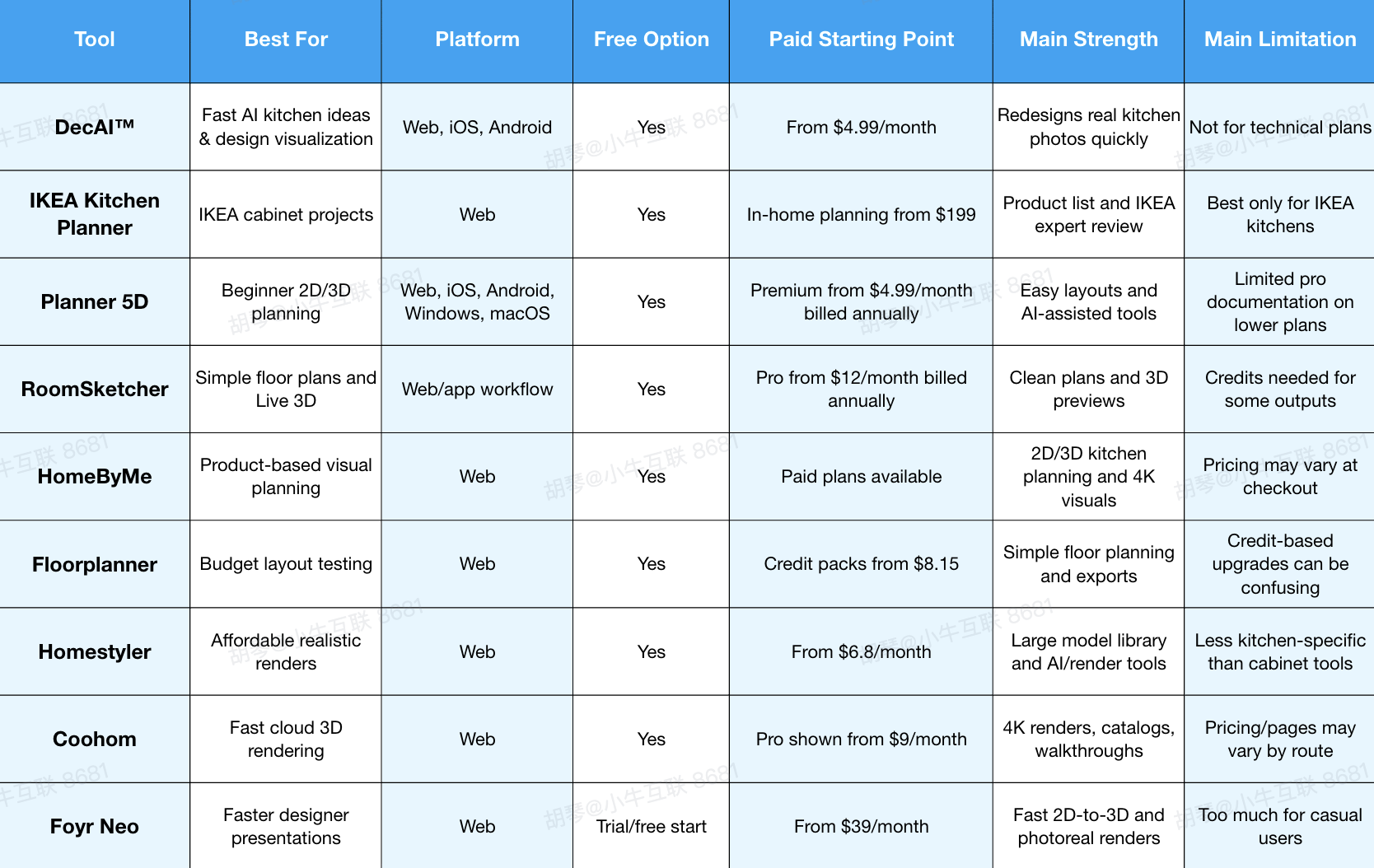
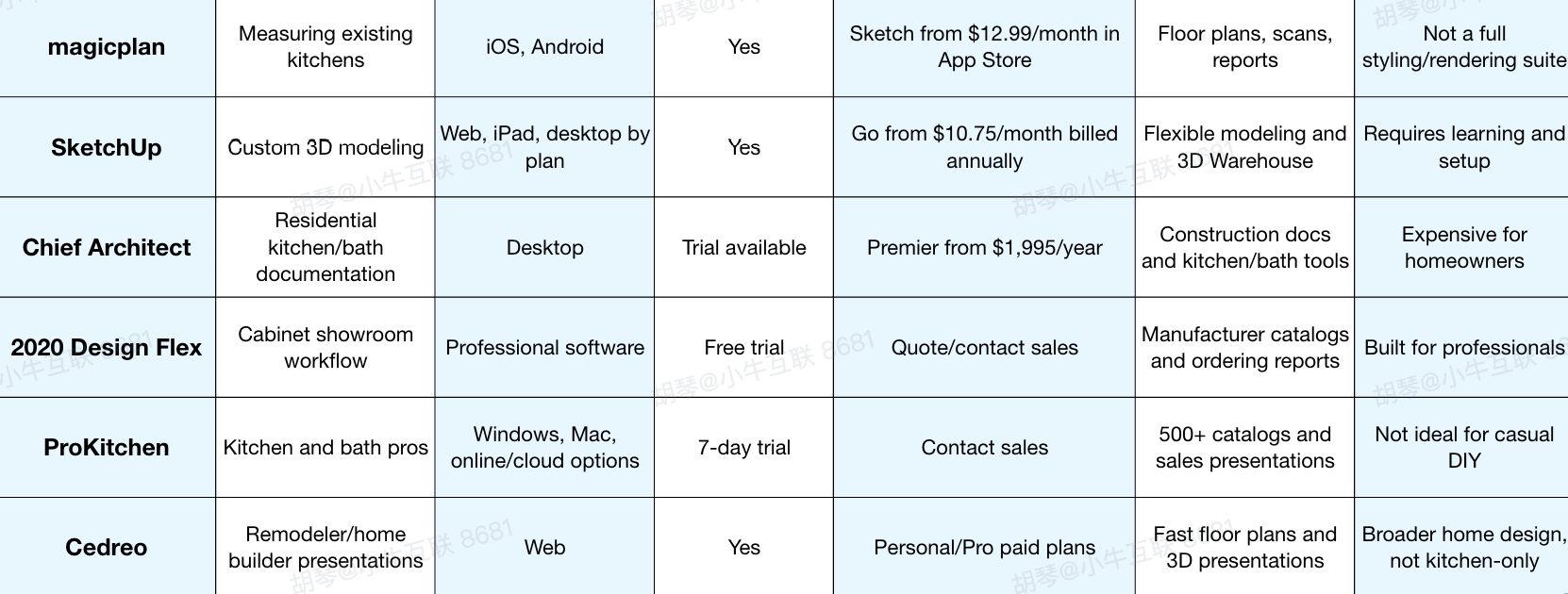
Quick overview of these 15 best kitchen design tools
To help you better scan and find the right one as quickly as possible, we'll also introduce them all in three groups as follows:
- Best for beginners and homeowners
- Best for DIYers and design enthusiasts
- Best for interior designers, architects, and professionals
Best for Beginners and Homeowners
1.DecAI™ - Best for Quick AI Kitchen Idea & Style Visualization

Platform: Web, iOS, Android
Pricing: FFree plan available; Pro plans start at $4.99 per month. One-time credit packages are also available for users who prefer more flexible, pay-as-you-go options.
DecAI™ is a powerful AI kitchen design tool when you want to see what your existing kitchen could look like before you start measuring cabinets or pricing materials.
Instead of building a room from scratch, you upload a photo of your kitchen, choose a design direction, and generate new visual ideas quickly.
For homeowners or beginners, this is useful at the messy early stage when you know the current kitchen feels wrong but cannot yet explain what should change.
DecAI is especially helpful for comparing styles, cabinet colors, wall treatments, flooring ideas, and overall mood.
Most importantly, DecAI isn't limited to kitchen design. It also supports interiors, exteriors, gardens, and more, so you can continue refining the rest of your home once you've found a kitchen direction you love—all in one place, with much less guesswork.
Why to choose DecAI
- Fast and beginner-friendly;
- Star with a photo of your actual kitchen;
- Easy to explore and refine different styles, walls, floors, furniture, and more;
- Cover kitchen and whole-home design in one platform.
- Over 30 design styles available
- Smart AI agents to keep refining ideas until it is right
Reasons to avoid
- Best suited to visualization and design exploration rather than precise floor plans, technical drawings, or construction-ready kitchen plans.
2.IKEA Kitchen Planner - Best for Planning an IKEA Kitchen
Platform: Web
Pricing: Free 3D kitchen planner and free online/in-store planning appointments; in-home kitchen planning is listed at $199 in the U.S.
IKEA Kitchen Planner is one of the most practical free kitchen design software tools if you already plan to buy an IKEA kitchen. It lets you design with IKEA products, explore cabinet layouts, and prepare for a planning or verification appointment with an IKEA specialist.
Its biggest advantage is workflow alignment. You are not just creating a pretty 3D kitchen; you are working inside the same product ecosystem where you may eventually buy cabinets, drawers, fronts, hardware, and accessories. IKEA also offers free kitchen planning and plan verification services, which makes the tool more useful for homeowners who want help checking their own plan.
Why to choose IKEA Kitchen Planner
- You are seriously considering IKEA cabinets.
- You want a free planner connected to real products and price estimates.
- You want an IKEA expert to review your kitchen plan before ordering.
- You prefer a guided retail workflow over open-ended design software.
Reasons to avoid
- You are not buying IKEA cabinetry.
- You want broader brand, cabinet, or appliance flexibility.
- You need professional construction documentation outside the IKEA system.
3.Planner 5D - Best Beginner 2D and 3D Kitchen Planner
Platform: Web, iOS, Android, Windows, macOS
Pricing: Free plan available; Premium from $4.99/month billed annually; Professional from $33.33/month billed annually
Planner 5D is one of the most accessible kitchen design software tools for homeowners who want to move beyond inspiration and start testing layouts. You can create a floor plan, switch between 2D and 3D, furnish the space, and use AI-assisted features such as floor plan recognition and design tools depending on your plan.
It works well for early kitchen planning because it gives enough structure to think through walls, furniture, appliances, and circulation without feeling like professional CAD software. The free plan is useful for getting started, while Premium unlocks more catalog access and visualization features.
Why to choose Planner 5D
- You want an easy virtual kitchen designer with 2D and 3D views.
- You are a beginner who wants layout control without a steep learning curve.
- You want a free plan with affordable upgrades.
- You may want AI-assisted floor plan recognition or design tools.
Reasons to avoid
- You need cabinet ordering reports or contractor-ready details.
- You want every pro feature without upgrading.
- You dislike catalog or rendering limits.
4.RoomSketcher - Best for Simple Floor Plans and Live 3D

Platform: Web/app workflow
Pricing: Free subscription available; Pro from $12/month billed annually
RoomSketcher is a good fit when your main need is a clear, understandable kitchen floor plan. It lets users draw floor plans, add furniture and fixtures, view designs in 3D, and create higher-quality outputs on paid plans.
For kitchen projects, RoomSketcher is useful when you want to explain a layout to a partner, contractor, or designer. It is less about dramatic AI makeovers and more about making the room readable. The Live 3D feature is helpful because it lets you walk through the space virtually and notice circulation problems that may not be obvious in a flat plan.
Why to choose RoomSketcher
- You need a clean 2D kitchen plan and simple 3D visualization.
- You want a tool that homeowners can learn quickly.
- You want to share layouts with another person before making decisions.
- You value measurements and practical planning more than decorative effects.
Reasons to avoid
- You need advanced kitchen cabinet catalogs.
- You want unlimited premium outputs without credits or a paid plan.
- You are looking mainly for AI photo redesign.
5.HomeByMe - Best for Product-Based Visual Planning
Platform: Web
Pricing: Free Starter plan; paid Essentials and Pro plans available, with current pricing shown at checkout or by region
HomeByMe is a free online kitchen layout planner that lets users draw a kitchen in 2D, switch to 3D, customize cabinets and finishes, and create realistic visuals. Its catalog-driven approach makes it attractive for homeowners who want to see how real-looking products, materials, and furniture may work together.
HomeByMe is useful when your project is somewhere between mood-board inspiration and measured planning. You can test L-shaped, U-shaped, galley, and island layouts, then visualize the result in 3D. It is especially helpful for homeowners who care about both layout and atmosphere.
Why to choose HomeByMe
- You want a free 3D kitchen design tool with product-style visuals.
- You want to test kitchen layouts and finishes in one place.
- You like realistic renderings and a large catalog.
- You want a tool that can serve both homeowners and light professional users.
Reasons to avoid
- You need cabinet-specific ordering or manufacturer reports.
- You want exact paid pricing before entering checkout.
- You need technical construction documents.
6.Best for DIYers and Design Enthusiasts
Floorplanner - Best for Budget-Conscious Layout Testing
Platform: Web
Pricing: Free for casual use with up to 5 free projects; credit packs start at $8.15
Floorplanner is a practical option if you want to test layouts without committing to a full subscription immediately. You can create floor plans, furnish rooms, and upgrade projects with credits when you need higher-quality exports or more advanced outputs.
For kitchen design, Floorplanner works best during layout exploration. You can compare island sizes, table placement, traffic flow, and room proportions before you start choosing exact cabinets. Its pricing model is flexible, but you should understand credits before depending on it for repeated exports.
Why to choose Floorplanner
- You want a free or low-cost way to explore kitchen layouts.
- You prefer web-based planning without heavy software.
- You only need occasional upgraded exports.
- You want to compare several room arrangements quickly.
Reasons to avoid
- You do not want to manage credits.
- You need kitchen-specific cabinet ordering tools.
- You want all high-resolution outputs included in a simple flat plan.
7.Homestyler - Best for Affordable Realistic Renders
Platform: Web
Pricing: Free Basic plan; Individual plans from $6.8/month
Homestyler is one of the best online kitchen design tools for users who care about render quality but do not want to jump directly into professional software. It offers a free Basic plan, a large library of 3D models and materials, AI credits on paid plans, and rendering options that can help a kitchen concept feel more polished.
For DIYers, Homestyler is useful when the goal is to compare materials, cabinet colors, lighting, and finishes in a more realistic scene. It also includes more advanced features on paid plans, such as watermark removal, higher-resolution rendering, custom model uploads, and export options.
Why to choose Homestyler
- You want attractive kitchen renderings on a modest budget.
- You care about materials, lighting, and visual presentation.
- You want AI and rendering credits included in paid plans.
- You need more polish than a basic floor planner provides.
Reasons to avoid
- You need a cabinet dealership workflow.
- You want a kitchen-only tool rather than a broader interior platform.
- You need build-ready technical specifications.
8.Coohom - Best for Fast Cloud 3D Rendering
Design any room, shop or space with DecAI in less 30 seconds! It's free!

Platform: Web
Pricing: Free plan available; Pro shown from $9/month on current beginner-focused page, though pricing can vary by plan route and region
Coohom is built around fast online design, 3D conversion, furniture catalogs, 4K rendering, and shareable walkthroughs. It is a strong middle-ground tool for users who want better visuals and faster presentation without using traditional CAD software.
For kitchen projects, Coohom is useful when you want to upload or draw a plan, furnish it, create polished images, and share the design through a browser. It also offers AI layout support and budget features, making it useful for design enthusiasts and early-stage client work.
Why to choose Coohom
- You want cloud-based 3D kitchen design with fast rendering.
- You want a large model catalog and shareable presentation links.
- You like AI layout assistance but still want manual control.
- You need better visuals than a basic planner.
Reasons to avoid
- You want the simplest possible photo-to-design workflow.
- You need cabinet manufacturer ordering integration.
- You need stable, transparent pricing across every entry page before signup.
9.Foyr Neo - Best for Interior Designers Who Want Faster Kitchen Renders
Platform: Web
Pricing: Try at $0; paid plans from $39/month
Foyr Neo is aimed more at designers than casual homeowners. It helps users move from floor plans to 3D designs, renders, elevations, and client-ready visuals without stacking several different tools. Its pitch is speed: faster design, faster presentation, and less friction between layout and rendering.
For kitchen design, Foyr Neo is a strong option when visual presentation matters. Interior designers, decorators, and remodelers can use it to produce polished kitchen concepts, test finishes, and show clients a realistic version of the proposed space.
Why to choose Foyr Neo
- You create kitchen concepts for clients.
- You want faster 2D-to-3D workflows and high-quality renders.
- You need presentations, walkthroughs, or elevations.
- You want a design tool that feels more professional than beginner apps.
Reasons to avoid
- You only need a free kitchen idea generator.
- You do not produce enough projects to justify the monthly cost.
- You need deep cabinet manufacturer catalogs and order reports.
10.magicplan - Best for Scanning and Measuring an Existing Kitchen
Platform: iOS, Android
Pricing: Free Starter plan with 2 projects; App Store lists Sketch Plan from $12.99/month, Report Plan from $39.99/month, and Estimate Plan from $89.99/month
magicplan is different from most tools on this list. It is not mainly about making a kitchen look beautiful. It is about capturing the existing space, creating floor plans, documenting conditions, adding photos and notes, and supporting reports or estimates.
That makes magicplan especially useful before any serious kitchen remodel. If your measurements are wrong, every later design decision becomes shaky. Magicplan can help homeowners, contractors, adjusters, and remodelers document the existing kitchen before moving into design software.
Why to choose magicplan
- You need accurate existing-space measurements.
- You want floor plans, photos, reports, or estimating support.
- You work on-site and need mobile capture.
- You use LiDAR-enabled iOS devices or laser measurement workflows.
Reasons to avoid
- You mainly want style inspiration or photorealistic kitchen renderings.
- You want a full cabinet design tool.
- You prefer designing entirely on desktop.
Best for Interior Designers, Architects, and Professionals
11.SketchUp - Best for Flexible Custom 3D Modeling
Platform: Web, iPad, desktop depending on plan
Pricing: Free version available; Go from $10.75/month billed annually; Pro from $33.25/month billed annually
SketchUp is one of the most flexible 3D modeling tools for kitchen design, especially when you need custom shapes, unusual spaces, or detailed visual studies. Unlike template-based kitchen planners, SketchUp gives you more freedom to model exactly what you want.
For kitchens, SketchUp works well for custom cabinetry concepts, islands, built-ins, shelving, and architectural details. Its 3D Warehouse also gives users access to a large ecosystem of models. However, the freedom comes with a learning curve, and kitchen-specific workflows often require good modeling habits, plugins, or additional documentation tools.
Why to choose SketchUp
- You want flexible custom 3D modeling.
- You design unusual kitchens or custom details.
- You need access to a large library of 3D models.
- You are willing to learn a more open-ended tool.
Reasons to avoid
- You want a guided kitchen planner with cabinet ordering built in.
- You need a tool that beginners can master immediately.
- You want automated kitchen schedules without setup.
12.Chief Architect - Best for Residential Kitchen and Bath Documentation
Platform: Desktop
Pricing: Chief Architect Premier from $1,995/year or $229/month
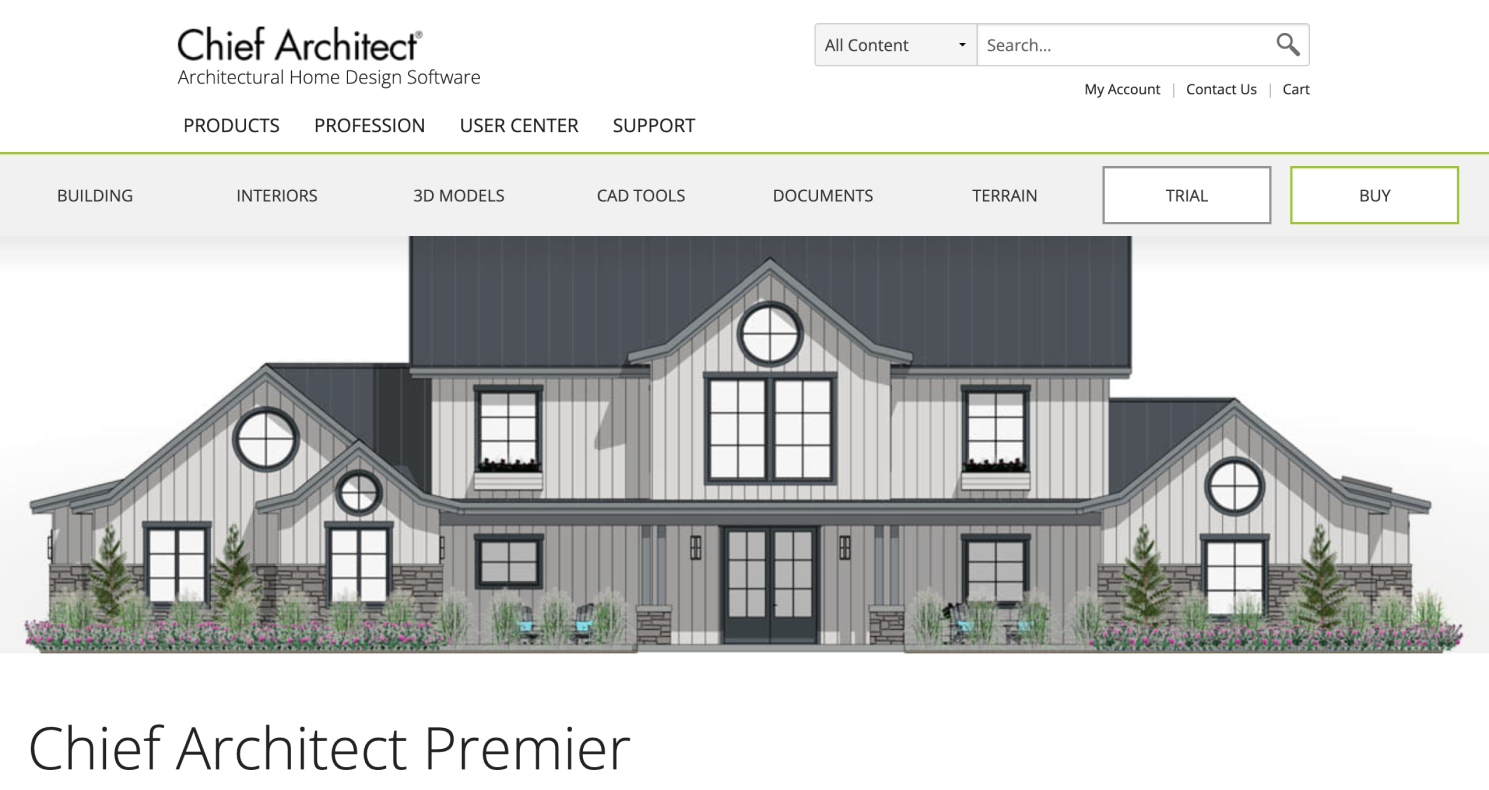
Chief Architect is professional home design software for residential design, remodeling, kitchen, bath, interiors, and construction documentation. It is far beyond what most casual homeowners need, but it is extremely relevant for designers and remodelers who need accuracy, elevations, materials lists, and client-ready 3D visuals.
For kitchen and bath work, Chief Architect is valuable because it connects the design model with more technical outputs. Designers can work in 2D, elevation, or 3D views, use catalogs, specify materials, and produce drawings that support real renovation workflows.
Why to choose Chief Architect
- You design kitchens as part of larger residential projects.
- You need 2D plans, elevations, 3D views, materials lists, and construction drawings.
- You want a serious professional tool for kitchen, bath, and interior design.
- You need more than visual inspiration.
Reasons to avoid
- You are a homeowner planning one simple kitchen.
- You do not need construction documentation.
- The annual or monthly cost is too high for your project.
13.2020 Design Flex - Best for Cabinet Showroom Workflows
Platform: Professional kitchen/bath software
Pricing: Free trial available; pricing typically requires contacting sales or requesting a trial
Design Flex is built for kitchen and bath professionals, especially those working with cabinetry, manufacturers, showrooms, and sales workflows. It supports manufacturer catalogs, configurable products, renderings, 360-degree panoramas, reports, and order-focused processes.
This is not the tool most homeowners need for early kitchen ideas. Its value appears when you are selling, specifying, or ordering kitchens professionally. For cabinet dealers, it can help connect design, presentation, product selection, reporting, and manufacturer communication.
Why to choose 2020 Design Flex
- You work in a kitchen showroom or cabinet sales environment.
- You need manufacturer catalogs and configurable product data.
- You create client presentations and order reports.
- You want a kitchen/bath-specific professional workflow.
Reasons to avoid
- You are a DIY homeowner.
- You only need a quick visual concept.
- You want transparent self-serve pricing before contacting sales.
14.ProKitchen - Best for Kitchen and Bath Professionals Using Manufacturer Catalogs
Platform: Windows, Mac, online/cloud options
Pricing: Free 7-day trial; pricing generally requires contacting ProKitchen
ProKitchen is another professional kitchen and bath design software tool focused on designers, dealers, and showrooms. It emphasizes speed, catalog access, client presentations, HD renderings, 360-degree panoramas, and professional sales workflows.
Its 500+ catalogs make it especially relevant for users who need real manufacturer options rather than generic cabinets. For professionals, that difference matters. A beautiful kitchen render is helpful, but a design tied to catalogs, pricing, reports, and presentations is much closer to a sellable project.
Why to choose ProKitchen
- You are a kitchen or bath professional.
- You rely on manufacturer catalogs.
- You need renderings, panoramas, and client presentations.
- You want software designed specifically for kitchen and bath sales.
Reasons to avoid
- You only need a personal kitchen remodel planner.
- You want a low-cost hobby tool.
- You are not working with cabinet catalogs or clients.
15.Cedreo - Best for Remodelers and Home Builders Who Need Fast Presentations
Platform: Web
Pricing: Free plan available; third-party pricing listings show Personal from $139 one-time and Pro from $129/month, while Cedreo’s official page confirms free and paid plan tiers
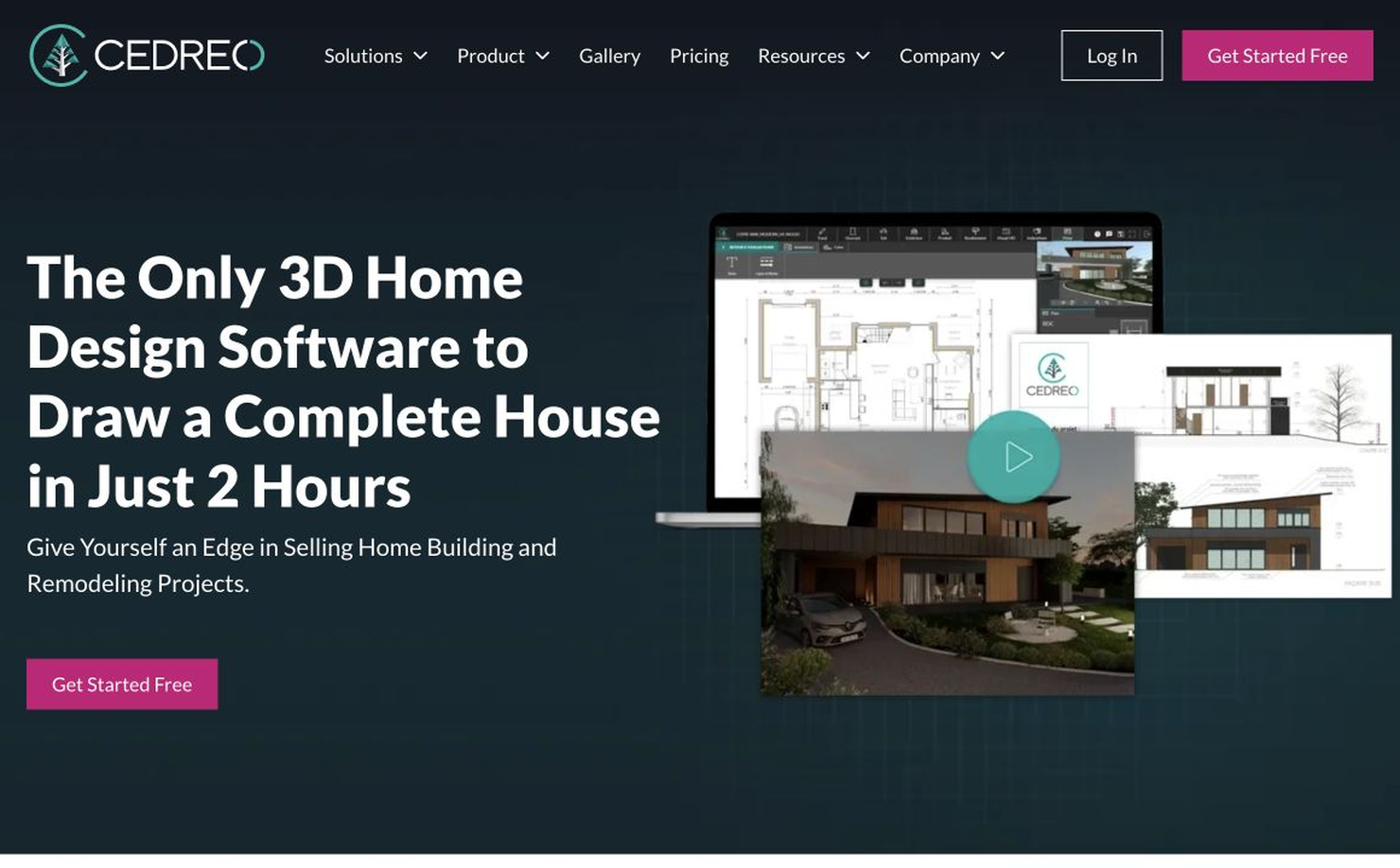
Cedreo is a cloud-based home design platform for builders, remodelers, and design professionals who need to create floor plans, 3D visuals, and presentation documents quickly. It is not only a kitchen design tool, but it can be useful when the kitchen is part of a larger remodeling or home-building project.
Cedreo is strongest when you need to communicate a whole-space concept: kitchen, dining, living area, walls, flow, furniture, and finishes. For remodelers, that broader context is valuable because kitchen decisions often affect adjacent rooms.
Why to choose Cedreo
- You are a remodeler, builder, or residential design professional.
- You need fast floor plans and 3D presentations.
- You want a browser-based workflow.
- You design kitchens as part of broader home projects.
Reasons to avoid
- You need a kitchen-only cabinet dealership tool.
- You want the cheapest possible planner.
- You need every pricing detail directly visible before account or checkout steps.
Which Kitchen Design Software Should You Choose?
If you still cannot make a decision, OK, the following cases might give you some clues:
- If you want fast kitchen inspiration from a real photo, start with DecAI. It is the quickest way to see how different styles might look in your own kitchen before you spend time building a model.
- If you are buying IKEA cabinetry, use IKEA Kitchen Planner. It is the most practical option because the planner, product ecosystem, expert review, and ordering path all connect.
- If you want easy 2D and 3D planning, choose Planner 5D or RoomSketcher. Planner 5D is stronger for broad beginner-friendly design exploration, while RoomSketcher is especially good for clean plans and easy layout communication.
- If you care most about realistic visuals, consider Homestyler, Coohom, or Foyr Neo. Homestyler is budget-friendly, Coohom is fast and cloud-based, and Foyr Neo is better suited to designers who need client-ready presentations.
- If your existing kitchen needs to be measured first, use magicplan. It helps prevent one of the most common renovation problems: building a design on bad measurements.
- If you are a professional, match the tool to your business model. SketchUp is best for flexible custom modeling. Chief Architect is strong for residential documentation. 2020 Design Flex and ProKitchen are better for cabinet showroom and kitchen/bath sales workflows. Cedreo is a strong option for remodelers and builders who need fast whole-home presentations.

FAQs
1.What software do most kitchen designers use?
Many professional kitchen designers use tools such as SketchUp, and sometimes AutoCAD depending on their workflow. Cabinet showrooms often prefer kitchen-specific tools with manufacturer catalogs, while architects and residential designers may use broader CAD or home design software.
2.What is the best app to help me design my kitchen?
The best fit depends on your goal. DecAI™ is great for quick AI kitchen visualization from a photo. Planner 5D is strong for beginner 2D and 3D layouts. IKEA Kitchen Planner is best if you plan to buy IKEA cabinets. RoomSketcher is a good option for simple floor plans and Live 3D previews.
3.Can ChatGPT design a kitchen layout?
Yes. ChatGPT can help you brainstorm kitchen layouts, improve storage, think through appliance placement and work zones, explore style directions, and create renovation checklists.
However, it isn't a dedicated kitchen design or visualization tool. If you want to see how those ideas could actually look in your own space, pair ChatGPT with a visual kitchen design tool like DecAI™. This way, you can brainstorm the ideas first, visualize different possibilities, and refine your direction before renovating.
4.Can AI help to design a kitchen?
Yes. AI can help with kitchen design by generating style ideas, exploring cabinet colors, suggesting layouts, visualizing finishes, and comparing design directions. AI tools like DecAI™ is especially helpful at the inspiration stage to quickly iterate your ideas and core design direction.
5.Is there a free AI kitchen design app?
Yes, there are free-to-start AI kitchen design tools. For example, DecAI™ offers a free plan that lets you generate kitchen design ideas, explore 10 design styles and 10 space types, and freely export and share your designs.
6.What is the best professional kitchen design software?
For professional kitchen and bath workflows, 2020 Design Flex and ProKitchen are strong cabinet-focused options. Chief Architect is excellent for residential kitchen, bath, and remodeling documentation. SketchUp is useful for custom 3D modeling, especially when paired with plugins and documentation workflows.
7.Do I need kitchen design software if I am hiring a designer?
Yes, it can still help. You can use kitchen design software like DecAI™ to clarify your style, test rough layout ideas, and communicate preferences before hiring a designer. But your designer should still verify measurements, clearances, code issues, cabinet specifications, and contractor-ready documents.
--------------------------------------
If you believe that any material on this site infringes your intellectual property rights, please contact the author at decaiwebteam@outlook.com with details of your claim.
Redesign any home interior, exterior & garden in seconds
Share this Post:
'%3e%3cpath%20d='M17.9995%2035.999C17.0317%2035.999%2016.0619%2035.9219%2015.1161%2035.7696C10.9414%2035.0973%207.11524%2032.9513%204.34408%2029.7273C1.54287%2026.4683%200%2022.3035%200%2017.9995C0%208.07403%208.07503%200%2017.9995%200C27.924%200%2036%208.07503%2036%2017.9995C36%2022.3696%2034.4151%2026.5835%2031.5357%2029.8646C28.6844%2033.1156%2024.7671%2035.2326%2020.5052%2035.8267C19.6806%2035.9419%2018.8371%2036%2017.9995%2036V35.999ZM17.9995%201.20123C8.73726%201.20123%201.20224%208.73626%201.20224%2017.9985C1.20224%2026.2919%207.13427%2033.2659%2015.3075%2034.5814C16.9546%2034.8469%2018.6808%2034.8659%2020.3389%2034.6345C28.5812%2033.4863%2034.7968%2026.334%2034.7968%2017.9985C34.7968%208.73626%2027.2617%201.20123%2017.9985%201.20123H17.9995Z'%20fill='%23FF0209'/%3e%3cpath%20d='M29.0557%2014.3621C28.9184%2013.0276%2028.6208%2011.5539%2027.5268%2010.7784C26.6782%2010.1773%2025.5642%2010.1553%2024.5242%2010.1563C22.3251%2010.1583%2020.126%2010.1603%2017.9269%2010.1623C15.812%2010.1643%2013.6971%2010.1663%2011.5821%2010.1683C10.6985%2010.1683%209.8399%2010.1002%209.01937%2010.4819C8.31406%2010.8105%207.76303%2011.4347%207.43241%2012.1289C6.97156%2013.0957%206.87438%2014.1898%206.81927%2015.2588C6.71708%2017.2044%206.7281%2019.156%206.85133%2021.0996C6.9405%2022.5193%207.16792%2024.0872%208.26496%2024.9919C9.23777%2025.7934%2010.6103%2025.8325%2011.8707%2025.8335C15.8741%2025.8365%2019.8776%2025.8395%2023.881%2025.8435C24.394%2025.8435%2024.93%2025.8345%2025.453%2025.7774C26.4829%2025.6661%2027.4637%2025.3716%2028.1249%2024.6092C28.7922%2023.8407%2028.9635%2022.7698%2029.0657%2021.7569C29.3121%2019.3003%2029.3091%2016.8177%2029.0557%2014.3621ZM15.6116%2021.4453V14.5545L21.5797%2017.9999L15.6116%2021.4453Z'%20fill='%23FF0209'/%3e%3c/g%3e%3cdefs%3e%3cclipPath%20id='clip0_13816_41422'%3e%3crect%20width='36'%20height='36'%20fill='white'/%3e%3c/clipPath%3e%3c/defs%3e%3c/svg%3e)
'%3e%3cpath%20d='M17.9995%2036C17.0327%2036%2016.0619%2035.9229%2015.1161%2035.7696C10.9414%2035.0973%207.11524%2032.9513%204.34408%2029.7273C1.54287%2026.4683%200%2022.3035%200%2017.9995C0%208.07403%208.07503%200%2017.9995%200C27.924%200%2036%208.07503%2036%2017.9995C36%2022.3696%2034.4151%2026.5835%2031.5357%2029.8646C28.6844%2033.1156%2024.7671%2035.2326%2020.5052%2035.8267C19.6806%2035.9419%2018.8371%2036%2017.9995%2036ZM17.9995%201.20224C8.73726%201.20224%201.20224%208.73726%201.20224%2017.9995C1.20224%2026.2919%207.13427%2033.2669%2015.3075%2034.5824C16.9556%2034.8479%2018.6808%2034.8669%2020.3389%2034.6355C28.5812%2033.4873%2034.7968%2026.335%2034.7968%2017.9995C34.7968%208.73726%2027.2617%201.20224%2017.9985%201.20224H17.9995Z'%20fill='url(%23paint0_linear_13816_41436)'/%3e%3cpath%20d='M23.4463%207.55469H12.549C9.53841%207.55469%207.08984%2010.0032%207.08984%2013.0138V22.9834C7.08984%2025.994%209.53841%2028.4426%2012.549%2028.4426H23.4463C26.4569%2028.4426%2028.9054%2025.994%2028.9054%2022.9834V13.0138C28.9054%2010.0032%2026.4569%207.55469%2023.4463%207.55469ZM9.01543%2013.0138C9.01543%2011.0652%2010.6004%209.48027%2012.549%209.48027H23.4463C25.3949%209.48027%2026.9799%2011.0652%2026.9799%2013.0138V22.9834C26.9799%2024.932%2025.3949%2026.517%2023.4463%2026.517H12.549C10.6004%2026.517%209.01543%2024.932%209.01543%2022.9834V13.0138Z'%20fill='url(%23paint1_linear_13816_41436)'/%3e%3cpath%20d='M17.9964%2023.0749C20.7966%2023.0749%2023.0749%2020.7966%2023.0749%2017.9964C23.0749%2015.1962%2020.7966%2012.918%2017.9964%2012.918C15.1962%2012.918%2012.918%2015.1962%2012.918%2017.9964C12.918%2020.7966%2015.1962%2023.0749%2017.9964%2023.0749ZM17.9964%2014.8446C19.7346%2014.8446%2021.1483%2016.2582%2021.1483%2017.9964C21.1483%2019.7347%2019.7346%2021.1483%2017.9964%2021.1483C16.2582%2021.1483%2014.8446%2019.7347%2014.8446%2017.9964C14.8446%2016.2582%2016.2582%2014.8446%2017.9964%2014.8446Z'%20fill='url(%23paint2_linear_13816_41436)'/%3e%3cpath%20d='M23.5482%2013.741C24.3026%2013.741%2024.9168%2013.1269%2024.9168%2012.3725C24.9168%2011.618%2024.3026%2011.0039%2023.5482%2011.0039C22.7938%2011.0039%2022.1797%2011.618%2022.1797%2012.3725C22.1797%2013.1269%2022.7938%2013.741%2023.5482%2013.741Z'%20fill='url(%23paint3_linear_13816_41436)'/%3e%3c/g%3e%3cdefs%3e%3clinearGradient%20id='paint0_linear_13816_41436'%20x1='5.27482'%20y1='30.7312'%20x2='30.7242'%20y2='5.28083'%20gradientUnits='userSpaceOnUse'%3e%3cstop%20stop-color='%23FAAD4F'/%3e%3cstop%20offset='0.35'%20stop-color='%23DD2A7B'/%3e%3cstop%20offset='0.62'%20stop-color='%239537B0'/%3e%3cstop%20offset='1'%20stop-color='%23515BD4'/%3e%3c/linearGradient%3e%3clinearGradient%20id='paint1_linear_13816_41436'%20x1='8.92225'%20y1='27.074'%20x2='27.073'%20y2='8.92324'%20gradientUnits='userSpaceOnUse'%3e%3cstop%20stop-color='%23FAAD4F'/%3e%3cstop%20offset='0.35'%20stop-color='%23DD2A7B'/%3e%3cstop%20offset='0.62'%20stop-color='%239537B0'/%3e%3cstop%20offset='1'%20stop-color='%23515BD4'/%3e%3c/linearGradient%3e%3clinearGradient%20id='paint2_linear_13816_41436'%20x1='14.4077'%20y1='21.5861'%20x2='21.5861'%20y2='14.4077'%20gradientUnits='userSpaceOnUse'%3e%3cstop%20stop-color='%23FAAD4F'/%3e%3cstop%20offset='0.35'%20stop-color='%23DD2A7B'/%3e%3cstop%20offset='0.62'%20stop-color='%239537B0'/%3e%3cstop%20offset='1'%20stop-color='%23515BD4'/%3e%3c/linearGradient%3e%3clinearGradient%20id='paint3_linear_13816_41436'%20x1='22.5814'%20y1='13.3393'%20x2='24.515'%20y2='11.4057'%20gradientUnits='userSpaceOnUse'%3e%3cstop%20stop-color='%23FAAD4F'/%3e%3cstop%20offset='0.35'%20stop-color='%23DD2A7B'/%3e%3cstop%20offset='0.62'%20stop-color='%239537B0'/%3e%3cstop%20offset='1'%20stop-color='%23515BD4'/%3e%3c/linearGradient%3e%3cclipPath%20id='clip0_13816_41436'%3e%3crect%20width='36'%20height='36'%20fill='white'/%3e%3c/clipPath%3e%3c/defs%3e%3c/svg%3e)
'%3e%3cpath%20d='M17.9995%2035.999C17.0317%2035.999%2016.0619%2035.9219%2015.1161%2035.7696C10.9414%2035.0973%207.11524%2032.9513%204.34408%2029.7273C1.54287%2026.4683%200%2022.3035%200%2017.9995C0%208.07403%208.07502%200%2017.9995%200C27.924%200%2036%208.07503%2036%2017.9995C36%2022.3696%2034.415%2026.5835%2031.5357%2029.8646C28.6844%2033.1156%2024.7671%2035.2326%2020.5052%2035.8267C19.6806%2035.9419%2018.8371%2036%2017.9995%2036V35.999ZM17.9995%201.20123C8.73725%201.20123%201.20224%208.73626%201.20224%2017.9985C1.20224%2026.2919%207.13427%2033.2659%2015.3075%2034.5814C16.9545%2034.8469%2018.6808%2034.8659%2020.3388%2034.6345C28.5812%2033.4863%2034.7968%2026.334%2034.7968%2017.9985C34.7968%208.73626%2027.2617%201.20123%2017.9985%201.20123H17.9995Z'%20fill='%23007EBB'/%3e%3cpath%20d='M9.06639%2012.124C8.60253%2011.6932%208.37109%2011.1602%208.37109%2010.526C8.37109%209.89184%208.60253%209.33481%209.06639%208.90401C9.53026%208.47321%2010.1274%208.25781%2010.8587%208.25781C11.5901%208.25781%2012.1642%208.47321%2012.627%208.90401C13.0909%209.33481%2013.3223%209.87581%2013.3223%2010.526C13.3223%2011.1762%2013.0909%2011.6932%2012.627%2012.124C12.1631%2012.5548%2011.5741%2012.7702%2010.8587%2012.7702C10.1434%2012.7702%209.52926%2012.5548%209.06639%2012.124ZM12.9326%2014.5946V27.7962H8.76182V14.5946H12.9326Z'%20fill='%23007EBB'/%3e%3cpath%20d='M26.8196%2015.9006C27.7283%2016.8875%2028.1832%2018.243%2028.1832%2019.9682V27.5663H24.2208V20.5042C24.2208%2019.6346%2023.9954%2018.9583%2023.5445%2018.4764C23.0937%2017.9945%2022.4876%2017.7541%2021.7262%2017.7541C20.9647%2017.7541%2020.3586%2017.9955%2019.9078%2018.4764C19.4569%2018.9583%2019.2315%2019.6346%2019.2315%2020.5042V27.5663H15.2461V14.5611H19.2315V16.2863C19.6353%2015.7113%2020.1793%2015.2574%2020.8636%2014.9228C21.5468%2014.5892%2022.3163%2014.4219%2023.1708%2014.4219C24.6937%2014.4219%2025.9099%2014.9158%2026.8186%2015.9016L26.8196%2015.9006Z'%20fill='%23007EBB'/%3e%3c/g%3e%3cdefs%3e%3cclipPath%20id='clip0_13816_41425'%3e%3crect%20width='36'%20height='36'%20fill='white'/%3e%3c/clipPath%3e%3c/defs%3e%3c/svg%3e)
'%3e%3cpath%20d='M18%2035.999C17.0322%2035.999%2016.0623%2035.9219%2015.1166%2035.7696C10.9417%2035.0973%207.11544%2032.9513%204.3442%2029.7273C1.54291%2026.4683%200%2022.3035%200%2017.9995C0%208.07403%208.07526%200%2018%200C27.9248%200%2036%208.07503%2036%2017.9995C36%2022.3696%2034.415%2026.5835%2031.5356%2029.8646C28.6842%2033.1156%2024.7668%2035.2326%2020.5047%2035.8267C19.6802%2035.9419%2018.8366%2036%2017.999%2036L18%2035.999ZM18%201.20123C8.73751%201.20123%201.20227%208.73626%201.20227%2017.9985C1.20227%2026.2919%207.13448%2033.2659%2015.3079%2034.5814C16.955%2034.8469%2018.6813%2034.8659%2020.3394%2034.6345C28.582%2033.4863%2034.7977%2026.334%2034.7977%2017.9985C34.7977%208.73626%2027.2625%201.20123%2018%201.20123Z'%20fill='black'/%3e%3cpath%20d='M7%208.09163H13.5067L19.521%2016.1816L27.0073%207.90625L28.786%207.93715L20.4078%2017.3454L29%2028.901H22.4959L16.8193%2021.362L9.8847%2029.0864H8.13428L15.9583%2020.26L7%208.09163ZM12.8931%209.28633H9.45676L23.2048%2027.6754H26.5793L12.8931%209.28633Z'%20fill='black'/%3e%3c/g%3e%3cdefs%3e%3cclipPath%20id='clip0_13886_43848'%3e%3crect%20width='36'%20height='36'%20fill='white'/%3e%3c/clipPath%3e%3c/defs%3e%3c/svg%3e)
'%3e%3cpath%20d='M17.9995%2035.999C17.0327%2035.999%2016.0619%2035.9219%2015.1161%2035.7686C10.9414%2035.0963%207.11524%2032.9503%204.34408%2029.7263C1.54287%2026.4673%200%2022.3025%200%2017.9995C0%208.07403%208.07503%200%2017.9995%200C27.924%200%2036%208.07503%2036%2017.9995C36%2022.3696%2034.415%2026.5835%2031.5357%2029.8646C28.6844%2033.1156%2024.7671%2035.2326%2020.5052%2035.8267C19.6806%2035.9419%2018.8371%2036%2017.9995%2036V35.999ZM17.9995%201.20123C8.73726%201.20123%201.20224%208.73626%201.20224%2017.9985C1.20224%2026.2909%207.13428%2033.2659%2015.3075%2034.5814C16.9556%2034.8469%2018.6808%2034.8659%2020.3389%2034.6345C28.5812%2033.4863%2034.7968%2026.334%2034.7968%2017.9985C34.7968%208.73626%2027.2617%201.20123%2017.9985%201.20123H17.9995Z'%20fill='%231877F7'/%3e%3cpath%20d='M20.5337%2014.9635V18.7536H25.2225L24.4801%2023.8601H20.5337V35.624C19.7423%2035.7342%2018.9328%2035.7913%2018.1112%2035.7913C17.1625%2035.7913%2016.2317%2035.7151%2015.324%2035.5689V23.8601H11V18.7536H15.324V14.1169C15.324%2011.2396%2017.6564%208.90625%2020.5347%208.90625V8.90926C20.5428%208.90926%2020.5508%208.90625%2020.5588%208.90625H25.2235V13.3215H22.1758C21.2691%2013.3215%2020.5347%2014.0558%2020.5347%2014.9625L20.5337%2014.9635Z'%20fill='%231877F7'/%3e%3c/g%3e%3cdefs%3e%3cclipPath%20id='clip0_13816_41433'%3e%3crect%20width='36'%20height='36'%20fill='white'/%3e%3c/clipPath%3e%3c/defs%3e%3c/svg%3e)
'%3e%3cpath%20d='M17.9995%2035.999C17.0327%2035.999%2016.0619%2035.9219%2015.1161%2035.7686C10.9414%2035.0963%207.11524%2032.9503%204.34408%2029.7263C1.54287%2026.4673%200%2022.3025%200%2017.9995C0%208.07403%208.07503%200%2017.9995%200C27.924%200%2036%208.07503%2036%2017.9995C36%2022.3696%2034.415%2026.5835%2031.5357%2029.8646C28.6844%2033.1156%2024.7671%2035.2326%2020.5052%2035.8267C19.6806%2035.9419%2018.8371%2036%2017.9995%2036V35.999ZM17.9995%201.20123C8.73726%201.20123%201.20224%208.73626%201.20224%2017.9985C1.20224%2026.2909%207.13428%2033.2659%2015.3075%2034.5814C16.9556%2034.8469%2018.6808%2034.8659%2020.3389%2034.6345C28.5812%2033.4863%2034.7968%2026.334%2034.7968%2017.9985C34.7968%208.73626%2027.2617%201.20123%2017.9985%201.20123H17.9995Z'%20fill='%232A91F7'/%3e%3cg%20clip-path='url(%23clip1_13816_41442)'%3e%3cpath%20d='M16.3345%2018.834C16.6924%2019.3124%2017.149%2019.7083%2017.6733%2019.9947C18.1976%2020.2812%2018.7774%2020.4516%2019.3734%2020.4942C19.9693%2020.5369%2020.5675%2020.4509%2021.1273%2020.2421C21.6871%2020.0333%2022.1954%2019.7065%2022.6178%2019.284L25.1178%2016.784C25.8768%2015.9981%2026.2968%2014.9456%2026.2873%2013.8531C26.2778%2012.7606%2025.8396%2011.7156%2025.0671%2010.943C24.2946%2010.1705%2023.2495%209.73231%2022.157%209.72281C21.0645%209.71332%2020.012%2010.1333%2019.2262%2010.8923L17.7928%2012.3173M19.6678%2017.1673C19.3099%2016.6889%2018.8533%2016.293%2018.329%2016.0065C17.8047%2015.7201%2017.2249%2015.5497%2016.6289%2015.507C16.033%2015.4643%2015.4348%2015.5503%2014.875%2015.7592C14.3152%2015.968%2013.8069%2016.2947%2013.3845%2016.7173L10.8845%2019.2173C10.1255%2020.0031%209.70551%2021.0557%209.715%2022.1481C9.72449%2023.2406%2010.1627%2024.2857%2010.9352%2025.0582C11.7078%2025.8307%2012.7528%2026.269%2013.8453%2026.2784C14.9378%2026.2879%2015.9903%2025.868%2016.7761%2025.109L18.2011%2023.684'%20stroke='%232A91F7'%20stroke-width='1.66667'%20stroke-linecap='round'%20stroke-linejoin='round'/%3e%3c/g%3e%3c/g%3e%3cdefs%3e%3cclipPath%20id='clip0_13816_41442'%3e%3crect%20width='36'%20height='36'%20fill='white'/%3e%3c/clipPath%3e%3cclipPath%20id='clip1_13816_41442'%3e%3crect%20width='20'%20height='20'%20fill='white'%20transform='translate(8%208)'/%3e%3c/clipPath%3e%3c/defs%3e%3c/svg%3e)
Redesign any home interior, exterior & garden in seconds