

Top 18 Free AI Tools for Architects & Designers in 2026 (Fully Tested & Impressive)


Ever spent hours perfecting a render, redrawing a floor plan, or stressing over a client presentation—only to wish you could cut your design time in half… or more?
You’re not alone. Architects, interior designers, and creative professionals like you are drowning in repetitive work, like sketching, layouts, 3D modeling, rendering, documentation, and endless client updates.
The good news? The right AI tools fix all of that. Better renders, faster floor plans, smoother client approvals, less busywork, and more time for creativity—this is no longer a fantasy.
In this article, we’ve broken down the full design workflow and handpicked 18 of the best free AI tools for architects and designers to streamline the design workflow process, level up visuals, and wow the clients effortlessly.
Let’s dive straight into the details!
A quick overview of the top 18 AI tools
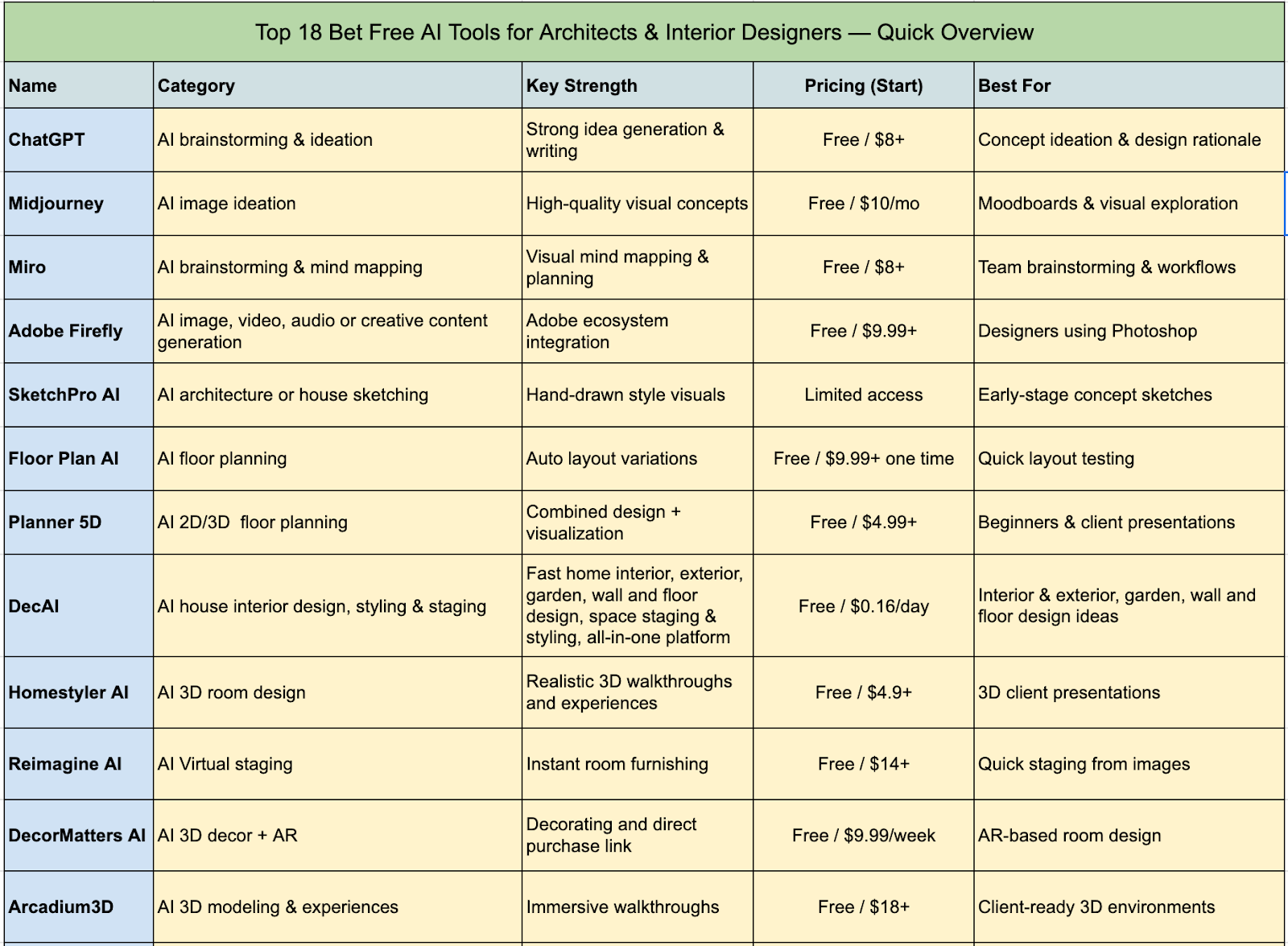
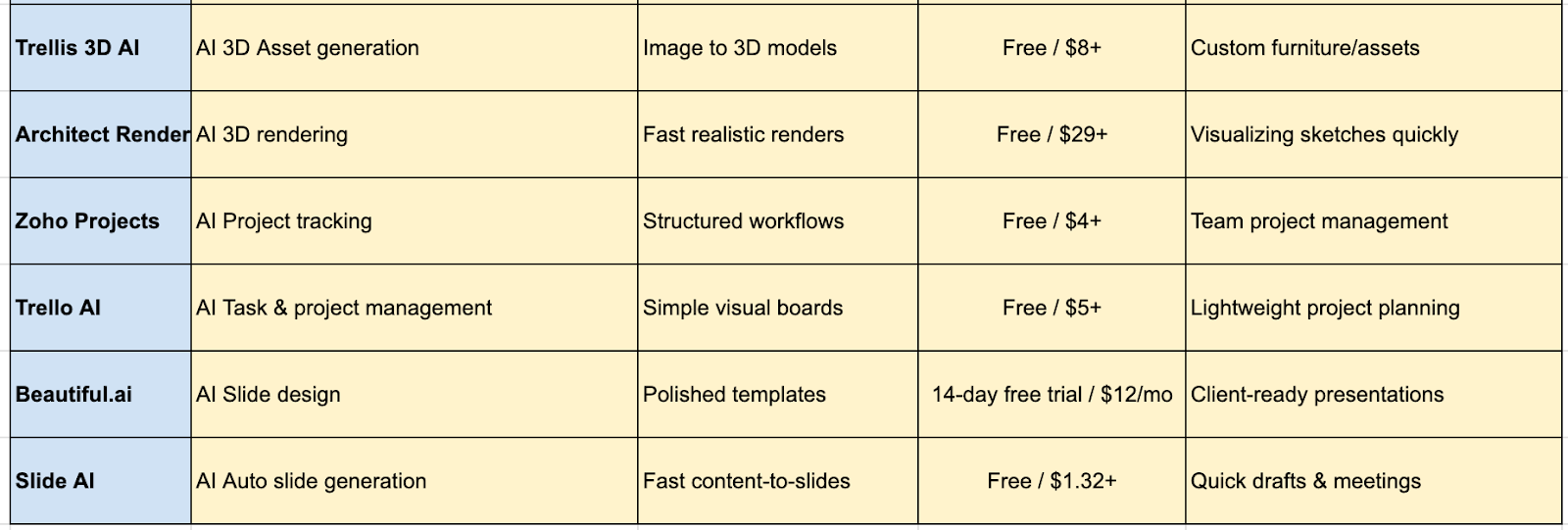
Design any room, shop or space with DecAI in less 30 seconds! It's free!
AI tools for concepts and ideation
1.ChatGPT - AI brainstorming and ideation

Pricing: Free plan available; Premium plans starting at $8/month;
Just start a project and need some fresh ideas? Well, ChatGPT, the world's most widely-used AI assistant, can be a powerful brainstorming partner.
Simply describe your building or house case, the design goals, or any challenges, and it will suggest creative ideas, refine concepts, and even help draft design rationales.
It will be an inspiring and trusted collaborator of your design project, just as the teammate sitting aside you.
Why to choose
- Great for text-based ideation and brainstorming
- Free plan is sufficient for generating creative design ideas
- Excellent for writing design rationales, summarizing building features, and researching materials
- Work with a wide range of document formats
Why not to use:
- Limited image or 3D visualization capabilities
- Not specifically tailored for building or interior design
2.Midjourney - AI image ideation

Pricing: Free trial available; Premium plans starting at $10 per month;
Already get some ideas about your building or house design project, like a design style, a mood, or a scene? Midjourney helps you to quickly bring it to life. This fast AI image generator transforms text prompts into high-quality visual concepts almost instantly.
Simply describe your idea, and Midjourney generates multiple image variations, giving you plenty of options to explore.
So, for architecture or house design, it is ideal for exploring different design directions, experimenting with color schemes, lighting, and spatial composition, or preparing moodboards to communicate ideas effectively to clients.
Why to choose:
- Quickly generates multiple high-quality visuals from text prompts
- Great for experimenting with styles, colors, and layouts
- Ideal for moodboards and client presentations
- Helps visualize ideas before committing to a project
Why not to use:
- Work via Discord, making it not so familiar for some users
- Limited integration with other design tools
- Not special for architectural or interior design workflows
3.Miro - AI brainstorming and mind mapping

Pricing: Free plan available with 3 boards & 10 AI credits; Premium plan starting at $8 per user/month;
If you need a visual way to brainstorm ideas, organize thoughts or plan your design workflow? Miro is a collaborative whiteboard platform that helps you or your team map out ideas, connect concepts, and create clear visual structures in minutes. Its AI features also make it quite easy to mind maps, flowcharts, and diagrams for organizing complex projects or client ideas.
It is perfect for sketching out initial architectural design concepts, planning layouts, collaborating with clients, or visualizing project timelines—all in one interactive workspace.
Why to choose:
- AI-powered mind mapping and diagram generation
- Excellent for organizing ideas, brainstorming sessions, and project planning
- Collaborative platform for team or client interaction and alignment
- Free plan available for small projects or personal use
Why not to use:
- Heavy on collaboration features, not for architectural design
- Overkill for solo quick ideation
4.Adobe Firefly - AI image, video, audio or creative content generation
Pricing: Free plan available; Premium plans starting at $9.99 per month;
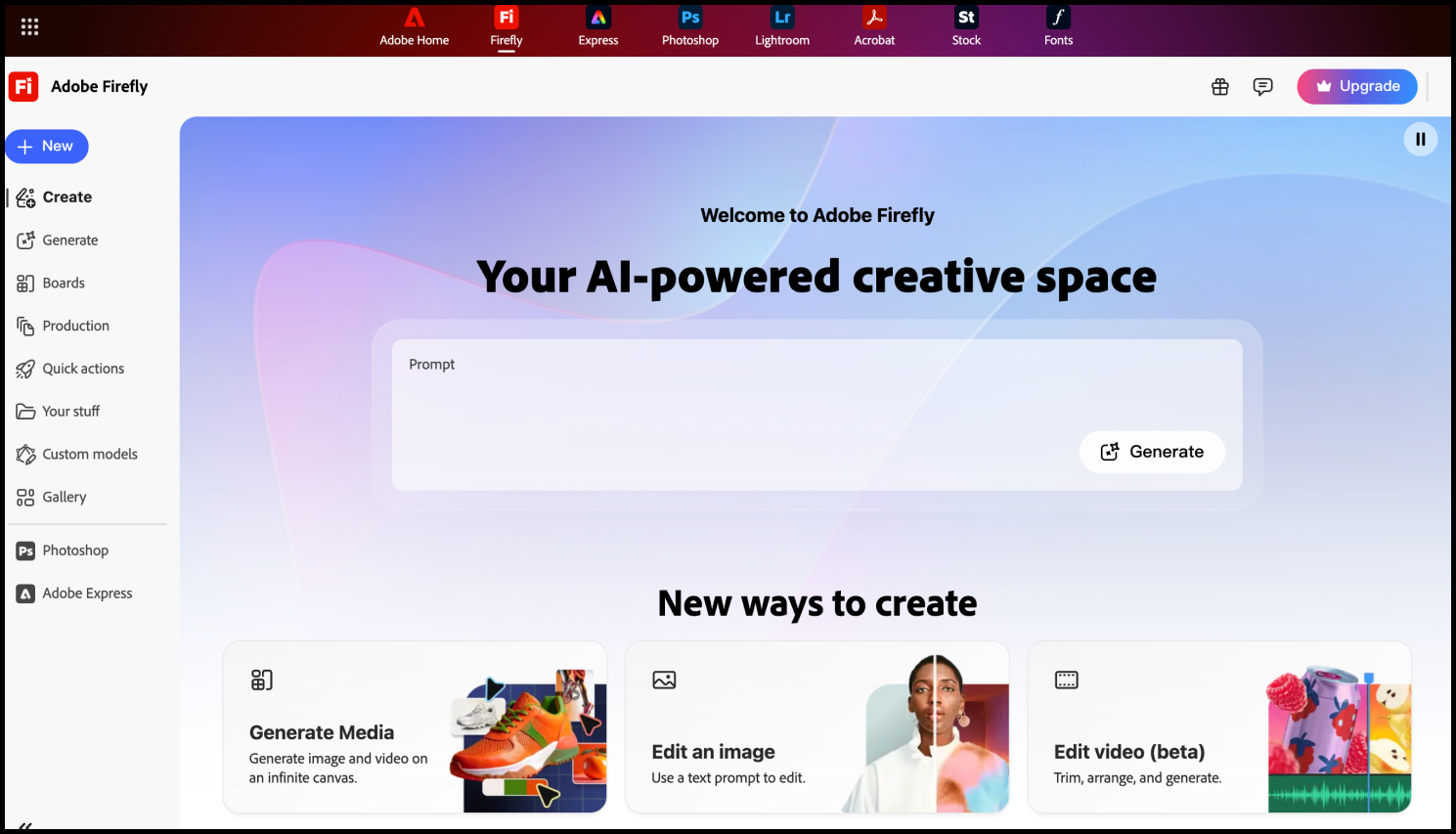
If you’re already working with Adobe tools, Adobe Firefly is one of the easiest ways to bring AI into your design workflow.
You can use it to generate images, videos and audios, experiment with styles, or quickly create textures and visual elements from simple text prompts. What makes it especially useful for architects and designers is how smoothly it connects with tools like Photoshop, so you can generate ideas and immediately refine them into more polished visuals.
It’s a practical choice when you want both creativity and control in the same workflow.
Why to choose:
- Seamless integration with Photoshop and other Adobe tools
- Great for generating textures, materials, and visual concepts
- Easy to refine AI outputs into more professional designs
Why not to use:
- Advanced features require payment
- Much more professional compared to tools like Midjourney
- Locked into the Adobe ecosystem
AI tools for sketching and drawing
5.SketchPro AI - AI architecture or house sketching
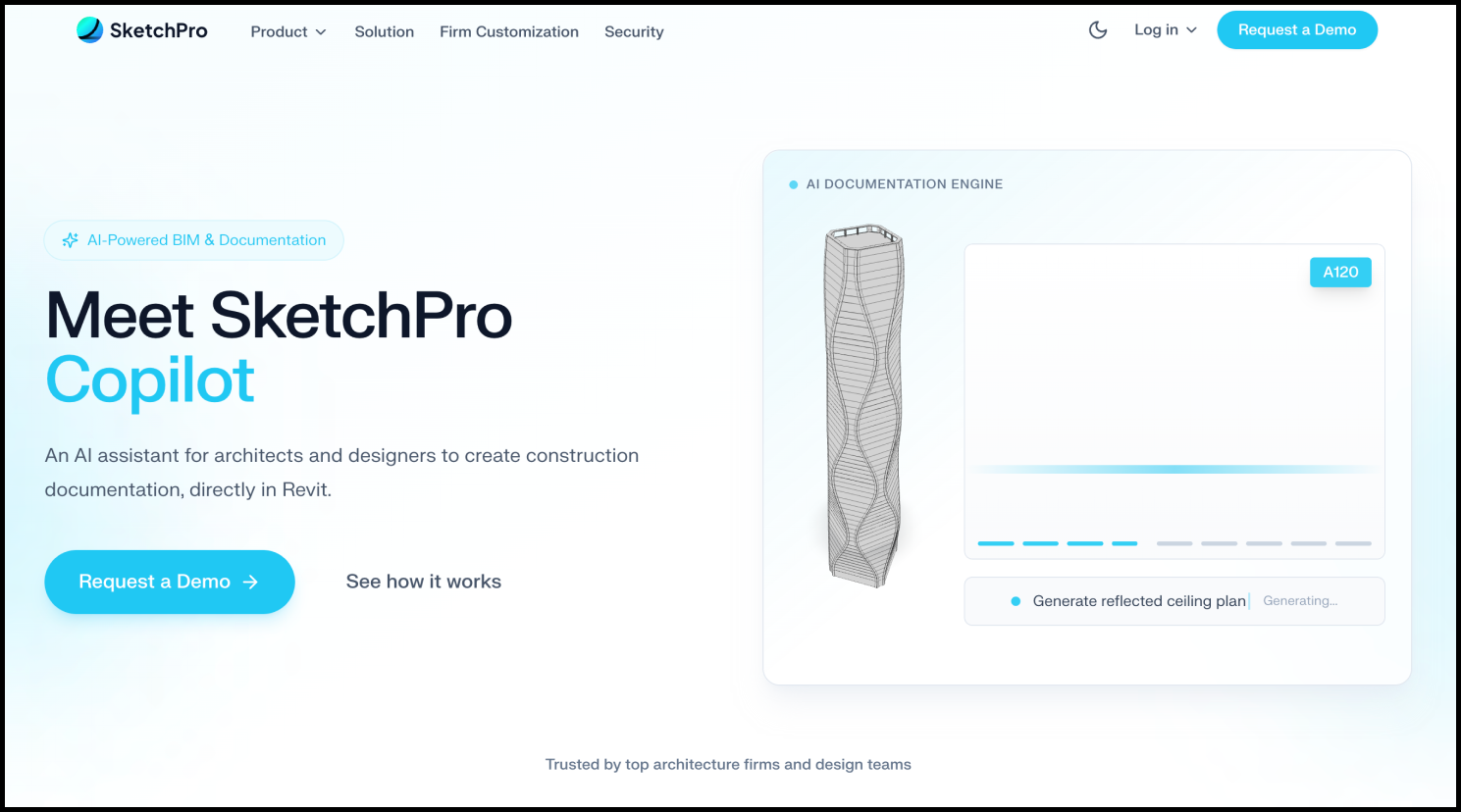
If you want to turn rough ideas into architectural sketches quickly, SketchPro is worth trying. You can upload simple massing models or basic concepts, and it generates sketch-style renderings that look like hand-drawn architectural visuals.
As an architect or designer, this is especially useful in early-stage design when you need to present ideas that feel conceptual rather than fully polished. It helps you communicate design intent clearly without spending too much time refining drawings.
Why to choose:
- Quickly generates sketch-style architectural visuals from simple inputs
- Great for early-stage concept presentations
- Helps you communicate ideas in a more artistic and conceptual way
- Saves time compared to manual sketching
Why not to use:
- Access is still limited and may require a waitlist
- Not suitable for detailed or construction-level drawings
- Less control compared to traditional sketching tools
AI tools for floor or space planning
6.Floor Plan AI - AI floor planning
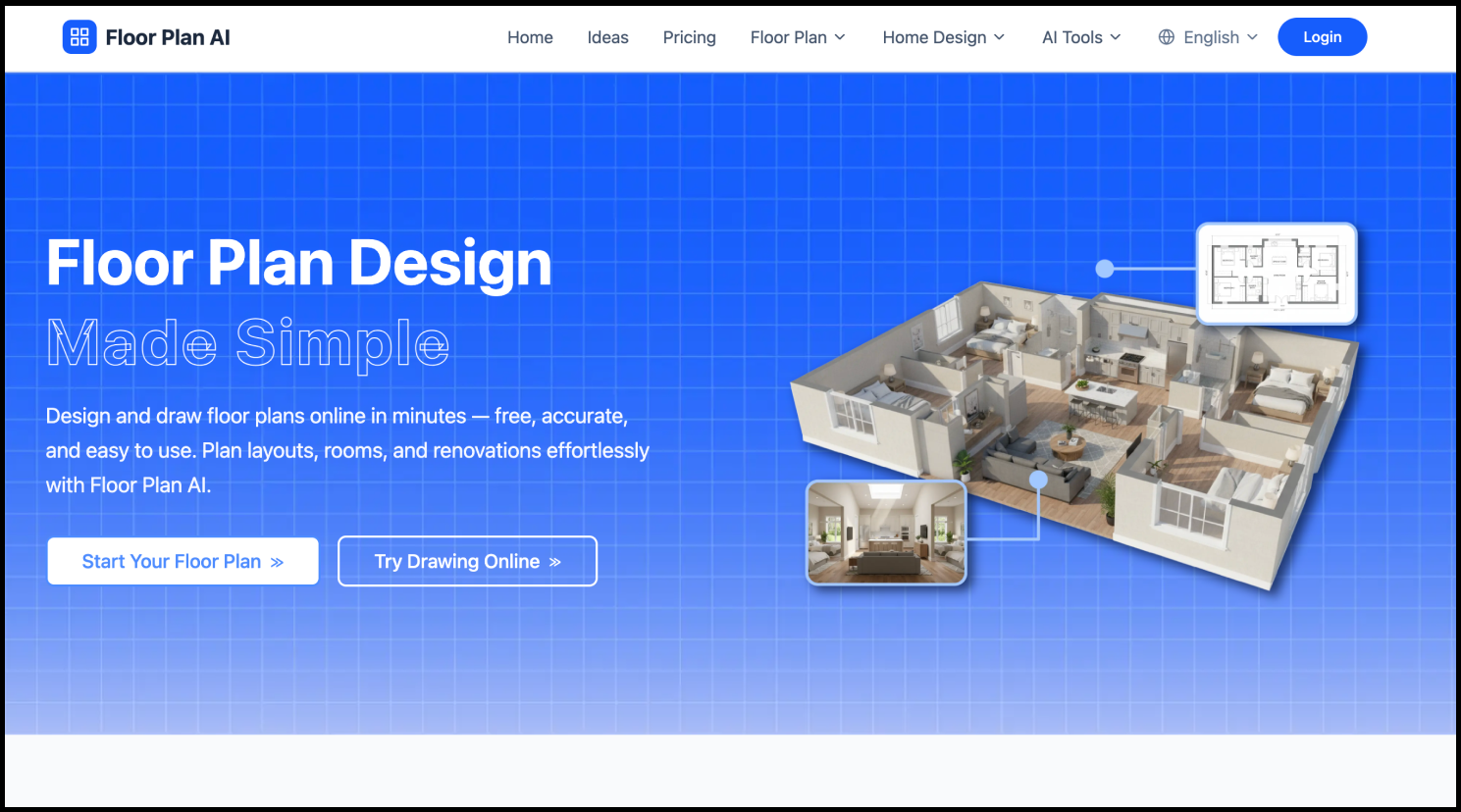
Pricing: Free plan available; Premium plans starting at $9.99, with 100 AI credits;
At the early design stage, you might need to quickly turn ideas into a workable layout, Floor Plan AI can save you a lot of time. It is an AI-powered floor planning tool that generates complete, furnished floor plan layouts from minimal inputs, typically a rough sketch, a set of room dimensions, or a basic description of the space and its requirements.
Instead of placing every wall or window manually, it automatically creates layout options for you to review and refine. So, it is quite helpful in the early planning stage when you want to test different layouts, optimize space usage, or present multiple options to clients without starting from scratch each time.
Why to choose:
- Give multiple layout variations from the same inputs
- Useful for early-stage planning and client discussions
- Strong at handling the functional logic of interior layouts
- Saves time compared to manual layout drafting
Why not to use:
- Limited control compared to professional CAD or BIM tools
- Outputs may still require manual refinement
7.Planner 5D - AI floor, house or room planning
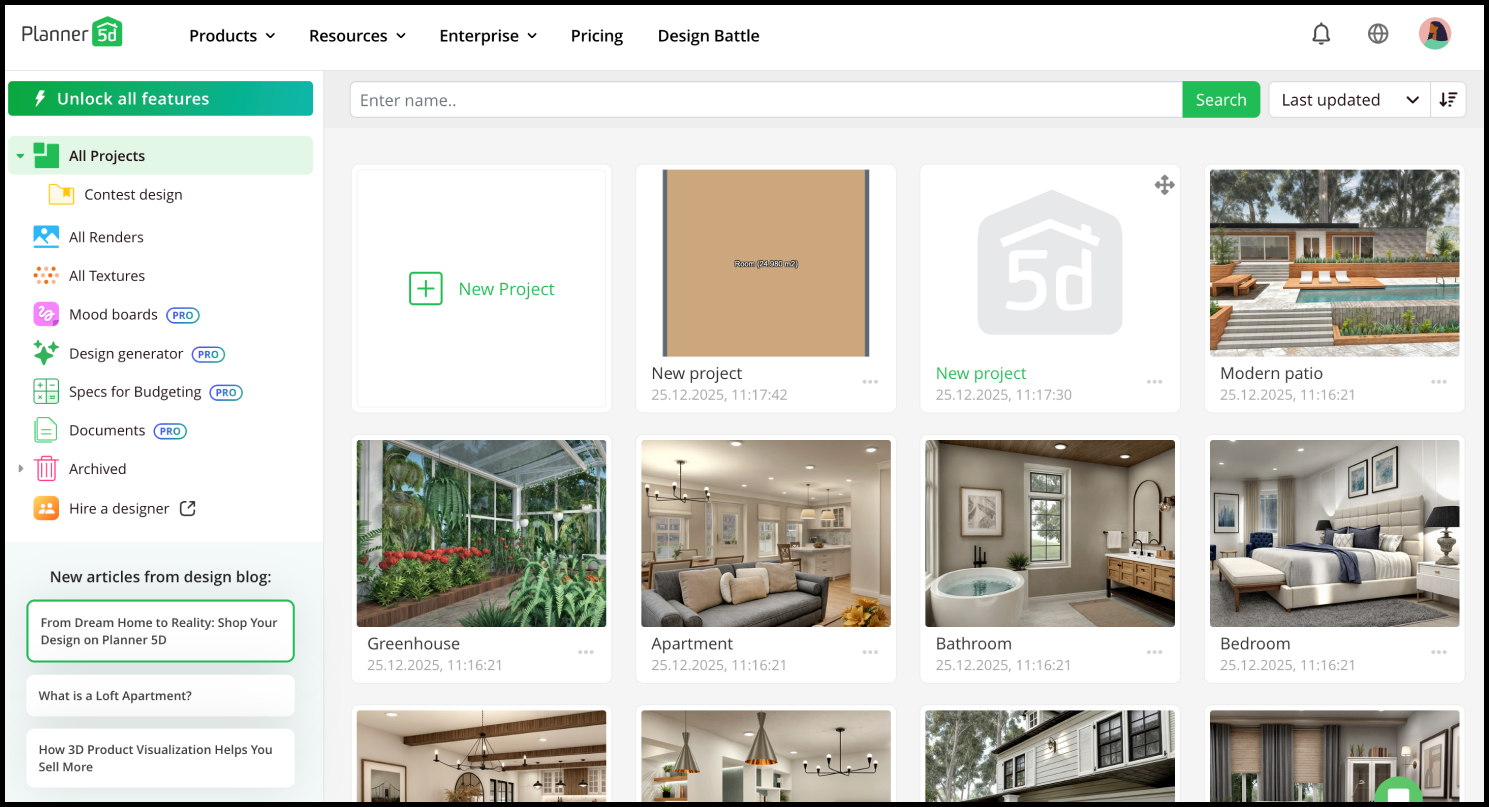
Pricing: Free plan available; Premium plans starting at $4.99 per month;
Besides Floor Plan AI, Planner 5D AI is another great tool worth trying for both 2D and 3D floor planning.
Instead of just generating layouts, you can build your floor plans step by step, adjust room sizes, place furniture, and instantly switch to a 3D view to see how everything comes together, the whole process is completed in just one single browser.
Its AI-assisted Smart Wizard can generate complete furnished room layouts from minimal inputs.
Overall, it’s a solid choice for architects and designers who want to handle both the technical spatial planning and the visual presentation layer of a project without switching between multiple applications.
Why to choose:
- Generate layouts with AI or just build manually from scratch, all up to you
- Smooth switch between 2D plans and 3D visualization
- Great for presenting ideas and helping clients understand the space
- Beginner-friendly and easy to learn
Why no to use:
- Limited free plan
AI tools for interior design, styling and staging
8. DecAI - AI interior design, styling and staging
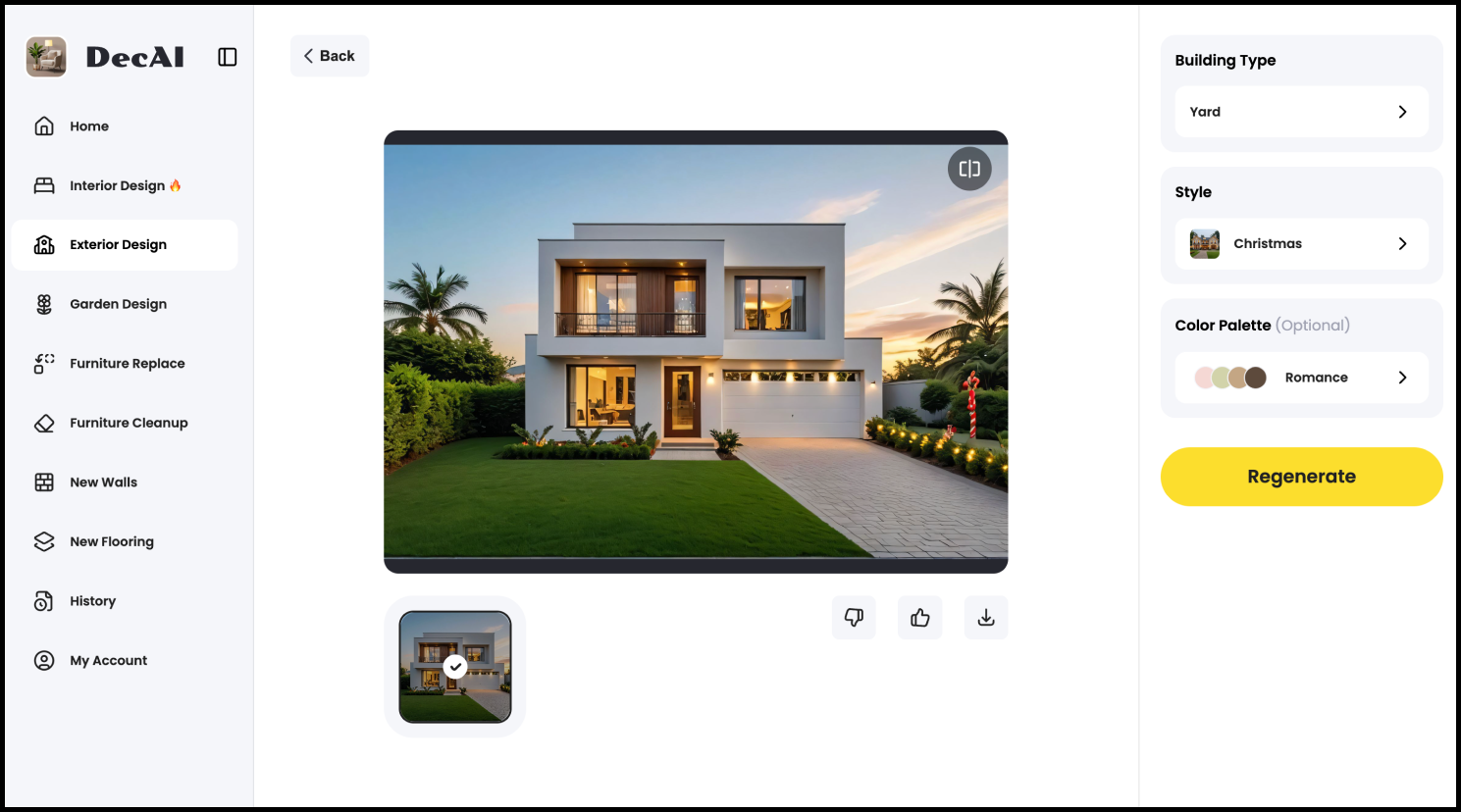
Pricing: Free-forever plan available; Premium plans starting at $0.16 per day;
When you’re working on an architectural or house design project, interior and exterior design, styling, and staging are essential to elevate the overall presentation.
DecAI is the AI tool that lets you complete interior design, exterior design, garden design, wall and floor styling, and even empty room staging by simply uploading an image.
Over 30 design styles are provided for you to quickly try on different tastes and choose the best fit.
So, it would be a must-try AI tool for designers and architects who want to have a better interior or exterior design to attract clients and similar at just fingertips.
Why to choose:
- AI-driven set makes it quite fast, fun and easy to get started
- Quickly try different styles, colors, building types, and staging from a single image
- Interior, exterior, garden, floor, and wall design in under 30 seconds
- 30 design styles and 15 building types to explore
- Easy to share for client presentations and staged previews
- Free-Forever plan works on both mobile and desktop
Why not to use:
- Its free plan comes with limited AI generations
9.Homestyler AI - 3D interior design
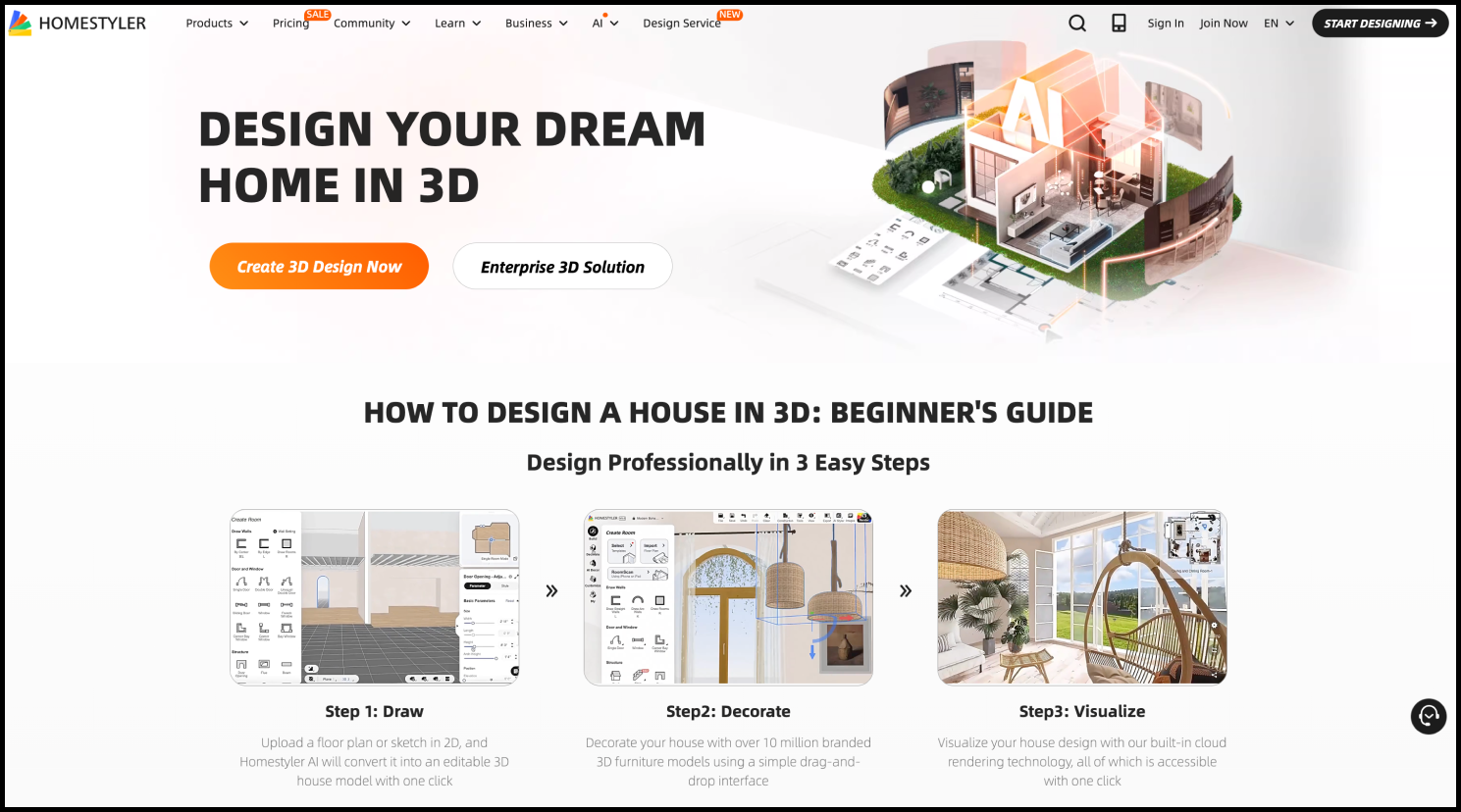
Pricing: Free plan available with 3D floor planners, 4k renders & 3D models; Premium plans starting at $ 4.9 per month;
If you want to take interior design to the next level, like fully realistic 3D designs, beyond flat images, Homestyler AI is a go-to tool. With this AI tool, you can quickly create floor and space plans, furnish rooms with real-brand furniture and decor, and instantly turn them into 3D for preview.
Even for professionals like architects and designers, you can simply test out different spatial layouts, furniture arrangements and give clients a realistic walkthrough, all without starting from scratch like the traditional CAD software.
Why to choose:
- Quickly turns 2D into 3D
- Furnish with real-branded furnitures and decors
- 1K + resolution renders
- Great for client presentations and virtual walkthroughs
- Much easier and user-friendly compared to traditional tool like CAD software
Design any room, shop or space with DecAI in less 30 seconds! It's free!
Why not to use:
- Limited free plan
- Not suitable for highly technical or construction-level modeling
10.Reimagine AI - AI virtual staging

Pricing: Free plan available; Premium plans starting at $14 per month;
Want a quick way to virtually stage an empty room or building? Reimagine AI is a dedicated AI-powered virtual staging tool that can furnish your space in seconds.
Unlike other interior design tools that focus on individual details—like furniture, décor, walls, or floors, Reimagine AI emphasizes experimenting with different styles, décor, and ambiances rapidly. It’s perfect for exploring design ideas and visual concepts without any modeling or drafting work.
Why to choose:
- Quickly transforms empty spaces into fully staged interiors
- Furniture and decor suggestions
- Test different furniture styles and color combinations effortlessly
- Every design starts from a single image
Why not to use:
- Limited free plan
11.DecorMatters AI - AI 3D room decoring

Pricing: Free plan available; Premium plan starting at $9.99 per week
Let’s imagine, try to decorate your empty house or building with a 3D AI tool.
DecorMatters AI makes the whole process simple and interactive. With built-in augmented reality (AR), you can upload a room photo or scan your space, then experiment with furniture, color schemes, and décor in an immersive 3D environment.
Most importantly, with this AI tool, you can not only try different furniture and décor options but also purchase them directly if they fit your project perfectly, no extra searching needed. Pretty convenient, right?
Why to choose:
- Interactive 3D room decorating from photos or layouts
- Test furniture arrangements, color palettes, and décor options easily
- 3D and AR techniques integrated
- Provide direct purchase link for suggested furnitures & decors
- Mobile apps are also available
Why not to use:
- Limited free plan
AI tools for 3D modeling and texturing
12.Arcadium3D - AI 3D modeling and experiences
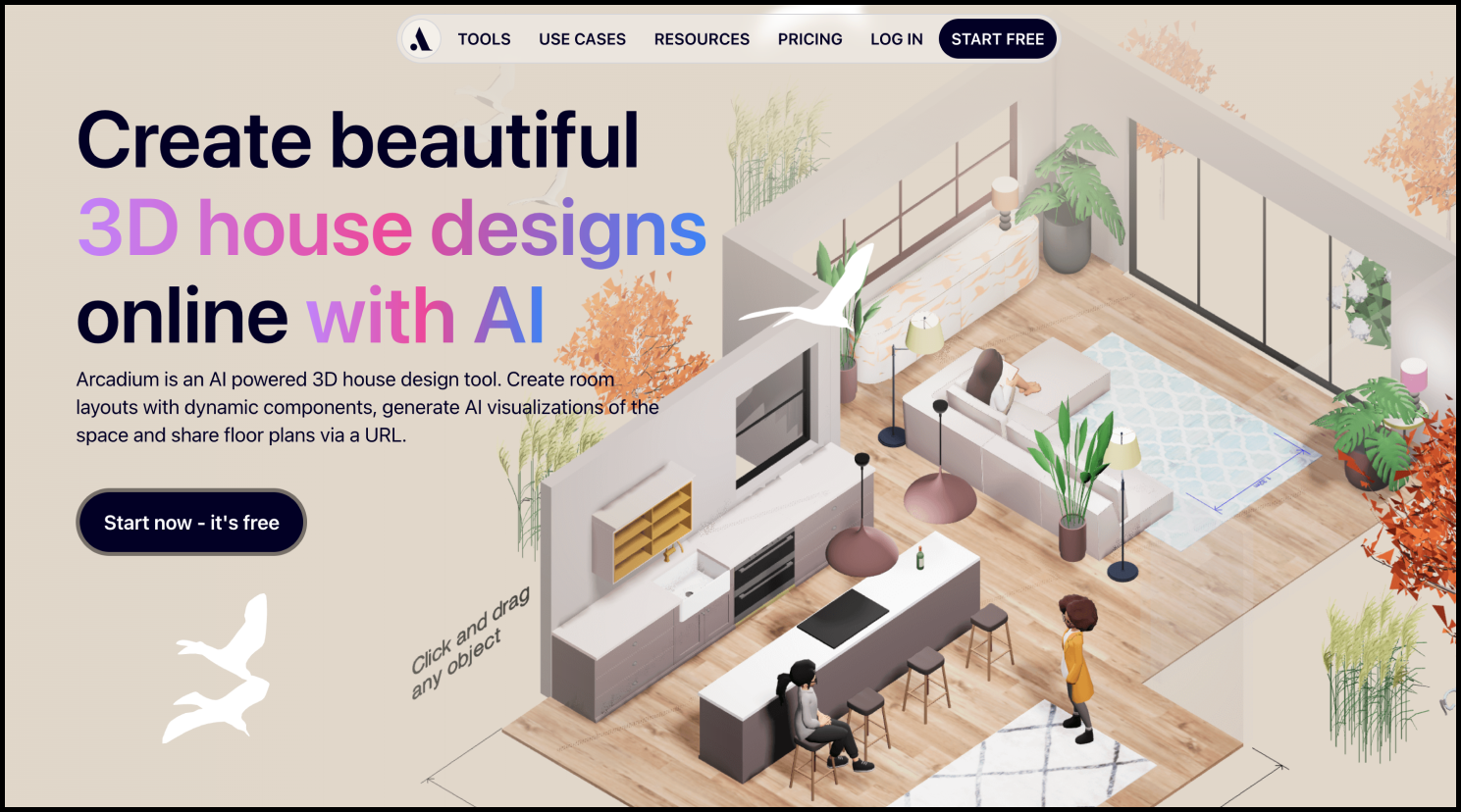
Pricing: Free plan available with 2 projects & a furniture library; Premium plans starting at $18 per month;
Arcadium3D is a professional 3D design and architectural visualization platform that helps you to create 3D designs and turns them into immersive 3D experiences, so your clients or other teammates can instantly explore the space themselves instead of just looking at static images.
Simply input your images or 3D sketches, and its AI will do the rest. So, it’s especially useful when you want to present spatial layouts more clearly and help others truly experience how a space will feel before it’s built.
Why to choose:
- Generate 3D walkthrough experiences
- Turn 2D design images and sketches into 3D previews
- 3D model library
- Built-in furniture library
- Instant rendering
- Simple light control
Why not to use:
- Limited free project
- Require some professional setup to achieve the best walkthrough results
13.Trellis 3D AI - AI 3D model generator

Pricing: Free generation available; Premium plans starting at $8 per month;
Trellis 3D AI isn’t specifically built for architectural or interior design, but it’s still a tool our team frequently uses and recommends, since it generates 3D assets simply by uploading an image, which is incredibly helpful when you need custom furniture, décor, or objects for your projects.
It is surely quite useful when you or your team need to create quick prototypes, concept models, or supporting assets. So, you don’t have to build any elements or objects from scratch anymore.
Why to choose:
- Quickly generate high-quality 3D assets from imagesRich output formats for later sharing and use
- 3D assets are generated with detailed geometry and vivid textures
- Allow local setup for general models
- Useful for rapid prototyping, concept models, and asset creation
- Browser-based workflow with no heavy setup required
Why not to use:
- Limited free generation
- Texture may lack precision and need further refinement
- Require strong hardware configuration
AI tools for 3D rendering and visualization
14.Architect Render AI - AI 3D rendering
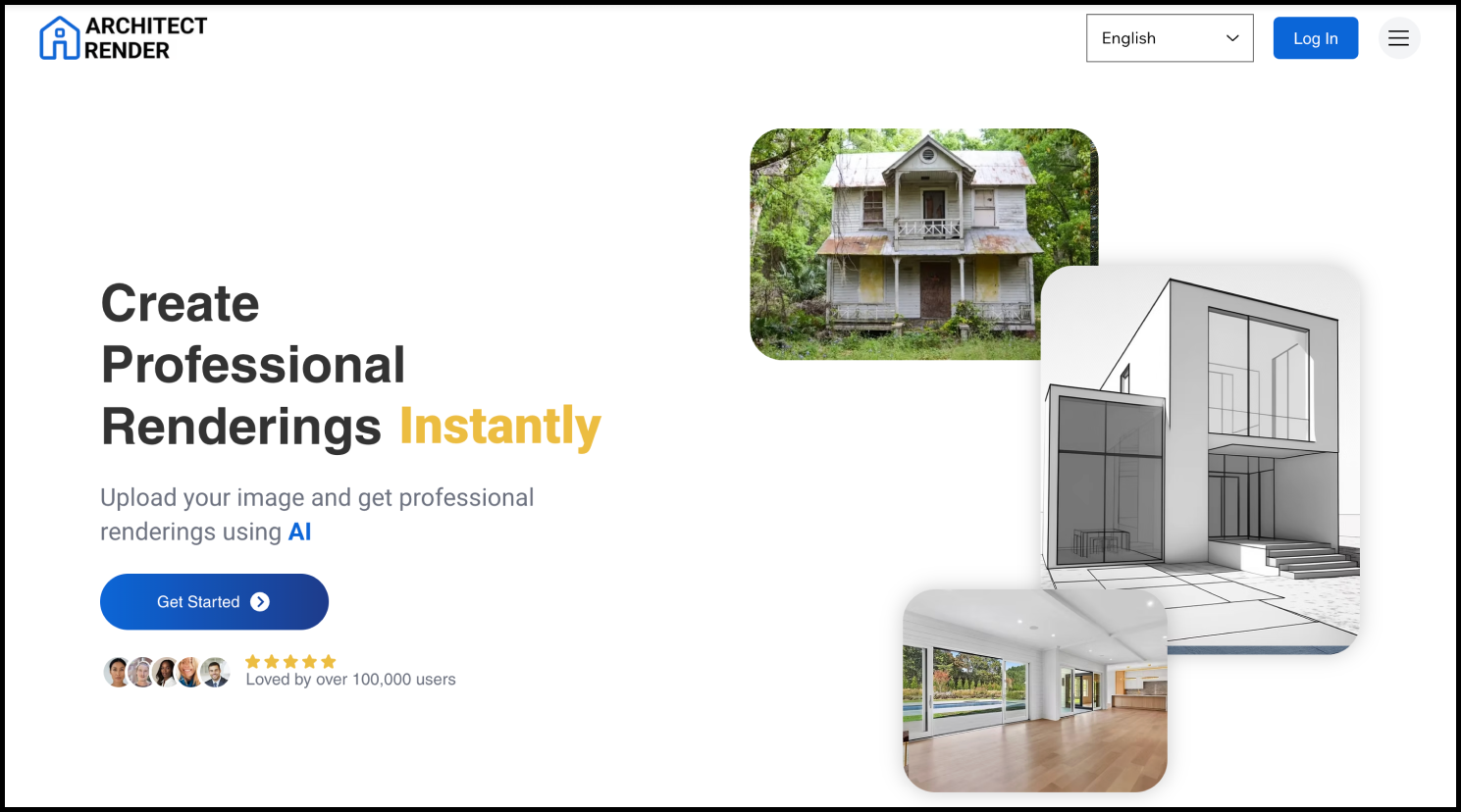
Pricing: Free plan available; Premium plans starting at $29 per month;
If you do have some raw drawings or sketches and want to quickly render them all to preview the final effect in advance, you can try to rely on Architect Render AI. It helps you to turn your sketches or drawings into realistic 3D visuals in just a few clicks.
Simply upload your sketches, floor plans, or basic models, and the AI generates detailed renders with lighting, textures, and materials automatically applied.
So, it is much better for you to visualize concepts and present ideas clearly to clients—especially in the early or mid design stages.
Why to choose:
Quickly generates realistic 3D renders from simple inputs
Saves time on lighting, materials, and scene setup
Your rough sketches, drawing and ideas are supported
Why not to use:
- Limited free plan
- Output quality varies sometimes
- Not so good for complex project
AI tools for file and project management
15.Zoho projects - AI task & project management

Pricing: Free plan available with 3 projects & 5GB storage space; Premium plans starting at $4 per user/month;
For architects and interior designers, managing multiple projects and deadlines at the same time is often part of the job—especially when working in a team.
That’s where a reliable project management tool comes in. A platform that helps you plan the entire design process, break it down into manageable tasks, track progress, and collaborate smoothly can save you a lot of time and effort. Zoho projects is exactly that kind of tool.
You can simply use it to assign tasks, set timelines, monitor progress, and keep client work on schedule. With built-in automation and reporting features, it helps to reduce manual work and let you focus more on what matters most—design.
Why to choose:
- Efficient task management and project tracking
- AI assisted automation and smart insights
Why not to use:
- Interface may feel complex for beginners
16.Trello AI - AI project management platform
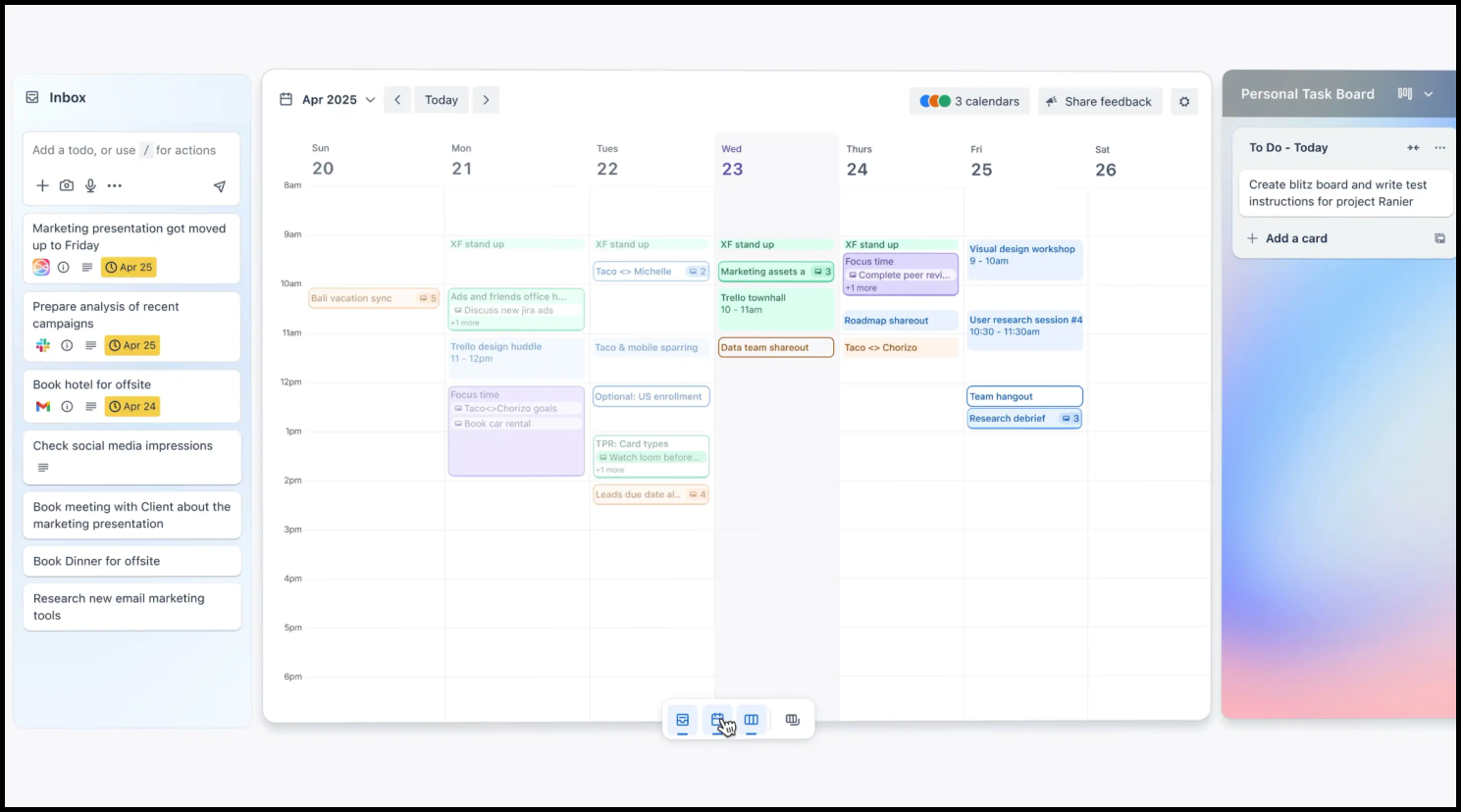
Pricing: Free plan available with 10 boards & 250 command runs per month; Premium plans starting at $5 user/month;
If you prefer a more visual and flexible way to manage your design projects, Trello is a good alternative. Instead of complex dashboards, it uses simple boards, lists, and cards to help you organize tasks and manage your entire workflow virtually, even at a glance. Its AI helps to generate checklists, summarize tasks and suggest next steps, making it quite efficient and convenient to keep the whole project forwarded smoothly.
Why to choose:
- Simple, visual workflow that’s easy to understand at a glance
- Flexible and adaptable for different types of projects
- AI helps with task breakdowns and quick summaries
- Great for lightweight collaboration and quick planning
Why not to use:
- Limited free plan
- Limited advanced reporting and automation features
AI tools for client communication and presentation
17.Beautiful.ai - AI presentation maker

Pricing: 14-day free trial available; Premium plans starting at $12 per month;
Get sick of spending hours adjusting slide layouts, aligning elements, fixing formatting or repetitive work of your client presentation? No worries! You should try Beautiful.ai, which helps you to transform any raw ideas, moodboards and project plans into sharp, professional slides. Its preset, fully customizable templates help you to headstart any project quickly.
It can also generate charts from your data, making it easy to present insights in a clear and visually appealing way.
Why to choose:
- Create professional presentations in minutes
- Smart templates with automatic layout and formatting
- image, chart, table and analysis generation
Why not to use:
- Limited free trial
- Limited customization compared to traditional tool like PowerPoint
18.Slide AI - AI slide and presentation generation

Pricing: Free plan available with 12 slides & 120 AI credits; Premium plans starting at $ 1.32 per month;
Unlike Beautiful.ai, which focuses on polished design and layout control, Slide AI is built for speed. It turns your ideas, notes, or text into complete presentations in seconds, no manual slide building required.
Simply input your content or topic, and it automatically generates a full set of slides with structured content, layouts, and visuals.
You can feel free to use it to create slides or presentations for client meetings, proposals, or internal reviews without starting from a blank page.
Why to choose:
- Instantly generates complete presentations from text
- Saves time on structuring content and slide creation
- Great for quick client presentations and drafts
- Simple and fast to use
Why not to use:
- Limited free plan
- Less control over detailed design and layout
FAQs
1.Which is the best AI tool for architects?
It depends on your needs. For example, if you want to quickly design or stage an interior space, tools like DecAI allow you to upload a photo and generate results in seconds. Other tools may be better suited for floor planning, rendering, or project management. So, the best solution is to choose the tools based on your specific workflow.
2.What can AI do for architects and designers?
AI can assist architects in many ways, including generating design ideas, creating floor plans, producing realistic renders, transferring 2D design into 3D, organizing projects, and even preparing presentations. They all do help to automate repetitive tasks, improve efficiency, and free up more time for creative work.
3.Do AI tools for architects require professional technical skills to use?
No. Most of these AI tools mentioned above are made to be beginner-friendly and easy to use, like DecAI, Midjourney and more. Well, having basic design knowledge, such as layout, scale, and materials, will help you achieve better results.
4.Can AI tools replace architects in the future?
No. While AI can automate tasks and support the design process, it cannot replace human creativity, critical thinking, and real-world problem-solving. Architects are still essential for making decisions, understanding client needs, and delivering meaningful designs.
5.Which AI tools are most essential for beginner architects?
Beginners may not yet have extensive knowledge of architectural or interior design, so it’s best to start with tools that are easy to use and cover key stages of the workflow. For example, ChatGPT (ideation), DecAI (interior design, staging, and styling), Midjourney (visualization), and Trello (project management) are all great starting points.
It’s recommended to try these tools first and see which ones best fit your workflow and needs.
------------------------
If you believe that any material on this site infringes your intellectual property rights, please contact the author at decaiwebteam@outlook.com with details of your claim.
Redesign any home interior, exterior & garden in seconds
Share this Post:
'%3e%3cpath%20d='M17.9995%2035.999C17.0317%2035.999%2016.0619%2035.9219%2015.1161%2035.7696C10.9414%2035.0973%207.11524%2032.9513%204.34408%2029.7273C1.54287%2026.4683%200%2022.3035%200%2017.9995C0%208.07403%208.07503%200%2017.9995%200C27.924%200%2036%208.07503%2036%2017.9995C36%2022.3696%2034.4151%2026.5835%2031.5357%2029.8646C28.6844%2033.1156%2024.7671%2035.2326%2020.5052%2035.8267C19.6806%2035.9419%2018.8371%2036%2017.9995%2036V35.999ZM17.9995%201.20123C8.73726%201.20123%201.20224%208.73626%201.20224%2017.9985C1.20224%2026.2919%207.13427%2033.2659%2015.3075%2034.5814C16.9546%2034.8469%2018.6808%2034.8659%2020.3389%2034.6345C28.5812%2033.4863%2034.7968%2026.334%2034.7968%2017.9985C34.7968%208.73626%2027.2617%201.20123%2017.9985%201.20123H17.9995Z'%20fill='%23FF0209'/%3e%3cpath%20d='M29.0557%2014.3621C28.9184%2013.0276%2028.6208%2011.5539%2027.5268%2010.7784C26.6782%2010.1773%2025.5642%2010.1553%2024.5242%2010.1563C22.3251%2010.1583%2020.126%2010.1603%2017.9269%2010.1623C15.812%2010.1643%2013.6971%2010.1663%2011.5821%2010.1683C10.6985%2010.1683%209.8399%2010.1002%209.01937%2010.4819C8.31406%2010.8105%207.76303%2011.4347%207.43241%2012.1289C6.97156%2013.0957%206.87438%2014.1898%206.81927%2015.2588C6.71708%2017.2044%206.7281%2019.156%206.85133%2021.0996C6.9405%2022.5193%207.16792%2024.0872%208.26496%2024.9919C9.23777%2025.7934%2010.6103%2025.8325%2011.8707%2025.8335C15.8741%2025.8365%2019.8776%2025.8395%2023.881%2025.8435C24.394%2025.8435%2024.93%2025.8345%2025.453%2025.7774C26.4829%2025.6661%2027.4637%2025.3716%2028.1249%2024.6092C28.7922%2023.8407%2028.9635%2022.7698%2029.0657%2021.7569C29.3121%2019.3003%2029.3091%2016.8177%2029.0557%2014.3621ZM15.6116%2021.4453V14.5545L21.5797%2017.9999L15.6116%2021.4453Z'%20fill='%23FF0209'/%3e%3c/g%3e%3cdefs%3e%3cclipPath%20id='clip0_13816_41422'%3e%3crect%20width='36'%20height='36'%20fill='white'/%3e%3c/clipPath%3e%3c/defs%3e%3c/svg%3e)
'%3e%3cpath%20d='M17.9995%2036C17.0327%2036%2016.0619%2035.9229%2015.1161%2035.7696C10.9414%2035.0973%207.11524%2032.9513%204.34408%2029.7273C1.54287%2026.4683%200%2022.3035%200%2017.9995C0%208.07403%208.07503%200%2017.9995%200C27.924%200%2036%208.07503%2036%2017.9995C36%2022.3696%2034.4151%2026.5835%2031.5357%2029.8646C28.6844%2033.1156%2024.7671%2035.2326%2020.5052%2035.8267C19.6806%2035.9419%2018.8371%2036%2017.9995%2036ZM17.9995%201.20224C8.73726%201.20224%201.20224%208.73726%201.20224%2017.9995C1.20224%2026.2919%207.13427%2033.2669%2015.3075%2034.5824C16.9556%2034.8479%2018.6808%2034.8669%2020.3389%2034.6355C28.5812%2033.4873%2034.7968%2026.335%2034.7968%2017.9995C34.7968%208.73726%2027.2617%201.20224%2017.9985%201.20224H17.9995Z'%20fill='url(%23paint0_linear_13816_41436)'/%3e%3cpath%20d='M23.4463%207.55469H12.549C9.53841%207.55469%207.08984%2010.0032%207.08984%2013.0138V22.9834C7.08984%2025.994%209.53841%2028.4426%2012.549%2028.4426H23.4463C26.4569%2028.4426%2028.9054%2025.994%2028.9054%2022.9834V13.0138C28.9054%2010.0032%2026.4569%207.55469%2023.4463%207.55469ZM9.01543%2013.0138C9.01543%2011.0652%2010.6004%209.48027%2012.549%209.48027H23.4463C25.3949%209.48027%2026.9799%2011.0652%2026.9799%2013.0138V22.9834C26.9799%2024.932%2025.3949%2026.517%2023.4463%2026.517H12.549C10.6004%2026.517%209.01543%2024.932%209.01543%2022.9834V13.0138Z'%20fill='url(%23paint1_linear_13816_41436)'/%3e%3cpath%20d='M17.9964%2023.0749C20.7966%2023.0749%2023.0749%2020.7966%2023.0749%2017.9964C23.0749%2015.1962%2020.7966%2012.918%2017.9964%2012.918C15.1962%2012.918%2012.918%2015.1962%2012.918%2017.9964C12.918%2020.7966%2015.1962%2023.0749%2017.9964%2023.0749ZM17.9964%2014.8446C19.7346%2014.8446%2021.1483%2016.2582%2021.1483%2017.9964C21.1483%2019.7347%2019.7346%2021.1483%2017.9964%2021.1483C16.2582%2021.1483%2014.8446%2019.7347%2014.8446%2017.9964C14.8446%2016.2582%2016.2582%2014.8446%2017.9964%2014.8446Z'%20fill='url(%23paint2_linear_13816_41436)'/%3e%3cpath%20d='M23.5482%2013.741C24.3026%2013.741%2024.9168%2013.1269%2024.9168%2012.3725C24.9168%2011.618%2024.3026%2011.0039%2023.5482%2011.0039C22.7938%2011.0039%2022.1797%2011.618%2022.1797%2012.3725C22.1797%2013.1269%2022.7938%2013.741%2023.5482%2013.741Z'%20fill='url(%23paint3_linear_13816_41436)'/%3e%3c/g%3e%3cdefs%3e%3clinearGradient%20id='paint0_linear_13816_41436'%20x1='5.27482'%20y1='30.7312'%20x2='30.7242'%20y2='5.28083'%20gradientUnits='userSpaceOnUse'%3e%3cstop%20stop-color='%23FAAD4F'/%3e%3cstop%20offset='0.35'%20stop-color='%23DD2A7B'/%3e%3cstop%20offset='0.62'%20stop-color='%239537B0'/%3e%3cstop%20offset='1'%20stop-color='%23515BD4'/%3e%3c/linearGradient%3e%3clinearGradient%20id='paint1_linear_13816_41436'%20x1='8.92225'%20y1='27.074'%20x2='27.073'%20y2='8.92324'%20gradientUnits='userSpaceOnUse'%3e%3cstop%20stop-color='%23FAAD4F'/%3e%3cstop%20offset='0.35'%20stop-color='%23DD2A7B'/%3e%3cstop%20offset='0.62'%20stop-color='%239537B0'/%3e%3cstop%20offset='1'%20stop-color='%23515BD4'/%3e%3c/linearGradient%3e%3clinearGradient%20id='paint2_linear_13816_41436'%20x1='14.4077'%20y1='21.5861'%20x2='21.5861'%20y2='14.4077'%20gradientUnits='userSpaceOnUse'%3e%3cstop%20stop-color='%23FAAD4F'/%3e%3cstop%20offset='0.35'%20stop-color='%23DD2A7B'/%3e%3cstop%20offset='0.62'%20stop-color='%239537B0'/%3e%3cstop%20offset='1'%20stop-color='%23515BD4'/%3e%3c/linearGradient%3e%3clinearGradient%20id='paint3_linear_13816_41436'%20x1='22.5814'%20y1='13.3393'%20x2='24.515'%20y2='11.4057'%20gradientUnits='userSpaceOnUse'%3e%3cstop%20stop-color='%23FAAD4F'/%3e%3cstop%20offset='0.35'%20stop-color='%23DD2A7B'/%3e%3cstop%20offset='0.62'%20stop-color='%239537B0'/%3e%3cstop%20offset='1'%20stop-color='%23515BD4'/%3e%3c/linearGradient%3e%3cclipPath%20id='clip0_13816_41436'%3e%3crect%20width='36'%20height='36'%20fill='white'/%3e%3c/clipPath%3e%3c/defs%3e%3c/svg%3e)
'%3e%3cpath%20d='M17.9995%2035.999C17.0317%2035.999%2016.0619%2035.9219%2015.1161%2035.7696C10.9414%2035.0973%207.11524%2032.9513%204.34408%2029.7273C1.54287%2026.4683%200%2022.3035%200%2017.9995C0%208.07403%208.07502%200%2017.9995%200C27.924%200%2036%208.07503%2036%2017.9995C36%2022.3696%2034.415%2026.5835%2031.5357%2029.8646C28.6844%2033.1156%2024.7671%2035.2326%2020.5052%2035.8267C19.6806%2035.9419%2018.8371%2036%2017.9995%2036V35.999ZM17.9995%201.20123C8.73725%201.20123%201.20224%208.73626%201.20224%2017.9985C1.20224%2026.2919%207.13427%2033.2659%2015.3075%2034.5814C16.9545%2034.8469%2018.6808%2034.8659%2020.3388%2034.6345C28.5812%2033.4863%2034.7968%2026.334%2034.7968%2017.9985C34.7968%208.73626%2027.2617%201.20123%2017.9985%201.20123H17.9995Z'%20fill='%23007EBB'/%3e%3cpath%20d='M9.06639%2012.124C8.60253%2011.6932%208.37109%2011.1602%208.37109%2010.526C8.37109%209.89184%208.60253%209.33481%209.06639%208.90401C9.53026%208.47321%2010.1274%208.25781%2010.8587%208.25781C11.5901%208.25781%2012.1642%208.47321%2012.627%208.90401C13.0909%209.33481%2013.3223%209.87581%2013.3223%2010.526C13.3223%2011.1762%2013.0909%2011.6932%2012.627%2012.124C12.1631%2012.5548%2011.5741%2012.7702%2010.8587%2012.7702C10.1434%2012.7702%209.52926%2012.5548%209.06639%2012.124ZM12.9326%2014.5946V27.7962H8.76182V14.5946H12.9326Z'%20fill='%23007EBB'/%3e%3cpath%20d='M26.8196%2015.9006C27.7283%2016.8875%2028.1832%2018.243%2028.1832%2019.9682V27.5663H24.2208V20.5042C24.2208%2019.6346%2023.9954%2018.9583%2023.5445%2018.4764C23.0937%2017.9945%2022.4876%2017.7541%2021.7262%2017.7541C20.9647%2017.7541%2020.3586%2017.9955%2019.9078%2018.4764C19.4569%2018.9583%2019.2315%2019.6346%2019.2315%2020.5042V27.5663H15.2461V14.5611H19.2315V16.2863C19.6353%2015.7113%2020.1793%2015.2574%2020.8636%2014.9228C21.5468%2014.5892%2022.3163%2014.4219%2023.1708%2014.4219C24.6937%2014.4219%2025.9099%2014.9158%2026.8186%2015.9016L26.8196%2015.9006Z'%20fill='%23007EBB'/%3e%3c/g%3e%3cdefs%3e%3cclipPath%20id='clip0_13816_41425'%3e%3crect%20width='36'%20height='36'%20fill='white'/%3e%3c/clipPath%3e%3c/defs%3e%3c/svg%3e)
'%3e%3cpath%20d='M18%2035.999C17.0322%2035.999%2016.0623%2035.9219%2015.1166%2035.7696C10.9417%2035.0973%207.11544%2032.9513%204.3442%2029.7273C1.54291%2026.4683%200%2022.3035%200%2017.9995C0%208.07403%208.07526%200%2018%200C27.9248%200%2036%208.07503%2036%2017.9995C36%2022.3696%2034.415%2026.5835%2031.5356%2029.8646C28.6842%2033.1156%2024.7668%2035.2326%2020.5047%2035.8267C19.6802%2035.9419%2018.8366%2036%2017.999%2036L18%2035.999ZM18%201.20123C8.73751%201.20123%201.20227%208.73626%201.20227%2017.9985C1.20227%2026.2919%207.13448%2033.2659%2015.3079%2034.5814C16.955%2034.8469%2018.6813%2034.8659%2020.3394%2034.6345C28.582%2033.4863%2034.7977%2026.334%2034.7977%2017.9985C34.7977%208.73626%2027.2625%201.20123%2018%201.20123Z'%20fill='black'/%3e%3cpath%20d='M7%208.09163H13.5067L19.521%2016.1816L27.0073%207.90625L28.786%207.93715L20.4078%2017.3454L29%2028.901H22.4959L16.8193%2021.362L9.8847%2029.0864H8.13428L15.9583%2020.26L7%208.09163ZM12.8931%209.28633H9.45676L23.2048%2027.6754H26.5793L12.8931%209.28633Z'%20fill='black'/%3e%3c/g%3e%3cdefs%3e%3cclipPath%20id='clip0_13886_43848'%3e%3crect%20width='36'%20height='36'%20fill='white'/%3e%3c/clipPath%3e%3c/defs%3e%3c/svg%3e)
'%3e%3cpath%20d='M17.9995%2035.999C17.0327%2035.999%2016.0619%2035.9219%2015.1161%2035.7686C10.9414%2035.0963%207.11524%2032.9503%204.34408%2029.7263C1.54287%2026.4673%200%2022.3025%200%2017.9995C0%208.07403%208.07503%200%2017.9995%200C27.924%200%2036%208.07503%2036%2017.9995C36%2022.3696%2034.415%2026.5835%2031.5357%2029.8646C28.6844%2033.1156%2024.7671%2035.2326%2020.5052%2035.8267C19.6806%2035.9419%2018.8371%2036%2017.9995%2036V35.999ZM17.9995%201.20123C8.73726%201.20123%201.20224%208.73626%201.20224%2017.9985C1.20224%2026.2909%207.13428%2033.2659%2015.3075%2034.5814C16.9556%2034.8469%2018.6808%2034.8659%2020.3389%2034.6345C28.5812%2033.4863%2034.7968%2026.334%2034.7968%2017.9985C34.7968%208.73626%2027.2617%201.20123%2017.9985%201.20123H17.9995Z'%20fill='%231877F7'/%3e%3cpath%20d='M20.5337%2014.9635V18.7536H25.2225L24.4801%2023.8601H20.5337V35.624C19.7423%2035.7342%2018.9328%2035.7913%2018.1112%2035.7913C17.1625%2035.7913%2016.2317%2035.7151%2015.324%2035.5689V23.8601H11V18.7536H15.324V14.1169C15.324%2011.2396%2017.6564%208.90625%2020.5347%208.90625V8.90926C20.5428%208.90926%2020.5508%208.90625%2020.5588%208.90625H25.2235V13.3215H22.1758C21.2691%2013.3215%2020.5347%2014.0558%2020.5347%2014.9625L20.5337%2014.9635Z'%20fill='%231877F7'/%3e%3c/g%3e%3cdefs%3e%3cclipPath%20id='clip0_13816_41433'%3e%3crect%20width='36'%20height='36'%20fill='white'/%3e%3c/clipPath%3e%3c/defs%3e%3c/svg%3e)
'%3e%3cpath%20d='M17.9995%2035.999C17.0327%2035.999%2016.0619%2035.9219%2015.1161%2035.7686C10.9414%2035.0963%207.11524%2032.9503%204.34408%2029.7263C1.54287%2026.4673%200%2022.3025%200%2017.9995C0%208.07403%208.07503%200%2017.9995%200C27.924%200%2036%208.07503%2036%2017.9995C36%2022.3696%2034.415%2026.5835%2031.5357%2029.8646C28.6844%2033.1156%2024.7671%2035.2326%2020.5052%2035.8267C19.6806%2035.9419%2018.8371%2036%2017.9995%2036V35.999ZM17.9995%201.20123C8.73726%201.20123%201.20224%208.73626%201.20224%2017.9985C1.20224%2026.2909%207.13428%2033.2659%2015.3075%2034.5814C16.9556%2034.8469%2018.6808%2034.8659%2020.3389%2034.6345C28.5812%2033.4863%2034.7968%2026.334%2034.7968%2017.9985C34.7968%208.73626%2027.2617%201.20123%2017.9985%201.20123H17.9995Z'%20fill='%232A91F7'/%3e%3cg%20clip-path='url(%23clip1_13816_41442)'%3e%3cpath%20d='M16.3345%2018.834C16.6924%2019.3124%2017.149%2019.7083%2017.6733%2019.9947C18.1976%2020.2812%2018.7774%2020.4516%2019.3734%2020.4942C19.9693%2020.5369%2020.5675%2020.4509%2021.1273%2020.2421C21.6871%2020.0333%2022.1954%2019.7065%2022.6178%2019.284L25.1178%2016.784C25.8768%2015.9981%2026.2968%2014.9456%2026.2873%2013.8531C26.2778%2012.7606%2025.8396%2011.7156%2025.0671%2010.943C24.2946%2010.1705%2023.2495%209.73231%2022.157%209.72281C21.0645%209.71332%2020.012%2010.1333%2019.2262%2010.8923L17.7928%2012.3173M19.6678%2017.1673C19.3099%2016.6889%2018.8533%2016.293%2018.329%2016.0065C17.8047%2015.7201%2017.2249%2015.5497%2016.6289%2015.507C16.033%2015.4643%2015.4348%2015.5503%2014.875%2015.7592C14.3152%2015.968%2013.8069%2016.2947%2013.3845%2016.7173L10.8845%2019.2173C10.1255%2020.0031%209.70551%2021.0557%209.715%2022.1481C9.72449%2023.2406%2010.1627%2024.2857%2010.9352%2025.0582C11.7078%2025.8307%2012.7528%2026.269%2013.8453%2026.2784C14.9378%2026.2879%2015.9903%2025.868%2016.7761%2025.109L18.2011%2023.684'%20stroke='%232A91F7'%20stroke-width='1.66667'%20stroke-linecap='round'%20stroke-linejoin='round'/%3e%3c/g%3e%3c/g%3e%3cdefs%3e%3cclipPath%20id='clip0_13816_41442'%3e%3crect%20width='36'%20height='36'%20fill='white'/%3e%3c/clipPath%3e%3cclipPath%20id='clip1_13816_41442'%3e%3crect%20width='20'%20height='20'%20fill='white'%20transform='translate(8%208)'/%3e%3c/clipPath%3e%3c/defs%3e%3c/svg%3e)
Redesign any home interior, exterior & garden in seconds