
How to Use AI for Study Room Design Like a Pro: A Step-by-Step Guide for Beginners


What makes a good study room? A bigger desk? More storage? Better lighting? Or simply fewer distractions?
The answer is usually a combination of all of them—and finding the right balance isn't always easy. That's where AI tools can help.
With the right AI tools, you can quickly explore different study room ideas, visualize changes in your own space, and refine your design before buying furniture or starting a makeover.
So, to make the process easier, we've compiled this complete beginner's step-by-step guide to help you learn how to use AI for study room design like a professional designer—from uploading your first photo and writing effective prompts to improving your layout, lighting, storage, and style. We’ll also share practical design tips and common beginner mistakes to help you create a study room that looks good and actually works for you.
Design any room, shop or space with DecAI in less 30 seconds! It's free!
Why Use AI for Modern Study Room Design in 2026?
A good study room design needs more than a stylish desk and chair. You also need to think about layout, lighting, storage, colors, comfort, available space, and how the room supports the way you actually study or work.
That's where AI can make the process easier.
- Explore more ideas quickly: Try different study room styles, color schemes, furniture arrangements, and decor ideas without redesigning everything manually.
- Visualize before making changes: AI design tools can help you see how different ideas might look in your space before buying furniture, painting walls, or renovating.
- Make better use of limited space: For small bedrooms, apartments, or study corners, AI can inspire smarter ways to organize desks, shelves, storage, and other essentials.
- Personalize the room around your needs: Whether you're designing for focused studying, reading, creative work, gaming and studying, or working from home, AI can help you explore ideas around those needs.
- Reduce costly trial and error: Comparing different possibilities virtually can help you narrow down your direction before spending money on real changes.
Most importantly, AI gives you more room to experiment before you commit. Instead of trying to imagine whether a new style, color, or setup will work, you can explore different possibilities first and make your final decisions with more confidence.

What You Need to Prepare Before Using AI to Design a Study Room
Before opening any AI tool, spend a few minutes preparing your room and your design requirements. This step may feel simple, but it has a big impact on the quality of your results.
1.A clear photo of your current room, empty or furnished
Your uploaded photo becomes the foundation for the AI design. If the photo is dark, blurry, cluttered, or cropped too tightly, the AI may misunderstand the room.
For best results, take a photo during the day with natural light. Stand in a corner or doorway so the photo shows the desk wall, window, floor, ceiling line, and main storage area. Try to include as much of the room as possible without using extreme wide-angle distortion.
You do not need to make the room perfect, but remove temporary clutter such as laundry, trash, random cables, bags, cups, or open boxes. Keep permanent furniture visible if you want the AI to work around it.
2.Your room's basic measurements
AI can understand visual perspective, but it does not know your exact dimensions unless you provide them. Measure the room length and width, desk wall width, window size, door swing, and any awkward corners.
You do not need a professional floor plan. A simple note like this is enough:
- Room size: 10 ft x 12 ft
- Window on left wall
- Door opens inward from back right
- Current desk wall: 72 inches wide
- Must keep existing bookshelf
- Need space for one monitor and writing
These details will help you judge the AI result later.
3.Clarify core usage scenarios
A study room for exam preparation is different from a study room for remote work, coding, art, music theory, or online tutoring. Before generating designs, decide what the room must support.
Ask yourself:
- Do I mostly read books or use a laptop?
- Do I need one monitor or two?
- Will I write by hand often?
- Do I attend video calls or online classes?
- Do I need storage for textbooks, files, art supplies, or equipment?
- Is this a quiet solo room or a shared space?
- Do I study for short sessions or work for many hours?
The more specific your use case is, the better your AI prompts will become.
4.A keep, change, and avoid list
Create three quick lists.
Keep: items that must stay, such as an existing desk, bookshelf, chair, rug, or bed.
Change: elements you are open to changing, such as wall color, shelves, lighting, curtains, floor finish, or furniture style.
Avoid: things you do not want, such as dark walls, open shelves, too many plants, luxury furniture, glass desks, or anything unsuitable for a rental.
This gives the AI clearer boundaries and helps you avoid unrealistic results.

5.Decide on your style direction
For beginners, it is better to start with two or three styles instead of trying every possible option. Good study room styles include modern minimalist, Scandinavian, Japandi, warm wood, classic library, and soft contemporary.
If your room is small, bright styles usually work better. If you want a serious reading atmosphere, warm wood and library-inspired details may feel better. If you are easily distracted, choose a simpler style with closed storage and fewer decorations.
How to Use AI for Study Room Design: A Step-by-Step Guide
Now that you’ve done the preparation, it’s time for the fun part—using AI to bring your study room ideas to life step by step.
To make each step easier to follow, we’ll use DecAI™, a free yet powerful AI room design tool, as an example. Even if you’ve never designed a room before, you can use it to explore and visualize interior and exterior design ideas in just a few clicks—no professional design skills or complicated software required.
Step 1: Access DecAI™ and free sign up there
Navigate to decai.ai on any device — desktop, tablet, or smartphone. DecAI works equally well on all platforms with no download required.
Create a free account using your email address. No credit card is required, and its Free-forever allows you to fully explore advanced features before deciding whether to upgrade.
Step 2: Upload a clear photo of your study room
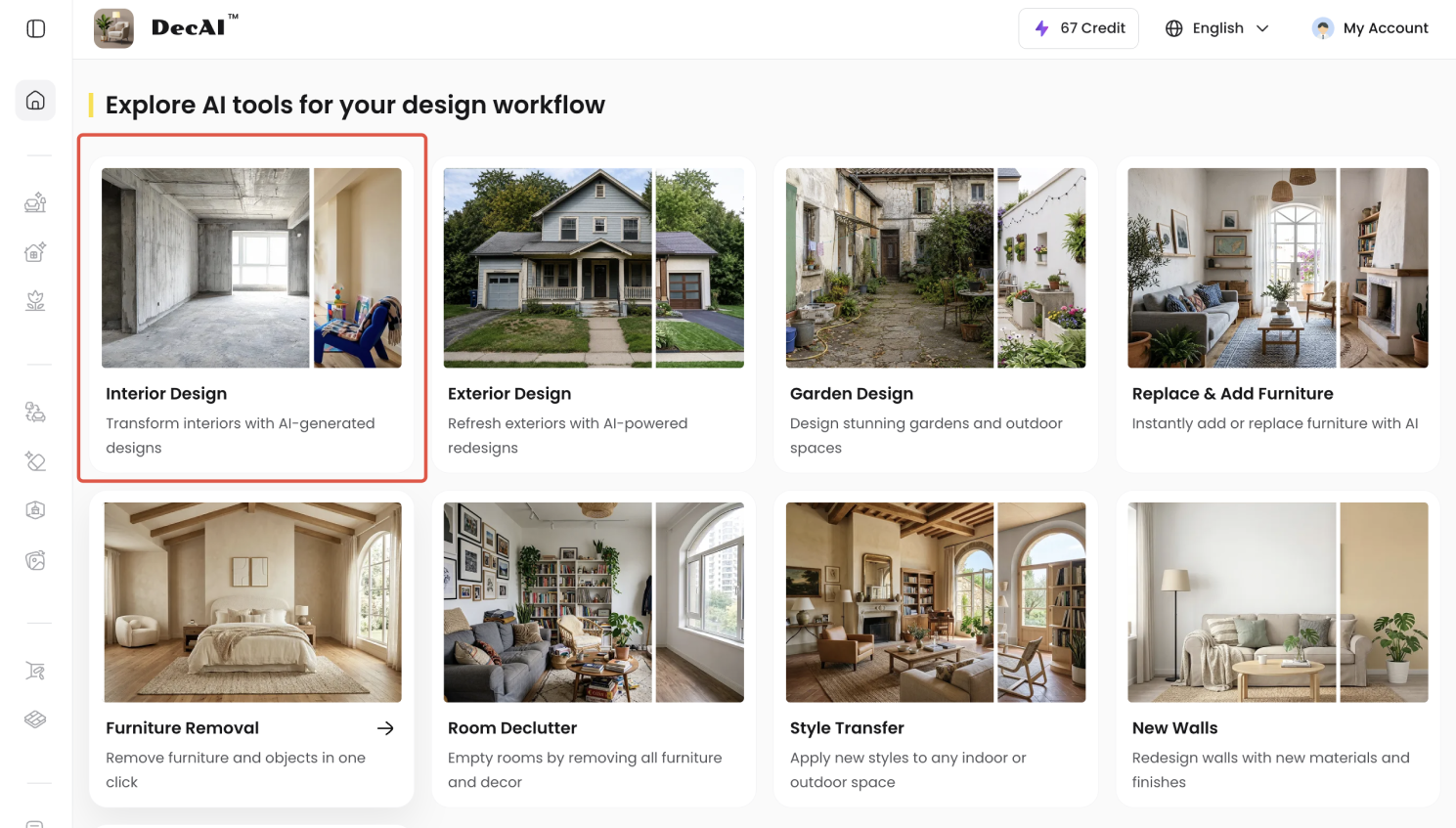
Switch to the "Interior design" section and upload the best photo of your room. For better results, choose a well-lit photo that captures as much of the space as possible—ideally taken from a corner or doorway.
If your study room has multiple important areas, such as a desk wall and a separate bookshelf or storage wall, you can upload and redesign each view separately. For your first try, start with the main view that shows most of the space you want to improve.
Ideally, your photo could include:
- The wall where your desk is or could be placed
- Windows or the main source of natural light
- Enough floor space around the desk and chair
- Any large furniture you want to keep
- Your main storage area
After uploading, check whether the room looks understandable. If the image is too dark, retake it. AI cannot fix every bad input, and a cleaner photo usually creates a cleaner design.
Step 3: Choose the right room type and design style
Next, choose the room type and design style that best match your space. If your AI tool offers options like "Study Room", "Home Office", or "Bedroom", simply select the one closest to how you actually use the room.
With DecAI™, you can choose Study Room directly and explore 30+ design styles, including minimalist, modern, cozy, luxury, Japandi, and more.
Remember the mood board and design direction you prepared earlier? Use them as your guide and start with the style that feels closest to the look and atmosphere you want.
Not sure which one works best in your room? Try several. That’s one of the biggest advantages of designing with AI—you can experiment without committing to anything. DecAI™ lets you apply different styles to your actual room in seconds, so you can compare the results and see what genuinely works for your space, all with just seconds and simple clicks.
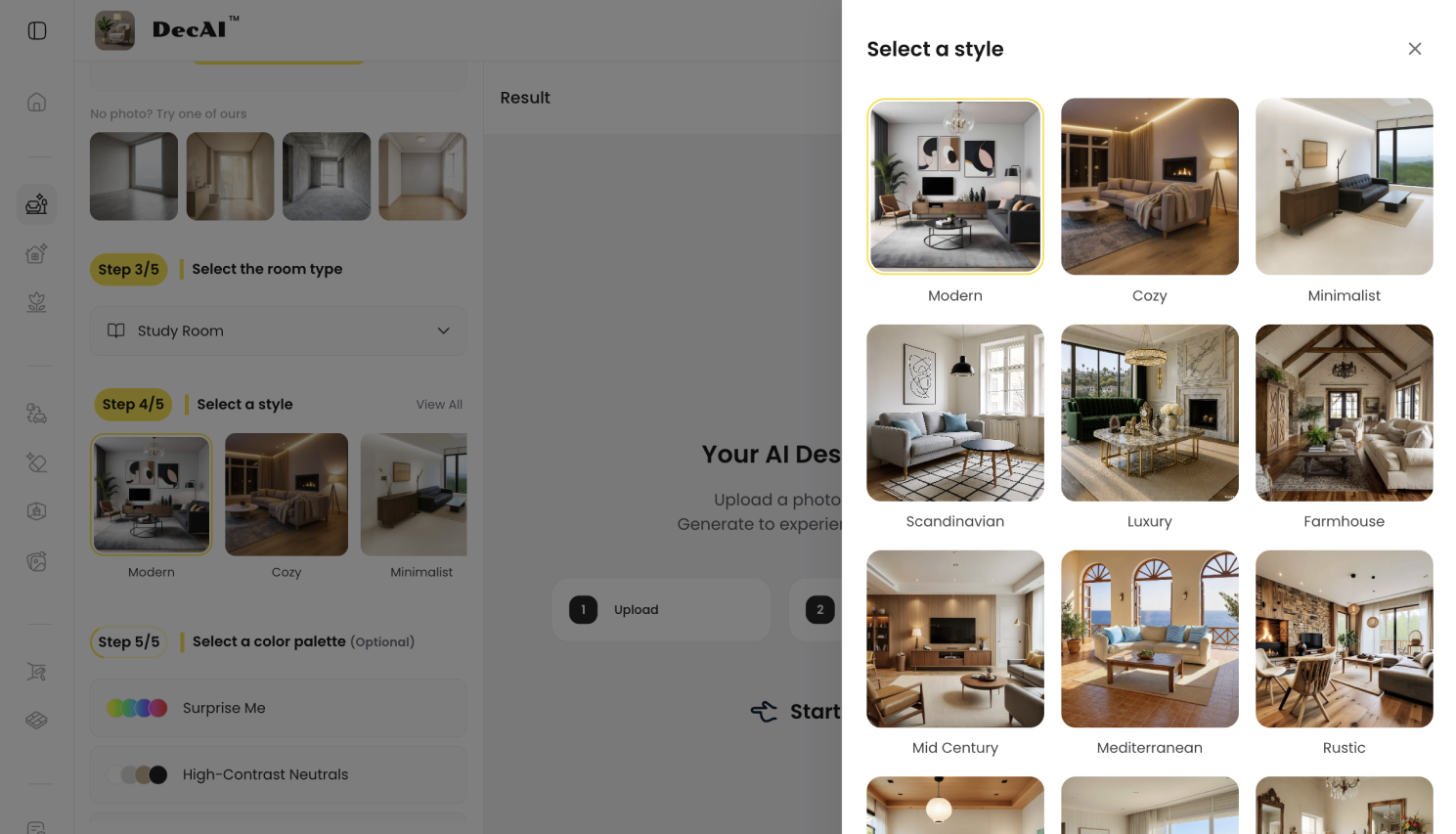
DecAI™ provides over 30 design style options
For a study room in 2026, here are a few popular styles worth trying:
- Warm minimalism — the most popular study room style in 2026; clean, warm, genuinely functional
- Japandi — the deepest calm; ideal for serious focused work environments
- Scandinavian — light, organized, functional; works in small and large spaces equally
- Organic modern — for creatives who need inspiration as much as organization
Step 4: Try several styles and keep refining
Don’t stop at the first result. AI design works best when you experiment and compare. Try generating several versions with different styles, colors, layouts, or furniture choices until you find a direction that feels right.
With DecAI™, you don’t have to start over every time you want to make a change. Simply click “Ask Designer” to activate your personal AI designer and continue refining the generated design through conversation. For example, you can ask it to add more storage, make the room brighter, change the desk, or create a calmer study atmosphere, all with just simple prompts.

Ask designers to activate the AI agent of DecAI™ to fully iterate your design untill it is right
Or also only want to change just one small detail without affecting the whole design? Click “Edit” to fine-tune specific elements, such as the furniture, walls, floors, or design style.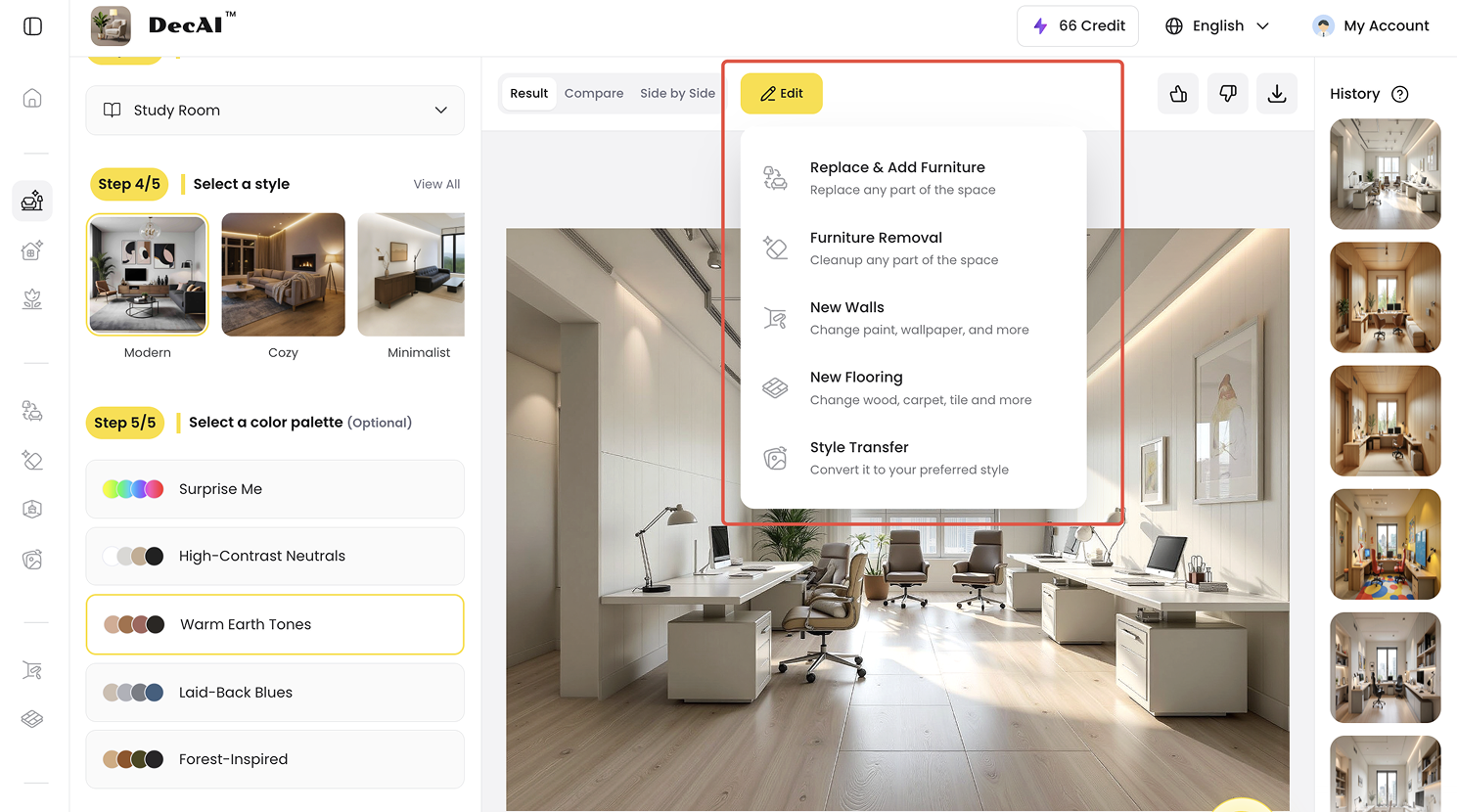
Click Edit to further refine the furniture, floor, wall or design style
Anyway, just use DecAI™ as your personal AI designer, start with a broad idea, compare different possibilities, and then gradually refine the details until your study room looks and works the way you want.
Step 5. Download and Share Your Final Design
Design any room, shop or space with DecAI in less 30 seconds! It's free!
Once you’re happy with your study room design, download the final image and use it as a visual reference for your next steps.
You can share it with family members, contractors, designers, furniture retailers or the similar to communicate your ideas more clearly. You can also keep it handy while shopping for desks, chairs, lighting, storage, paint, and décor so you have a clearer idea of the overall look you’re trying to create.
Just remember that an AI-generated design is best used as a visualization and planning reference, rather than a construction-ready plan. Before making major renovations, double-check real-world measurements, clearances, materials, electrical requirements, and other practical details.
In short, with DecAI™, your room design workflow can be effectively simplified into just several clicks and seconds, there is no back-and-forth rendering, sketching, iterations or communications as you do with other AI tools or tradditional room design tools.
Professional AI Design Tips for a More Functional Study Room
A study room should make focus easier. These tips will help you use AI with better judgment.
1.Put function before aesthetics
The best study room is not always the most dramatic one. If a design has a beautiful chair that is uncomfortable, shelves that are too high, or a desk that faces distractions, it is not the best choice.
When prompting AI, use words like functional, calm, ergonomic, organized, glare-free, practical, and easy to maintain. These words push the result toward daily use, not just style.
2.Use side light whenever possible
Natural light is valuable, but direct glare can make studying harder. If you use a laptop or monitor, try placing the desk so the window is to the side rather than directly in front of or behind the screen.
In your prompt, say:
“Place the desk to receive soft side light without screen glare.”
This gives the AI a more realistic lighting goal.
3.Choose the desk based on your study style
A laptop-only user may need a compact desk. Someone who uses a monitor, notebook, textbooks, and a keyboard may need a deeper desk. A person who studies with printed material may need more open surface area.
Prompt example:
“Use a desk large enough for a laptop, one monitor, an open notebook, and a desk lamp, while keeping enough chair clearance.”
4.Add layered lighting
A single ceiling light is rarely enough for a study room. Aim for three layers:
- Ambient lighting for the whole room
- Task lighting for reading and writing
- Soft accent lighting for comfort
Ask AI to include a desk lamp, indirect light, or warm ambient lighting. For evening study, avoid lighting that is too harsh or too dim.
5.Use closed storage for visual noise
Open shelves can look beautiful in AI renders, but they are harder to maintain. If you own many books, notebooks, chargers, files, and supplies, closed cabinets or drawers may work better.
Prompt example:
“Use mostly closed storage with a few open shelves for books and decor.”
This creates a cleaner room without making it feel empty.
6.Keep the wall in front of the desk calm
A study room does not have to be plain, but the main focus wall should not be chaotic. Too many posters, shelves, calendars, sticky notes, and decorative items can create visual noise.
If you want personality, use one large artwork, one organized pinboard, or a clean shelf arrangement instead of many small objects.
7.Generate a budget version and an ideal version
One smart way to use AI is to create two versions of the same room:
- Ideal version: the dream design without strict budget limits
- Budget version: affordable furniture, simple lighting, removable decor, and no construction
Then compare them. The ideal version shows your taste. The budget version shows your next realistic step. Often, the best final plan combines both.
Common AI Study Room Design Mistakes Beginners Should Avoid
AI makes room design easier, but it also makes it easier to fall in love with unrealistic ideas. Watch out for these mistakes.
Mistake 1: starting with a vague prompt
“Make this room look better” is too broad. The AI may improve the style but ignore the actual study function.
Instead, write what the room is for, what needs to stay, and what problems you want to solve.
Mistake 2: Uploading a messy or poorly lit photo
AI tools can work with imperfect photos, but a poor photo often leads to poor results. If the room is too dark, cluttered, or cropped, the AI may misunderstand the space.
Take five minutes to clean the main surfaces and retake the photo in better light.
Mistake 3: Choosing style before use
Many beginners start with style: modern, luxury, minimalist, or cozy. Style matters, but use comes first.
A student preparing for exams needs a different room from someone who reads casually on weekends. Define the study behavior first, then choose the style.
Mistake 4: Trusting the first AI render
The first result is only a starting point. Generate multiple versions and compare them. A slightly less dramatic image may be more practical than the most impressive one.
Mistake 5: Ignoring measurements
AI may show a desk that looks perfect but is too wide for your wall. It may show a chair with no real clearance or shelves that do not fit above your desk.
Always measure before buying.
Mistake 6: Forgetting chair movement
A study room needs movement space. You need to pull the chair out, turn, stand up, open drawers, and move around without bumping into furniture.
If the AI fills the room too tightly, ask for a more spacious layout.
Mistake 7: Creating too much open storage
Open shelving can make the room look stylish, but it can also collect clutter. For real study rooms, a mix of closed cabinets, drawers, and a few open shelves is usually easier to maintain.
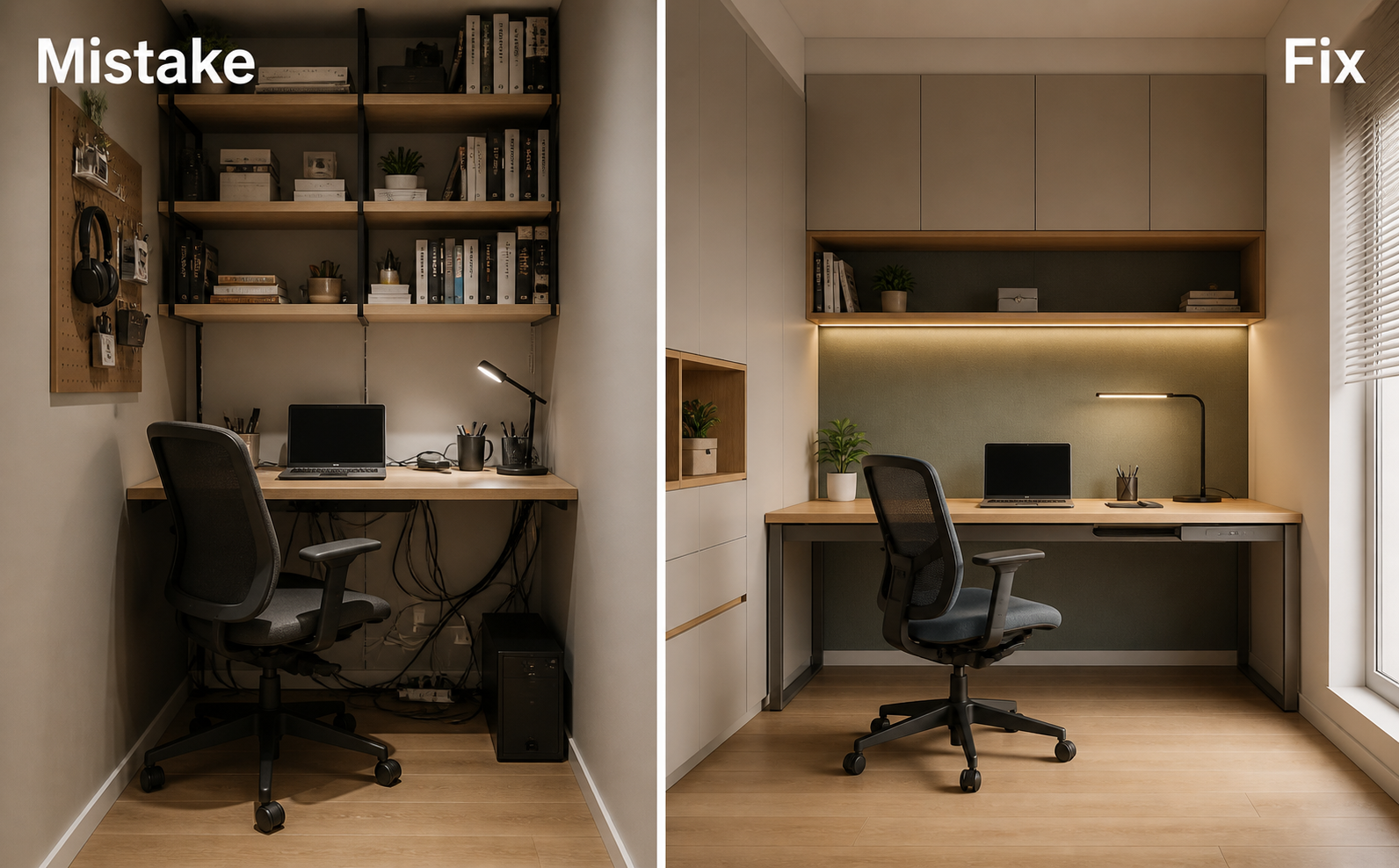
Mistake 8: Ignoring cables and outlets
AI images often hide cables. Real rooms do not. Plan for chargers, lamps, monitors, routers, headphones, and power strips.
Ask for “hidden cable management” or “a realistic desk setup with accessible outlets.”
Mistake 9: Copying furniture without checking availability
AI furniture may not match a real product. Use the image as a style reference, then find real items with similar shape, size, and material.
Mistake 10: Designing for the image, not the habit
A study room is successful when it helps you sit down and start working. If the design is too precious, too dark, too cluttered, or too hard to maintain, it may fail even if it looks beautiful.
FAQs
1.How to use AI to make a room look better?
Simply put, upload a clear photo of your room, choose a room type and style, describe what you want to improve, and generate several design versions. To get better results, mention layout, lighting, storage, color, furniture, and clutter instead of only asking for a prettier room.
2.How do I use AI for room design?
Take DecAI™ as an example. You can simply do this in four steps: upload a clear photo of your room, choose a room type and style, let AI generate the designs in seconds, and refined the details.
3.Can AI truly design a practical, livable study room as a beginner?
Yes, AI can help beginners create practical study room concepts, especially for layout inspiration, color ideas, furniture direction, and storage planning. However, AI should not be the only step. You still need to check desk size, chair clearance, outlet locations, lighting, glare, and budget.
4.What is the best free AI tool to design a study room in 2026?
DecAI™ is a strong option for beginners because it is free to start, works from uploaded room photos, supports interior redesign, offers multiple design styles, and allows quick visual iteration. It is especially useful if you want to test study room ideas before making real changes.
5.Can I use ChatGPT to design a room?
Yes. ChatGPT can help you brainstorm layouts, write AI room design prompts, choose color palettes, create shopping lists, and think through design constraints. For visual room makeovers, however, a dedicated AI home design tool like DecAI™ is usually more direct because it can work from an actual room photo.
6.How do I write good AI prompts for a functional study room?
A good prompt should include the room purpose, your study habits, furniture you want to keep, storage needs, lighting needs, style preference, budget, and constraints. For example, instead of “modern study room,” write “calm modern study room for laptop work and reading, with closed storage, soft side lighting, warm wood, and minimal clutter.” Anyway, in general, the more details you provide, the better results you will get.
7.Should I design my study room around a window?
A window can make a study room feel brighter and more pleasant, but be careful with glare. For screen work, side light is usually better than placing the monitor directly in front of or behind a bright window. Use curtains, blinds, and task lighting to control brightness.
--------------------------------------
If you believe that any material on this site infringes your intellectual property rights, please contact the author at decaiwebteam@outlook.com with details of your claim.
Redesign any home interior, exterior & garden in seconds
Share this Post:
'%3e%3cpath%20d='M17.9995%2035.999C17.0317%2035.999%2016.0619%2035.9219%2015.1161%2035.7696C10.9414%2035.0973%207.11524%2032.9513%204.34408%2029.7273C1.54287%2026.4683%200%2022.3035%200%2017.9995C0%208.07403%208.07503%200%2017.9995%200C27.924%200%2036%208.07503%2036%2017.9995C36%2022.3696%2034.4151%2026.5835%2031.5357%2029.8646C28.6844%2033.1156%2024.7671%2035.2326%2020.5052%2035.8267C19.6806%2035.9419%2018.8371%2036%2017.9995%2036V35.999ZM17.9995%201.20123C8.73726%201.20123%201.20224%208.73626%201.20224%2017.9985C1.20224%2026.2919%207.13427%2033.2659%2015.3075%2034.5814C16.9546%2034.8469%2018.6808%2034.8659%2020.3389%2034.6345C28.5812%2033.4863%2034.7968%2026.334%2034.7968%2017.9985C34.7968%208.73626%2027.2617%201.20123%2017.9985%201.20123H17.9995Z'%20fill='%23FF0209'/%3e%3cpath%20d='M29.0557%2014.3621C28.9184%2013.0276%2028.6208%2011.5539%2027.5268%2010.7784C26.6782%2010.1773%2025.5642%2010.1553%2024.5242%2010.1563C22.3251%2010.1583%2020.126%2010.1603%2017.9269%2010.1623C15.812%2010.1643%2013.6971%2010.1663%2011.5821%2010.1683C10.6985%2010.1683%209.8399%2010.1002%209.01937%2010.4819C8.31406%2010.8105%207.76303%2011.4347%207.43241%2012.1289C6.97156%2013.0957%206.87438%2014.1898%206.81927%2015.2588C6.71708%2017.2044%206.7281%2019.156%206.85133%2021.0996C6.9405%2022.5193%207.16792%2024.0872%208.26496%2024.9919C9.23777%2025.7934%2010.6103%2025.8325%2011.8707%2025.8335C15.8741%2025.8365%2019.8776%2025.8395%2023.881%2025.8435C24.394%2025.8435%2024.93%2025.8345%2025.453%2025.7774C26.4829%2025.6661%2027.4637%2025.3716%2028.1249%2024.6092C28.7922%2023.8407%2028.9635%2022.7698%2029.0657%2021.7569C29.3121%2019.3003%2029.3091%2016.8177%2029.0557%2014.3621ZM15.6116%2021.4453V14.5545L21.5797%2017.9999L15.6116%2021.4453Z'%20fill='%23FF0209'/%3e%3c/g%3e%3cdefs%3e%3cclipPath%20id='clip0_13816_41422'%3e%3crect%20width='36'%20height='36'%20fill='white'/%3e%3c/clipPath%3e%3c/defs%3e%3c/svg%3e)
'%3e%3cpath%20d='M17.9995%2036C17.0327%2036%2016.0619%2035.9229%2015.1161%2035.7696C10.9414%2035.0973%207.11524%2032.9513%204.34408%2029.7273C1.54287%2026.4683%200%2022.3035%200%2017.9995C0%208.07403%208.07503%200%2017.9995%200C27.924%200%2036%208.07503%2036%2017.9995C36%2022.3696%2034.4151%2026.5835%2031.5357%2029.8646C28.6844%2033.1156%2024.7671%2035.2326%2020.5052%2035.8267C19.6806%2035.9419%2018.8371%2036%2017.9995%2036ZM17.9995%201.20224C8.73726%201.20224%201.20224%208.73726%201.20224%2017.9995C1.20224%2026.2919%207.13427%2033.2669%2015.3075%2034.5824C16.9556%2034.8479%2018.6808%2034.8669%2020.3389%2034.6355C28.5812%2033.4873%2034.7968%2026.335%2034.7968%2017.9995C34.7968%208.73726%2027.2617%201.20224%2017.9985%201.20224H17.9995Z'%20fill='url(%23paint0_linear_13816_41436)'/%3e%3cpath%20d='M23.4463%207.55469H12.549C9.53841%207.55469%207.08984%2010.0032%207.08984%2013.0138V22.9834C7.08984%2025.994%209.53841%2028.4426%2012.549%2028.4426H23.4463C26.4569%2028.4426%2028.9054%2025.994%2028.9054%2022.9834V13.0138C28.9054%2010.0032%2026.4569%207.55469%2023.4463%207.55469ZM9.01543%2013.0138C9.01543%2011.0652%2010.6004%209.48027%2012.549%209.48027H23.4463C25.3949%209.48027%2026.9799%2011.0652%2026.9799%2013.0138V22.9834C26.9799%2024.932%2025.3949%2026.517%2023.4463%2026.517H12.549C10.6004%2026.517%209.01543%2024.932%209.01543%2022.9834V13.0138Z'%20fill='url(%23paint1_linear_13816_41436)'/%3e%3cpath%20d='M17.9964%2023.0749C20.7966%2023.0749%2023.0749%2020.7966%2023.0749%2017.9964C23.0749%2015.1962%2020.7966%2012.918%2017.9964%2012.918C15.1962%2012.918%2012.918%2015.1962%2012.918%2017.9964C12.918%2020.7966%2015.1962%2023.0749%2017.9964%2023.0749ZM17.9964%2014.8446C19.7346%2014.8446%2021.1483%2016.2582%2021.1483%2017.9964C21.1483%2019.7347%2019.7346%2021.1483%2017.9964%2021.1483C16.2582%2021.1483%2014.8446%2019.7347%2014.8446%2017.9964C14.8446%2016.2582%2016.2582%2014.8446%2017.9964%2014.8446Z'%20fill='url(%23paint2_linear_13816_41436)'/%3e%3cpath%20d='M23.5482%2013.741C24.3026%2013.741%2024.9168%2013.1269%2024.9168%2012.3725C24.9168%2011.618%2024.3026%2011.0039%2023.5482%2011.0039C22.7938%2011.0039%2022.1797%2011.618%2022.1797%2012.3725C22.1797%2013.1269%2022.7938%2013.741%2023.5482%2013.741Z'%20fill='url(%23paint3_linear_13816_41436)'/%3e%3c/g%3e%3cdefs%3e%3clinearGradient%20id='paint0_linear_13816_41436'%20x1='5.27482'%20y1='30.7312'%20x2='30.7242'%20y2='5.28083'%20gradientUnits='userSpaceOnUse'%3e%3cstop%20stop-color='%23FAAD4F'/%3e%3cstop%20offset='0.35'%20stop-color='%23DD2A7B'/%3e%3cstop%20offset='0.62'%20stop-color='%239537B0'/%3e%3cstop%20offset='1'%20stop-color='%23515BD4'/%3e%3c/linearGradient%3e%3clinearGradient%20id='paint1_linear_13816_41436'%20x1='8.92225'%20y1='27.074'%20x2='27.073'%20y2='8.92324'%20gradientUnits='userSpaceOnUse'%3e%3cstop%20stop-color='%23FAAD4F'/%3e%3cstop%20offset='0.35'%20stop-color='%23DD2A7B'/%3e%3cstop%20offset='0.62'%20stop-color='%239537B0'/%3e%3cstop%20offset='1'%20stop-color='%23515BD4'/%3e%3c/linearGradient%3e%3clinearGradient%20id='paint2_linear_13816_41436'%20x1='14.4077'%20y1='21.5861'%20x2='21.5861'%20y2='14.4077'%20gradientUnits='userSpaceOnUse'%3e%3cstop%20stop-color='%23FAAD4F'/%3e%3cstop%20offset='0.35'%20stop-color='%23DD2A7B'/%3e%3cstop%20offset='0.62'%20stop-color='%239537B0'/%3e%3cstop%20offset='1'%20stop-color='%23515BD4'/%3e%3c/linearGradient%3e%3clinearGradient%20id='paint3_linear_13816_41436'%20x1='22.5814'%20y1='13.3393'%20x2='24.515'%20y2='11.4057'%20gradientUnits='userSpaceOnUse'%3e%3cstop%20stop-color='%23FAAD4F'/%3e%3cstop%20offset='0.35'%20stop-color='%23DD2A7B'/%3e%3cstop%20offset='0.62'%20stop-color='%239537B0'/%3e%3cstop%20offset='1'%20stop-color='%23515BD4'/%3e%3c/linearGradient%3e%3cclipPath%20id='clip0_13816_41436'%3e%3crect%20width='36'%20height='36'%20fill='white'/%3e%3c/clipPath%3e%3c/defs%3e%3c/svg%3e)
'%3e%3cpath%20d='M17.9995%2035.999C17.0317%2035.999%2016.0619%2035.9219%2015.1161%2035.7696C10.9414%2035.0973%207.11524%2032.9513%204.34408%2029.7273C1.54287%2026.4683%200%2022.3035%200%2017.9995C0%208.07403%208.07502%200%2017.9995%200C27.924%200%2036%208.07503%2036%2017.9995C36%2022.3696%2034.415%2026.5835%2031.5357%2029.8646C28.6844%2033.1156%2024.7671%2035.2326%2020.5052%2035.8267C19.6806%2035.9419%2018.8371%2036%2017.9995%2036V35.999ZM17.9995%201.20123C8.73725%201.20123%201.20224%208.73626%201.20224%2017.9985C1.20224%2026.2919%207.13427%2033.2659%2015.3075%2034.5814C16.9545%2034.8469%2018.6808%2034.8659%2020.3388%2034.6345C28.5812%2033.4863%2034.7968%2026.334%2034.7968%2017.9985C34.7968%208.73626%2027.2617%201.20123%2017.9985%201.20123H17.9995Z'%20fill='%23007EBB'/%3e%3cpath%20d='M9.06639%2012.124C8.60253%2011.6932%208.37109%2011.1602%208.37109%2010.526C8.37109%209.89184%208.60253%209.33481%209.06639%208.90401C9.53026%208.47321%2010.1274%208.25781%2010.8587%208.25781C11.5901%208.25781%2012.1642%208.47321%2012.627%208.90401C13.0909%209.33481%2013.3223%209.87581%2013.3223%2010.526C13.3223%2011.1762%2013.0909%2011.6932%2012.627%2012.124C12.1631%2012.5548%2011.5741%2012.7702%2010.8587%2012.7702C10.1434%2012.7702%209.52926%2012.5548%209.06639%2012.124ZM12.9326%2014.5946V27.7962H8.76182V14.5946H12.9326Z'%20fill='%23007EBB'/%3e%3cpath%20d='M26.8196%2015.9006C27.7283%2016.8875%2028.1832%2018.243%2028.1832%2019.9682V27.5663H24.2208V20.5042C24.2208%2019.6346%2023.9954%2018.9583%2023.5445%2018.4764C23.0937%2017.9945%2022.4876%2017.7541%2021.7262%2017.7541C20.9647%2017.7541%2020.3586%2017.9955%2019.9078%2018.4764C19.4569%2018.9583%2019.2315%2019.6346%2019.2315%2020.5042V27.5663H15.2461V14.5611H19.2315V16.2863C19.6353%2015.7113%2020.1793%2015.2574%2020.8636%2014.9228C21.5468%2014.5892%2022.3163%2014.4219%2023.1708%2014.4219C24.6937%2014.4219%2025.9099%2014.9158%2026.8186%2015.9016L26.8196%2015.9006Z'%20fill='%23007EBB'/%3e%3c/g%3e%3cdefs%3e%3cclipPath%20id='clip0_13816_41425'%3e%3crect%20width='36'%20height='36'%20fill='white'/%3e%3c/clipPath%3e%3c/defs%3e%3c/svg%3e)
'%3e%3cpath%20d='M18%2035.999C17.0322%2035.999%2016.0623%2035.9219%2015.1166%2035.7696C10.9417%2035.0973%207.11544%2032.9513%204.3442%2029.7273C1.54291%2026.4683%200%2022.3035%200%2017.9995C0%208.07403%208.07526%200%2018%200C27.9248%200%2036%208.07503%2036%2017.9995C36%2022.3696%2034.415%2026.5835%2031.5356%2029.8646C28.6842%2033.1156%2024.7668%2035.2326%2020.5047%2035.8267C19.6802%2035.9419%2018.8366%2036%2017.999%2036L18%2035.999ZM18%201.20123C8.73751%201.20123%201.20227%208.73626%201.20227%2017.9985C1.20227%2026.2919%207.13448%2033.2659%2015.3079%2034.5814C16.955%2034.8469%2018.6813%2034.8659%2020.3394%2034.6345C28.582%2033.4863%2034.7977%2026.334%2034.7977%2017.9985C34.7977%208.73626%2027.2625%201.20123%2018%201.20123Z'%20fill='black'/%3e%3cpath%20d='M7%208.09163H13.5067L19.521%2016.1816L27.0073%207.90625L28.786%207.93715L20.4078%2017.3454L29%2028.901H22.4959L16.8193%2021.362L9.8847%2029.0864H8.13428L15.9583%2020.26L7%208.09163ZM12.8931%209.28633H9.45676L23.2048%2027.6754H26.5793L12.8931%209.28633Z'%20fill='black'/%3e%3c/g%3e%3cdefs%3e%3cclipPath%20id='clip0_13886_43848'%3e%3crect%20width='36'%20height='36'%20fill='white'/%3e%3c/clipPath%3e%3c/defs%3e%3c/svg%3e)
'%3e%3cpath%20d='M17.9995%2035.999C17.0327%2035.999%2016.0619%2035.9219%2015.1161%2035.7686C10.9414%2035.0963%207.11524%2032.9503%204.34408%2029.7263C1.54287%2026.4673%200%2022.3025%200%2017.9995C0%208.07403%208.07503%200%2017.9995%200C27.924%200%2036%208.07503%2036%2017.9995C36%2022.3696%2034.415%2026.5835%2031.5357%2029.8646C28.6844%2033.1156%2024.7671%2035.2326%2020.5052%2035.8267C19.6806%2035.9419%2018.8371%2036%2017.9995%2036V35.999ZM17.9995%201.20123C8.73726%201.20123%201.20224%208.73626%201.20224%2017.9985C1.20224%2026.2909%207.13428%2033.2659%2015.3075%2034.5814C16.9556%2034.8469%2018.6808%2034.8659%2020.3389%2034.6345C28.5812%2033.4863%2034.7968%2026.334%2034.7968%2017.9985C34.7968%208.73626%2027.2617%201.20123%2017.9985%201.20123H17.9995Z'%20fill='%231877F7'/%3e%3cpath%20d='M20.5337%2014.9635V18.7536H25.2225L24.4801%2023.8601H20.5337V35.624C19.7423%2035.7342%2018.9328%2035.7913%2018.1112%2035.7913C17.1625%2035.7913%2016.2317%2035.7151%2015.324%2035.5689V23.8601H11V18.7536H15.324V14.1169C15.324%2011.2396%2017.6564%208.90625%2020.5347%208.90625V8.90926C20.5428%208.90926%2020.5508%208.90625%2020.5588%208.90625H25.2235V13.3215H22.1758C21.2691%2013.3215%2020.5347%2014.0558%2020.5347%2014.9625L20.5337%2014.9635Z'%20fill='%231877F7'/%3e%3c/g%3e%3cdefs%3e%3cclipPath%20id='clip0_13816_41433'%3e%3crect%20width='36'%20height='36'%20fill='white'/%3e%3c/clipPath%3e%3c/defs%3e%3c/svg%3e)
'%3e%3cpath%20d='M17.9995%2035.999C17.0327%2035.999%2016.0619%2035.9219%2015.1161%2035.7686C10.9414%2035.0963%207.11524%2032.9503%204.34408%2029.7263C1.54287%2026.4673%200%2022.3025%200%2017.9995C0%208.07403%208.07503%200%2017.9995%200C27.924%200%2036%208.07503%2036%2017.9995C36%2022.3696%2034.415%2026.5835%2031.5357%2029.8646C28.6844%2033.1156%2024.7671%2035.2326%2020.5052%2035.8267C19.6806%2035.9419%2018.8371%2036%2017.9995%2036V35.999ZM17.9995%201.20123C8.73726%201.20123%201.20224%208.73626%201.20224%2017.9985C1.20224%2026.2909%207.13428%2033.2659%2015.3075%2034.5814C16.9556%2034.8469%2018.6808%2034.8659%2020.3389%2034.6345C28.5812%2033.4863%2034.7968%2026.334%2034.7968%2017.9985C34.7968%208.73626%2027.2617%201.20123%2017.9985%201.20123H17.9995Z'%20fill='%232A91F7'/%3e%3cg%20clip-path='url(%23clip1_13816_41442)'%3e%3cpath%20d='M16.3345%2018.834C16.6924%2019.3124%2017.149%2019.7083%2017.6733%2019.9947C18.1976%2020.2812%2018.7774%2020.4516%2019.3734%2020.4942C19.9693%2020.5369%2020.5675%2020.4509%2021.1273%2020.2421C21.6871%2020.0333%2022.1954%2019.7065%2022.6178%2019.284L25.1178%2016.784C25.8768%2015.9981%2026.2968%2014.9456%2026.2873%2013.8531C26.2778%2012.7606%2025.8396%2011.7156%2025.0671%2010.943C24.2946%2010.1705%2023.2495%209.73231%2022.157%209.72281C21.0645%209.71332%2020.012%2010.1333%2019.2262%2010.8923L17.7928%2012.3173M19.6678%2017.1673C19.3099%2016.6889%2018.8533%2016.293%2018.329%2016.0065C17.8047%2015.7201%2017.2249%2015.5497%2016.6289%2015.507C16.033%2015.4643%2015.4348%2015.5503%2014.875%2015.7592C14.3152%2015.968%2013.8069%2016.2947%2013.3845%2016.7173L10.8845%2019.2173C10.1255%2020.0031%209.70551%2021.0557%209.715%2022.1481C9.72449%2023.2406%2010.1627%2024.2857%2010.9352%2025.0582C11.7078%2025.8307%2012.7528%2026.269%2013.8453%2026.2784C14.9378%2026.2879%2015.9903%2025.868%2016.7761%2025.109L18.2011%2023.684'%20stroke='%232A91F7'%20stroke-width='1.66667'%20stroke-linecap='round'%20stroke-linejoin='round'/%3e%3c/g%3e%3c/g%3e%3cdefs%3e%3cclipPath%20id='clip0_13816_41442'%3e%3crect%20width='36'%20height='36'%20fill='white'/%3e%3c/clipPath%3e%3cclipPath%20id='clip1_13816_41442'%3e%3crect%20width='20'%20height='20'%20fill='white'%20transform='translate(8%208)'/%3e%3c/clipPath%3e%3c/defs%3e%3c/svg%3e)
Redesign any home interior, exterior & garden in seconds