

15 Best AI Home Design Tools with Free Trial in 2026 (Tested & Compared)


The world of home design has been revolutionized by AI, and the numbers prove it: the market for AI interior design is projected to jump from $1.98 billion in 2025 to $2.58 billion in 2026—a nearly 30% annual growth rate (from 2026 AI interior design report).
Over the past few years, I’ve tested 50+ AI interior design tools, from beginner-friendly apps to professional software. One clear conclusion emerged: a genuine free trial is the most important factor when choosing a tool. That’s why I’ve curated 15 AI design tools that truly offer free trials.
Design any room, shop or space with DecAI in less 30 seconds! It's free!
Why choose an AI home design tool with free trial?
As I mentioned before, based on my experience, free trial is the most significant criterion for AI interior design tools. Here are the reasons.
1. Test and compare before you commit

Here’s a truth few marketing pages will tell you: AI tools vary wildly in quality. I’ve seen them fail spectacularly, while others deliver stunning realism. You can’t judge from a demo video. A free trial lets you test with your own space and find what actually works—with nothing to lose but a few minutes.
2. Validate your own vision
A free trial isn’t just about testing the tool—it’s about testing your own ideas. With a free trial, you can experiment freely—try three different styles side by side, or go wild with something you’d never considered. Some of my favorite design discoveries came from experiments I almost didn’t try.
3. Reduce financial risk
Most AI design tools demand your credit card if you want to see a render. I’ve seen too many “free trials” that deliver watermarked low-res images, auto-charge after seven days. That’s why I value true free trials: honest evaluation before you spend a dime.
How to choose an AI home design tool for your project?
1. Project goals: match the tool to your endgame
- Are you staging to sell?
If you are a real estate agent, you need a tool that excels at virtual staging. In this case, look for tools that offer “furnish empty room” features and decluttering capabilities to make spaces look pristine (I’ll share more details in the full list below).
- Are you renovating your forever home?
If you are a homeowner planning a major renovation, you might want to see your kitchen in “Mid Century” today and “Farmhouse” tomorrow. Here, a free AI home design tool like DecAI, which allows for deep dives into material selection and styles, is your best bet.

- Are you a professional architect?
If you are presenting to clients, you need tools that respect geometry and integrate with your existing workflow, such as MyArchitectAI with its accurate rendering mode, which plugs directly into CAD software.
- Just browsing for inspiration?
If you are simply scrolling for home design ideas, you just need a simple, fun generator, allowing you to generate countless aesthetic variations in seconds without any technical overhead.
2.User interface(UI): the learning curve matters
The ease of use is crucial, especially if you’re new to digital home design. In my testing, I’ve found that AI tools generally fall into three interface categories:
- Three-step process: Upload a photo, pick a style, get a redesigned room. No typing required.
- Prompt-driven tools: Write a design brief (e.g., “Scandinavian style with light oak flooring”), and the AI brings it to life.
- 2D drawing into 3D rendering: Built for those who work with floor plans and CAD files—integrating with tools like SketchUp or Revit.
3.Test is the best: let the free trial be your guide
I’ve saved the most important criterion for last. A genuine free trial is the single most reliable indicator that a tool is worth your time.
Next, I’ll share the 15 best AI home design tools with free trials—carefully selected from over 50 platforms I’ve tested—to help you make the right choice.
15 best AI home design tools with free trial

Three-step simplicity with prompt control
After testing over 50 tools, hybrid design tools hit a sweet spot: start with a fast three‑step flow to explore ideas, then use prompts to dial in exact details. Here are 6 three-step tools with prompts worth trying.
1. DecAI
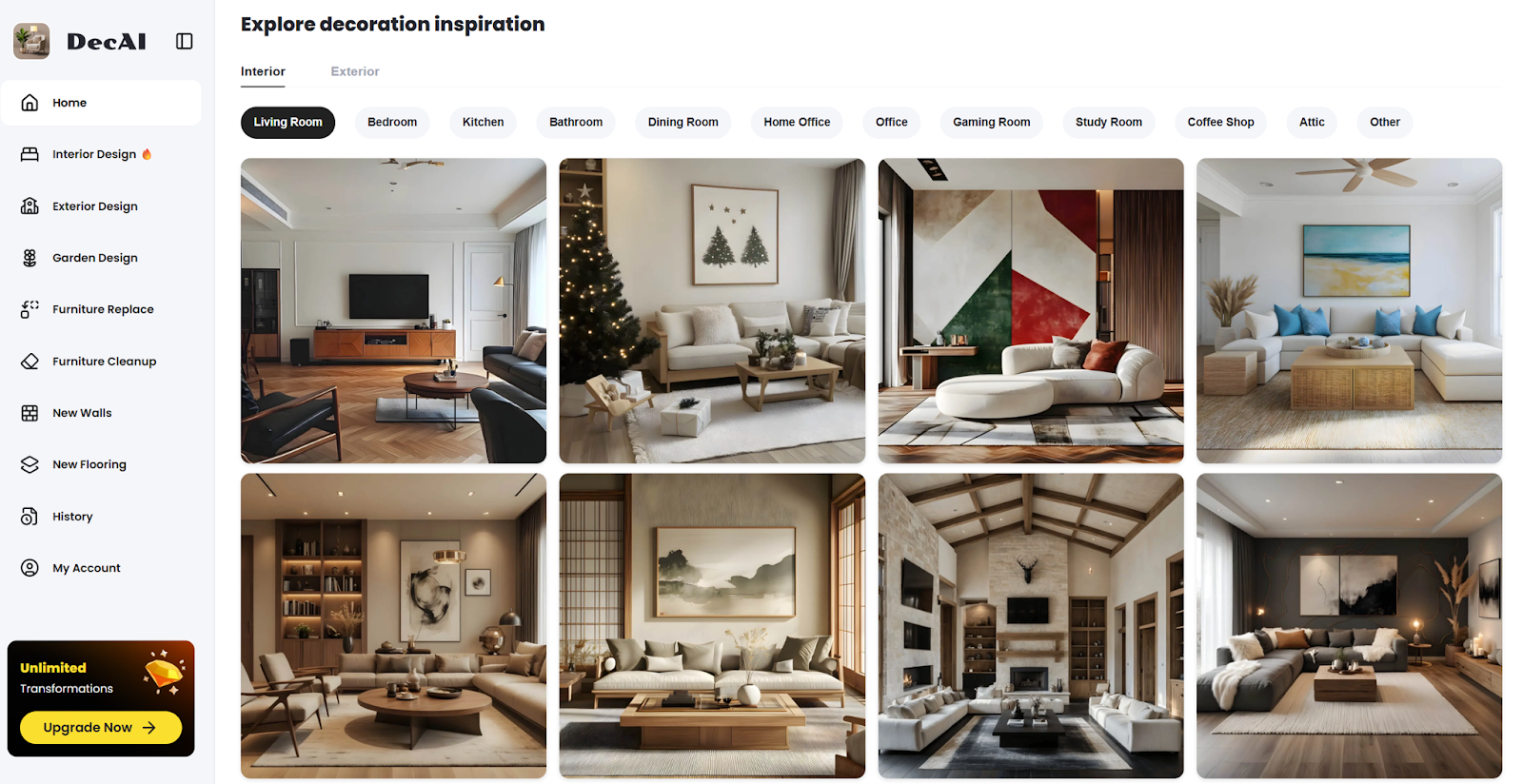
DecAI is an AI-powered home design tool that transforms photos of your space into redesigned interiors and exteriors in just a few steps. It combines a simple three-step workflow with prompt-based editing, allowing users not only to generate new styles but also to replace furniture, walls, and flooring, and refine specific elements within a scene.
Platforms: Web, iOS and Android devices
Free trial:
- 1 web-based generation
- 3 app-based generations
- Access to all features of the tool
- Unlimited design inspiration
- Unlimited access to your design history
Key features:
- Not only offers design capabilities, but also includes replacement and furniture removal features
- The design function follows a typical three-step process, while replacement (furniture, walls, floors) is prompt-based
- 30+ design styles, like cyberpunk, bohemian, baroque, gothic and more
- Works for over 15 room types, like bedroom, entryway, study room, etc
Best for:
- Users who prefer a simple three-step design process for quick results
- Users who value the ability to replace or remove furniture using prompt-based instructions
- Users who are unsure of their preferred style and wants to experiment with a variety of design options
2. HomeDesignAI

HomeDesignsAI focuses on redesigning, especially interior redesign. You can find nearly any room type in the tool, from standard interiors to niche spaces like sunroom, mudroom and petroom. It combines a three-step workflow with optional prompt-based guidance, allowing users to generate multiple design variations at once and control the level of AI intervention.
Platform: Web, iOS and Android
Free trial:
- Free plan with 3 designs per day
- Access to all features of the tool
Key features:
- Focuses on redesigning, with many detailed categories—for example, interior redesign alone includes nearly fifty categories, such as onsen and man cave, which are not offered by many other tools
- Allows users to choose number of designs (up to four) at once
- Let users adjust the level of AI intervention (very low, low, medium, extreme)
- Users can provide detailed prompts if desired, but designs can still be generated without any prompt input
Best for:
- Users who want highly customizable redesigns across a wide variety of room types
- Users who want control over AI involvement and multiple design variations
- Users who prefer to guide the AI with detailed prompts or let it generate ideas automatically
3. Homevisualizer AI

HomeVisualizer AI is an AI home design tool that combines a simple three-step redesign process with prompt-driven customization. Its standout paint feature enables precise edits on specific areas like walls, ceilings, and doors—offering more control than typical full-room redesign tools.
Platform: Web
Free trial:
- 3 free renderings
- Access to all features of the tool
Key features:
- The custom design and style fusion features allow users to either input prompts or let the AI generate results randomly.
- Compared to other tools, the paint feature is more refined, allowing users to select specific areas to apply changes (such as walls, ceilings, doors, etc.).
- The auto feature follows a typical three-step process.
Best for:
- Users who want to either input prompts or let the AI automatically generate designs or styles
- Users who want to apply paint to specific areas of a space
4. Archi AI

Archi is an AI‑powered interior design platform that lets users quickly transform photos of real spaces into photo‑realistic interior design visuals. One standout feature is the ability to shop furniture directly from your generated designs, connecting visual inspiration with real product options.
Platform: Web, iOS mobile device
Free trial:
- 3 free renders
- Available only for interior design and inspiration, but not free for exterior design and virtual staging
Key features:
- Shop furniture directly from your renders with the “Shop Furniture” feature
- Generate designs by choosing styles and room types, and users can add details for better results at the same time
- Snap any piece of furniture to discover where to buy it, with similar options to compare
Best for:
- Users who want to purchase furniture directly within the AI home design software
- Users who want to purchase furniture but at the same time compare these furnitures
- Users who need to generate designs from multiple input types—photos, text prompts
5. Spacely AI

Spacely AI is a versatile web-based AI interior design tool that bridges the gap between rough concepts and client-ready presentations. Used by over 580,000 architects, interior designers, and real estate professionals worldwide, it transforms sketches and room photos into photorealistic renders in under 45 seconds.
Platforms: Web
Free trial:
- 30 credits
- Access to all features of the tool
- The number of credits consumed may vary depending on the feature
Key features:
- Convert sketches or models into high-quality architectural visuals using either preset styles or text prompts
- You can just describe what you want to edit to its AI model
- Apply lighting mood from a reference image to transform your render
Best for:
- Users who have not only room photos but also their own hand-drawn sketches
- Users who value the importance of lighting in interior design
- Users who prefer interacting directly with AI through conversation instead of clicking buttons to create designs
6. mnml

mnml is a comprehensive AI rendering platform that gives users detailed control over their designs. Trusted by over 1.8 million users globally, it offers 12+ AI tools and 40+ rendering styles.
Platform: Web
Free trial:
- 100 free credits on signup
- The number of credits consumed may vary depending on the feature
- Access to all features of the tool
Key features:
- Offers highly detailed control button, including (but not limited to) the number of people and vehicles
- Compared to other tools, provides a wider range of render style options, including photorealistic, watercolor, model, and more
- Add annotations and callouts to the render
Best for:
- Users who pay close attention to design details, such as selecting very specific conditions like floor moisture
- Users who want to add annotations to their interior design images
- Users who want to experiment with multiple render styles
Simplicity without prompt control
The tools in this category do one thing well: upload a photo, pick a style, and get a redesigned room. Perfect for exploring ideas fast—no typing required.
7. RoomGPT

RoomGPT focuses exclusively on one thing: transforming photos of your space with fresh design styles. Unlike tools that layer on furniture replacement, object removal, or photo editing features, RoomGPT keeps it simple—upload a room, pick a style, and get instant redesigns.
Platform: Web, iOS and Android
Free trial:
- Free plan with 3 designs per day
- Access to all features of the tool
Design any room, shop or space with DecAI in less 30 seconds! It's free!
Key features:
- Focuses on redesigning living room, dining room, bedroom, bathroom, office, kitchen, basement, outdoor patio, gaming room
- Allows users to choose the generation quality (standard or high quality)
- Supports selecting up to four design styles at once, while most other tools only allow one style per generation
Best for:
- Users who only want redesign functionality without additional features such as replacement and enhancement
- Users who want to view multiple generated design results at once
8. Remodeled AI

Remodeled AI is an AI home design tool that allows users to redesign or enhance spaces using a simple three-step process, with the option to keep or modify the original room layout. While the platform includes additional features, the free trial focuses on its core remodel and enhance functions, giving users a straightforward way to experiment with layout-aware redesigns and image improvements.
Platform: Web and IOS devices
Free trial:
- 8 free credits
- Access to remodel and enhance features of the tool
- Preserving the room layout requires more credits
- The free trial does not provide access to all design styles and all types of room
Key features:
- Allows users to choose whether to keep or modify the room layout
Best for:
- Users who want to preserve the original room layout
- Users who simply want to try out AI home design tools without strict requirements for room structure or design styles during the trial
9.Virtual Staging AI

Virtual Staging AI is an AI-powered home design tool that focuses on furnishing empty rooms and removing existing furniture through a simple three-step process. It allows users to quickly stage spaces by adding styled furniture to photos, making it especially suited for visualizing layout and decor, although available room types and furniture styles are limited during the free trial.
Platform: Web, iOS and Android
Free trial:
- Access to core features (furniture addition and removal)
- No sign-up or credit card required
- During the free trial, only bedroom and living room are available for empty room staging and only eight furniture styles are available
Key features:
- Focuses on clearing out existing furniture in the room
- Focuses furnishing empty spaces
Best for:
- Users who consider furniture to be a crucial element of interior design
- Users who have a certain level of understanding of different furniture styles
10. Gepetto AI

Gepetto AI is a virtual staging and interior design tool focused on subtle, realistic transformations—adjusting furniture, materials, lighting, or even sky conditions to make a space more appealing without breaking its authenticity.
Platform: Web, iOS and Android
Free trial:
- Access to all features including redesign, furnish, declutter, and sunshine modes
- 5 free generations
Key features:
- Provides control over details, such as lighting, materials, and atmosphere
- Automatically correct brightness, exposure, and sky quality to make photos look professionally polished
Best for:
- Users who want to adjust details like sunlight, sky, and foliage
- Users who prefer a simple three-step process to achieve those adjustments
2D drawing into 3D rendering: From sketch to reality
The tools in this category start with a 2D drawing, floor plan, sketch, or CAD file—and turn it into a fully rendered 3D space.
If you know how to draw a room—whether you’re a designer, student, or homeowner—these tools respect the geometry you’ve created and build on it.
11. Homestyler
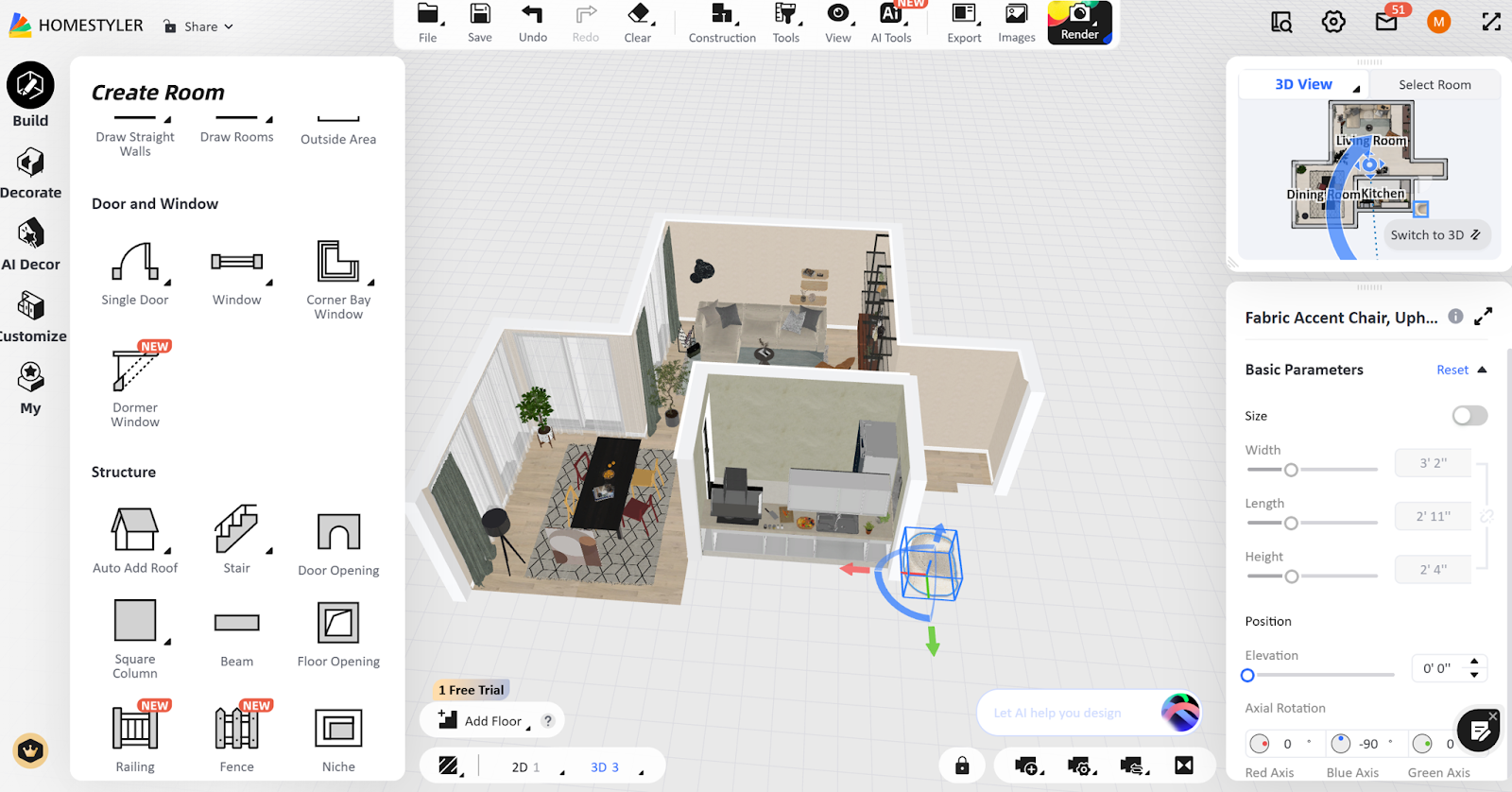
Homestyler is a visualization-driven home design tool that focuses more on interior styling and realistic rendering than on technical floor planning. Used by over 200 million designers and homeowners worldwide, the platform supports 1M+ branded furniture.
Platform: Web, iOS and Android
Free trial:
- Create 2D/3D home layouts
- Basic rendering (low-resolution images or view 3D effects online)
- Limitations: watermarked exports, limited access to premium models, fewer rendering credits compared to paid plans
Key features:
- Filter furniture directly by specific dimensions and colors when browsing the 1M+ branded 3D models
- Extensive furniture library including real brands like IKEA, West Elm, and Maisons du Monde—updated weekly
Best for:
- Users who care about spatial accuracy
- Users who need to plan furniture placement based on specific dimensions and styles
- Users who prefer various furniture brands and styles
12. Floorplanner
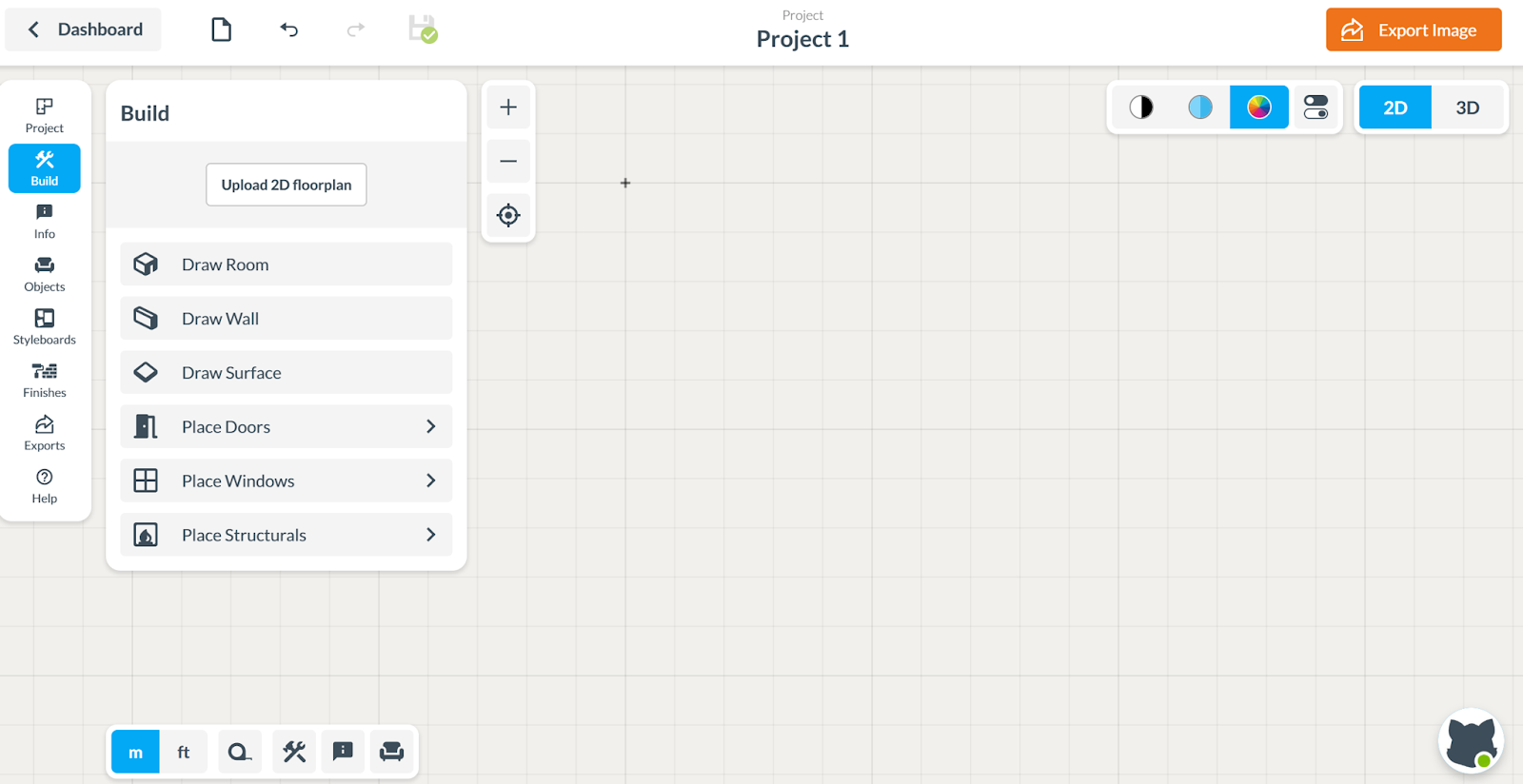
Floorplanner is a usability-focused home design tool built for quickly turning ideas into 2D and 3D layouts with minimal setup. Unlike CAD software, it’s built for people who want to draw a room plan with drag-and-drop items, and switch between 2D and 3D views instantly.
Platform: Web
Free trial:
- 5 projects with standard-definition rendering with up to 3 floors per project
- Save up to 20 favorites and 5 custom groups for easy reuse
- Full access to the furniture and material library
Key features:
- Allows users to upload 2D plans for rendering or start from hand-drawn sketches and convert them to 3D
- When browsing furniture, users can view both 2D and 3D representations
Best for:
- Users who want a flexible and efficient way to turn 2D plans into 3D designs
- Users who work with existing floor plans or rough sketches and prefer a straightforward visualization workflow
- Users who want to use a software for design exploration before committing to professional CAD software
13.HomeByMe
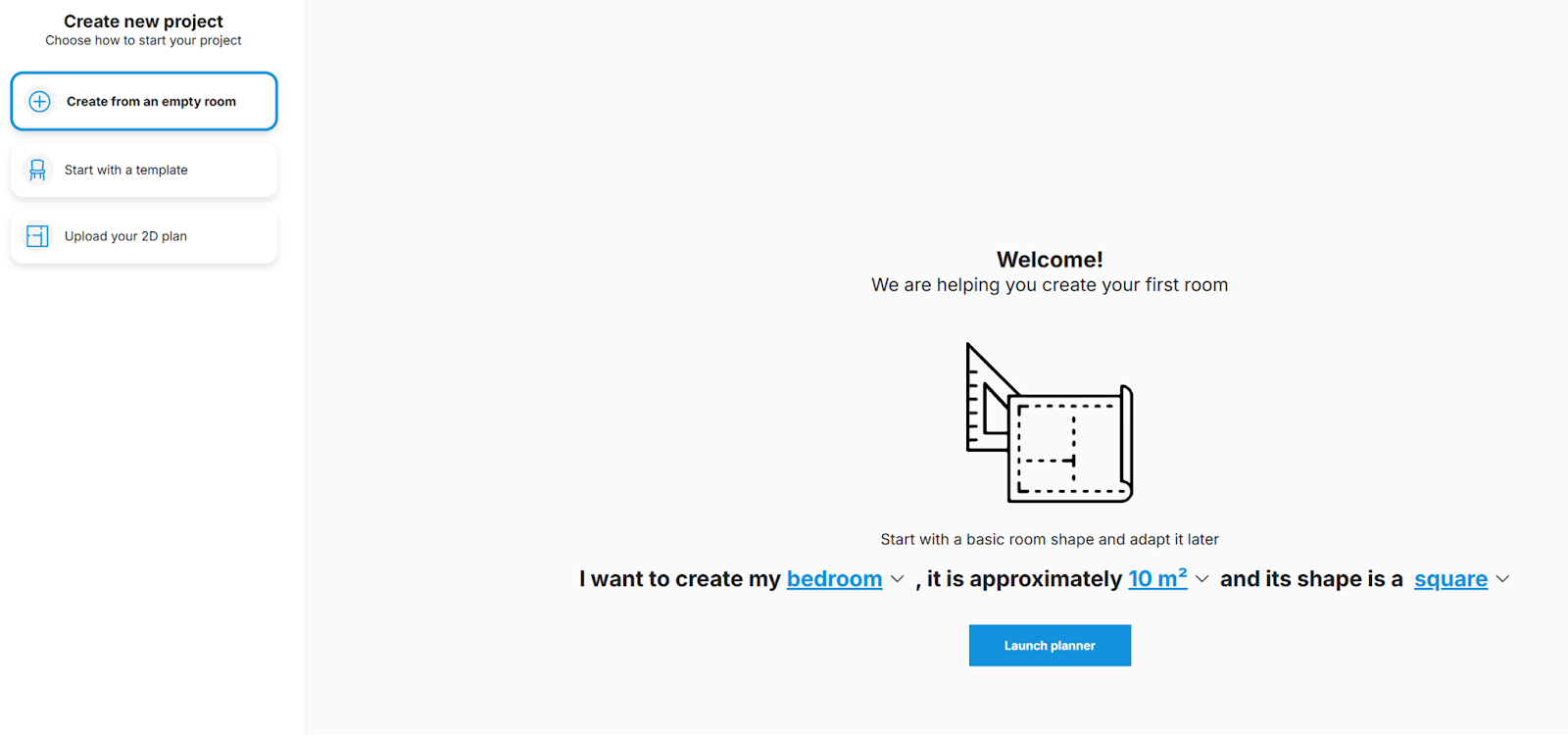
HomeByMe is an interior-focused home design tool that emphasizes photorealistic rendering and branded furniture integration. Powered by Dassault Systèmes—the company behind SolidWorks—it combines professional-grade 3D modeling capabilities with an intuitive drag-and-drop interface.
Platform: Web, iOS
Free trial:
- Create 2 projects
- Generate 5 FHD images
- Community inspiration gallery access
Key features:
- Includes a furniture brand collection, allowing you to find your favorite brands
- Features a community function, categorized by color, material, room, style, etc., so you can use community materials without creating your own
- Detailed control over lighting and materials
Best for:
- Users who care about realistic interior styling and brand-specific furniture
- Users who lack design inspiration and want to browse others’ designs to gain ideas
- Users who lack design inspiration and want to browse millions of community projects to spark ideas
14. Foyr Neo

Foyr Neo is a cloud-based interior design platform that combines AI-powered tools with an intuitive interface. It focuses on simplifying the design process through chat-driven furniture search and ready-to-use community assets.
Platform: Web
Free trial:
- 14-day free trial, during which all features of the product are accessible
- The trial automatically cancels at the end with no auto-billing
Key features:
- Furniture search function, allowing you to directly find the furniture you want, such as a “three-seat sofa”
- 10,000+ pre-designed room layouts and templates to kickstart projects
Best for:
- Users who have a vague idea of the furniture they want
- Users who want to draw inspiration from preset layouts and design styles
15. RoomSketcher

RoomSketcher is a floor plan–focused design tool built for creating accurate, professional-grade 2D and 3D layouts, making it more aligned with professional workflows than purely visual design tools.
Platform: Web, iOS and Android (mobile version allows viewing only, no design editing)
Free trial:
- Offers a free subscription
- Provides basic drawing features
- Advanced features require a paid upgrade
Key features:
- Can export professional-grade floor plans
- Accurate dimensions (area can be annotated)
Best for:
- Users who need precise and presentation-ready floor plans
- Users who are real estate professionals, planners, or anyone creating layouts for commercial or client-facing purposes
- Users who want to add annotations to their design images
FAQS
1.What is the best AI tool that is free for home design?
If you are looking for a reliable and easy-to-use AI home design tool, DecAI stands out as one of the best options. It offers intuitive design features, AI-powered suggestions, and a generous free trial that lets you experiment without any commitment.
2.Are these best AI home design tools with free trial really free? No hidden fees?
Yes. Most AI home design tools offer a genuine free trial, but the features may be limited compared to paid plans. With DecAI, the free trial is completely transparent—there are no hidden fees, and you can access essential design tools to create and visualize your home projects.
3.Can I export my designs during the free trial?
In most cases, yes—but with limitations.Some tools allow exports with watermarks. Others restrict high-resolution downloads. With DecAI, users can export and share their designs even on the free plan, making it especially useful for presentations, client previews, or social media content.
4.Which AI home design tool with free trial is best for beginners?
For beginners, DecAI is highly recommended. Its user-friendly interface, AI-assisted design suggestions, and step-by-step guidance make it simple to start designing your dream home—even if you have no prior experience.
5.Do I need to download an app to use these free trial AI home design tools?
Not necessarily. Many modern AI design tools are web-based. DecAI, for example, can work directly in your browser while also offering mobile apps for iOS and Android. This means you can: design on desktop, tablet, or phone; switch devices seamlessly; avoid downloads if you prefer web access.
6.What should I do if the free trial expires?
When your free trial expires, you don’t have to stop designing. If the tool fits your workflow, upgrading unlocks higher-quality renders, more design generations, and advanced features. You can also use a tool with a free plan. For example, DecAI offers a free plan that still lets you generate and refine designs, even after your trial ends.
------------------------------------
If you believe that any material on this site infringes your intellectual property rights, please contact the author at decaiwebteam@outlook.com with details of your claim.
Redesign any home interior, exterior & garden in seconds
Share this Post:
'%3e%3cpath%20d='M17.9995%2035.999C17.0317%2035.999%2016.0619%2035.9219%2015.1161%2035.7696C10.9414%2035.0973%207.11524%2032.9513%204.34408%2029.7273C1.54287%2026.4683%200%2022.3035%200%2017.9995C0%208.07403%208.07503%200%2017.9995%200C27.924%200%2036%208.07503%2036%2017.9995C36%2022.3696%2034.4151%2026.5835%2031.5357%2029.8646C28.6844%2033.1156%2024.7671%2035.2326%2020.5052%2035.8267C19.6806%2035.9419%2018.8371%2036%2017.9995%2036V35.999ZM17.9995%201.20123C8.73726%201.20123%201.20224%208.73626%201.20224%2017.9985C1.20224%2026.2919%207.13427%2033.2659%2015.3075%2034.5814C16.9546%2034.8469%2018.6808%2034.8659%2020.3389%2034.6345C28.5812%2033.4863%2034.7968%2026.334%2034.7968%2017.9985C34.7968%208.73626%2027.2617%201.20123%2017.9985%201.20123H17.9995Z'%20fill='%23FF0209'/%3e%3cpath%20d='M29.0557%2014.3621C28.9184%2013.0276%2028.6208%2011.5539%2027.5268%2010.7784C26.6782%2010.1773%2025.5642%2010.1553%2024.5242%2010.1563C22.3251%2010.1583%2020.126%2010.1603%2017.9269%2010.1623C15.812%2010.1643%2013.6971%2010.1663%2011.5821%2010.1683C10.6985%2010.1683%209.8399%2010.1002%209.01937%2010.4819C8.31406%2010.8105%207.76303%2011.4347%207.43241%2012.1289C6.97156%2013.0957%206.87438%2014.1898%206.81927%2015.2588C6.71708%2017.2044%206.7281%2019.156%206.85133%2021.0996C6.9405%2022.5193%207.16792%2024.0872%208.26496%2024.9919C9.23777%2025.7934%2010.6103%2025.8325%2011.8707%2025.8335C15.8741%2025.8365%2019.8776%2025.8395%2023.881%2025.8435C24.394%2025.8435%2024.93%2025.8345%2025.453%2025.7774C26.4829%2025.6661%2027.4637%2025.3716%2028.1249%2024.6092C28.7922%2023.8407%2028.9635%2022.7698%2029.0657%2021.7569C29.3121%2019.3003%2029.3091%2016.8177%2029.0557%2014.3621ZM15.6116%2021.4453V14.5545L21.5797%2017.9999L15.6116%2021.4453Z'%20fill='%23FF0209'/%3e%3c/g%3e%3cdefs%3e%3cclipPath%20id='clip0_13816_41422'%3e%3crect%20width='36'%20height='36'%20fill='white'/%3e%3c/clipPath%3e%3c/defs%3e%3c/svg%3e)
'%3e%3cpath%20d='M17.9995%2036C17.0327%2036%2016.0619%2035.9229%2015.1161%2035.7696C10.9414%2035.0973%207.11524%2032.9513%204.34408%2029.7273C1.54287%2026.4683%200%2022.3035%200%2017.9995C0%208.07403%208.07503%200%2017.9995%200C27.924%200%2036%208.07503%2036%2017.9995C36%2022.3696%2034.4151%2026.5835%2031.5357%2029.8646C28.6844%2033.1156%2024.7671%2035.2326%2020.5052%2035.8267C19.6806%2035.9419%2018.8371%2036%2017.9995%2036ZM17.9995%201.20224C8.73726%201.20224%201.20224%208.73726%201.20224%2017.9995C1.20224%2026.2919%207.13427%2033.2669%2015.3075%2034.5824C16.9556%2034.8479%2018.6808%2034.8669%2020.3389%2034.6355C28.5812%2033.4873%2034.7968%2026.335%2034.7968%2017.9995C34.7968%208.73726%2027.2617%201.20224%2017.9985%201.20224H17.9995Z'%20fill='url(%23paint0_linear_13816_41436)'/%3e%3cpath%20d='M23.4463%207.55469H12.549C9.53841%207.55469%207.08984%2010.0032%207.08984%2013.0138V22.9834C7.08984%2025.994%209.53841%2028.4426%2012.549%2028.4426H23.4463C26.4569%2028.4426%2028.9054%2025.994%2028.9054%2022.9834V13.0138C28.9054%2010.0032%2026.4569%207.55469%2023.4463%207.55469ZM9.01543%2013.0138C9.01543%2011.0652%2010.6004%209.48027%2012.549%209.48027H23.4463C25.3949%209.48027%2026.9799%2011.0652%2026.9799%2013.0138V22.9834C26.9799%2024.932%2025.3949%2026.517%2023.4463%2026.517H12.549C10.6004%2026.517%209.01543%2024.932%209.01543%2022.9834V13.0138Z'%20fill='url(%23paint1_linear_13816_41436)'/%3e%3cpath%20d='M17.9964%2023.0749C20.7966%2023.0749%2023.0749%2020.7966%2023.0749%2017.9964C23.0749%2015.1962%2020.7966%2012.918%2017.9964%2012.918C15.1962%2012.918%2012.918%2015.1962%2012.918%2017.9964C12.918%2020.7966%2015.1962%2023.0749%2017.9964%2023.0749ZM17.9964%2014.8446C19.7346%2014.8446%2021.1483%2016.2582%2021.1483%2017.9964C21.1483%2019.7347%2019.7346%2021.1483%2017.9964%2021.1483C16.2582%2021.1483%2014.8446%2019.7347%2014.8446%2017.9964C14.8446%2016.2582%2016.2582%2014.8446%2017.9964%2014.8446Z'%20fill='url(%23paint2_linear_13816_41436)'/%3e%3cpath%20d='M23.5482%2013.741C24.3026%2013.741%2024.9168%2013.1269%2024.9168%2012.3725C24.9168%2011.618%2024.3026%2011.0039%2023.5482%2011.0039C22.7938%2011.0039%2022.1797%2011.618%2022.1797%2012.3725C22.1797%2013.1269%2022.7938%2013.741%2023.5482%2013.741Z'%20fill='url(%23paint3_linear_13816_41436)'/%3e%3c/g%3e%3cdefs%3e%3clinearGradient%20id='paint0_linear_13816_41436'%20x1='5.27482'%20y1='30.7312'%20x2='30.7242'%20y2='5.28083'%20gradientUnits='userSpaceOnUse'%3e%3cstop%20stop-color='%23FAAD4F'/%3e%3cstop%20offset='0.35'%20stop-color='%23DD2A7B'/%3e%3cstop%20offset='0.62'%20stop-color='%239537B0'/%3e%3cstop%20offset='1'%20stop-color='%23515BD4'/%3e%3c/linearGradient%3e%3clinearGradient%20id='paint1_linear_13816_41436'%20x1='8.92225'%20y1='27.074'%20x2='27.073'%20y2='8.92324'%20gradientUnits='userSpaceOnUse'%3e%3cstop%20stop-color='%23FAAD4F'/%3e%3cstop%20offset='0.35'%20stop-color='%23DD2A7B'/%3e%3cstop%20offset='0.62'%20stop-color='%239537B0'/%3e%3cstop%20offset='1'%20stop-color='%23515BD4'/%3e%3c/linearGradient%3e%3clinearGradient%20id='paint2_linear_13816_41436'%20x1='14.4077'%20y1='21.5861'%20x2='21.5861'%20y2='14.4077'%20gradientUnits='userSpaceOnUse'%3e%3cstop%20stop-color='%23FAAD4F'/%3e%3cstop%20offset='0.35'%20stop-color='%23DD2A7B'/%3e%3cstop%20offset='0.62'%20stop-color='%239537B0'/%3e%3cstop%20offset='1'%20stop-color='%23515BD4'/%3e%3c/linearGradient%3e%3clinearGradient%20id='paint3_linear_13816_41436'%20x1='22.5814'%20y1='13.3393'%20x2='24.515'%20y2='11.4057'%20gradientUnits='userSpaceOnUse'%3e%3cstop%20stop-color='%23FAAD4F'/%3e%3cstop%20offset='0.35'%20stop-color='%23DD2A7B'/%3e%3cstop%20offset='0.62'%20stop-color='%239537B0'/%3e%3cstop%20offset='1'%20stop-color='%23515BD4'/%3e%3c/linearGradient%3e%3cclipPath%20id='clip0_13816_41436'%3e%3crect%20width='36'%20height='36'%20fill='white'/%3e%3c/clipPath%3e%3c/defs%3e%3c/svg%3e)
'%3e%3cpath%20d='M17.9995%2035.999C17.0317%2035.999%2016.0619%2035.9219%2015.1161%2035.7696C10.9414%2035.0973%207.11524%2032.9513%204.34408%2029.7273C1.54287%2026.4683%200%2022.3035%200%2017.9995C0%208.07403%208.07502%200%2017.9995%200C27.924%200%2036%208.07503%2036%2017.9995C36%2022.3696%2034.415%2026.5835%2031.5357%2029.8646C28.6844%2033.1156%2024.7671%2035.2326%2020.5052%2035.8267C19.6806%2035.9419%2018.8371%2036%2017.9995%2036V35.999ZM17.9995%201.20123C8.73725%201.20123%201.20224%208.73626%201.20224%2017.9985C1.20224%2026.2919%207.13427%2033.2659%2015.3075%2034.5814C16.9545%2034.8469%2018.6808%2034.8659%2020.3388%2034.6345C28.5812%2033.4863%2034.7968%2026.334%2034.7968%2017.9985C34.7968%208.73626%2027.2617%201.20123%2017.9985%201.20123H17.9995Z'%20fill='%23007EBB'/%3e%3cpath%20d='M9.06639%2012.124C8.60253%2011.6932%208.37109%2011.1602%208.37109%2010.526C8.37109%209.89184%208.60253%209.33481%209.06639%208.90401C9.53026%208.47321%2010.1274%208.25781%2010.8587%208.25781C11.5901%208.25781%2012.1642%208.47321%2012.627%208.90401C13.0909%209.33481%2013.3223%209.87581%2013.3223%2010.526C13.3223%2011.1762%2013.0909%2011.6932%2012.627%2012.124C12.1631%2012.5548%2011.5741%2012.7702%2010.8587%2012.7702C10.1434%2012.7702%209.52926%2012.5548%209.06639%2012.124ZM12.9326%2014.5946V27.7962H8.76182V14.5946H12.9326Z'%20fill='%23007EBB'/%3e%3cpath%20d='M26.8196%2015.9006C27.7283%2016.8875%2028.1832%2018.243%2028.1832%2019.9682V27.5663H24.2208V20.5042C24.2208%2019.6346%2023.9954%2018.9583%2023.5445%2018.4764C23.0937%2017.9945%2022.4876%2017.7541%2021.7262%2017.7541C20.9647%2017.7541%2020.3586%2017.9955%2019.9078%2018.4764C19.4569%2018.9583%2019.2315%2019.6346%2019.2315%2020.5042V27.5663H15.2461V14.5611H19.2315V16.2863C19.6353%2015.7113%2020.1793%2015.2574%2020.8636%2014.9228C21.5468%2014.5892%2022.3163%2014.4219%2023.1708%2014.4219C24.6937%2014.4219%2025.9099%2014.9158%2026.8186%2015.9016L26.8196%2015.9006Z'%20fill='%23007EBB'/%3e%3c/g%3e%3cdefs%3e%3cclipPath%20id='clip0_13816_41425'%3e%3crect%20width='36'%20height='36'%20fill='white'/%3e%3c/clipPath%3e%3c/defs%3e%3c/svg%3e)
'%3e%3cpath%20d='M18%2035.999C17.0322%2035.999%2016.0623%2035.9219%2015.1166%2035.7696C10.9417%2035.0973%207.11544%2032.9513%204.3442%2029.7273C1.54291%2026.4683%200%2022.3035%200%2017.9995C0%208.07403%208.07526%200%2018%200C27.9248%200%2036%208.07503%2036%2017.9995C36%2022.3696%2034.415%2026.5835%2031.5356%2029.8646C28.6842%2033.1156%2024.7668%2035.2326%2020.5047%2035.8267C19.6802%2035.9419%2018.8366%2036%2017.999%2036L18%2035.999ZM18%201.20123C8.73751%201.20123%201.20227%208.73626%201.20227%2017.9985C1.20227%2026.2919%207.13448%2033.2659%2015.3079%2034.5814C16.955%2034.8469%2018.6813%2034.8659%2020.3394%2034.6345C28.582%2033.4863%2034.7977%2026.334%2034.7977%2017.9985C34.7977%208.73626%2027.2625%201.20123%2018%201.20123Z'%20fill='black'/%3e%3cpath%20d='M7%208.09163H13.5067L19.521%2016.1816L27.0073%207.90625L28.786%207.93715L20.4078%2017.3454L29%2028.901H22.4959L16.8193%2021.362L9.8847%2029.0864H8.13428L15.9583%2020.26L7%208.09163ZM12.8931%209.28633H9.45676L23.2048%2027.6754H26.5793L12.8931%209.28633Z'%20fill='black'/%3e%3c/g%3e%3cdefs%3e%3cclipPath%20id='clip0_13886_43848'%3e%3crect%20width='36'%20height='36'%20fill='white'/%3e%3c/clipPath%3e%3c/defs%3e%3c/svg%3e)
'%3e%3cpath%20d='M17.9995%2035.999C17.0327%2035.999%2016.0619%2035.9219%2015.1161%2035.7686C10.9414%2035.0963%207.11524%2032.9503%204.34408%2029.7263C1.54287%2026.4673%200%2022.3025%200%2017.9995C0%208.07403%208.07503%200%2017.9995%200C27.924%200%2036%208.07503%2036%2017.9995C36%2022.3696%2034.415%2026.5835%2031.5357%2029.8646C28.6844%2033.1156%2024.7671%2035.2326%2020.5052%2035.8267C19.6806%2035.9419%2018.8371%2036%2017.9995%2036V35.999ZM17.9995%201.20123C8.73726%201.20123%201.20224%208.73626%201.20224%2017.9985C1.20224%2026.2909%207.13428%2033.2659%2015.3075%2034.5814C16.9556%2034.8469%2018.6808%2034.8659%2020.3389%2034.6345C28.5812%2033.4863%2034.7968%2026.334%2034.7968%2017.9985C34.7968%208.73626%2027.2617%201.20123%2017.9985%201.20123H17.9995Z'%20fill='%231877F7'/%3e%3cpath%20d='M20.5337%2014.9635V18.7536H25.2225L24.4801%2023.8601H20.5337V35.624C19.7423%2035.7342%2018.9328%2035.7913%2018.1112%2035.7913C17.1625%2035.7913%2016.2317%2035.7151%2015.324%2035.5689V23.8601H11V18.7536H15.324V14.1169C15.324%2011.2396%2017.6564%208.90625%2020.5347%208.90625V8.90926C20.5428%208.90926%2020.5508%208.90625%2020.5588%208.90625H25.2235V13.3215H22.1758C21.2691%2013.3215%2020.5347%2014.0558%2020.5347%2014.9625L20.5337%2014.9635Z'%20fill='%231877F7'/%3e%3c/g%3e%3cdefs%3e%3cclipPath%20id='clip0_13816_41433'%3e%3crect%20width='36'%20height='36'%20fill='white'/%3e%3c/clipPath%3e%3c/defs%3e%3c/svg%3e)
'%3e%3cpath%20d='M17.9995%2035.999C17.0327%2035.999%2016.0619%2035.9219%2015.1161%2035.7686C10.9414%2035.0963%207.11524%2032.9503%204.34408%2029.7263C1.54287%2026.4673%200%2022.3025%200%2017.9995C0%208.07403%208.07503%200%2017.9995%200C27.924%200%2036%208.07503%2036%2017.9995C36%2022.3696%2034.415%2026.5835%2031.5357%2029.8646C28.6844%2033.1156%2024.7671%2035.2326%2020.5052%2035.8267C19.6806%2035.9419%2018.8371%2036%2017.9995%2036V35.999ZM17.9995%201.20123C8.73726%201.20123%201.20224%208.73626%201.20224%2017.9985C1.20224%2026.2909%207.13428%2033.2659%2015.3075%2034.5814C16.9556%2034.8469%2018.6808%2034.8659%2020.3389%2034.6345C28.5812%2033.4863%2034.7968%2026.334%2034.7968%2017.9985C34.7968%208.73626%2027.2617%201.20123%2017.9985%201.20123H17.9995Z'%20fill='%232A91F7'/%3e%3cg%20clip-path='url(%23clip1_13816_41442)'%3e%3cpath%20d='M16.3345%2018.834C16.6924%2019.3124%2017.149%2019.7083%2017.6733%2019.9947C18.1976%2020.2812%2018.7774%2020.4516%2019.3734%2020.4942C19.9693%2020.5369%2020.5675%2020.4509%2021.1273%2020.2421C21.6871%2020.0333%2022.1954%2019.7065%2022.6178%2019.284L25.1178%2016.784C25.8768%2015.9981%2026.2968%2014.9456%2026.2873%2013.8531C26.2778%2012.7606%2025.8396%2011.7156%2025.0671%2010.943C24.2946%2010.1705%2023.2495%209.73231%2022.157%209.72281C21.0645%209.71332%2020.012%2010.1333%2019.2262%2010.8923L17.7928%2012.3173M19.6678%2017.1673C19.3099%2016.6889%2018.8533%2016.293%2018.329%2016.0065C17.8047%2015.7201%2017.2249%2015.5497%2016.6289%2015.507C16.033%2015.4643%2015.4348%2015.5503%2014.875%2015.7592C14.3152%2015.968%2013.8069%2016.2947%2013.3845%2016.7173L10.8845%2019.2173C10.1255%2020.0031%209.70551%2021.0557%209.715%2022.1481C9.72449%2023.2406%2010.1627%2024.2857%2010.9352%2025.0582C11.7078%2025.8307%2012.7528%2026.269%2013.8453%2026.2784C14.9378%2026.2879%2015.9903%2025.868%2016.7761%2025.109L18.2011%2023.684'%20stroke='%232A91F7'%20stroke-width='1.66667'%20stroke-linecap='round'%20stroke-linejoin='round'/%3e%3c/g%3e%3c/g%3e%3cdefs%3e%3cclipPath%20id='clip0_13816_41442'%3e%3crect%20width='36'%20height='36'%20fill='white'/%3e%3c/clipPath%3e%3cclipPath%20id='clip1_13816_41442'%3e%3crect%20width='20'%20height='20'%20fill='white'%20transform='translate(8%208)'/%3e%3c/clipPath%3e%3c/defs%3e%3c/svg%3e)
Redesign any home interior, exterior & garden in seconds